


Hoe Apple Music over te zetten naar Spotify: Complete gids
Digitale loyaliteit is dynamisch. Muziekliefhebbers die op zoek zijn naar betere compatibiliteit tussen verschillende platforms en nieuwe algoritmes voor het ontdekken van nieuwe muziek, maken steeds vaker de overstap van... Apple Music naar SpotifyDe grootste drempel om over te stappen is echter niet het abonnementsgeld, maar de angst om tien jaar aan muziekgeschiedenis kwijt te raken. Gelukkig maken verschillende tools het nu mogelijk om... Apple Music overzetten naar Spotify automatisch. In deze handleiding onderzoeken we de meest effectieve methoden om Apple Music-nummers over te zetten naar Spotify op verschillende apparaten.
Inhoudsopgave Deel 1. Apple Music-afspeellijst overzetten naar Spotify on Windows/MacDeel 2. Apple Music-afspeellijst overzetten naar Spotify OnlineDeel 3. Apple Music-afspeellijst overzetten naar Spotify op iOS/AndroidDeel 4. Veelgestelde vragenDeel 5. Om het allemaal samen te vatten
Deel 1. Apple Music-afspeellijst overzetten naar Spotify on Windows/Mac
Een van de meest betrouwbare manieren om Apple Music over te zetten naar Spotify Een andere mogelijkheid is het gebruik van een speciaal desktopprogramma dat geavanceerde functies voor het migreren van afspeellijsten biedt. Een zeer aanbevolen optie is... DumpMedia Elke muziekconverter, waaronder een krachtige functie voor het overzetten van afspeellijsten.
Gratis downloaden Gratis downloaden
DumpMedia Any Music Converter is een professionele desktopapplicatie die is ontworpen voor het beheren en converteren van muziek op verschillende platformen. Het werkt op beide WinWindows en macOS. Dankzij de ingebouwde functie voor het overzetten van afspeellijsten kunnen gebruikers Apple Music efficiënt overzetten naar Spotify waarbij de afspeellijststructuur en de metadata van de nummers behouden blijven.
BELANGRIJKSTE KENMERKEN
- Functie voor het overzetten van afspeellijsten: DumpMedia Hiermee kun je complete afspeellijsten verplaatsen in plaats van nummers afzonderlijk over te zetten. Dit bespaart aanzienlijk veel tijd bij grote muziekcollecties.
- Migratie van afspeellijsten in batches: U kunt meerdere afspeellijsten selecteren en deze tegelijkertijd overzetten, waardoor het beheer van grote bibliotheken eenvoudiger wordt.
- Stabiele desktopprestaties: sinds DumpMedia Doordat het lokaal op uw computer werkt, biedt het een stabieler overdrachtsproces dan veel browsergebaseerde tools.
- Slimme songmatching: De software identificeert automatisch overeenkomende nummers in Spotifyde catalogus van 's, zodat de overgezette afspeellijst de juiste nummers bevat.
- Behoud van metadata: Songtitels, artiestennamen, albums en de volgorde van afspeellijsten blijven intact tijdens het overdrachtsproces.
Stapsgewijze handleiding
Stap 1. Eerst downloaden DumpMedia Download Any Music Converter van de officiële website. Installeer het programma op uw computer. WinStart het programma op je Windows- of Mac-computer. Open de applicatie en kies Tools > Playlist Transfer.
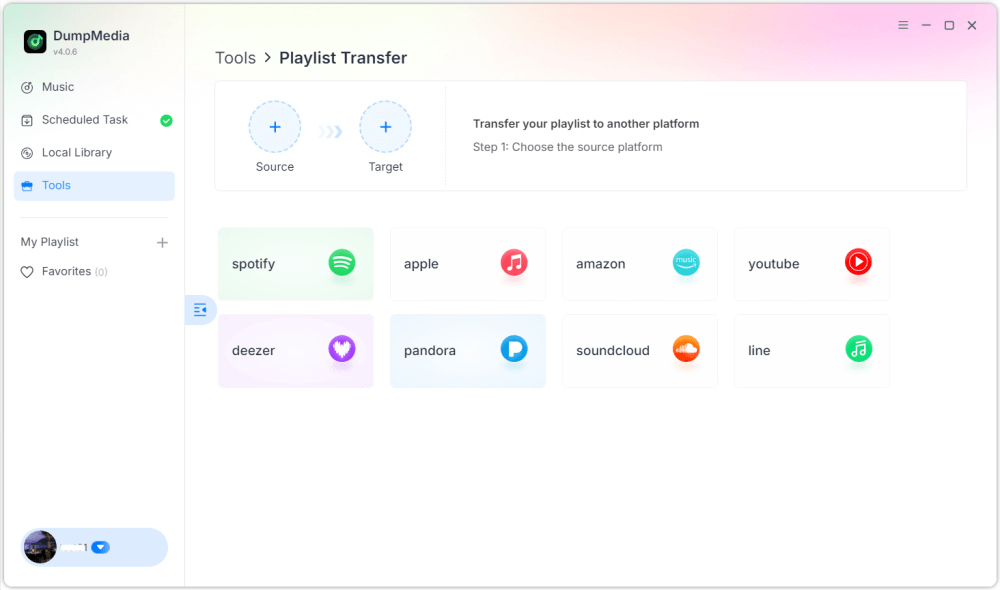
Stap 2. Selecteer Apple Music als bron. Selecteer vervolgens Spotify als doelplatform.
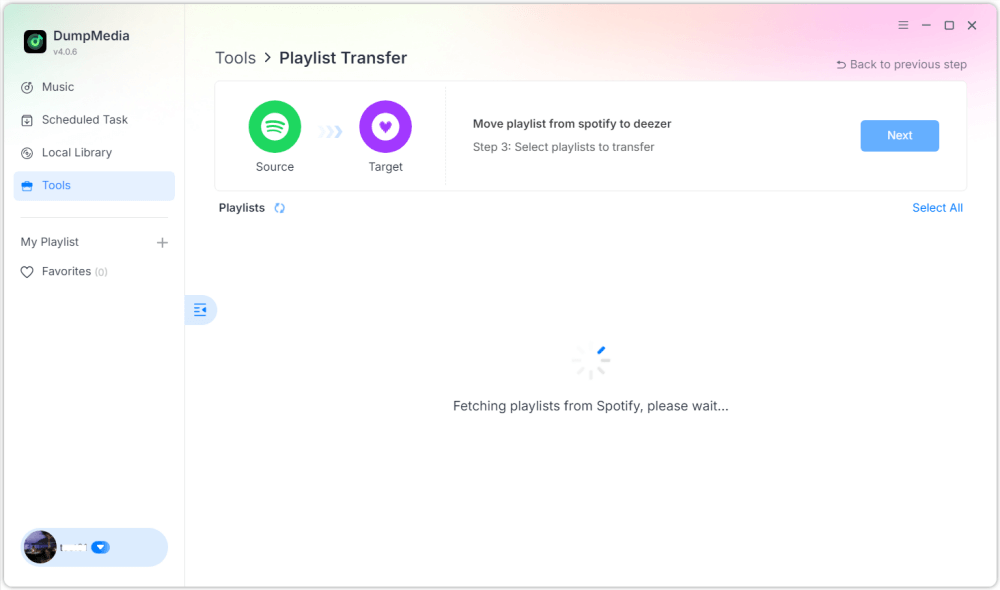
Stap 3. Zoek de afspeellijsten die je wilt overzetten van Apple Music naar Spotifyen selecteer alle afspeellijsten die je wilt verplaatsen.

Stap 4. Klik op de knop 'Converteren' om de afspeellijst te migreren. DumpMedia zal de afspeellijst automatisch opnieuw aanmaken op Spotify.
Stap 5. De overdracht is voltooid. Klik op "Ga naar". SpotifyJe afspeellijsten zijn overgezet naar een nieuwe dienst, en je kunt nu genieten van je nieuwe muziekstreamingdienst.
Deze methode via de desktop is een van de meest efficiënte manieren om Apple Music over te zetten. SpotifyVooral als je meerdere afspeellijsten of een grote muziekbibliotheek hebt.
Deel 2. Apple Music-afspeellijst overzetten naar Spotify Online
Als je liever geen extra software installeert, kan een online tool voor het overzetten van afspeellijsten je ook helpen bij het overzetten van Apple Music. Spotify Snel. Een populaire optie is Soundiiz. Soundiiz is een cloudgebaseerd platform voor afspeellijstbeheer waarmee gebruikers afspeellijsten tussen verschillende muziekstreamingdiensten kunnen overzetten. Omdat het volledig in een browser draait, werkt het op vrijwel elk apparaat.
BELANGRIJKSTE KENMERKEN
- Webgebaseerde interface, geen installatie vereist.
- Ondersteunt veel muziekstreamingplatforms.
- Hulpmiddelen voor het converteren van afspeellijsten
- Batchgewijs afspeellijstbeheer
Stappen om Apple Music over te zetten naar Spotify met Soundiiz
Stap 1. Ga naar de Soundiiz-website en meld je aan voor een account. Log in op je Apple Music-account en geef Soundiiz toestemming om toegang te krijgen tot je afspeellijsten.
Stap 2. Verbind vervolgens uw Spotify account.
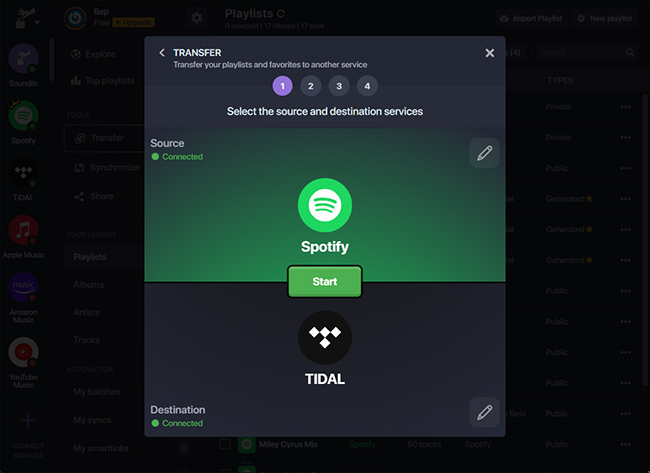
Stap 3. Blader door je Apple Music-afspeellijsten en selecteer de afspeellijst die je wilt overzetten. Klik op Converteren en kies Spotify als bestemmingsplatform.
Stap 4. Soundiiz begint met het matchen van nummers en het opnieuw samenstellen van de afspeellijst in Spotify.
Online tools zoals Soundiiz zijn een handige optie voor gebruikers die Apple Music-nummers willen overzetten. Spotify Zonder desktopsoftware te installeren. Ze kunnen echter beperkingen hebben, zoals overdrachtslimieten of een tragere verwerking van grote afspeellijsten.
Deel 3. Apple Music-afspeellijst overzetten naar Spotify op iOS/Android
Als je je afspeellijsten liever rechtstreeks vanaf je smartphone beheert, zijn er verschillende mobiele apps waarmee je Apple Music kunt overzetten. Spotify Heel eenvoudig. Twee van de meest gebruikte apps zijn FreeYourMusic en SongShift.
FreeYourMusic gebruiken (iOS en Android)
FreeYourMusic is een platformoverschrijdende tool voor het overzetten van muziek, beschikbaar voor zowel iOS- als Android-apparaten. Hiermee kunnen gebruikers afspeellijsten rechtstreeks vanaf hun telefoon tussen verschillende streamingdiensten overzetten.
- Installeer de FreeYourMusic-app vanuit de App Store of Google Play.
- Open de app en selecteer Apple Music als bronplatform.
- Meld u aan bij uw Apple Music-account.
- Kies Spotify als bestemmingsplatform.
- Selecteer de afspeellijst die u wilt migreren.
- Tik op Overdragen om het proces te starten.
Je afspeellijst zou binnen enkele minuten moeten verschijnen. Spotify.
SongShift gebruiken (alleen iOS)
SongShift is een andere populaire mobiele app die speciaal is ontworpen voor iOS-gebruikers. Hiermee kun je snel afspeellijsten overzetten tussen verschillende muziekdiensten.
- Download SongShift vanuit de App Store.
- Verbind je Apple Music en Spotify accounts.
- Tik op 'Dienst aanmaken'.
- Selecteer Apple Music als bron en Spotify als de bestemming.
- Kies de afspeellijst die je wilt overzetten.
- Start het overdrachtsproces.
Het gebruik van mobiele apps is een uitstekende optie als je Apple Music wilt overzetten. Spotify Rechtstreeks vanaf je telefoon, zonder computer.
Deel 4. Veelgestelde vragen
1. Kan ik Apple Music overzetten naar Spotify gratis?
Sommige tools bieden gratis afspeellijstoverdracht aan, maar met beperkingen, zoals een maximum aantal nummers. Betaalde versies bieden meestal onbeperkte overdracht en een snellere verwerking.
2. Worden alle nummers succesvol overgezet?
De meeste nummers worden correct overgezet, maar soms verschijnen sommige nummers niet als ze niet beschikbaar zijn op het bestemmingsplatform.
3. Hoe lang duurt de overdracht?
De benodigde tijd hangt af van de grootte van de afspeellijst. Kleinere afspeellijsten kunnen binnen enkele minuten worden overgezet, terwijl grotere afspeellijsten langer kunnen duren.
4. Is het veilig om tools voor het overzetten van afspeellijsten te gebruiken?
Betrouwbare tools gebruiken veilige authenticatiemethoden om verbinding te maken met je muziekaccounts. Kies altijd voor vertrouwde software wanneer je Apple Music overzet. Spotify.
Deel 5. Om het allemaal samen te vatten
Overstappen naar een ander muziekstreamingplatform betekent niet langer dat je je zorgvuldig samengestelde afspeellijsten kwijtraakt. Dankzij moderne tools voor het overzetten van afspeellijsten is het nu eenvoudiger dan ooit om Apple Music over te zetten naar een ander platform. Spotify Zonder je muziekbibliotheek handmatig opnieuw op te bouwen. Door de methode te kiezen die het beste bij je apparaat en de grootte van je afspeellijst past, kun je Apple Music-nummers succesvol overzetten naar je apparaat. Spotify En blijf ongestoord genieten van je favoriete nummers op je nieuwe streamingplatform.