


Hoe over te dragen Spotify Eenvoudig naar Deezer: complete handleiding
Veel luisteraars die oorspronkelijk gebruik maakten van Spotify kunnen later besluiten hun muziekbibliotheken te verplaatsen naar Deezer vanwege de unieke functies, zoals hoogwaardige audio, gepersonaliseerde aanbevelingen en compatibiliteit met veel slimme apparaten. De grootste zorg bij het overstappen naar een ander platform is echter hoe je afspeellijsten kunt overzetten zonder ze handmatig opnieuw op te bouwen. Het nummer voor nummer opnieuw maken van afspeellijsten kan uren duren, vooral als je honderden nummers hebt.
Gelukkig zijn er tegenwoordig verschillende tools waarmee gebruikers afspeellijsten automatisch kunnen verplaatsen. Spotify naar DeezerZo bespaar je tijd en zorg je ervoor dat je favoriete muziek overzichtelijk blijft. In deze handleiding onderzoeken we de meest effectieve manieren om je muziek te migreren. Spotify We uploaden afspeellijsten naar Deezer en beantwoorden enkele veelgestelde vragen om het proces soepel te laten verlopen.
Inhoudsopgave Deel 1. Overdracht Spotify Afspeellijsten voor Deezer OnlineDeel 2. Overdracht Spotify Afspeellijsten voor Deezer op Windows/MacDeel 3. Veelgestelde vragenDeel 4. Conclusie
Deel 1. Overdracht Spotify Afspeellijsten voor Deezer Online
Een van de makkelijkste manieren om afspeellijsten te verplaatsen Spotify Je kunt je afspeellijsten overzetten naar Deezer met behulp van een online service. Deze tools werken direct in je browser en vereisen geen installatie. Ze maken verbinding met je muziekaccounts en creëren automatisch nieuwe afspeellijsten op het nieuwe platform.
Een veelgebruikt online hulpmiddel voor deze taak is TuneMyMusic. TuneMyMusic is een browsergebaseerde tool voor het overzetten van muziekbestanden, ontworpen om gebruikers te helpen bij het overzetten van afspeellijsten tussen verschillende streamingdiensten. Het ondersteunt veel populaire platforms en biedt een eenvoudige workflow voor het verplaatsen van muziekbestanden. Spotify afspeellijsten uploaden naar Deezer.
BELANGRIJKSTE KENMERKEN
- Werkt direct in een webbrowser.
- Ondersteunt meerdere muziekstreamingdiensten.
- Eenvoudige stapsgewijze interface
- Geen software installatie vereist
- Maakt het mogelijk om afspeellijstlinks of accountimport te gebruiken.
Vanwege de eenvoud wordt TuneMyMusic vaak aanbevolen voor gebruikers die afspeellijsten willen overzetten van Spotify Snel toegang krijgen tot Deezer zonder extra applicaties te hoeven installeren.
Stapsgewijze handleiding
Stap 1. Ga naar de website van TuneMyMusic en klik op de knop 'Aan de slag' om het overzetten van de afspeellijst te starten.
Stap 2. Selecteren Spotify als bronplatform. U wordt gevraagd in te loggen op uw account. Spotify Geef de tool toestemming om toegang te krijgen tot je afspeellijsten. Zodra je toestemming hebt gegeven, toont de service je beschikbare afspeellijsten.
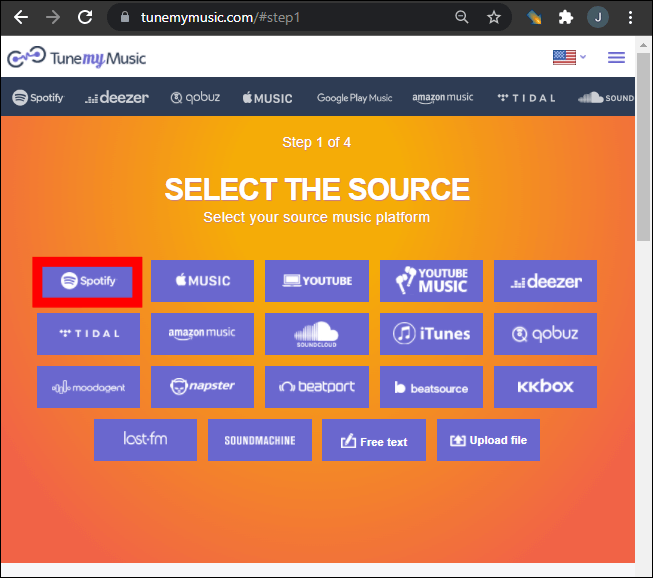
Stap 3. Je kunt een specifieke afspeellijst uit je bibliotheek kiezen of een link naar een afspeellijst plakken. TuneMyMusic laadt automatisch alle nummers in die afspeellijst.
Stap 4. Selecteer vervolgens Deezer als bestemmingsplatform. Log in op je Deezer-account en geef de tool toestemming om afspeellijsten in je bibliotheek aan te maken.
Stap 5. Klik op "Begin met het verplaatsen van mijn muziek". Het systeem begint dan met het matchen van nummers tussen Spotify en Deezer.
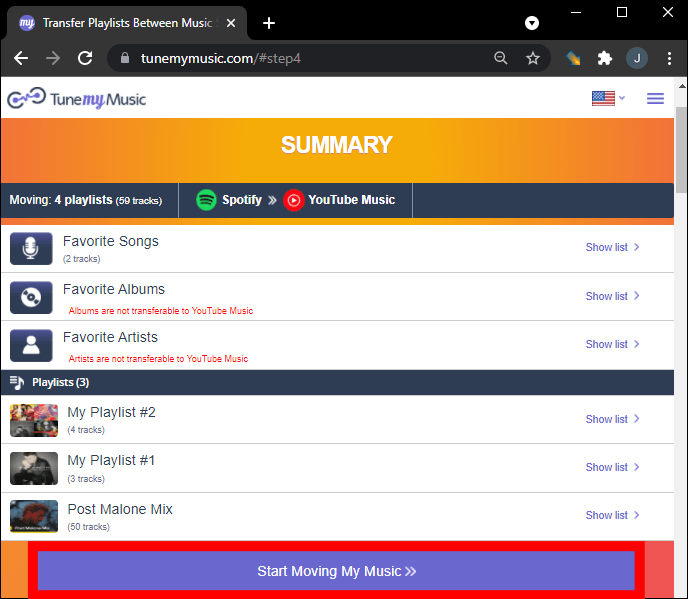
Stap 6. Zodra de overdracht is voltooid, open je je Deezer-bibliotheek om te controleren of de afspeellijst succesvol opnieuw is aangemaakt.
Met deze methode kunnen veel gebruikers snel afspeellijsten verplaatsen van Spotify Binnen enkele minuten op Deezer te bekijken.
Beperkingen van online tools
Hoewel online tools handig zijn, kunnen ze wel enkele beperkingen hebben:
- Gratis versies kunnen het aantal over te zetten nummers beperken.
- Het verwerken van grote afspeellijsten kan langer duren.
- De nauwkeurigheid van de songmatching kan variëren.
- Internetverbinding beïnvloedt de overdrachtssnelheid.
Vanwege deze beperkingen geven gebruikers met grote muziekbibliotheken vaak de voorkeur aan een desktopoplossing om afspeellijsten over te zetten. Spotify betrouwbaarder naar Deezer.
Deel 2. Overdracht Spotify Afspeellijsten voor Deezer op Windows/Mac
Voor gebruikers die meer stabiliteit en beter afspeellijstbeheer wensen, is desktopsoftware vaak de meest betrouwbare optie. Een zeer aanbevolen oplossing is DumpMedia Elke muziekconverterwaaronder een speciaal daarvoor bestemde Afspeellijst overzetten kenmerk.
Gratis downloaden Gratis downloaden
DumpMedia Any Music Converter is een krachtige desktopapplicatie die is ontworpen om gebruikers te helpen bij het beheren en converteren van muziek tussen verschillende platformen. Het ondersteunt beide WinDe software is compatibel met Windows en macOS en biedt geavanceerde tools voor het migreren van afspeellijsten. Met de software kunnen gebruikers afspeellijsten overzetten van en naar Windows. Spotify efficiënt naar Deezer overzetten, met behoud van de afspeellijststructuur en trackinformatie.
BELANGRIJKSTE KENMERKEN
- Het programma bevat een ingebouwde functie voor het overzetten van afspeellijsten, waarmee complete afspeellijsten tussen streamingplatforms kunnen worden verplaatst.
- Gebruikers kunnen meerdere afspeellijsten tegelijk migreren in plaats van ze één voor één over te zetten.
- Tijdens het migratieproces blijven songtitels, artiesten, albuminformatie en de volgorde van de afspeellijst behouden.
- Omdat de software lokaal op uw computer draait, wordt deze minder beïnvloed door netwerkonderbrekingen dan browsergebaseerde tools.
Stapsgewijze handleiding voor overdracht Spotify Playlists
Stap 1. Download en installeer DumpMedia Elke muziekconverter op uw Windows of Mac-computer. Start het programma na installatie.
Gratis downloaden Gratis downloaden
Stap 2. Kies Hulpmiddelen > Afspeellijst overzetten. Selecteer Spotify als bron.
Stap 3. Selecteer Deezer als bestemming.
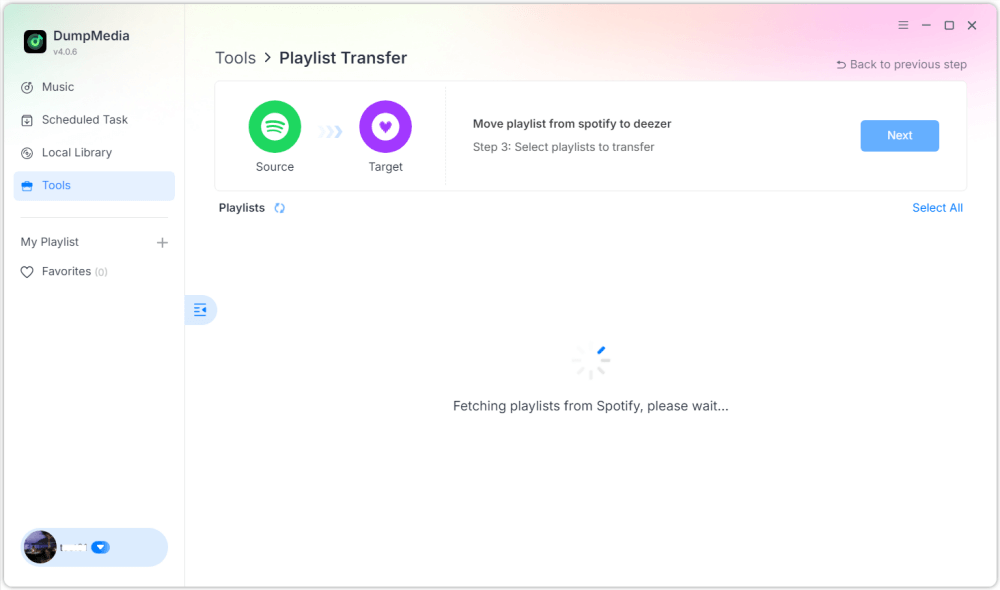
Stap 4. Selecteer wat je wilt overzetten. We ondersteunen je favoriete nummers, artiesten, albums en je samengestelde afspeellijsten.

Stap 5. Klik op Converteren om de overdracht te starten.
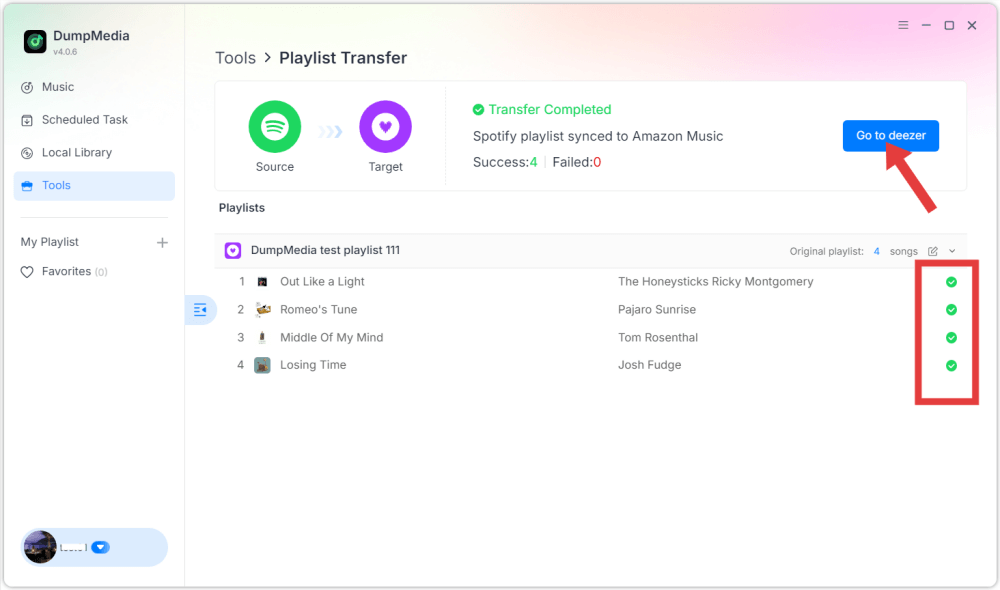
Stap 6. De overdracht is voltooid. Klik op "Ga naar Deezer". Je afspeellijst zou nu met de bijbehorende nummers moeten verschijnen.
Deel 3. Veelgestelde vragen
1. Kan ik overdragen Spotify Playlists gratis uploaden naar Deezer?
Sommige online tools bieden gratis afspeellijstoverdracht aan met beperkte functies. Deze gratis versies kunnen echter het aantal nummers dat tegelijkertijd kan worden overgedragen beperken. Premium tools heffen deze beperkingen meestal op en bieden snellere overdrachten.
2. Worden alle nummers succesvol overgezet?
De meeste nummers worden probleemloos overgezet, omdat beide platforms over grote muziekcatalogi beschikken. Het kan echter voorkomen dat bepaalde nummers niet in de bestemmingsafspeellijst verschijnen als ze niet beschikbaar zijn op Deezer.
3. Hoe lang duurt het om afspeellijsten over te zetten?
De overdrachtstijd is afhankelijk van de grootte van de afspeellijst. Kleine afspeellijsten kunnen binnen enkele minuten worden overgezet, terwijl grotere afspeellijsten met honderden nummers langer kunnen duren.
4. Is het veilig om tools voor het overzetten van afspeellijsten te gebruiken?
Betrouwbare tools gebruiken veilige authenticatiesystemen om verbinding te maken met je streamingaccounts. Kies altijd voor vertrouwde applicaties en vermijd onbekende services bij het migreren van afspeellijsten. Spotify naar Deezer.
Deel 4. Conclusie
Overstappen naar een andere muziekstreamingdienst betekent niet langer dat je je zorgvuldig georganiseerde afspeellijsten kwijtraakt. Met moderne tools voor het overzetten van afspeellijsten kun je je muziekbibliotheek eenvoudig verplaatsen. Spotify naar Deezer zonder handmatig afspeellijsten opnieuw op te bouwen. Als je een grote muziekcollectie hebt of meer betrouwbaarheid wilt, kun je desktopsoftware zoals DumpMedia Any Music Converter biedt een stabielere en efficiëntere oplossing.