


iTunes Match versus Apple Music: een complete vergelijkingsgids
Het is essentieel voor gebruikers om het echte verschil tussen iTunes Match en Apple Music te begrijpen , zodat ze kunnen bepalen welke Apple-dienst het beste bij hun luistergewoonten past. Hoewel beide diensten toegang tot muziek in de cloud bieden, verschillen hun doelen, mogelijkheden en beperkingen aanzienlijk. Deze gids biedt een duidelijke en diepgaande vergelijking van iTunes Match en Apple Music, zodat u een weloverwogen beslissing kunt nemen. Daarbij wordt uitgelegd hoe Apple Music-gebruikers hun nummers DRM-vrij kunnen bewaren voor offline afspelen.
Inhoudsopgave Deel 1. Wat is iTunes Match en Apple Music? Deel 2. Wat is het verschil tussen iTunes Match en Apple Music? Deel 3. Bonus: Apple Music-nummers DRM-vrij houden voor offline luisteren Deel 4. Veelgestelde vragen Deel 5. Conclusie
Deel 1. Wat zijn iTunes Match en Apple Music?
Wat is iTunes Match?
iTunes Match is Apple's cloudgebaseerde muziekopslagservice, ontworpen voor gebruikers die al een persoonlijke muziekcollectie beheren. MP3/AAC-bibliotheek.
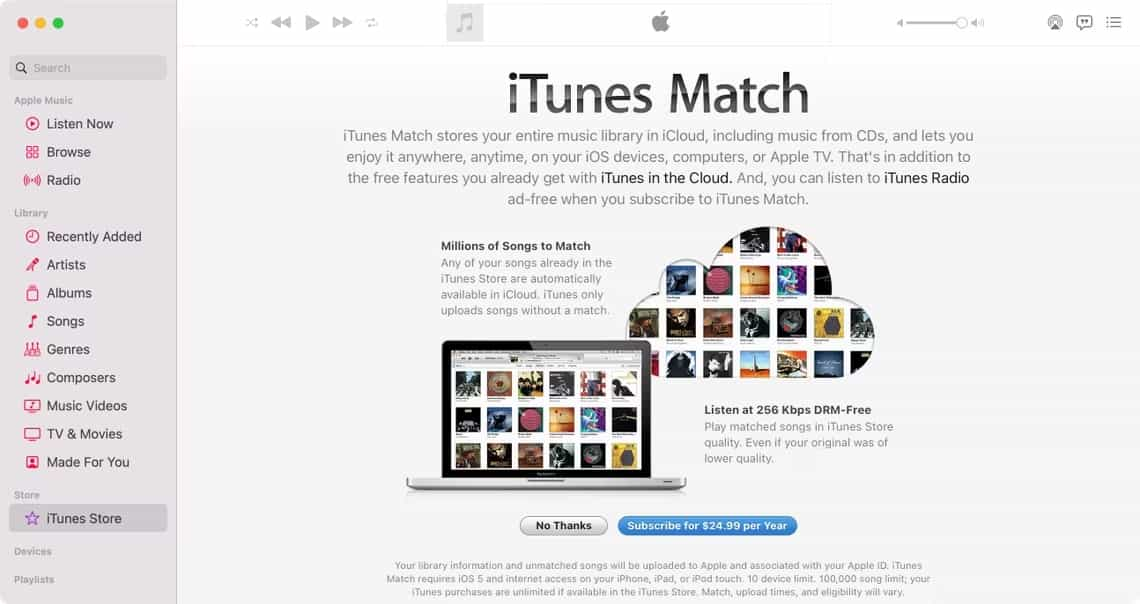
Prijs: iTunes Match is beschikbaar als jaarabonnement in plaats van een maandabonnement. In de Verenigde Staten kost iTunes Match $24.99 per jaar.
Belangrijkste kenmerken van iTunes Match
- Vergelijkt en uploadt uw persoonlijke muziekbibliotheek naar iCloud
- Biedt toegang tot je geüploade/gekoppelde nummers op alle Apple-apparaten.
- Ondersteunt tot 100,000 nummers.
- Hiermee kunnen nummers opnieuw worden gedownload in 256 kbps AAC-formaat.
- Geen toegang tot de Apple Music-streamingcatalogus
- Alle overeenkomende of geüploade bestanden zijn DRM-vrij.
Het meest geschikt voor: iTunes Match is ideaal voor gebruikers met een grote offline muziekbibliotheek die deze eenvoudigweg willen synchroniseren tussen apparaten zonder DRM-beperkingen.
Wat is Apple-muziek?
Apple Music is een volwaardig muziekstreamingplatform met een enorme bibliotheek, samengestelde afspeellijsten en moderne luisterfuncties die niet beschikbaar zijn in iTunes Match.
Prijs: De prijsstelling van Apple Music is gebaseerd op maandelijkse abonnementen, met verschillende pakketten afhankelijk van hoe je de dienst wilt gebruiken:
- Individueel abonnement: $ 10.99 per maand
- Studentenabonnement: $ 5.99 per maand
- Gezinsabonnement: $16.99 per maand (te delen met maximaal zes personen)
Belangrijkste kenmerken van Apple Music
- Toegang tot meer dan 100 miljoen nummers
- Gepersonaliseerde afspeellijsten, aanbevelingen en exclusieve content.
- Apple Music-radio
- Opties voor lossless en ruimtelijke audio
- Offline downloads met DRM
- Beschikbaar op iOS, macOS, Windows, Android en meer
Het meest geschikt voor: Apple Music is het meest geschikt voor mensen die graag streamen, nieuwe muziek ontdekken en toegang hebben tot een wereldwijde catalogus.
Deel 2. Wat is het verschil tussen iTunes Match en Apple Music?
Om iTunes Match en Apple Music te begrijpen, moet je weten hoe ze omgaan met muziekbibliotheken, streaming, toegang en DRM-beveiliging. Hieronder worden de belangrijkste verschillen uitgelegd.
1. Doel en kernfunctionaliteit
Het belangrijkste verschil tussen iTunes Match en Apple Music zit hem in hun doel. iTunes Match is ontworpen voor gebruikers die al een grote persoonlijke muziekbibliotheek hebben en die bestanden willen uploaden, matchen en synchroniseren tussen apparaten via iCloud. Apple Music daarentegen is een volwaardige streamingdienst met een abonnement die toegang biedt tot meer dan 100 miljoen nummers, samengestelde afspeellijsten, radiostations en exclusieve content. De ene dienst richt zich op het beheren van je eigen muziek; de andere geeft je toegang tot een enorme streamingcatalogus.
2. Muziekeigendom en DRM-beveiliging
Eigendom is een belangrijk verschilpunt tussen iTunes Match en Apple Music. Nummers die via iTunes Match worden gedownload, zijn DRM-vrij, wat betekent dat je ze voor altijd kunt bewaren, vrij kunt overzetten en zonder beperkingen op elk apparaat kunt afspelen.
Apple Music-nummers zijn echter beveiligd met DRM. Dit betekent dat offline Apple Music-nummers niet meer werken als je je abonnement opzegt, en dat ze niet kunnen worden gekopieerd, overgezet of afgespeeld op niet-geautoriseerde apparaten, tenzij ze worden geconverteerd met een geschikt programma.
3. Toegang tot streaming en het ontdekken van muziek
iTunes Match bevat geen streamingbibliotheek en is bedoeld om muziek die je al bezit op te slaan en te synchroniseren. Apple Music daarentegen biedt onbeperkte toegang tot miljoenen nummers, gepersonaliseerde afspeellijsten, aanbevelingen op basis van algoritmes en exclusieve releases. Gebruikers die graag nieuwe muziek ontdekken of een wereldwijde catalogus verkennen, zullen Apple Music veel beter vinden.
4. Opties voor audiokwaliteit
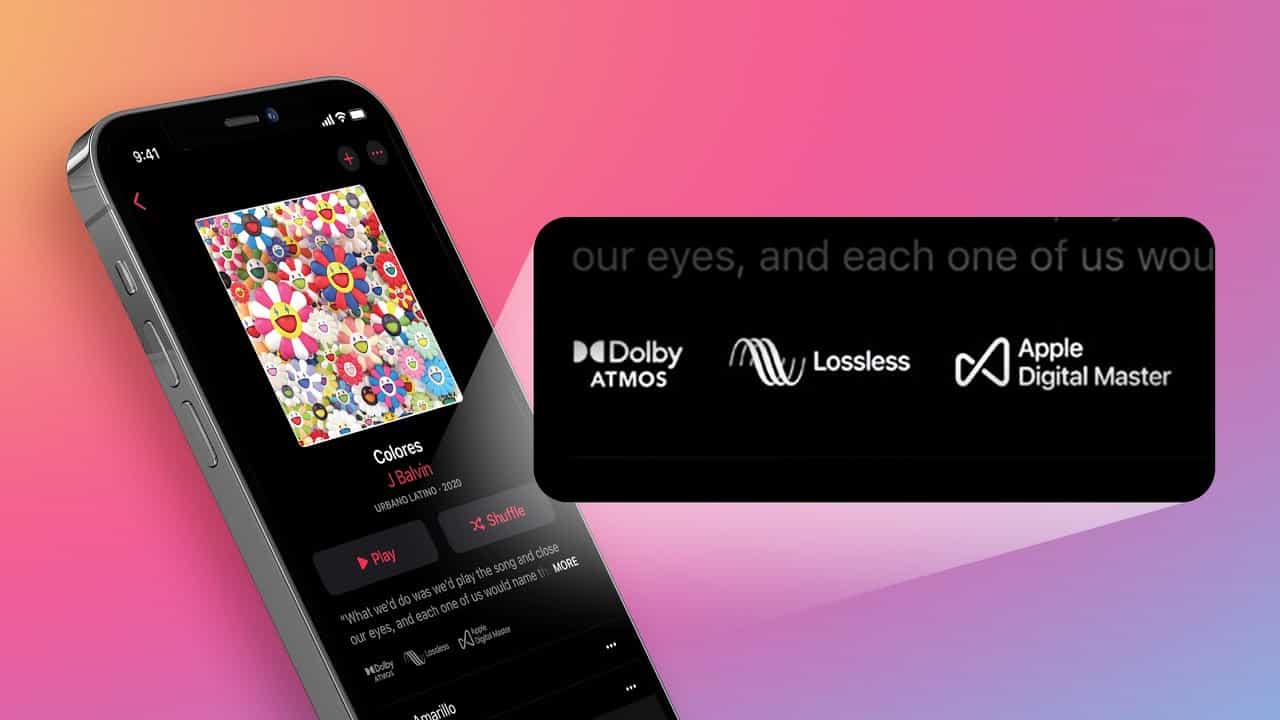
Bij een vergelijking tussen iTunes Match en Apple Music speelt de audiokwaliteit een duidelijke rol. iTunes Match biedt gematchte nummers aan in 256 kbps AAC, wat voor de meeste gebruikers acceptabel is, maar niet van hoge resolutie. Apple Music ondersteunt formaten van hogere kwaliteit, zoals Lossless en High-Resolution Lossless, en zelfs Dolby Atmos/Spatial Audio op compatibele apparaten. Gebruikers die op zoek zijn naar een hoogwaardige audio-ervaring zullen meer baat hebben bij Apple Music.
5. Compatibiliteit tussen verschillende apparaten
iTunes Match synchroniseert je geüploade of gekoppelde muziek op al je Apple-apparaten en stelt je in staat om DRM-vrije bestanden op elk apparaat te downloaden. Apple Music biedt een bredere compatibiliteit, waaronder iOS, macOS, Windows, Android en CarPlayMaar de DRM-beperkingen beperken hoe vrij gedownloade nummers kunnen worden verplaatst of bewaard. iTunes Match biedt vrijheid; Apple Music biedt gemak en een bredere beschikbaarheid van de app.
6. Wat gebeurt er na annulering?
De ervaring na het opzeggen van een abonnement is een van de duidelijkste praktische verschillen tussen iTunes Match en Apple Music. Als je iTunes Match opzegt, behoud je al je gedownloade DRM-vrije nummers permanent. Als je Apple Music opzegt, worden alle offline nummers met DRM-beveiliging direct onspeelbaar. Apple Music-gebruikers die hun gedownloade nummers langdurig willen blijven gebruiken, moeten deze vóór het opzeggen converteren naar DRM-vrije formaten.
Heb je zowel iTunes Match als Apple Music nodig?
De meeste gebruikers hebben ze niet allebei nodig. Apple Music biedt al iCloud-synchronisatie voor je Apple Music-bibliotheek, waardoor iTunes Match voor veel abonnees overbodig is.
iTunes Match is de ideale, budgetvriendelijke optie als je voornamelijk een grote lokale muziekbibliotheek wilt synchroniseren. MP3en waardeer DRM-vrije downloads zonder dat je een streamingcatalogus nodig hebt.
Aan de andere kant is Apple Music de beste keuze voor wie dagelijks nieuwe releases streamt, van samengestelde aanbevelingen houdt en prioriteit geeft aan premiumfuncties zoals lossless en ruimtelijke audio. Door deze verschillen te begrijpen, kun je de dienst kiezen die het beste aansluit bij jouw luistergewoonten.
Deel 3. Bonus: Houd Apple Music-nummers DRM-vrij voor offline luisteren.
Omdat Apple Music-nummers DRM bevatten, kunnen gebruikers ze niet bewaren of overzetten nadat ze hun abonnement hebben opgezegd. Om Apple Music-nummers offline te kunnen gebruiken, moeten ze worden geconverteerd naar DRM-vrije formaten. DumpMedia Apple Music Converter Het is ontwikkeld voor gebruikers die Apple Music verkiezen boven iTunes Match en permanent toegang willen tot hun nummers.
Belangrijke herinnering: DumpMedia Apple Music Converter werkt niet met iTunes en mag alleen worden gebruikt met nummers die via Apple Music worden gestreamd.
Gratis downloaden Gratis downloaden
Belangrijkste voordeel van DumpMedia Apple Music Converter
- Converteer Apple Music naar MP3, M4A, WAV of FLAC
- Verwijder DRM van Apple Music downloads
- Behoud ID3-tags, metadata en hoge audiokwaliteit.
- Speel Apple Music-nummers af op elk apparaat (MP3 spelers, Android-telefoons, auto-audiosystemen, tv's, enz.)
- Bewaar uw geconverteerde bestanden permanent.
Dit biedt een praktisch voordeel voor gebruikers die iTunes Match vergelijken met Apple Music en hun keuze baseren op het langdurig bezit van bestanden.
Gids van DumpMedia Apple Music Converter
Stap 1. Download en installeer DumpMedia Apple Music-converter. Er zijn pc- en Mac-versies beschikbaar.
Gratis downloaden Gratis downloaden
Stap 2. Open DumpMediaGa vervolgens naar het tabblad Bibliotheek. Selecteer de nummers die u wilt converteren vanuit uw Apple Music-bibliotheek door het selectievakje bij elk nummer aan te vinken.

Stap 3. Kies een uitvoerformaat dat u wilt gebruiken en zorg ervoor dat u een uitvoermap definieert. De overige uitvoerparameters kunt u naar wens instellen.

Stap 4. Zodra de installatie is voltooid, kunt u het vinkje bij 'Alles converteren' onderaan het scherm plaatsen.

Deel 4. FAQ
1. Is iTunes Match nog steeds beschikbaar?
Ja. Apple blijft het ondersteunen als een losstaand abonnement.
2. Moet ik iTunes Match aanschaffen als ik Apple Music al heb?
Meestal niet. Apple Music synchroniseert je muziekbibliotheek, waardoor iTunes Match minder nodig is.
3. Zijn Apple Music-downloads beveiligd met DRM?
Ja. Nummers op Apple Music blijven beveiligd met DRM, tenzij ze worden geconverteerd.
4. Welke app biedt een betere geluidskwaliteit: iTunes Match of Apple Music?
Apple Music biedt lossless en ruimtelijke audio, terwijl iTunes Match gebruikmaakt van 256 kbps AAC.
Deel 5. Conclusie
Bij de afweging tussen iTunes Match en Apple Music komt het er uiteindelijk op neer of je meer waarde hecht aan het bezitten van je muziek of aan toegang tot een uitgebreide streamingbibliotheek. iTunes Match is de betere optie voor gebruikers die al een grote persoonlijke collectie hebben en DRM-vrije, permanente toegang tot hun nummers op al hun apparaten willen. Apple Music is echter de betere keuze voor luisteraars die prioriteit geven aan het streamen van miljoenen nummers, het ontdekken van nieuwe artiesten en het genieten van moderne functies zoals samengestelde afspeellijsten, lossless audio en ruimtelijke audio.
Voor Apple Music-abonnees die hun nummers offline willen kunnen afspelen zonder DRM-beperkingen, is er een gespecialiseerde tool zoals DumpMedia Apple Music Converter biedt die controle, maar uitsluitend voor Apple Music-content, niet voor iTunes Match.