


Niet beschikbaar in jouw regio voor Apple Music? Dat wordt in 2026 opgelost.
Veel Apple Music-gebruikers krijgen de frustrerende melding: " Apple Music is niet beschikbaar in uw regio ." Regionale beperkingen, licentieovereenkomsten, DRM-beveiliging en problemen met accountverificatie zorgen er vaak voor dat Apple Music-nummers niet normaal afgespeeld kunnen worden. In deze handleiding leggen we uit waarom Apple Music de melding "niet beschikbaar in uw land" geeft, hoe u het probleem kunt oplossen op iPhone, Mac en pc, en wat de beste manier is om Apple Music-nummers offline te kunnen afspelen zonder regionale beperkingen.
Inhoudsopgave Deel 1. Waarom geeft Apple Music de melding 'Niet beschikbaar in uw regio'? Deel 2. Hoe los ik het probleem 'Apple Music niet beschikbaar in uw land' op? Deel 3. De beste manier om Apple Music overal te kunnen afspelen Deel 4. Veelgestelde vragen Deel 5. Samenvatting
Deel 1. Waarom geeft Apple Music de melding "Niet beschikbaar in uw regio"?
Gebruikers zoeken vaak naar "Apple Music niet beschikbaar in uw regio" in de volgende situaties.
- Apple Music-nummers zijn grijs weergegeven.
- De nummers verschijnen wel in afspeellijsten, maar kunnen niet worden afgespeeld.
- Gedownloade nummers plotseling niet meer beschikbaar
- Offline tracks werken niet meer na verificatie van het abonnement of de regio.
- Problemen met Apple Music tijdens het reizen
- Problemen met het wijzigen van het land van je Apple ID
- Apple Music werkt niet op iPhone of Mac.
Er zijn verschillende redenen waarom gebruikers de foutmelding 'Apple Music niet beschikbaar in uw regio' te zien krijgen.
Licentiebeperkingen
Apple Music hanteert verschillende licentievoorwaarden voor nummers per land en regio. Sommige nummers zijn mogelijk wel beschikbaar in het ene land, maar niet in een ander vanwege auteursrechtelijke overeenkomsten. Dit is een van de meest voorkomende oorzaken van het probleem "Apple Music niet beschikbaar in uw land".
Apple ID-regio-instellingen
Als de regio van je Apple ID verandert, kunnen bepaalde nummers verdwijnen. Veel gebruikers krijgen de melding 'Apple Music niet beschikbaar in jouw land' nadat ze naar het buitenland zijn verhuisd of hun betaalinstellingen hebben gewijzigd.
DRM-beveiliging
Nummers op Apple Music zijn beschermd door DRM (Digital Rights Management) , waarvoor accountverificatie en regionale autorisatie vereist zijn. Vanwege DRM-beperkingen kan offline afspelen mislukken.
Problemen met abonnementsverificatie
Apple Music controleert periodiek online de abonnementsstatus. Als de verificatie mislukt, kunnen gebruikers plotseling de toegang tot gedownloade nummers verliezen.
Nummers verwijderd uit de lokale catalogus
Soms verwijderen platenmaatschappijen nummers uit specifieke regionale catalogi, waardoor nummers niet meer beschikbaar zijn, zelfs als ze voorheen wel afspeelbaar waren.
Deel 2. Hoe los je het probleem op dat Apple Music niet beschikbaar is in jouw land?
Als je steeds de melding 'Apple Music niet beschikbaar in jouw regio' ziet, kunnen de volgende methoden mogelijk helpen om het probleem op te lossen.
Controleer de regio van uw Apple ID.
Een belangrijke reden waarom Apple Music niet beschikbaar is in jouw regio, is een onjuiste regio-instelling. Open de Apple ID-instellingen en controleer of je land of regio overeenkomt met je huidige locatie en betaalmethode.
Betalingsinformatie bijwerken
Verlopen of niet-ondersteunde betaalmethoden kunnen de accountverificatie en de toegang in bepaalde regio's beïnvloeden.
Apple Muziekbibliotheek opnieuw synchroniseren
Schakel de synchronisatie van de bibliotheek uit en weer in om de beschikbaarheidsinformatie van nummers te vernieuwen.
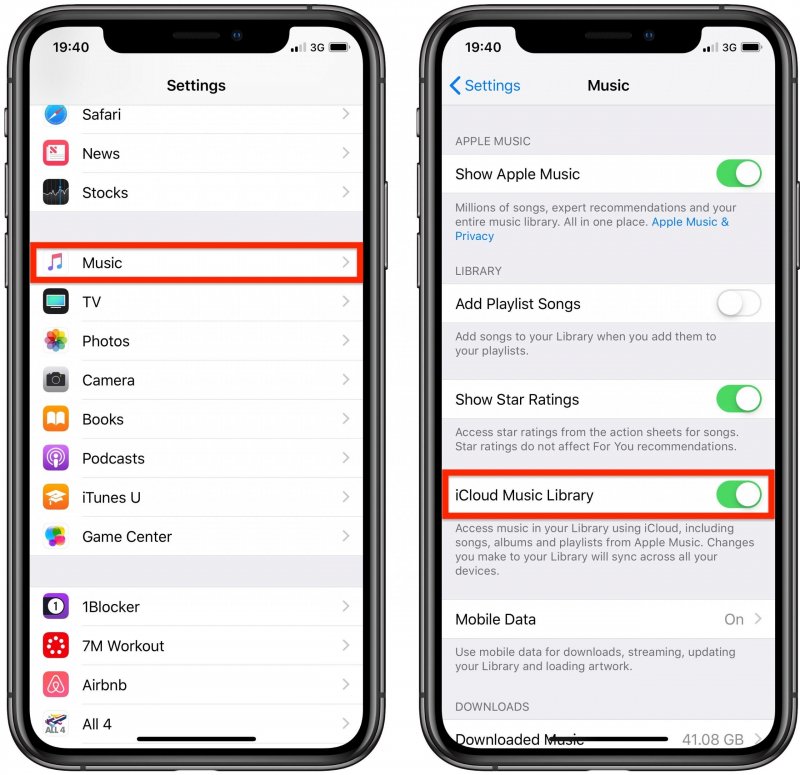
Voor iOS (iPhone): Open Instellingen > Apps > Muziek. Schakel 'Bibliotheek synchroniseren' UIT. Wacht 30 seconden en schakel 'Bibliotheek synchroniseren' vervolgens weer AAN. Open de Muziek-app; je zou bovenaan een voortgangsbalk moeten zien met de tekst 'Muziekbibliotheek laden'.
Voor Android: Open de Apple Music-app. Tik op het menu met de drie puntjes (⋮) rechtsboven en selecteer Instellingen. Zoek 'Bibliotheek synchroniseren' en schakel deze UIT en vervolgens weer AAN.
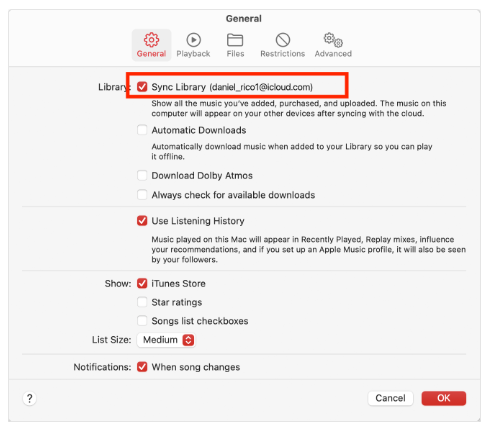
Voor macOS (Tahoe / 2026): Ga naar Muziek > Instellingen > Algemeen en schakel 'Bibliotheek synchroniseren' uit, klik op OK en schakel het vervolgens weer in.
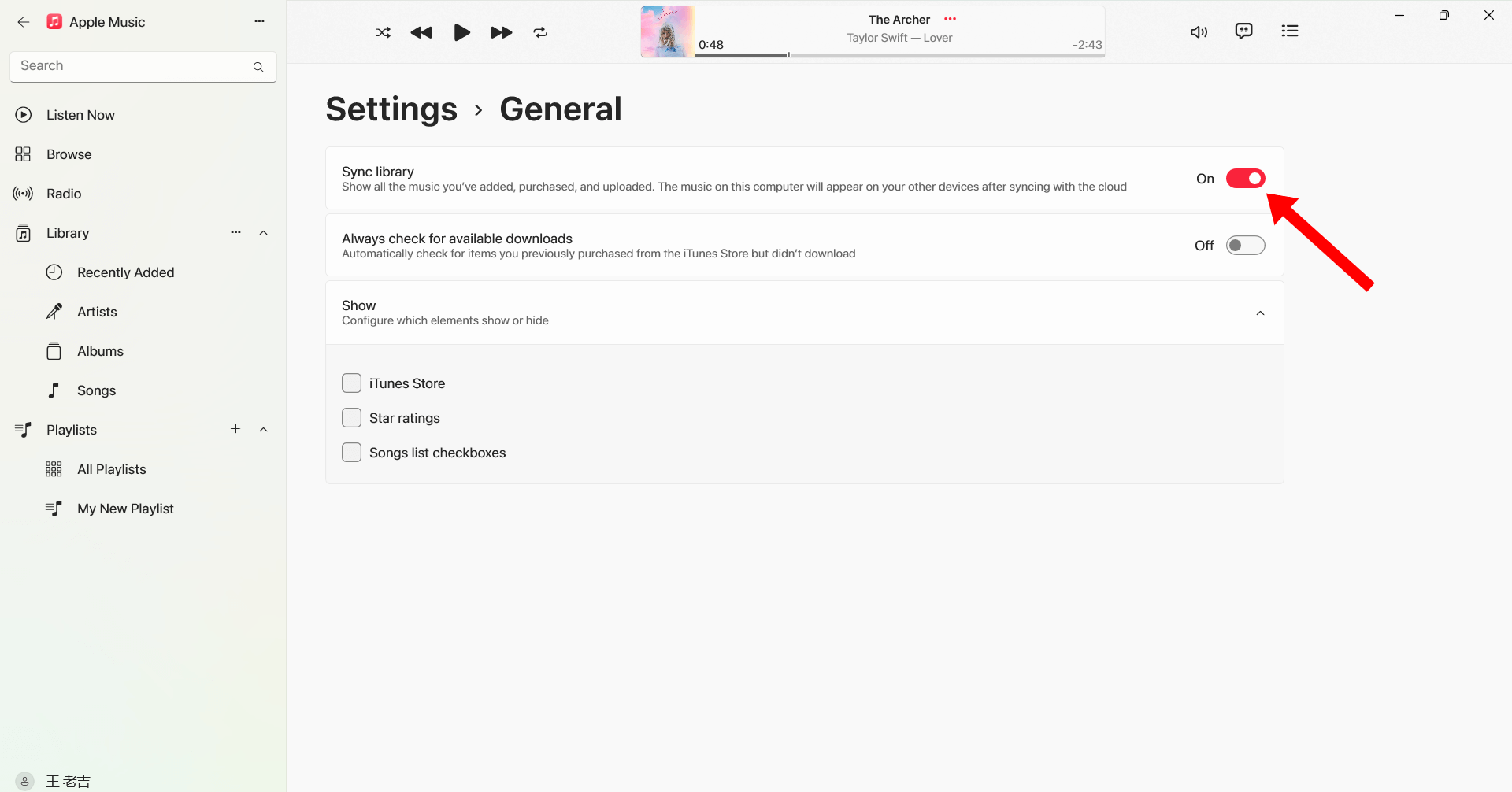
Bij Windows (10/11): Open de Apple Music-app. Klik op je profielnaam/icoon onderaan de zijbalk. Ga naar Instellingen > Algemeen. Schakel 'Bibliotheek synchroniseren' uit en weer in.
Uitloggen en opnieuw inloggen
Door opnieuw in te loggen op je Apple ID kun je de Apple Music-autorisatie vernieuwen en regio-gerelateerde afspeelproblemen oplossen.
Nummers opnieuw downloaden
Sommige gedownloade nummers kunnen beschadigd raken of de autorisatie verliezen. Het opnieuw downloaden van de nummers kan het afspelen herstellen.
iOS of macOS bijwerken
Oudere systeemversies kunnen compatibiliteitsproblemen met Apple Music veroorzaken.

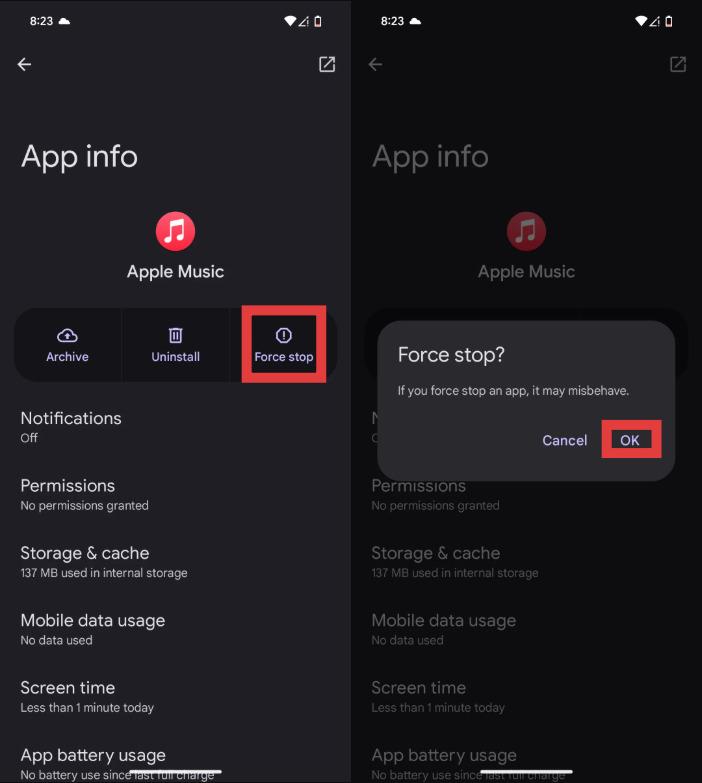
Start de Apple Music-app opnieuw
Tijdelijke bugs kunnen ook de melding 'Apple Music niet beschikbaar in uw regio' veroorzaken.
Als deze oplossingen niet werken, kan het probleem te maken hebben met DRM-beperkingen en regionale licentiebeperkingen waar u geen invloed op hebt.
Deel 3. De beste manier om Apple Music overal afspeelbaar te houden
Om terugkerende problemen zoals "Apple Music niet beschikbaar in uw regio" te voorkomen, gebruiken veel gebruikers Apple Music-nummers converteren naar lokale bestanden MP3 bestandenEen van de beste hulpmiddelen hiervoor is DumpMedia Apple Music ConverterDeze professionele Apple Music-converter helpt gebruikers nummers lokaal op te slaan voor stabiele offline weergave, zonder afhankelijk te zijn van regionale autorisatie.
Gratis downloaden Gratis downloaden
🏆Waarom kiezen voor DumpMedia Apple Music Converter
- Verwijder de DRM-beveiliging van Apple Music*
- Behoud de oorspronkelijke geluidskwaliteit.
- Download afspeellijsten en albums in batches.
- Snelle conversiesnelheid
- Behoud songmetadata en ID3-tags.
- Ondersteuning voor offline afspelen op elk apparaat.
Voor gebruikers die herhaaldelijk de melding 'Apple Music niet beschikbaar in uw regio' tegenkomen, MP3 Afspelen biedt een betrouwbaardere oplossing voor de lange termijn.
Hoe Apple Music naar te converteren MP3 voor offline afspelen
Stap 1. Download en installeer DumpMedia Installeer Apple Music Converter op je Mac/pc. Start het programma en je ziet de interface. Gebruik je Apple Music-account om in te loggen.
Gratis downloaden Gratis downloaden
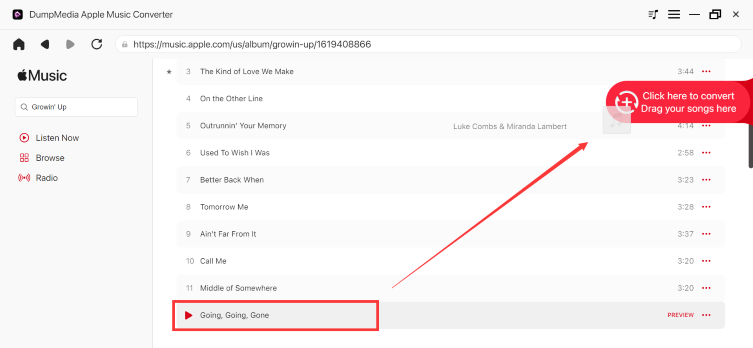
Stap 2. Zoek de afspeellijst, het album of het specifieke nummer dat u wilt converteren. U kunt een enkel nummer naar het "+" pictogram aan de rechterkant van het scherm slepen. U kunt ook een volledige afspeellijst/album openen en op het pictogram "Toevoegen aan converteren" klikken om de volledige lijst in de converter te laden.
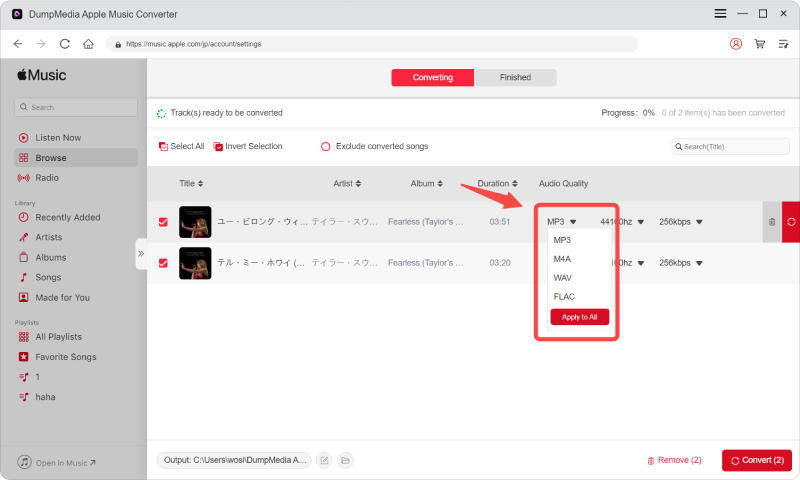
Stap 3. Selecteren MP3 (meest compatibel). Je kunt ook de bitrate of de samplefrequentie aanpassen. Kies voor de beste balans 320 kbps.
Stap 4. Zodra de instellingen zijn voltooid, kunnen gebruikers de conversie uitvoeren door op het pictogram 'Converteren' te klikken. DumpMedia zal Apple Music-nummers converteren naar MP3 Binnen enkele seconden dankzij de supersnelle snelheid.

Na de conversie kun je je nummers offline afspelen zonder dat Apple Music de regiocode hoeft te controleren.
Deel 4. Veelgestelde vragen
Waarom geeft Apple Music aan dat het niet beschikbaar is in uw regio?
Dit komt meestal door licentiebeperkingen, regio-instellingen van de Apple ID of problemen met DRM-autorisatie.
Hoe los ik het probleem op dat Apple Music niet beschikbaar is in mijn regio?
Je kunt proberen de regio-instellingen van je Apple ID bij te werken, je bibliotheek opnieuw te synchroniseren, nummers opnieuw te downloaden of de app opnieuw op te starten.
Waarom zijn mijn Apple Music-nummers grijs weergegeven?
Grijs weergegeven nummers duiden vaak op regionale licentie- of synchronisatieproblemen.
Kan ik Apple Music gebruiken als ik in het buitenland ben?
Ja, maar sommige nummers zijn mogelijk niet meer beschikbaar vanwege regionale auteursrechtbeperkingen.
Hoe bewaar ik mijn Apple Music-nummers permanent?
Veel gebruikers gebruiken DumpMedia Apple Music Converter om nummers naar lokale bestanden te converteren. MP3 bestanden voor permanente offline weergave.
Is DumpMedia Is Apple Music Converter veilig?
Ja. Het is ontworpen voor het converteren van Apple Music en het beheren van offline afspelen.
Deel 5. Overzicht
De foutmelding 'Apple Music niet beschikbaar in uw regio' wordt meestal veroorzaakt door licentiebeperkingen, DRM-beveiliging, regio-instellingen van de Apple ID of problemen met abonnementsverificatie. Voor gebruikers die stabiel offline willen luisteren zonder regionale beperkingen, DumpMedia Apple Music Converter biedt een praktische manier om Apple Music-bestanden om te zetten naar permanente lokale bestanden. MP3 bestanden. Door de afhankelijkheid van apps en streamingbeperkingen weg te nemen, kunnen gebruikers vrijer van Apple Music genieten op verschillende apparaten en locaties.
Gratis downloaden Gratis downloaden
*DumpMedia Deze functie werkt door Apple Music-nummers te decoderen en te downloaden naar DRM-vrije bestanden, waardoor je een schone, onbeperkte kopie van je bibliotheek krijgt voor elk apparaat. De functie omvat niet het verwijderen van DRM uit lokale audiobestanden.