


Transfer Spotify Guía completa para Apple Music (2026)
Muchos oyentes que inicialmente utilizaron Spotify Finalmente deciden trasladar sus bibliotecas de música a Apple Music Para una mejor integración con dispositivos Apple, una mejor gestión de la biblioteca o preferencias personales. Sin embargo, un gran desafío al cambiar de plataforma es mantener tus listas de reproducción cuidadosamente seleccionadas.
Afortunadamente, existen varias herramientas que pueden ayudarte. bancaria Spotify a la música de Apple De forma rápida y eficiente. En esta guía, le explicaremos los mejores métodos para transferir Spotify Listas de reproducción a Apple Music. También abordaremos herramientas en línea alternativas y consejos prácticos para que el proceso de migración sea fluido y preciso.
Guía de contenido Parte 1. Por qué los usuarios desean transferir Spotify Listas de reproducción para Apple MusicParte 2. La mejor manera de realizar transferencias Spotify Listas de reproducción para Apple MusicParte 3. Herramientas alternativas en línea para la transferencia Spotify Listas de reproducción para Apple MusicParte 4. Preguntas frecuentesParte 5. Conclusión
Parte 1. Por qué los usuarios desean transferir Spotify Listas de reproducción para Apple Music
Antes de explorar las herramientas disponibles, es útil comprender por qué muchos usuarios deciden transferir Spotify a Apple Music en primer lugar.
- Cambio de ecosistemas musicales: para los usuarios que dependen en gran medida del hardware de Apple, Apple Music ofrece una experiencia auditiva más fluida.
- Conservar las listas de reproducción existentes: Perderlas al cambiar de plataforma puede ser frustrante. Por eso son tan importantes las herramientas de migración de listas de reproducción.
- La transferencia manual es ineficiente: este enfoque tiene varios problemas, como que buscar cada canción individualmente lleva horas, se pueden olvidar algunas pistas, el orden de la lista de reproducción puede no coincidir con el original, etc.
Debido a estos desafíos, la mayoría de los usuarios dependen de herramientas especializadas para transferir Spotify a Apple Music automáticamente.
Parte 2. La mejor manera de realizar transferencias Spotify Listas de reproducción para Apple Music
Entre las herramientas disponibles, DumpMedia Cualquier convertidor de música es una de las soluciones más confiables para los usuarios que desean transferir Spotify a Apple Music de forma rápida y precisa. Su función de Transferencia de Listas de Reproducción simplifica todo el proceso de migración y garantiza que las listas de reproducción se creen correctamente.
Descarga gratuita Descarga gratuita
DumpMedia funciona en ambos WinWindows y macOS, lo que la hace accesible a una amplia gama de usuarios. La función de transferencia de listas de reproducción está diseñada específicamente para la migración de listas de reproducción entre plataformas. Estas son algunas de sus funciones más valiosas:
- Transferencia de listas de reproducción por lotes: puedes mover varias listas de reproducción a la vez en lugar de transferirlas individualmente.
- Coincidencia inteligente de pistas: el software identifica automáticamente las canciones correspondientes en Apple Music, lo que mejora la precisión de la transferencia.
- Preservación de metadatos: se puede conservar información importante como títulos de canciones, artistas, álbumes y orden de listas de reproducción durante la migración.
Guía paso a paso para transferir Spotify a la música de Apple
Siga estos sencillos pasos para completar el proceso de migración.
Paso 1: Descarga e instala DumpMedia Cualquier convertidor de música en tu WinComputadora Windows o Mac. Después de la instalación, inicie el programa para acceder a la interfaz principal.
Descarga gratuita Descarga gratuita
Paso 2: Vaya a la función Transferir lista de reproducción dentro del programa. Seleccione Spotify como fuente.

Paso 3. Selecciona Apple Music como la plataforma a la que deseas trasladar tu lista de reproducción.
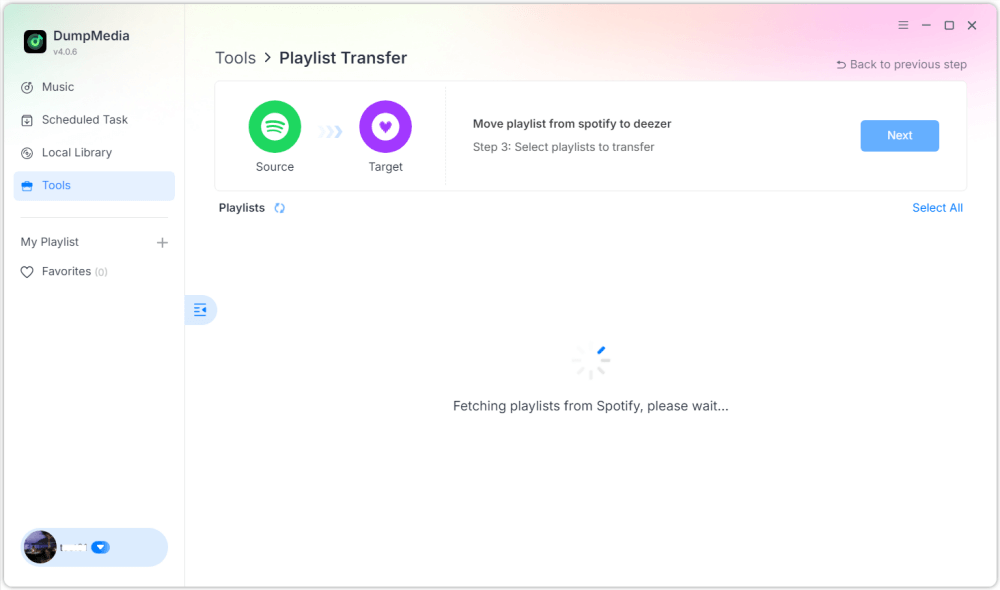
Paso 4: Encuentra las listas de reproducción que deseas transferir Spotify a Apple Music y selecciona todas las listas de reproducción que quieras mover.

Paso 5. Haga clic en Convertir para iniciar la transferencia.
Paso 6. La transferencia ha finalizado. Haz clic en «Ir a Apple Music». Tus listas de reproducción se han transferido a un nuevo servicio y ya puedes empezar a disfrutar de tu nuevo servicio de música en streaming.
Para los usuarios con grandes colecciones de música, esta solución proporciona una de las formas más sencillas de transferir Spotify a Apple Music sin errores ni pistas faltantes.
Parte 3. Herramientas alternativas en línea para la transferencia Spotify Listas de reproducción para Apple Music
Si bien el software de escritorio suele ser la opción más confiable, algunos usuarios prefieren las herramientas en línea porque no requieren instalación. Varios servicios web permiten transferir Spotify Accede a Apple Music directamente desde el navegador. Dos opciones populares son TuneMyMusic y Soundiiz.
Usando TuneMyMusic
TuneMyMusic es un sencillo servicio de transferencia de listas de reproducción en línea compatible con diversas plataformas musicales. Ofrece una interfaz sencilla para quienes desean transferir listas de reproducción entre servicios.
Paso 1. Visita el sitio web de TuneMyMusic y haz clic en “Comencemos”.
Paso 2: Seleccionar Spotify como su plataforma de origen e inicie sesión en su cuenta.
Paso 3. Seleccione la lista de reproducción que desea migrar o pegue la URL de la lista de reproducción.
Paso 4. Inicia sesión en tu cuenta de Apple Music para autorizar la transferencia.

Paso 5. Haz clic en “Comenzar a transferir mi música”. El servicio buscará las canciones y creará la lista de reproducción en Apple Music.
Usando Soundiiz
Soundiiz es otra potente plataforma de gestión de listas de reproducción en línea que admite muchos servicios de transmisión.
Paso 1. Regístrate o inicia sesión en el panel de control de Soundiiz.
Paso 2: Autorizar Spotify para que Soundiiz pueda acceder a tus listas de reproducción.
Paso 3. Agrega Apple Music como un servicio conectado.
Paso 4. Elige la lista de reproducción que deseas transferir.
Paso 5. Haz clic en Convertir y elige Apple Music como destino.
Una vez finalizado el proceso, la lista de reproducción debería aparecer en tu biblioteca de Apple Music.
Limitaciones de las herramientas en línea
Aunque las herramientas en línea son convenientes, pueden tener varias desventajas:
- Las versiones gratuitas a menudo limitan la cantidad de canciones transferidas
- La precisión de la coincidencia puede variar
- Las listas de reproducción grandes pueden tardar más en procesarse
- La conectividad a Internet afecta el rendimiento
Parte 4. Preguntas frecuentes
¿Puedo transferir? Spotify ¿A Apple Music gratis?
Algunas herramientas en línea ofrecen transferencias gratuitas de listas de reproducción, pero pueden limitar la cantidad de canciones. Las herramientas premium suelen ofrecer transferencias más rápidas y funciones adicionales.
¿Se transferirán todas las canciones con éxito?
La mayoría de las canciones se pueden combinar entre los dos servicios, pero ocasionalmente, algunas pistas pueden no estar disponibles debido a diferencias de licencia.
¿Cuánto tiempo se tarda en transferir listas de reproducción?
El tiempo necesario depende del tamaño de la lista de reproducción. Las listas de reproducción más pequeñas pueden transferirse en minutos, mientras que las bibliotecas más grandes pueden tardar más.
¿Puedo transferir varias listas de reproducción a la vez?
Sí. Algunas herramientas, incluidas DumpMedia Cualquier convertidor de música admite transferencias por lotes para que puedas mover varias listas de reproducción simultáneamente.
¿Es seguro utilizar herramientas de transferencia de listas de reproducción?
Las herramientas confiables utilizan métodos de autenticación seguros para conectarse a tus cuentas de streaming. Elige siempre servicios confiables al transferir. Spotify a la música de Apple.
Parte 5. Conclusión
Mover listas de reproducción entre servicios de streaming ya no tiene por qué ser difícil. Con las herramientas adecuadas, puedes transferir Spotify a Apple Music rápidamente y conservando tu biblioteca musical intacta. Gracias a su potente función de transferencia de listas de reproducción, DumpMedia le permite transferir Spotify Transfiere canciones a Apple Music con precisión, mantén la estructura de tus listas de reproducción y migra varias fácilmente. Al elegir el método adecuado, podrás disfrutar de tu música favorita en Apple Music sin perder las listas que has creado durante años.