


Cómo transferir Spotify ¿Lista de reproducción para Amazon Music?
Los servicios de streaming de música han transformado la forma en que la gente escucha música. Sin embargo, cambiar de plataforma a veces puede ser incómodo, especialmente cuando se tienen listas de reproducción cuidadosamente seleccionadas y creadas a lo largo del tiempo. Muchos usuarios que antes dependían de... Spotify puede decidir intentarlo Amazon Music por su integración con dispositivos de Amazon, amplia biblioteca de música y compatibilidad con altavoces inteligentes habilitados para Alexa.
Afortunadamente, ahora existen varias herramientas que permiten mover listas de reproducción entre servicios de streaming automáticamente. En esta guía, explicaremos los métodos más efectivos para... bancaria Spotify lista de reproducción a Amazon Music utilizando herramientas en línea, software de escritorio y aplicaciones móviles. Ya sea que esté usando WinYa sea que uses Windows, Mac, iOS o Android, encontrarás una solución que te ayudará a migrar tus listas de reproducción de forma rápida y precisa.
Guía de contenido Parte 1. Transferencia Spotify Listas de reproducción para Amazon Music OnlineParte 2. Transferencia Spotify Listas de reproducción de Amazon Music en WinDows/MacParte 3. Transferencia Spotify Listas de reproducción de Amazon Music en iOSParte 4. Transferencia Spotify Listas de reproducción de Amazon Music en AndroidParte 5. Preguntas frecuentesParte 6. Conclusión
Parte 1. Transferencia Spotify Listas de reproducción para Amazon Music Online
Para quienes buscan un método rápido y sencillo sin instalar software, las herramientas de transferencia de listas de reproducción en línea son una opción práctica. Estos servicios permiten conectar las cuentas de streaming a través de un navegador web y migrar automáticamente las listas de reproducción entre plataformas.
Una de las herramientas en línea más populares para este propósito es TuneMyMusic. TuneMyMusic es una herramienta web para migrar listas de reproducción, compatible con muchas plataformas de streaming. Permite a los usuarios transferir Spotify lista de reproducción a Amazon Music con solo unos pasos.
Características Principales
- Funciona directamente en su navegador web
- Admite muchas plataformas de streaming
- Interfaz sencilla con guía paso a paso
- No se requiere instalación de software
Pasos para transferir Spotify Lista de reproducción de Amazon Music con TuneMyMusic
Paso 1. Visita el sitio web de TuneMyMusic y haz clic en el botón "Comencemos" para iniciar el proceso.
Paso 2: Elija Spotify Como plataforma de origen e inicia sesión en tu cuenta. La herramienta te solicitará permiso para acceder a tus listas de reproducción.
Paso 3. Una vez conectado, puedes seleccionar la lista de reproducción que deseas migrar o pegar el enlace de la lista. El sistema cargará todas las canciones de esa lista.
Paso 4. A continuación, seleccione Amazon Music como servicio de destino e inicie sesión en su cuenta de Amazon para autorizar la transferencia.

Paso 5: Haga clic en “Comenzar a mover mi música”. La herramienta hará coincidir automáticamente las canciones de Spotify con el catálogo de Amazon Music.
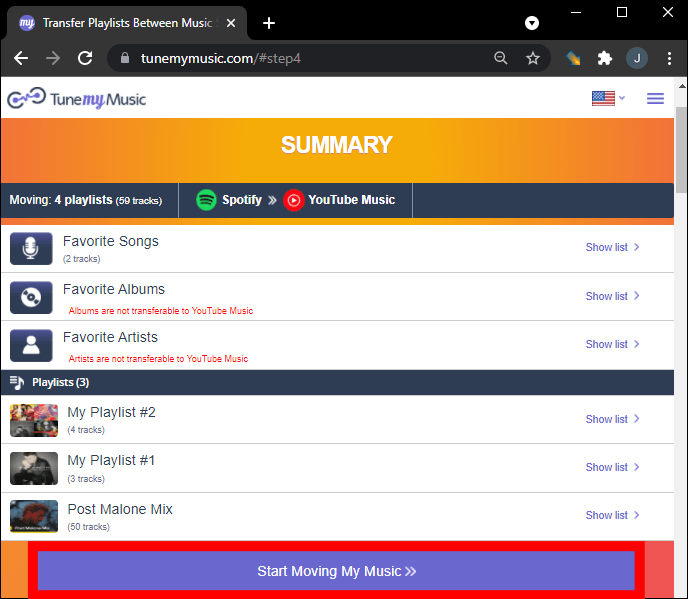
Paso 6. Una vez finalizado el proceso, abre tu biblioteca de Amazon Music para confirmar que la lista de reproducción se ha creado correctamente.
Usar una herramienta en línea como TuneMyMusic es una de las formas más rápidas de transferir Spotify Lista de reproducción de Amazon Music para listas pequeñas o medianas. Sin embargo, para usuarios con bibliotecas de música grandes o que buscan mayor estabilidad, una solución de escritorio puede ser una mejor opción.
Parte 2. Transferencia Spotify Listas de reproducción de Amazon Music en WinDows/Mac
Si desea una solución más confiable y con más funciones, utilizar software de escritorio suele ser la mejor opción. DumpMedia Cualquier convertidor de música es un potente programa diseñado para administrar y convertir música y que también ofrece una función dedicada a la transferencia de listas de reproducción. DumpMedia permite a los usuarios transferir Spotify lista de reproducción a Amazon Music de manera eficiente y al mismo tiempo conservando la información de la lista de reproducción y los metadatos de las canciones.
Descarga gratuita Descarga gratuita
Características principales
- soportes Windows y macOS
- Función de transferencia de listas de reproducción dedicada
- Migración de listas de reproducción por lotes
- Coincidencia inteligente de pistas
- Mantiene metadatos como títulos de artistas, álbumes y pistas.
- Procesamiento local estable sin limitaciones del navegador
Estas características lo convierten en una de las formas más eficientes de transferir Spotify Lista de reproducción de Amazon Music para usuarios con listas de reproducción grandes.
Guía paso por paso
Paso 1: Descarga e instala DumpMedia Cualquier convertidor de música en tu WinComputadora Windows o Mac. Inicie el programa después de la instalación.
Descarga gratuita Descarga gratuita
Paso 2: Seleccione Herramientas > Transferencia de lista de reproducción. Seleccione Spotify como fuente.

Paso 3. Seleccione Amazon Music como destino.
Paso 4. Selecciona qué transferir; admitimos tus canciones, artistas, álbumes favoritos y tus listas de reproducción personalizadas.

Paso 5. Haga clic en Convertir para iniciar la transferencia.
Paso 6. La transferencia ha finalizado. Haz clic en "Ir a Amazon Music". Tus listas de reproducción se han transferido a un nuevo servicio y ya puedes disfrutar de una nueva lista de reproducción en Amazon Music.
En comparación con los servicios en línea, este método proporciona más estabilidad y mejor precisión al transferir Spotify lista de reproducción de Amazon Music.
Parte 3. Transferencia Spotify Listas de reproducción de Amazon Music en iOS
Si prefieres usar un dispositivo móvil, existen varias aplicaciones que pueden ayudarte a transferir Spotify Transfiere tu lista de reproducción a Amazon Music directamente desde tu iPhone o iPad. Una de las opciones más populares es SongShift, una conocida app para migrar listas de reproducción, diseñada para usuarios de iOS. Es compatible con muchos servicios de streaming de música y ofrece una interfaz intuitiva para transferir listas de reproducción.
Características principales
- Interfaz móvil fácil de usar
- Admite múltiples plataformas de transmisión
- Permite transferencias de listas de reproducción por lotes
- Creado específicamente para dispositivos iOS
Pasos para transferir Spotify Lista de reproducción de Amazon Music con SongShift
Paso 1: Descarga SongShift desde la App Store y abre la aplicación. Autorizar. Spotify para que la aplicación pueda acceder a tus listas de reproducción.
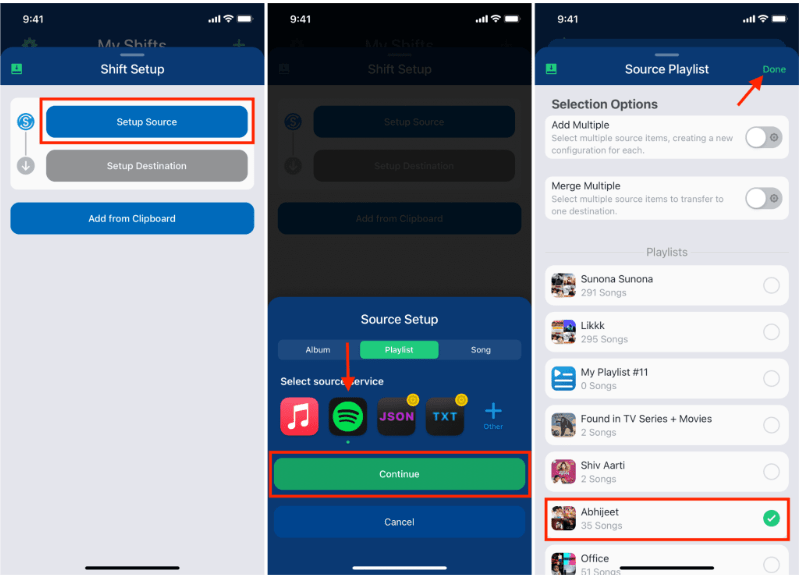
Paso 2. Añade Amazon Music como tu servicio de destino iniciando sesión en tu cuenta de Amazon.
Paso 3: Elija el Spotify lista de reproducción que desea migrar.
Paso 4. Pulsa Iniciar cambio y deja que la aplicación sincronice las canciones en todas las plataformas.
Una vez finalizado el proceso, tu lista de reproducción debería aparecer en Amazon Music. SongShift es una opción práctica para quienes desean transferir... Spotify lista de reproducción de Amazon Music sin usar una computadora.
Parte 4. Transferencia Spotify Listas de reproducción de Amazon Music en Android
Los usuarios de Android también pueden transferir listas de reproducción entre servicios de streaming mediante aplicaciones dedicadas. Una solución muy utilizada es FreeYourMusic. FreeYourMusic es una herramienta de transferencia de música multiplataforma compatible con Android, iOS, WinWindows y macOS. Permite a los usuarios mover listas de reproducción entre servicios de streaming con un mínimo esfuerzo.
Características principales
- Admite muchas plataformas de streaming
- Proceso de transferencia simple
- Funciona en varios dispositivos
- Permite transferencias de listas de reproducción por lotes
Pasos para transferir Spotify Lista de reproducción de Amazon Music con FreeYourMusic
Paso 1: Descarga FreeYourMusic desde Google Play Store y abre la aplicación. Selecciona Spotify como plataforma de origen e inicie sesión en su cuenta.
Paso 2. Elige Amazon Music e inicia sesión en tu cuenta.
Paso 3: Elige la Spotify lista de reproducción que desea migrar.
Paso 4. Pulsa Transferir para iniciar la migración. La aplicación buscará las canciones y recreará la lista de reproducción en Amazon Music.
Parte 5. Preguntas frecuentes
1. ¿Puedo transferir? Spotify ¿Lista de reproducción de Amazon Music gratis?
Algunas herramientas ofrecen transferencias gratuitas de listas de reproducción con limitaciones, como un número máximo de canciones por transferencia. Las versiones premium suelen eliminar estas restricciones.
2. ¿Se transferirán todas las canciones con éxito?
La mayoría de las canciones se transferirán correctamente, pero ocasionalmente algunas pistas pueden no estar disponibles en ambas plataformas debido a diferencias de licencia.
3. ¿Cuánto tiempo se tarda en transferir listas de reproducción?
El tiempo necesario depende del tamaño de tu lista de reproducción. Las listas más pequeñas pueden transferirse en minutos, mientras que las más grandes pueden tardar más.
4. ¿Es seguro utilizar herramientas de transferencia de listas de reproducción?
Las herramientas confiables utilizan autenticación segura para acceder a tus cuentas. Elige siempre aplicaciones confiables al transferir datos. Spotify lista de reproducción de Amazon Music.
Parte 6. Conclusión
Ya sea que prefiera un servicio en línea, un programa de escritorio o una aplicación móvil, existen varias formas de transferir Spotify Descarga tu lista de reproducción a Amazon Music de forma rápida y eficiente. Para usuarios que buscan resultados estables y precisos, especialmente para listas de reproducción extensas, DumpMedia Any Music Converter ofrece una de las mejores soluciones.