


Cómo transferir música de Amazon a Spotify [3 Respuestas]
Las plataformas de streaming ofrecen vastas bibliotecas de música, pero los usuarios suelen cambiar de servicio para buscar mejores funciones. Si te estás mudando de... Amazon Music a SpotifyEl mayor obstáculo es transferir tus listas de reproducción cuidadosamente seleccionadas sin la tediosa tarea de reconstruirlas manualmente. Esta guía compara ambas plataformas y explora las maneras más eficientes de ayudarte. transferir Amazon Music a Spotify sin reconstruir listas de reproducción desde cero.
Guía de contenido Parte 1. Descripción general: Amazon Music vs. SpotifyParte 2. Transferir lista de reproducción de Amazon Music a Spotify on WinDows/MacParte 3. Transferir lista de reproducción de Amazon Music a Spotify OnlineParte 4. Transferir lista de reproducción de Amazon Music a Spotify iOS / AndroidParte 5. Preguntas frecuentesParte 6. Conclusión
Parte 1. Descripción general: Amazon Music vs. Spotify
Tanto Amazon Music como Spotify ofrecen amplias bibliotecas de música y experiencias de transmisión convenientes, pero difieren en varios aspectos importantes que influyen en las preferencias de los usuarios.
Precios y Planes de Suscripción
Amazon Music ofrece varios niveles de suscripción, incluida una versión gratuita, Amazon Music Prime para miembros de Amazon Prime y Amazon Music Unlimited. Spotify También ofrece planes gratuitos y premium. SpotifyEl nivel gratuito incluye anuncios y funciones de reproducción limitadas, mientras que Spotify Premium ofrece escucha sin publicidad, descargas sin conexión y saltos ilimitados.
- Lea nuestra comparación en profundidad para ver la diferencia entre Spotify Gratis vs. Premium.
Calidad de audio
Amazon Music es conocido por ofrecer opciones de audio de alta resolución a través de Amazon Music Unlimited, que incluye pistas HD y Ultra HD. Spotify También ofrece streaming de alta calidad y es ampliamente reconocido por su rendimiento de reproducción consistente en todos los dispositivos. Para muchos oyentes, ambas plataformas ofrecen una excelente calidad de sonido, aunque Amazon Music se centra más en opciones de audio de alta resolución.
Funciones y herramientas de descubrimiento de música
Spotify Es ampliamente elogiado por su avanzado sistema de recomendaciones y listas de reproducción basadas en algoritmos, como Discover Weekly y Daily Mix. Estas listas personalizadas ayudan a los usuarios a descubrir nueva música según sus hábitos de escucha. Amazon Music ofrece listas de reproducción seleccionadas e integración de voz con Amazon Alexa, lo que lo hace especialmente práctico para hogares inteligentes.
Compatibilidad de dispositivos e integración del ecosistema
Amazon Music se integra profundamente con dispositivos de Amazon, como los altavoces Echo, mientras que Spotify Funciona a la perfección con una amplia gama de dispositivos de terceros, como televisores inteligentes, consolas de videojuegos y sistemas de coche. Debido a estas diferencias, muchos usuarios deciden transferir Amazon Music a... Spotify aprovechar SpotifyFunciones de descubrimiento y una compatibilidad más amplia de dispositivos.
Parte 2. Transferir lista de reproducción de Amazon Music a Spotify on WinDows/Mac
Una de las formas más confiables de transferir Amazon Music a Spotify Se utiliza un software de escritorio que incluye funciones de migración de listas de reproducción. Una solución recomendada es DumpMedia Cualquier convertidor de música, que funciona en ambos WinWindows y macOS. Este software incluye una función de transferencia de listas de reproducción diseñada para facilitar la migración de listas entre plataformas de streaming de forma rápida y eficiente.
Descarga gratuita Descarga gratuita
DumpMedia Any Music Converter permite a los usuarios conectar sus cuentas de música y recrear automáticamente listas de reproducción en la plataforma de destino. En lugar de buscar manualmente cada pista, el programa escanea la lista de reproducción, compara canciones entre servicios y crea la lista de reproducción de nuevo. SpotifyEste enfoque ahorra una cantidad significativa de tiempo, especialmente para los usuarios que mantienen grandes bibliotecas de música.
Guía paso por paso
Paso 1: Descarga e instala DumpMedia Cualquier convertidor de música en tu WinComputadora Windows o Mac. Inicie el programa después de la instalación.
Descarga gratuita Descarga gratuita
Paso 2. Una vez que se cargue la biblioteca, diríjase a la sección Transferencia de listas de reproducción del programa.
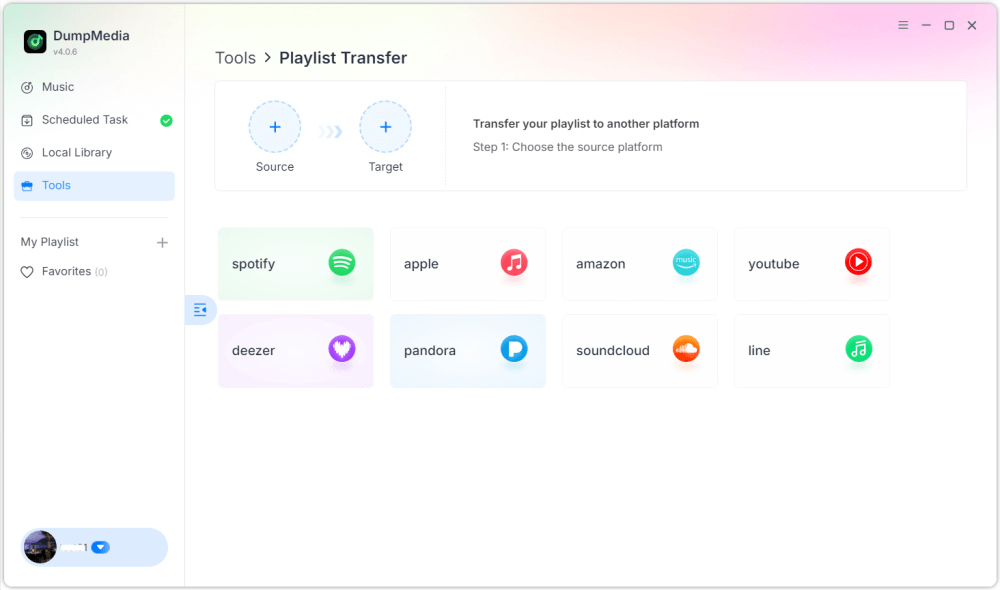
Paso 3. Elige Amazon Music como fuente.
Paso 4: Seleccionar Spotify como destino.
Paso 5. Selecciona qué transferir; admitimos tus canciones, artistas, álbumes favoritos y tus listas de reproducción personalizadas.
Paso 6. Haga clic en Convertir para iniciar la transferencia.
Paso 7: La transferencia ha finalizado. Haga clic en "Ir a". Spotify". Tu lista de reproducción ahora debería aparecer con las canciones coincidentes.
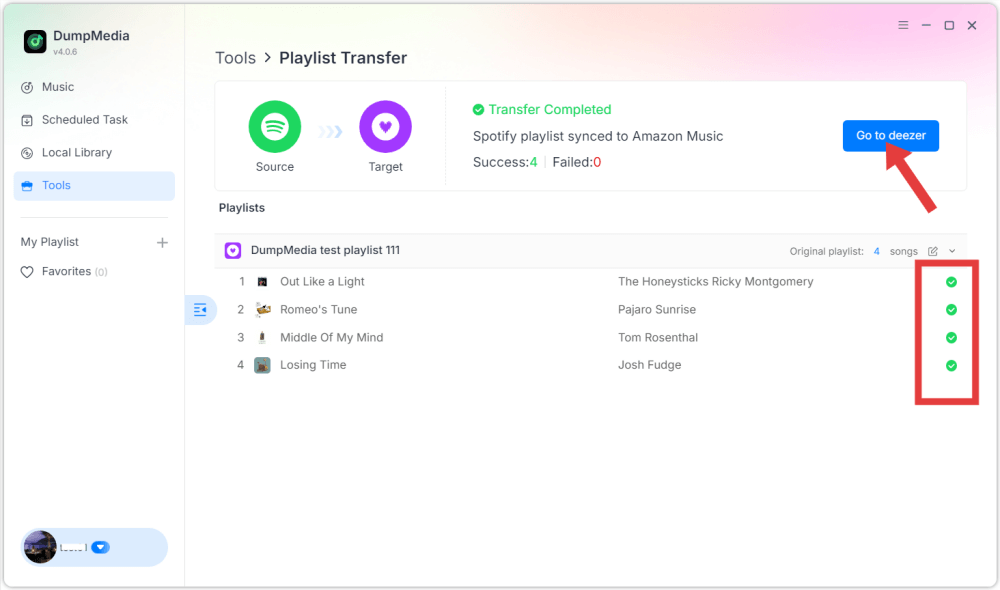
Con este método, los usuarios pueden transferir Amazon Music de manera eficiente a Spotify mientras se conserva el orden de la lista de reproducción y la información de las pistas.
Parte 3. Transferir lista de reproducción de Amazon Music a Spotify Online
Otra forma conveniente de transferir Amazon Music a Spotify Se puede usar un servicio de migración de listas de reproducción en línea. Una herramienta muy utilizada es TuneMyMusic, que funciona directamente en un navegador web y no requiere instalación. Las herramientas en línea son especialmente útiles para quienes buscan una solución rápida sin instalar software adicional.
Guía paso por paso
Paso 1. Para empezar, visita el sitio web de TuneMyMusic e inicia un nuevo proceso de transferencia. Selecciona Amazon Music como plataforma de origen e inicia sesión en tu cuenta para que el servicio pueda acceder a tus listas de reproducción.
Paso 2. Tras conectar tu cuenta, la plataforma mostrará tus listas de reproducción disponibles. Selecciona la lista de reproducción que deseas migrar y continúa con el siguiente paso.
Paso 3: A continuación, elige Spotify como plataforma de destino e inicie sesión para autorizar la conexión. TuneMyMusic analizará su lista de reproducción e intentará hacer coincidir cada pista con SpotifyEl catálogo de.
Paso 4: Una vez finalizado el proceso, la lista de reproducción se volverá a crear automáticamente en tu Spotify biblioteca. Esto facilita la transferencia de Amazon Music a Spotify sin necesidad de conocimientos técnicos.
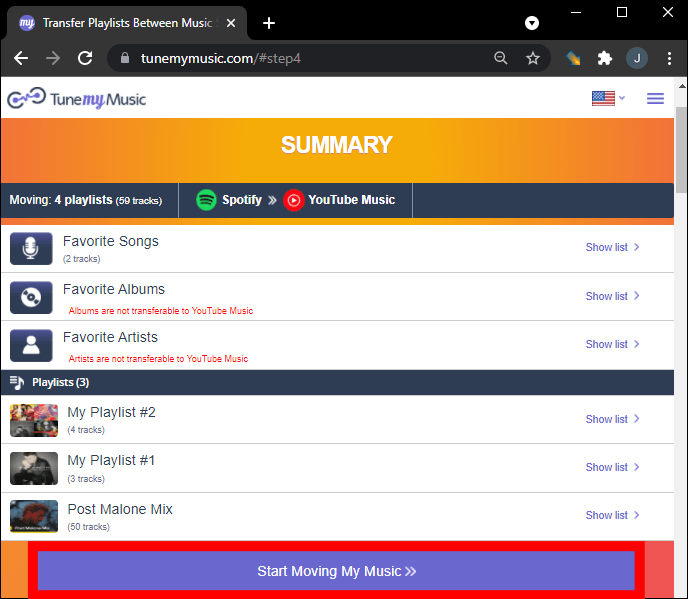
Aunque las herramientas en línea son prácticas, a veces presentan limitaciones, como límites de transferencia o un rendimiento más lento para listas de reproducción grandes. Para usuarios con bibliotecas extensas, las herramientas de escritorio pueden ofrecer una solución más estable.
Parte 4. Transferir lista de reproducción de Amazon Music a Spotify iOS / Android
Si prefieres usar tu teléfono inteligente para administrar bibliotecas de música, varias aplicaciones móviles también pueden ayudarte a transferir Amazon Music a SpotifyEstas aplicaciones permiten a los usuarios migrar listas de reproducción directamente desde sus dispositivos móviles. Una solución móvil popular es FreeYourMusic, compatible con dispositivos iOS y Android. La aplicación es compatible con múltiples plataformas de streaming y ofrece una interfaz sencilla para transferir listas de reproducción.
Guía paso por paso
Paso 1. Después de instalar la aplicación, ábrela y selecciona Amazon Music como plataforma de origen. Inicia sesión en tu cuenta para que la aplicación pueda acceder a tus listas de reproducción.
Paso 2: Entonces escoge Spotify como plataforma de destino y autorizar la conexión.
Paso 3: A continuación, selecciona la lista de reproducción que quieres mover e inicia la transferencia. La aplicación buscará automáticamente las pistas que coincidan en... SpotifyCatálogo y recrea la lista de reproducción.
Las aplicaciones móviles como FreeYourMusic brindan una forma conveniente de transferir Amazon Music a Spotify directamente desde un teléfono inteligente, especialmente para usuarios que prefieren no utilizar una computadora.
Parte 5. Preguntas frecuentes
¿Se transferirán todas las canciones exitosamente?
En la mayoría de los casos, la mayoría de las pistas se transferirán correctamente. Sin embargo, es posible que algunas canciones no aparezcan si no están disponibles en la plataforma de destino.
¿Cuánto tiempo lleva el proceso de transferencia?
El tiempo necesario depende de la cantidad de canciones de tu lista de reproducción y de la herramienta utilizada. Las listas de reproducción pequeñas pueden transferirse en minutos, mientras que las bibliotecas más grandes pueden tardar más.
¿Es seguro utilizar herramientas de transferencia de listas de reproducción?
Las herramientas confiables utilizan sistemas de autenticación seguros que permiten acceder a las listas de reproducción sin revelar información personal. Es importante utilizar servicios confiables al intentar transferir Amazon Music a... Spotify.
Parte 6. Conclusión
Cambiar de plataforma de streaming de música no significa perder tus listas de reproducción favoritas. Con las herramientas modernas de migración de listas de reproducción, ahora es posible transferir canciones de Amazon Music a... Spotify De forma rápida y eficiente. Al elegir el método adecuado, podrá transferir Amazon Music a... Spotify y continúa disfrutando de tu colección de música favorita en una de las plataformas de streaming más populares del mundo sin tener que reconstruir tus listas de reproducción manualmente.