


So übertragen Sie Spotify Playlist zu YouTube Music (2 bewährte Methoden)
Wenn Sie nach einer Möglichkeit suchen, die Übertragung zu veranlassen Spotify Wenn Sie Ihre Playlist zu YouTube Music übertragen möchten, versuchen Sie wahrscheinlich, Ihre sorgfältig zusammengestellten Playlists zu verschieben, ohne dabei Songs, die Struktur oder das Hörerlebnis zu verlieren. Leider… Spotify YouTube Music bietet keine direkte native Übertragungsfunktion, weshalb Nutzer auf Drittanbieter-Tools oder alternative Methoden angewiesen sind. In diesem Leitfaden stellen wir zwei zuverlässige Lösungen vor. Beide Methoden sind praktikabel, erfüllen aber je nach Geschwindigkeit, Kontrolle und Audioqualität unterschiedliche Nutzerbedürfnisse.
Inhaltsverzeichnis Warum eine direkte Überweisung nicht möglich ist Spotify zu YouTube Music Methode 1: Konvertieren Spotify Playlist zu MP3 (Ideal für die Offline-Steuerung)Methode 2: Übertragen Spotify Playlist zu YouTube Music (Direkte Migration)Häufig gestellte FragenZusammenfassung
Warum eine direkte Überweisung nicht möglich ist Spotify zu YouTube Music
Bevor man mögliche Lösungsansätze untersucht, ist es unerlässlich, die damit verbundenen technischen Beschränkungen zu verstehen.
Parce que Spotify Da YouTube Music und YouTube Music mit völlig unterschiedlichen Lizenzsystemen arbeiten, lassen sich Playlists nicht direkt zwischen den beiden Plattformen übertragen. Darüber hinaus sind Bibliotheksstrukturen und Metadaten weitgehend inkompatibel, und einzelne Titel bleiben durch strenge DRM-Beschränkungen geschützt. Daher ist es für alle, die nach einer Möglichkeit zur Übertragung suchen, schwierig, dies zu tun. Spotify Um eine Playlist auf YouTube Music zu erstellen, sind Lösungen von Drittanbietern erforderlich.
Methode 1: Konvertieren Spotify Playlist zu MP3 (Ideal für die Offline-Steuerung)
So übertragen Sie Spotify Playlist zu YouTube Music konvertieren? Eine der zuverlässigsten Lösungen ist die Verwendung eines professionellen Konverters wie DumpMedia Spotify Music ConverterDiese Methode ist ideal, wenn Sie die volle Kontrolle über Ihre Musikdateien behalten möchten oder wenn Sie Songs lieber manuell zu YouTube Music hochladen.
Kostenlos Herunterladen Kostenlos Herunterladen
🏅Warum wählen DumpMedia Spotify Music Converter:
- ⭐Integration mit Spotify Internet Spieler
- ⭐Arbeite für beide Spotify Premium und Spotify Kostenlose Benutzer
- ⭐Bietet Stapelkonvertierung mit bis zu 35-facher Geschwindigkeit
- ⭐Konvertieren Spotify Lieder zu MP3, WAV oder FLAC
- ⭐Behalten Sie ID3-Tags wie Künstler, Cover, Art usw. bei.
- ⭐Bewahren Sie die ursprüngliche Audioqualität
- ⭐100% sauber. Kein Risiko bei der Verwendung
Schritt-für-Schritt-Anleitung
Schritt 1: Laden Sie die Software herunter und installieren Sie sie auf Ihrem Computer. Sie funktioniert mit beiden WinWindows und Mac. Die Benutzeroberfläche ist benutzerfreundlich und daher auch für Anfänger leicht zu bedienen.
Kostenlos Herunterladen Kostenlos Herunterladen
Schritt 2: Öffnen Sie das integrierte Spotify Webplayer im Inneren DumpMedia und melde dich mit deinem an Spotify Konto. Durchsuchen Spotify Ziehen Sie die gewünschten Songs, Alben oder Wiedergabelisten per Drag & Drop in den Konverter.

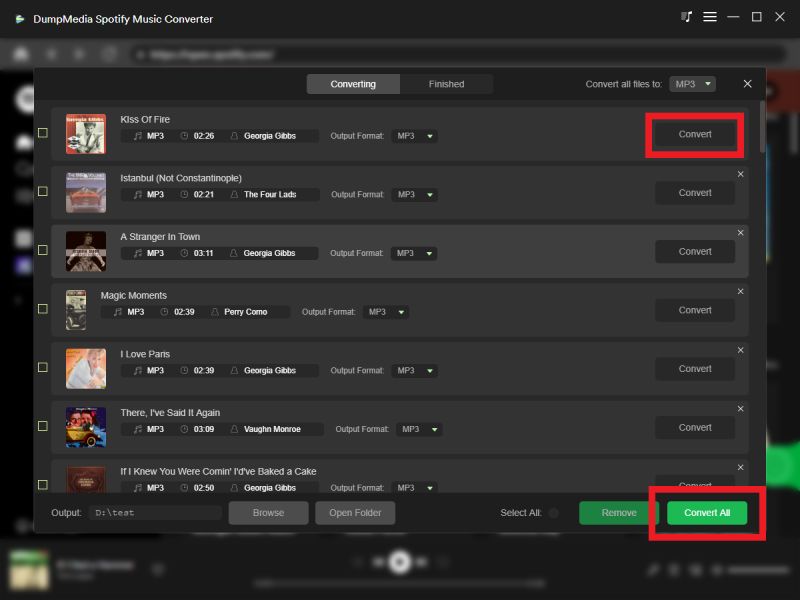
Schritt 3: Im Einstellungsfenster auswählen MP3 als Ausgabeformat, um ein MP3 Download der ausgewählten Titel.

Schritt 4: Klicken Sie auf „Konvertieren“ und laden Sie Songs direkt herunter als MP3 Dateien.
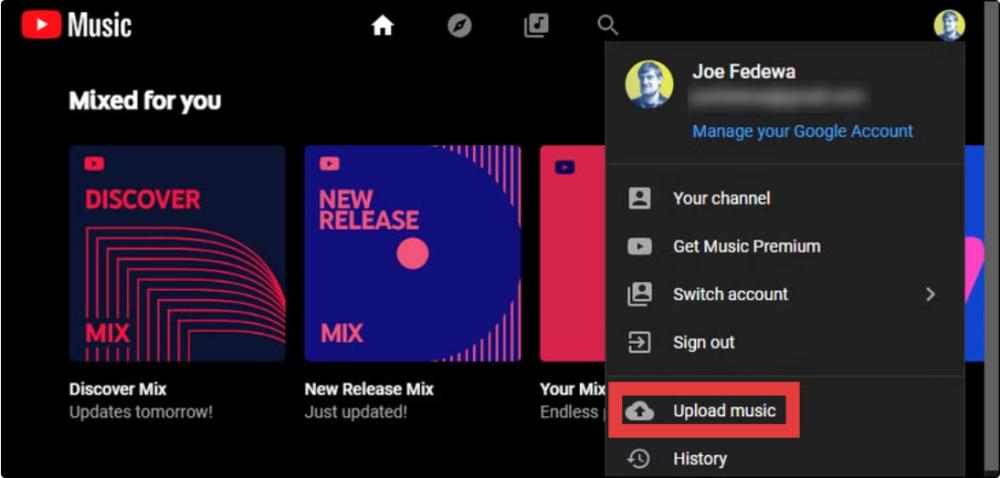
Schritt 5: So übertragen Sie Spotify Playlist zu YouTube Music hochladen? Öffnen Sie music.youtube.com in Ihrem Webbrowser. Klicken Sie auf Ihr Profilbild oben rechts auf der Seite und wählen Sie „Musik hochladen“.
Vorteile
- Hochwertige Audiokonvertierung
- Volle Kontrolle über die Dateien
- Keine Abhängigkeit von Plattform-APIs
Nachteile
- Manuelles Hochladen erforderlich
- Etwas längerer Prozess
Methode 2: Übertragen Spotify Playlist zu YouTube Music (Direkte Migration)
So übertragen Sie Spotify Playlist zu YouTube Music hinzufügen? Wenn es Ihnen auf Geschwindigkeit und Komfort ankommt, ist ein automatisiertes Tool wie Wiedergabelistenübertragung eines beliebigen Musikkonverters Die Funktion ist eine bessere Option. Diese Methode stellt eine direkte Verbindung her. Spotify und YouTube Music-Konten und -Wiedergabelisten werden automatisch übertragen.
Schritt-für-Schritt-Anleitung
Schritt 1: Öffne DumpMedia Installieren Sie einen beliebigen Musikkonverter auf Ihrem Computer. Sie werden eine übersichtliche und intuitive Benutzeroberfläche vorfinden, die die Konvertierung vereinfacht – auch für Erstanwender.
Schritt 2: Wählen Sie „Tools“ > „Playlist-Übertragung“.
Schritt 3: Wählen Spotify als Quelle.

Schritt 4: Wählen Sie YouTube Music als die Plattform aus, auf die Sie Ihre Playlist verschieben möchten.
Schritt 5: Suchen Sie die Wiedergabelisten, die Sie übertragen möchten. Spotify Gehe zu YouTube Music und wähle alle Wiedergabelisten aus, die du verschieben möchtest.
Schritt 6: Starten Sie den Migrationsprozess. Das Tool gleicht Ihre Songs automatisch ab und überträgt sie. Klicken Sie auf „Zu YouTube Music“. Ihre Playlists wurden zu einem neuen Dienst übertragen, und Sie können Ihren neuen Musikstreaming-Dienst nutzen.
Vorteile
- Ein-Klick-Übertragung
- Kein manuelles Herunterladen erforderlich
- Schnell und anfängerfreundlich
Nachteile
- Die Songübereinstimmung ist möglicherweise nicht möglich. 100% genau
- Erfordert eine stabile API-Verbindung
- Einige Titel fehlen möglicherweise oder wurden ersetzt
Häufig gestellte Fragen
1. Kann ich direkt überweisen? Spotify Playlists zu YouTube Music?
Nein. Es gibt keine offizielle, integrierte Übertragungsfunktion zwischen Spotify und YouTube Music.
2. Was ist der einfachste Weg, um zu überweisen? Spotify Playlist zu YouTube Music?
Die einfachste Methode ist die Verwendung eines automatisierten Playlist-Übertragungstools, das beide Konten synchronisiert.
Hinweis: DumpMedia Abonnenten von Any Music Converter können die Playlist-Übertragungsfunktion kostenlos nutzen. Noch kein Abonnent? Dann erwerben Sie Any Music Converter, um reibungslose, blitzschnelle Übertragungen mit voller Kontrolle zu genießen.
Kostenlos Herunterladen Kostenlos Herunterladen
3. ist DumpMedia Spotify Music Converter sicher zu benutzen?
Ja, es ist für die persönliche Musikkonvertierung konzipiert und ermöglicht die Offline-Speicherung Ihrer Titel.
4. Werden alle Lieder erfolgreich übertragen?
Nicht immer. Automatisierte Tools können aufgrund von Lizenzunterschieden manche Lieder möglicherweise nicht zuordnen.
5. Brauche ich Spotify Premium-Lizenz zum Übertragen von Wiedergabelisten?
Nein. Die meisten Drittanbieter-Tools funktionieren mit kostenlosen Versionen. Spotify Konten.
Zusammenfassung
Wenn Sie herausfinden möchten, wie Sie übertragen Spotify Für die Wiedergabeliste auf YouTube Music gibt es zwei Hauptansätze. Spotify Music Converter Alternativ können Sie die Wiedergabelistenübertragungsfunktion eines beliebigen Musikkonverters nutzen. Beide Lösungen sind je nach Ihren Prioritäten effektiv.

30 % Rabatt >>>