


So laden Sie YouTube-Musik herunter (Anleitung für Mobilgeräte, PC und Offline-Nutzung)
Viele Musikliebhaber möchten YouTube Music herunterladen, um es offline zu hören, insbesondere auf Reisen, unterwegs oder um mobiles Datenvolumen zu sparen. Obwohl YouTube Music offizielle Offline-Downloads anbietet, gibt es dennoch einige Einschränkungen, die Nutzer oft erst später bemerken.
In diesem Leitfaden erklären wir Ihnen, wie Sie Songs von YouTube Music auf Ihr Mobilgerät oder Ihren PC herunterladen und Ihre YouTube-Musik dauerhaft für die Offline-Wiedergabe speichern. Wenn Sie nach der besten Methode zum Herunterladen von Songs von YouTube Music suchen, hilft Ihnen dieser umfassende Leitfaden, alle verfügbaren Optionen zu verstehen.
Inhaltsverzeichnis Teil 1. Kann man Songs von YouTube Music herunterladen? Teil 2. Songs von YouTube Music auf dem Handy herunterladen Teil 3. Die beste Methode, Songs von YouTube Music dauerhaft herunterzuladen Teil 4. Häufig gestellte Fragen zum Herunterladen von YouTube Music Teil 5. Fazit
Teil 1. Kann man Lieder von YouTube Music herunterladen?
Ja, aber es gibt Bedingungen. Um YouTube Music offiziell herunterzuladen, benötigen Nutzer in der Regel ein aktives YouTube Music Premium- Abonnement und die YouTube Music-App.
Offizielle Downloads sind hauptsächlich für die temporäre Offline-Wiedergabe innerhalb der App gedacht. Dies ist wichtig, da viele Nutzer, die nach Möglichkeiten zum Herunterladen von YouTube Music suchen, dauerhafte lokale Dateien erwarten, die YouTube Music nicht direkt anbietet.
Teil 2. Songs von YouTube Music auf dem Handy herunterladen
Wenn Sie YouTube Music auf Ihr Android- oder iPhone-Gerät herunterladen möchten, folgen Sie diesen Schritten.
Schritt 1. Öffnen Sie die YouTube Music App auf Ihrem Gerät. Für Offline-Downloads ist in der Regel YouTube Music Premium erforderlich.
Schritt 2. Suchen Sie nach Liedern, Alben oder Wiedergabelisten, die Sie offline speichern möchten.
Schritt 3. Tippen Sie auf das Download-Symbol, um den Offline-Download zu starten.
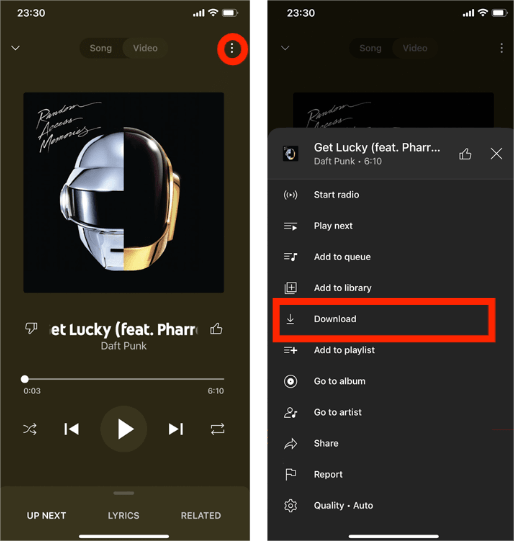
Nach Abschluss des Vorgangs steht Ihre Musik in der App offline zur Verfügung. Dies ist die Standardmethode zum offiziellen Herunterladen von YouTube Music.
Warum heruntergeladene YouTube-Musiktitel immer noch Einschränkungen haben
Viele Nutzer gehen fälschlicherweise davon aus, dass heruntergeladene Songs dauerhaft gespeichert werden. Streaming-Downloads funktionieren jedoch nicht so. Offizielle YouTube Music-Downloads bleiben innerhalb der App und können nicht frei weitergegeben werden. Außerdem können die heruntergeladenen Songs nach Kündigung des Abonnements verfallen. Das bedeutet, dass Nutzer die heruntergeladenen Titel nie vollständig besitzen. Daher suchen viele Nutzer nach besseren Möglichkeiten, YouTube Music ohne die Einschränkungen der App herunterzuladen.
Teil 3. Der beste Weg, Songs von YouTube Music dauerhaft herunterzuladen
Nach Ablauf des Abonnements können Offline-Downloads verloren gehen und die Wiedergabe von Liedern fehlschlagen. Wenn Sie Lieder dauerhaft behalten möchten, ist das Konvertieren von YouTube Music in lokale Audiodateien oft die einfachste Lösung. DumpMedia YouTube-Musikkonverter hilft Benutzern beim Herunterladen von YouTube Music. MP3Auf diese Weise können Sie Lieder dauerhaft speichern, Wiedergabelisten für immer offline aufbewahren und Musik auf jedes beliebige Gerät übertragen. Selbst wenn die Die YouTube Music App funktioniert nicht. Auf Ihrem Gerät können Sie YouTube Music-Songs sofort offline auf einem anderen Musikplayer abspielen.
Kostenloser Download Kostenloser Download
🏅Warum wählen DumpMedia YouTube-Musikkonverter:
- ⭐Integration mit dem YouTube Music Webplayer
- ⭐Funktioniert sowohl für YouTube Music Premium- als auch für kostenlose Nutzer.
- ⭐Bietet Stapelkonvertierung mit bis zu 35-facher Geschwindigkeit
- ⭐Behalten Sie ID3-Tags wie Künstler, Cover, Art usw. bei.
- ⭐Bewahren Sie die ursprüngliche Audioqualität
- ⭐100% sauber. Kein Risiko bei der Verwendung
Konvertieren Sie YouTube Music in MP3 Schritt für Schritt
Schritt 1: Laden Sie DumpMedia Installieren Sie den YouTube Music Converter auf Ihrem Mac/PC. Starten Sie ihn, und die Benutzeroberfläche wird angezeigt. Melden Sie sich mit Ihrem YouTube Music Premium- oder Gratis-Konto an.
Kostenloser Download Kostenloser Download
Schritt 2. Ziehen Sie anschließend die Songs oder die Wiedergabelisten direkt auf das schwebende "+"-Symbol, um sie der Konvertierungswarteschlange hinzuzufügen und für den Download vorzubereiten.
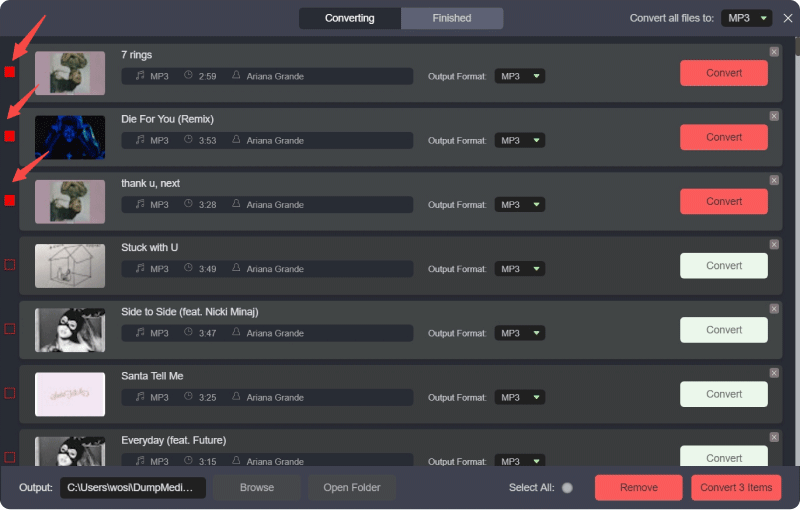
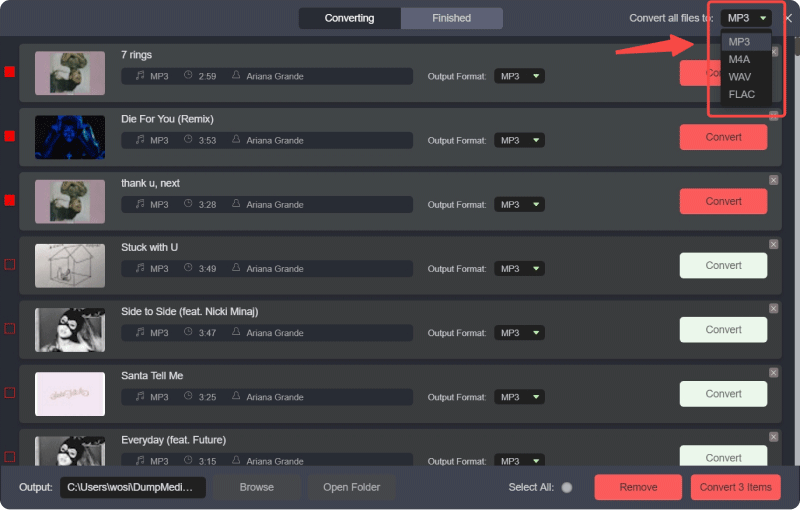
Schritt 3. Sobald Sie mit der Auswahl der Lieder zufrieden sind, können Sie das gewünschte Audiodateiformat auswählen.
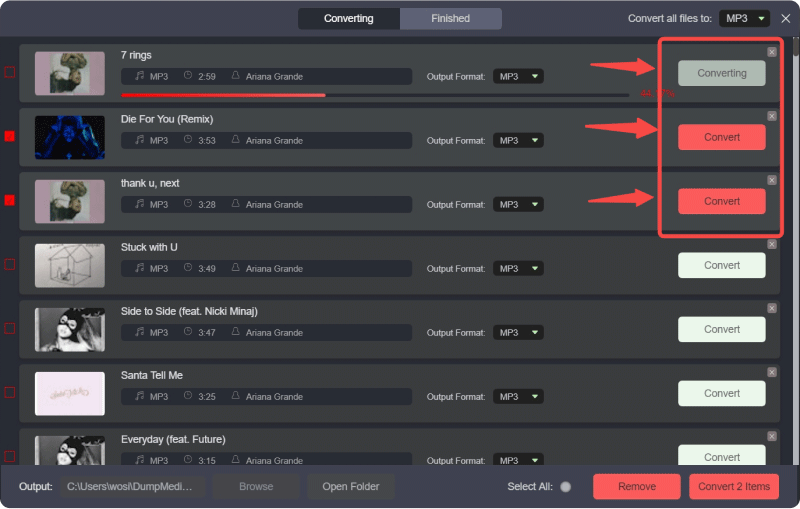
Schritt 4: Sobald die Einstellungen abgeschlossen sind, können Benutzer die Konvertierung durch Klicken auf das Symbol „Konvertieren“ durchführen. Dann DumpMedia wird YouTube-Songs konvertieren in MP3 innerhalb von Sekunden dank seiner superschnellen Geschwindigkeit.
Teil 4. FAQs zum Herunterladen von YouTube-Musik
Kann man YouTube Music kostenlos herunterladen?
Für den offiziellen Offline-Download ist in der Regel YouTube Music Premium erforderlich.
Verfallen heruntergeladene YouTube Music-Songs nach dem Download?
Ja. Offline-Downloads funktionieren möglicherweise nicht mehr nach Ablauf des Abonnements oder bei fehlgeschlagener Kontoverifizierung.
Können YouTube Music-Downloads auf ein anderes Gerät übertragen werden?
Offizielle App-Downloads können in der Regel nicht frei weitergegeben werden.
Können YouTube Music-Songs konvertiert werden in MP3?
Ja. Tools wie DumpMedia Mit dem YouTube Music Converter können Benutzer YouTube Music-Songs speichern als MP3 Dateien zur dauerhaften Offline-Wiedergabe.
Teil 5. Fazit
Mit YouTube Music Premium ist das Herunterladen von YouTube Music ganz einfach, doch offizielle Downloads unterliegen weiterhin App-Beschränkungen und sind von einem Abonnement abhängig. Nutzer, die dauerhaften Offline-Zugriff, übertragbare Musikdateien und langfristige Wiedergabeflexibilität wünschen, bevorzugen daher oft die Konvertierung von YouTube Music in lokale Dateien. MP3 Audiodateien für die vollständige Kontrolle über ihre Musiksammlungen.