


So übertragen Sie Spotify Playlist zu Amazon Music?
Musikstreamingdienste haben die Art und Weise, wie Menschen Musik hören, grundlegend verändert. Der Wechsel zwischen verschiedenen Plattformen kann jedoch mitunter umständlich sein, insbesondere wenn man über Jahre hinweg sorgfältig zusammengestellte Playlists angelegt hat. Viele Nutzer, die zuvor auf Streamingdienste angewiesen waren, wechseln nun zu einem anderen Anbieter. Spotify könnte sich entscheiden, es zu versuchen Amazon Musik für die Integration mit Amazon-Geräten, die umfangreiche Musikbibliothek und die Kompatibilität mit Alexa-fähigen Smart Speakern.
Glücklicherweise gibt es mittlerweile mehrere Tools, mit denen sich Wiedergabelisten automatisch zwischen Streaming-Diensten übertragen lassen. In diesem Leitfaden erklären wir die effektivsten Methoden. privaten Transfer Spotify Playlist zu Amazon Music mithilfe von Online-Tools, Desktop-Software und mobilen Apps. Egal, ob Sie diese nutzen WinEgal ob Windows, Mac, iOS oder Android – Sie finden eine Lösung, die Ihnen hilft, Ihre Wiedergabelisten schnell und präzise zu migrieren.
Inhaltsverzeichnis Teil 1. Übertragung Spotify Playlists zu Amazon Music OnlineTeil 2. Übertragung Spotify Wiedergabelisten zu Amazon Music auf Windows/MacTeil 3. Übertragung Spotify Wiedergabelisten zu Amazon Music auf iOSTeil 4. Übertragung Spotify Wiedergabelisten für Amazon Music auf AndroidTeil 5. Häufig gestellte FragenTeil 6. Fazit
Teil 1. Übertragung Spotify Playlists zu Amazon Music Online
Für Nutzer, die eine schnelle und einfache Methode ohne Softwareinstallation bevorzugen, sind Online-Tools zur Playlist-Übertragung eine praktische Option. Mit diesen Diensten können Sie Ihre Streaming-Konten über einen Webbrowser verbinden und Playlists automatisch zwischen Plattformen übertragen.
Eines der beliebtesten Online-Tools für diesen Zweck ist TuneMyMusic. TuneMyMusic ist ein webbasiertes Tool zur Playlist-Migration, das viele Streaming-Plattformen unterstützt. Es ermöglicht Nutzern, Playlists zu übertragen. Spotify Mit nur wenigen Schritten eine Playlist zu Amazon Music hinzufügen.
Hauptfunktionen
- Funktioniert direkt in Ihrem Webbrowser
- Unterstützt viele Streaming-Plattformen
- Einfache Benutzeroberfläche mit Schritt-für-Schritt-Anleitung
- Keine Softwareinstallation erforderlich
Schritte zur Übertragung Spotify Playlist zu Amazon Music mit TuneMyMusic
Schritt 1. Besuchen Sie die TuneMyMusic-Website und klicken Sie auf die Schaltfläche „Los geht’s“, um den Vorgang zu starten.
Schritt 2: Wählen Spotify Geben Sie die Quellplattform an und melden Sie sich in Ihrem Konto an. Das Tool benötigt die Berechtigung, auf Ihre Wiedergabelisten zuzugreifen.
Schritt 3. Sobald die Verbindung hergestellt ist, können Sie die gewünschte Wiedergabeliste auswählen oder den Link zur Wiedergabeliste einfügen. Das System lädt dann alle Titel dieser Wiedergabeliste.
Schritt 4. Wählen Sie als nächstes Amazon Music als Zieldienst aus und melden Sie sich in Ihrem Amazon-Konto an, um die Übertragung zu autorisieren.

Schritt 5: Klicken Sie auf „Meine Musik verschieben“. Das Tool gleicht automatisch Songs ab von Spotify mit dem Amazon Music-Katalog.
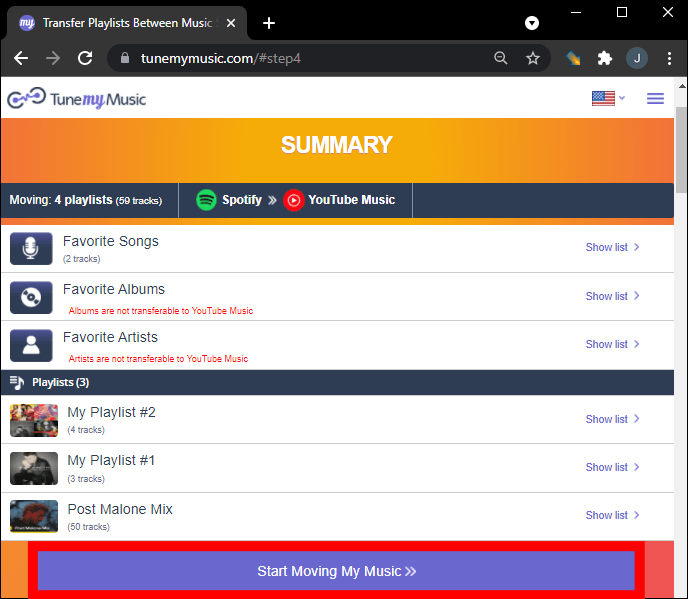
Schritt 6. Nach Abschluss des Vorgangs öffnen Sie Ihre Amazon Music-Bibliothek, um zu bestätigen, dass die Wiedergabeliste erfolgreich erstellt wurde.
Die Verwendung eines Online-Tools wie TuneMyMusic ist eine der schnellsten Möglichkeiten zum Übertragen von Musik. Spotify Für kleine bis mittelgroße Playlists eignet sich Amazon Music. Nutzer mit großen Musikbibliotheken oder solche, die mehr Stabilität wünschen, sollten jedoch eine Desktop-Lösung in Betracht ziehen.
Teil 2. Übertragung Spotify Wiedergabelisten zu Amazon Music auf Windows/Mac
Wenn Sie eine zuverlässigere und funktionsreichere Lösung wünschen, ist die Verwendung von Desktop-Software oft die beste Option. DumpMedia Jeder Musikkonverter ist ein leistungsstarkes Programm zur Verwaltung und Konvertierung von Musik und bietet außerdem eine spezielle Funktion zum Übertragen von Wiedergabelisten. DumpMedia ermöglicht es Benutzern zu übertragen Spotify Effizientes Hochladen von Wiedergabelisten auf Amazon Music unter Beibehaltung der Wiedergabelisteninformationen und der Metadaten der Songs.
Kostenloser Download Kostenloser Download
Hauptfunktionen
- Unterstützt Windows und macOS
- Funktion zum Übertragen dedizierter Wiedergabelisten
- Batch-Playlist-Migration
- Intelligente Gleisanpassung
- Verwaltet Metadaten wie Künstler-, Album- und Titelnamen
- Stabile lokale Verarbeitung ohne Browserbeschränkungen
Diese Eigenschaften machen es zu einer der effizientesten Übertragungsmethoden. Spotify Playlist zu Amazon Music für Nutzer mit großen Playlists.
Schritt-für-Schritt-Anleitung
Schritt 1: Laden Sie DumpMedia Jeder Musikkonverter auf Ihrem WinWindows- oder Mac-Computer. Starten Sie das Programm nach der Installation.
Kostenloser Download Kostenloser Download
Schritt 2: Wählen Sie „Tools“ > „Wiedergabelistenübertragung“. Wählen Sie aus. Spotify als Quelle.

Schritt 3. Wählen Sie Amazon Music als Ziel aus.
Schritt 4. Wählen Sie aus, was übertragen werden soll. Wir unterstützen Ihre Lieblingssongs, -künstler, -alben und Ihre kuratierten Wiedergabelisten.

Schritt 5. Klicken Sie auf „Konvertieren“, um die Übertragung zu starten.
Schritt 6. Die Übertragung ist abgeschlossen. Klicken Sie auf „Zu Amazon Music“. Ihre Wiedergabelisten wurden zu einem neuen Dienst übertragen, und Sie können jetzt Ihre neue Wiedergabeliste auf Amazon Music genießen.
Im Vergleich zu Online-Diensten bietet diese Methode mehr Stabilität und höhere Genauigkeit bei der Datenübertragung. Spotify Playlist zu Amazon Music hinzufügen.
Teil 3. Übertragung Spotify Wiedergabelisten zu Amazon Music auf iOS
Wenn Sie lieber ein Mobilgerät verwenden, können Ihnen verschiedene Apps bei der Übertragung helfen. Spotify Übertragen Sie Ihre Playlists direkt von Ihrem iPhone oder iPad zu Amazon Music. Eine der beliebtesten Optionen ist SongShift. SongShift ist eine bekannte App zur Playlist-Übertragung, die speziell für iOS-Nutzer entwickelt wurde. Sie unterstützt viele Musik-Streaming-Dienste und bietet eine intuitive Benutzeroberfläche.
Hauptfunktionen
- Benutzerfreundliche mobile Schnittstelle
- Unterstützt mehrere Streaming-Plattformen
- Ermöglicht die Stapelübertragung von Wiedergabelisten
- Speziell für iOS-Geräte entwickelt
Schritte zur Übertragung Spotify Playlist mit SongShift zu Amazon Music hinzufügen
Schritt 1: Laden Sie SongShift aus dem App Store herunter und öffnen Sie die App. Autorisierung Spotify damit die App auf Ihre Wiedergabelisten zugreifen kann.
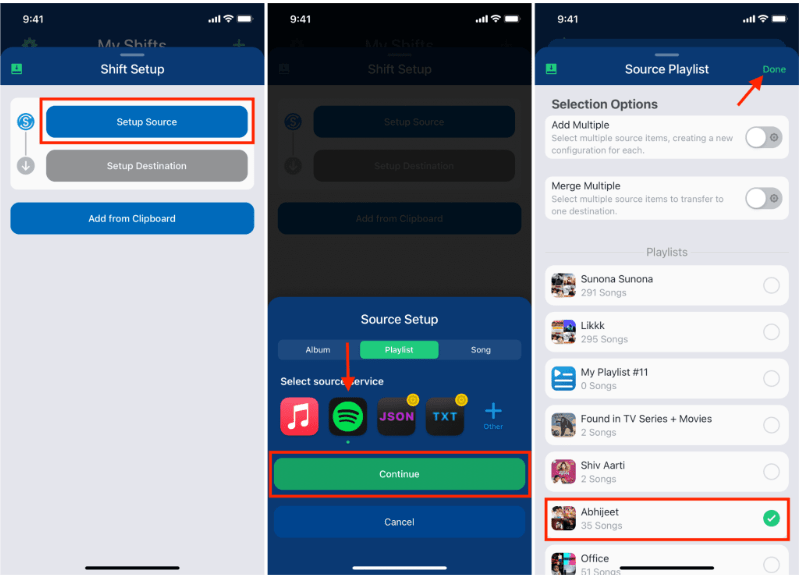
Schritt 2. Fügen Sie Amazon Music als Zieldienst hinzu, indem Sie sich in Ihr Amazon-Konto einloggen.
Schritt 3: Wähle die Spotify Playlist, die Sie migrieren möchten.
Schritt 4. Tippen Sie auf Start Shift und lassen Sie die App die Songs plattformübergreifend abgleichen.
Nach Abschluss des Vorgangs sollte Ihre Playlist in Amazon Music erscheinen. SongShift ist eine praktische Option für Nutzer, die ihre Musik übertragen möchten. Spotify Playlist zu Amazon Music hinzufügen, ohne einen Computer zu benutzen.
Teil 4. Übertragung Spotify Wiedergabelisten für Amazon Music auf Android
Android-Nutzer können Wiedergabelisten auch mithilfe spezieller Apps zwischen Streaming-Diensten übertragen. Eine weit verbreitete Lösung ist FreeYourMusic. FreeYourMusic ist ein plattformübergreifendes Musikübertragungstool, das auf Android und iOS funktioniert. WinWindows und macOS. Es ermöglicht Benutzern, Wiedergabelisten mit minimalem Aufwand zwischen Streaming-Diensten zu übertragen.
Hauptfunktionen
- Unterstützt viele Streaming-Plattformen
- Einfacher Übertragungsprozess
- Funktioniert auf mehreren Geräten
- Ermöglicht die Stapelübertragung von Wiedergabelisten
Schritte zur Übertragung Spotify Playlist zu Amazon Music mit FreeYourMusic
Schritt 1: Lade FreeYourMusic aus dem Google Play Store herunter und öffne die Anwendung. Wähle aus Spotify als Quellplattform und melden Sie sich in Ihrem Konto an.
Schritt 2. Wählen Sie Amazon Music und melden Sie sich in Ihrem Konto an.
Schritt 3: Wählen Sie die Spotify Playlist, die Sie migrieren möchten.
Schritt 4. Tippen Sie auf „Übertragen“, um die Migration zu starten. Die App ordnet die Songs zu und erstellt die Playlist in Amazon Music neu.
Teil 5. Häufig gestellte Fragen
1. Kann ich übertragen Spotify Playlist kostenlos zu Amazon Music hinzufügen?
Manche Tools bieten kostenlose Playlist-Übertragungen mit Einschränkungen an, beispielsweise einer maximalen Anzahl von Titeln pro Übertragung. Premium-Versionen heben diese Einschränkungen in der Regel auf.
2. Werden alle Lieder erfolgreich übertragen?
Die meisten Songs lassen sich problemlos übertragen, jedoch sind aufgrund von Lizenzunterschieden gelegentlich einige Titel nicht auf beiden Plattformen verfügbar.
3. Wie lange dauert die Übertragung von Wiedergabelisten?
Die benötigte Zeit hängt von der Größe Ihrer Wiedergabeliste ab. Kleinere Wiedergabelisten können innerhalb weniger Minuten übertragen werden, während größere länger dauern können.
4. Ist die Verwendung von Tools zum Übertragen von Wiedergabelisten sicher?
Seriöse Tools verwenden sichere Authentifizierung für den Zugriff auf Ihre Konten. Wählen Sie beim Übertragen von Daten stets vertrauenswürdige Anwendungen. Spotify Playlist zu Amazon Music hinzufügen.
Teil 6. Fazit
Ob Sie einen Online-Dienst, ein Desktop-Programm oder eine mobile App bevorzugen, es gibt mehrere Möglichkeiten zum Übertragen von Daten. Spotify Playlists schnell und effizient zu Amazon Music übertragen. Für Nutzer, die besonders stabile und präzise Ergebnisse wünschen, insbesondere bei großen Playlists. DumpMedia Any Music Converter bietet eine der besten Lösungen.