


So übertragen Sie Spotify Deezer einfach nutzen: Eine vollständige Anleitung
Viele Hörer, die ursprünglich nutzten Spotify könnten sich später dazu entscheiden, ihre Musikbibliotheken zu verschieben nach Deezer Aufgrund seiner einzigartigen Funktionen wie hoher Audioqualität, personalisierten Empfehlungen und Kompatibilität mit vielen Smart-Geräten ist die Plattform besonders beliebt. Die größte Herausforderung beim Plattformwechsel besteht jedoch darin, Wiedergabelisten zu übertragen, ohne sie manuell neu erstellen zu müssen. Das Neuerstellen von Wiedergabelisten Lied für Lied kann Stunden dauern, insbesondere bei Hunderten von Titeln.
Glücklicherweise ermöglichen mittlerweile mehrere Tools den Nutzern, Wiedergabelisten automatisch zu verschieben von Spotify zu DeezerSo sparen Sie Zeit und sorgen dafür, dass Ihre Lieblingsmusik übersichtlich organisiert bleibt. In diesem Leitfaden stellen wir Ihnen die effektivsten Migrationsmethoden vor. Spotify Wir stellen Ihnen Playlists für Deezer zur Verfügung und beantworten einige häufig gestellte Fragen, um Ihnen den Vorgang so einfach wie möglich zu gestalten.
Inhaltsverzeichnis Teil 1. Übertragung Spotify Playlists zu Deezer OnlineTeil 2. Übertragung Spotify Playlists zu Deezer auf Windows/MacTeil 3. Häufig gestellte FragenTeil 4. Fazit
Teil 1. Übertragung Spotify Playlists zu Deezer Online
Eine der einfachsten Möglichkeiten, Wiedergabelisten zu verschieben Spotify Der Wechsel zu Deezer erfolgt über einen Online-Playlist-Übertragungsdienst. Diese Tools funktionieren direkt im Browser und erfordern keine Installation. Sie verbinden sich mit Ihren Musikkonten und erstellen automatisch neue Playlists auf der neuen Plattform.
Ein weit verbreitetes Online-Tool für diese Aufgabe ist TuneMyMusic. TuneMyMusic ist ein browserbasiertes Musikmigrationstool, das Nutzern hilft, Wiedergabelisten zwischen verschiedenen Streaming-Diensten zu übertragen. Es unterstützt viele gängige Plattformen und bietet einen einfachen Workflow für die Übertragung. Spotify Playlists zu Deezer.
Hauptfunktionen
- Funktioniert direkt im Webbrowser
- Unterstützt mehrere Musik-Streaming-Dienste
- Einfache Schritt-für-Schritt-Oberfläche
- Keine Softwareinstallation erforderlich
- Ermöglicht den Import von Playlist-Links oder Konten.
Aufgrund seiner Einfachheit wird TuneMyMusic häufig Nutzern empfohlen, die Wiedergabelisten von einem anderen Programm übertragen möchten. Spotify Schneller Zugriff auf Deezer ohne Installation zusätzlicher Anwendungen.
Schritt-für-Schritt-Anleitung
Schritt 1: Rufen Sie die TuneMyMusic-Website auf und klicken Sie auf die Schaltfläche „Los geht’s“, um den Wiedergabelisten-Übertragungsprozess zu starten.
Schritt 2: Auswählen Spotify als Quellplattform. Sie werden aufgefordert, sich bei Ihrem Konto anzumelden. Spotify Erstellen Sie ein Konto und erteilen Sie dem Tool die Berechtigung, auf Ihre Wiedergabelisten zuzugreifen. Nach der Autorisierung zeigt der Dienst Ihre verfügbaren Wiedergabelisten an.
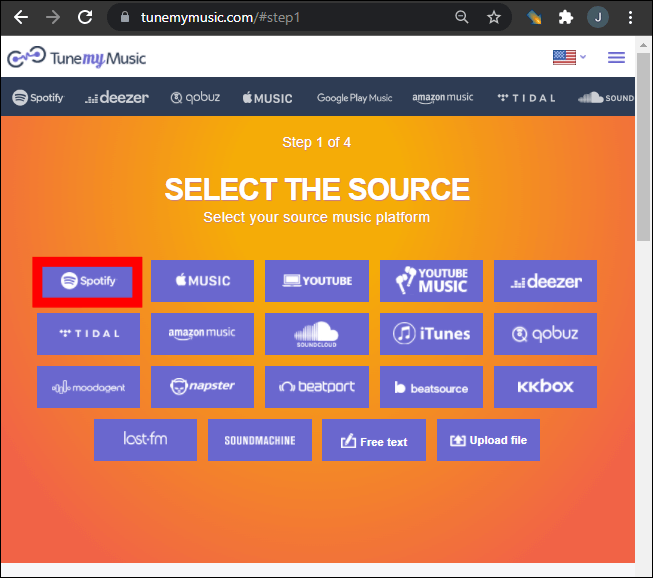
Schritt 3: Sie können eine bestimmte Wiedergabeliste aus Ihrer Bibliothek auswählen oder einen Wiedergabelistenlink einfügen. TuneMyMusic lädt dann automatisch alle in dieser Wiedergabeliste enthaltenen Titel.
Schritt 4: Wählen Sie anschließend Deezer als Zielplattform aus. Melden Sie sich in Ihrem Deezer-Konto an und erlauben Sie dem Tool, Wiedergabelisten in Ihrer Bibliothek zu erstellen.
Schritt 5: Klicken Sie auf „Musik verschieben starten“. Das System beginnt nun mit dem Abgleich der Lieder zwischen Spotify und Deezer.
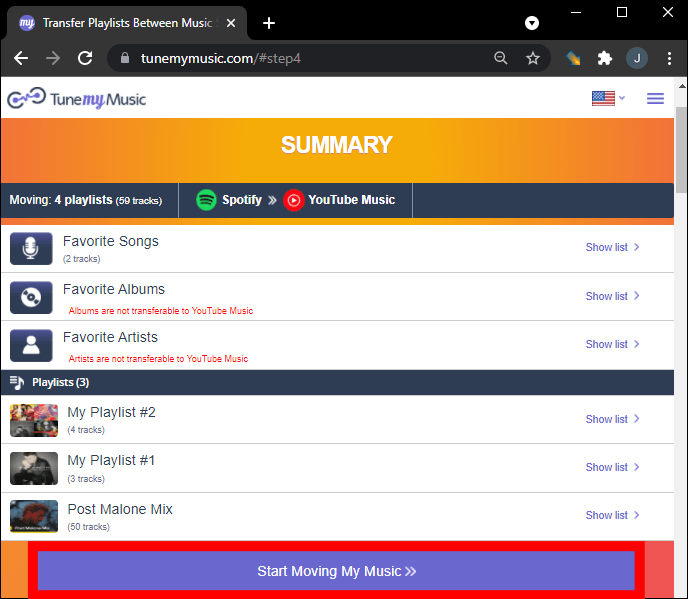
Schritt 6: Sobald die Übertragung abgeschlossen ist, öffnen Sie Ihre Deezer-Bibliothek, um zu überprüfen, ob die Playlist erfolgreich wiederhergestellt wurde.
Mithilfe dieser Methode können viele Nutzer Wiedergabelisten schnell verschieben von Spotify In wenigen Minuten zu Deezer.
Einschränkungen von Online-Tools
Online-Tools sind zwar praktisch, können aber auch einige Einschränkungen aufweisen:
- Kostenlose Versionen können die Anzahl der übertragbaren Lieder beschränken.
- Die Verarbeitung großer Wiedergabelisten kann länger dauern.
- Die Genauigkeit der Songzuordnung kann variieren.
- Die Internetverbindung beeinflusst die Übertragungsgeschwindigkeit
Aufgrund dieser Einschränkungen bevorzugen Nutzer mit großen Musikbibliotheken oft eine Desktop-Lösung zum Übertragen von Wiedergabelisten. Spotify um Deezer zuverlässiger zu nutzen.
Teil 2. Übertragung Spotify Playlists zu Deezer auf Windows/Mac
Für Nutzer, die sich mehr Stabilität und eine bessere Playlist-Verwaltung wünschen, ist Desktop-Software oft die zuverlässigste Option. Eine sehr empfehlenswerte Lösung ist DumpMedia Jeder Musikkonverter, wozu auch ein eigener Bereich gehört Playlist-Übertragung -Funktion
Kostenlos Herunterladen Kostenlos Herunterladen
DumpMedia Any Music Converter ist eine leistungsstarke Desktop-Anwendung, die Benutzern hilft, Musik plattformübergreifend zu verwalten und zu konvertieren. Sie unterstützt beides. WinWindows und macOS und bietet erweiterte Tools für die Playlist-Migration. Die Software ermöglicht es Benutzern, Playlists von Windows zu übertragen. Spotify Deezer effizient nutzen und dabei die Playlist-Struktur und die Titelinformationen beibehalten.
Hauptfunktionen
- Das Programm beinhaltet eine integrierte Wiedergabelisten-Übertragungsfunktion, mit der sich ganze Wiedergabelisten zwischen Streaming-Plattformen verschieben lassen.
- Nutzer können mehrere Wiedergabelisten gleichzeitig migrieren, anstatt sie einzeln zu übertragen.
- Songtitel, Interpreten, Albuminformationen und die Reihenfolge der Wiedergabeliste bleiben während des Migrationsprozesses erhalten.
- Da die Software lokal auf Ihrem Computer ausgeführt wird, ist sie im Vergleich zu browserbasierten Tools weniger anfällig für Netzwerkunterbrechungen.
Schritt-für-Schritt-Anleitung zum Übertragen Spotify Playlisten
Schritt 1: Laden Sie DumpMedia Jeder Musikkonverter auf Ihrem WinWindows- oder Mac-Computer. Starten Sie das Programm nach der Installation.
Kostenlos Herunterladen Kostenlos Herunterladen
Schritt 2: Wählen Sie „Tools“ > „Wiedergabelistenübertragung“. Wählen Sie aus. Spotify als Quelle.
Schritt 3: Wählen Sie Deezer als Ziel aus.
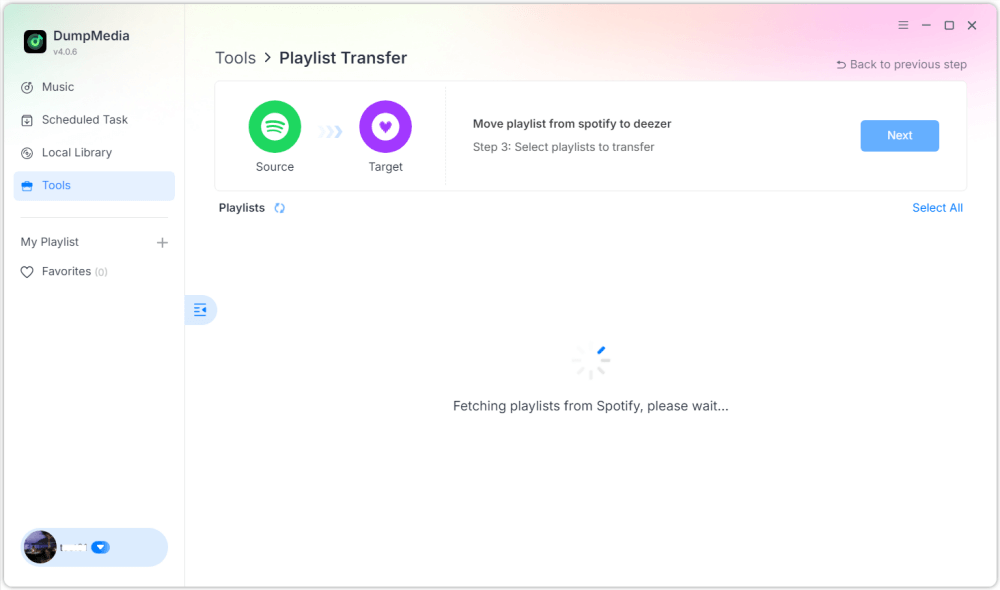
Schritt 4: Wählen Sie aus, was übertragen werden soll. Wir unterstützen Ihre Lieblingssongs, -künstler, -alben und Ihre zusammengestellten Wiedergabelisten.

Schritt 5: Klicken Sie auf „Konvertieren“, um die Übertragung zu starten.
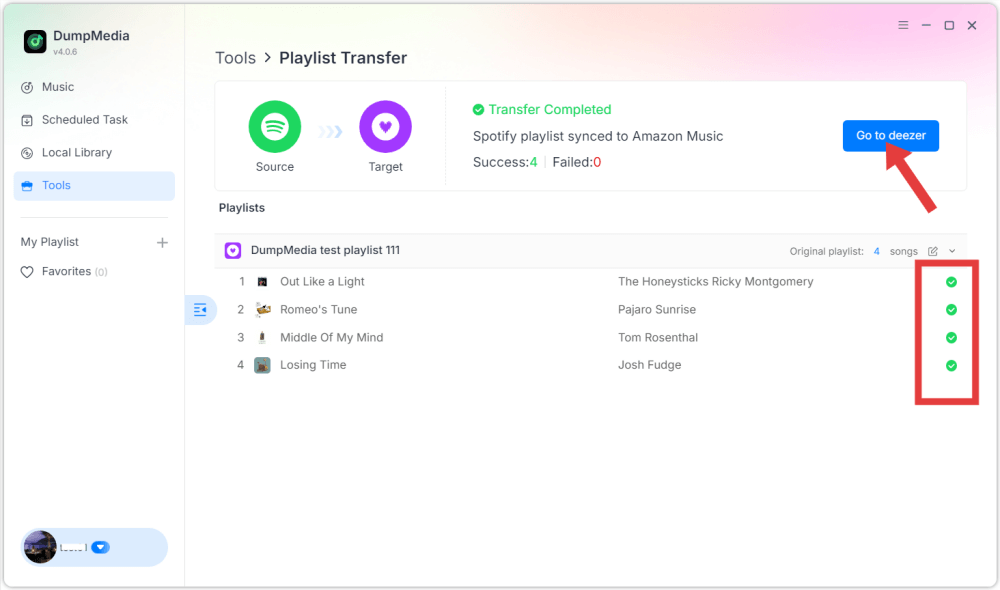
Schritt 6: Die Übertragung ist abgeschlossen. Klicke auf „Zu Deezer“. Deine Playlist mit den passenden Songs sollte nun angezeigt werden.
Teil 3. Häufig gestellte Fragen
1. Kann ich übertragen Spotify Kostenlose Playlists für Deezer?
Einige Online-Tools bieten kostenlose Playlist-Übertragungen mit eingeschränktem Funktionsumfang an. Diese Gratisversionen beschränken jedoch oft die Anzahl der gleichzeitig übertragbaren Titel. Premium-Tools heben diese Beschränkungen in der Regel auf und ermöglichen schnellere Übertragungen.
2. Werden alle Lieder erfolgreich übertragen?
Die meisten Songs lassen sich problemlos übertragen, da beide Plattformen über große Musikkataloge verfügen. Gelegentlich kann es jedoch vorkommen, dass einzelne Titel nicht in der Ziel-Playlist erscheinen, falls sie auf Deezer nicht verfügbar sind.
3. Wie lange dauert die Übertragung von Wiedergabelisten?
Die Übertragungszeit hängt von der Größe der Wiedergabeliste ab. Kleine Wiedergabelisten benötigen möglicherweise nur wenige Minuten, während größere Wiedergabelisten mit Hunderten von Liedern länger brauchen können.
4. Ist die Verwendung von Tools zum Übertragen von Wiedergabelisten sicher?
Seriöse Tools verwenden sichere Authentifizierungssysteme, um eine Verbindung zu Ihren Streaming-Konten herzustellen. Wählen Sie beim Migrieren von Wiedergabelisten stets vertrauenswürdige Anwendungen und vermeiden Sie unbekannte Dienste. Spotify zu Deezer.
Teil 4. Fazit
Der Wechsel eines Musikstreaming-Dienstes bedeutet nicht mehr, dass Sie Ihre sorgfältig organisierten Wiedergabelisten verlieren. Mit modernen Tools zur Wiedergabelistenmigration können Sie Ihre Musikbibliothek ganz einfach von einem anderen Dienst übertragen. Spotify Deezer ohne manuelles Neuaufbauen von Wiedergabelisten nutzen. Bei einer großen Musiksammlung oder für höhere Zuverlässigkeit empfiehlt sich Desktop-Software wie beispielsweise DumpMedia Any Music Converter bietet eine stabilere und effizientere Lösung.

30 % Rabatt >>>