


Spotify Reagiert nicht? Beheben Sie das Problem bis 2026.
Viele Nutzer stoßen auf das frustrierende Problem, dass Spotify antwortet nicht beim Versuch, Musik abzuspielen, Wiedergabelisten zu öffnen oder den Offline-Modus zu nutzen. Manchmal Spotify App friert vollständig ein, stürzt unerwartet ab oder funktioniert während der Wiedergabe nicht mehr. Spotify App-Probleme sind extrem häufig. In diesem Leitfaden erklären wir, warum. Spotify Funktioniert plötzlich nicht mehr, wie behebt man häufige Probleme? Spotify App-Probleme und wie Sie eine stabilere Offline-Musikwiedergabe genießen können.
Inhaltsverzeichnis Teil 1. Warum ist Spotify Die Anwendung reagiert nicht?Teil 2. Wie repariert man Spotify Die Anwendung reagiert nicht?Teil 3. Der beste Weg zu vermeiden Spotify WiedergabeproblemeTeil 4. Häufig gestellte FragenTeil 5. Fazit
Teil 1. Warum ist Spotify Die Anwendung reagiert nicht?
Dafür gibt es viele Gründe Spotify Reagiert weder während der Musikwiedergabe noch bei der Nutzung der App.
Schlechte Internetverbindung
Spotify ist für Streaming und Kontoverifizierung stark auf einen stabilen Internetzugang angewiesen. Schwache Netzwerkverbindungen können zu Problemen führen. Spotify einfrieren oder nicht mehr reagieren.
Beschädigt Spotify Cache
Temporäre Dateien werden in Spotify können mit der Zeit beschädigt werden, was zu App-Abstürzen und Wiedergabeproblemen führen kann.
Veraltet Spotify App
Älter Spotify Versionen können Fehler enthalten, die den "Spotify „Reagiert nicht“-Fehler.
Spotify Serverprobleme
Manchmal Spotify Serverausfälle beeinträchtigen die Wiedergabe durch die Nutzer und die Leistung der App weltweit.
Hintergrund Softwarekonflikte
Antivirensoftware, Firewall-Einstellungen oder Hardwarebeschleunigungskonflikte können ebenfalls die Ursache sein. Spotify nicht mehr zu reagieren.
Probleme mit der Gerätekompatibilität
Ältere Betriebssysteme oder nicht unterstützte Geräte könnten Schwierigkeiten haben, die neueste Version auszuführen. Spotify Die App läuft reibungslos.
Dies sind einige der häufigsten Ursachen für das "Spotify "reagiert nicht"-Problem.
Teil 2. Wie repariert man Spotify Die Anwendung reagiert nicht?
If Spotify Wenn Ihr Gerät nicht reagiert, versuchen Sie die folgenden Lösungen.
Lösung 1. Neu starten Spotify
Ganz nah dran Spotify Öffnen Sie die App anschließend erneut. Diese einfache Maßnahme behebt häufig vorübergehende Wiedergabeprobleme.
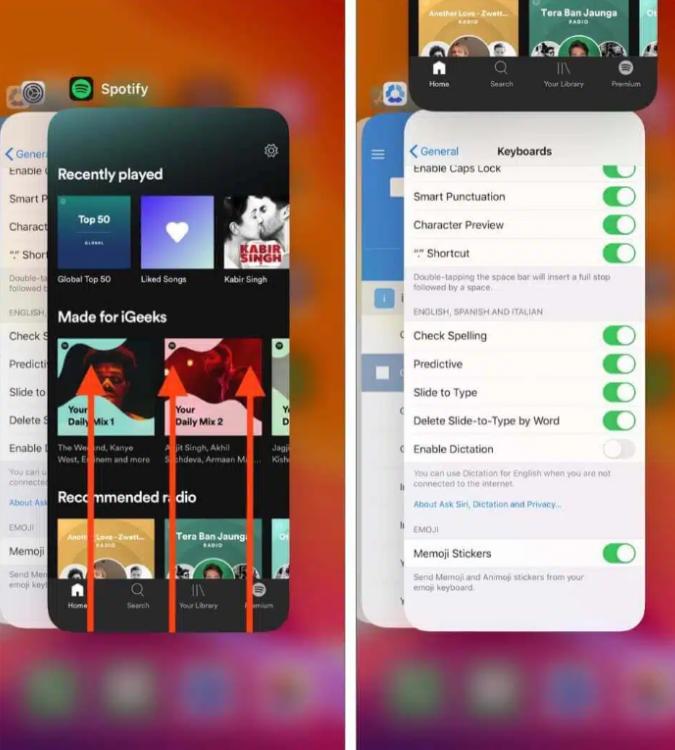
Auf iOS (iPhone / iPad): Wischen Sie vom unteren Bildschirmrand nach oben und halten Sie in der Mitte inne (oder doppelklicken Sie bei älteren Geräten auf die Home-Taste). Suchen Sie nach Spotify Vorschaukarte und wischen Sie sie vollständig nach oben und vom Bildschirm.
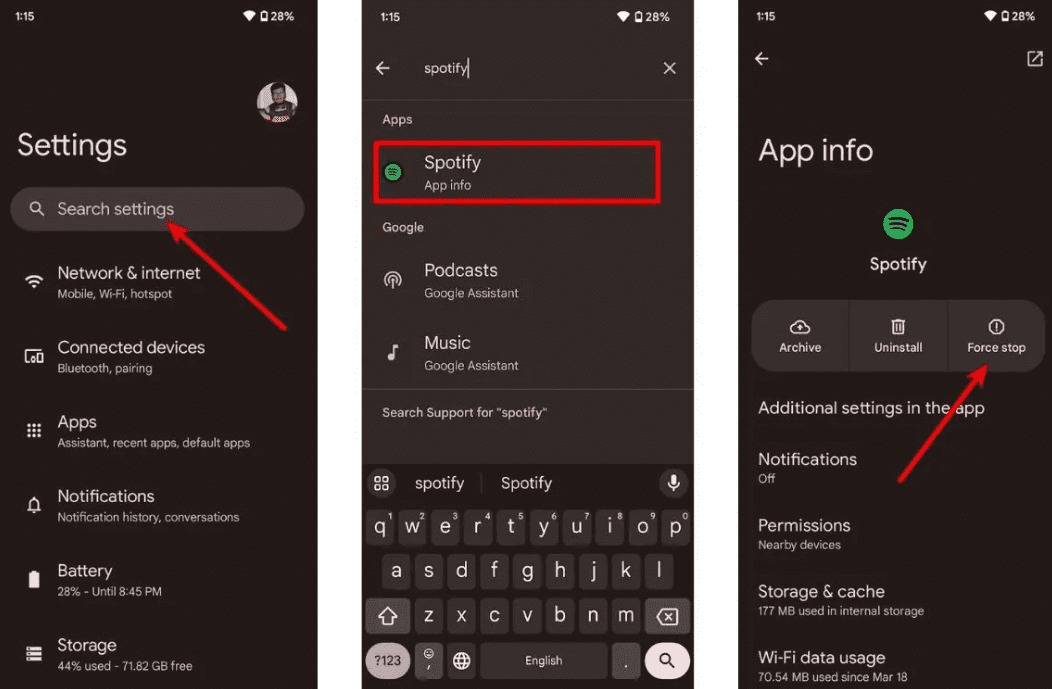
Auf Android: Gehen Sie zu Einstellungen > Apps > Spotify und tippen Sie auf „Stopp erzwingen“. Dadurch werden alle hängenden Hintergrundprozesse beendet. Öffnen Spotify aus Ihrer App-Schublade.
Unter macOS: Klicken Sie auf Spotify Klicken Sie in der oberen Menüleiste auf „Beenden“ und wählen Sie dann „Beenden“. SpotifyOder klicken Sie einfach auf das Fenster und drücken Sie Befehl (⌘) + Q.
On WinDow Jones (10/11): Klicken Sie in der oberen linken Ecke auf „Datei“. Spotify Öffnen Sie das Fenster und wählen Sie „Beenden“ (durch Drücken des „X“ in der oberen rechten Ecke wird das Fenster oft nur in die Taskleiste minimiert, anstatt geschlossen zu werden).
Lösung 2. Überprüfen Sie Ihre Internetverbindung
Wechseln Sie zwischen WLAN und mobilen Daten, um die Verbindungsstabilität zu testen.
Lösung 3. Löschen Spotify Cache
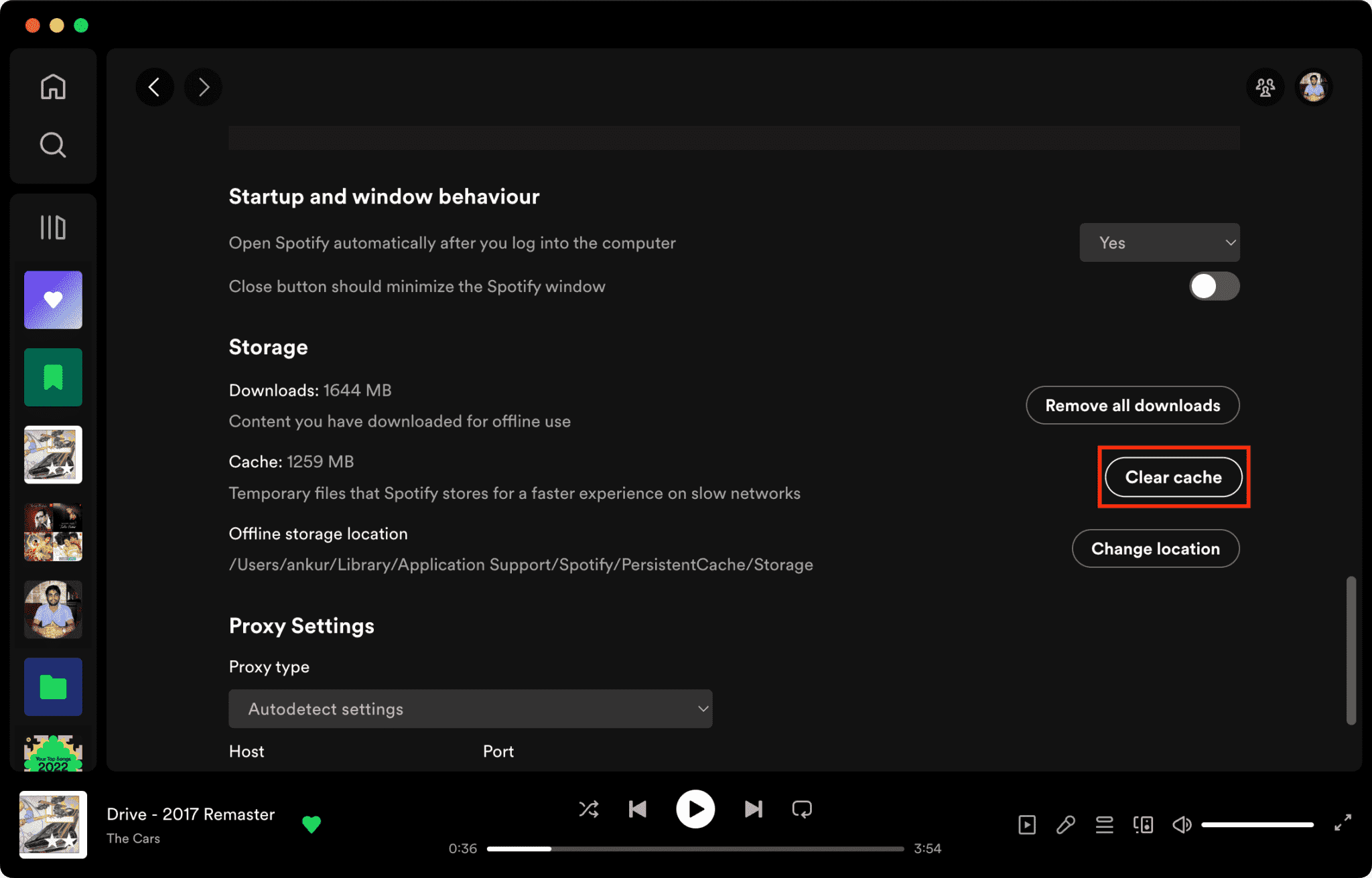
Beschädigte Cache-Dateien sind ein Hauptgrund dafür Spotify antwortet nicht.
So löschen Sie Spotify Cache auf dem Mac/WinWindows/iPhone/Android >>>>
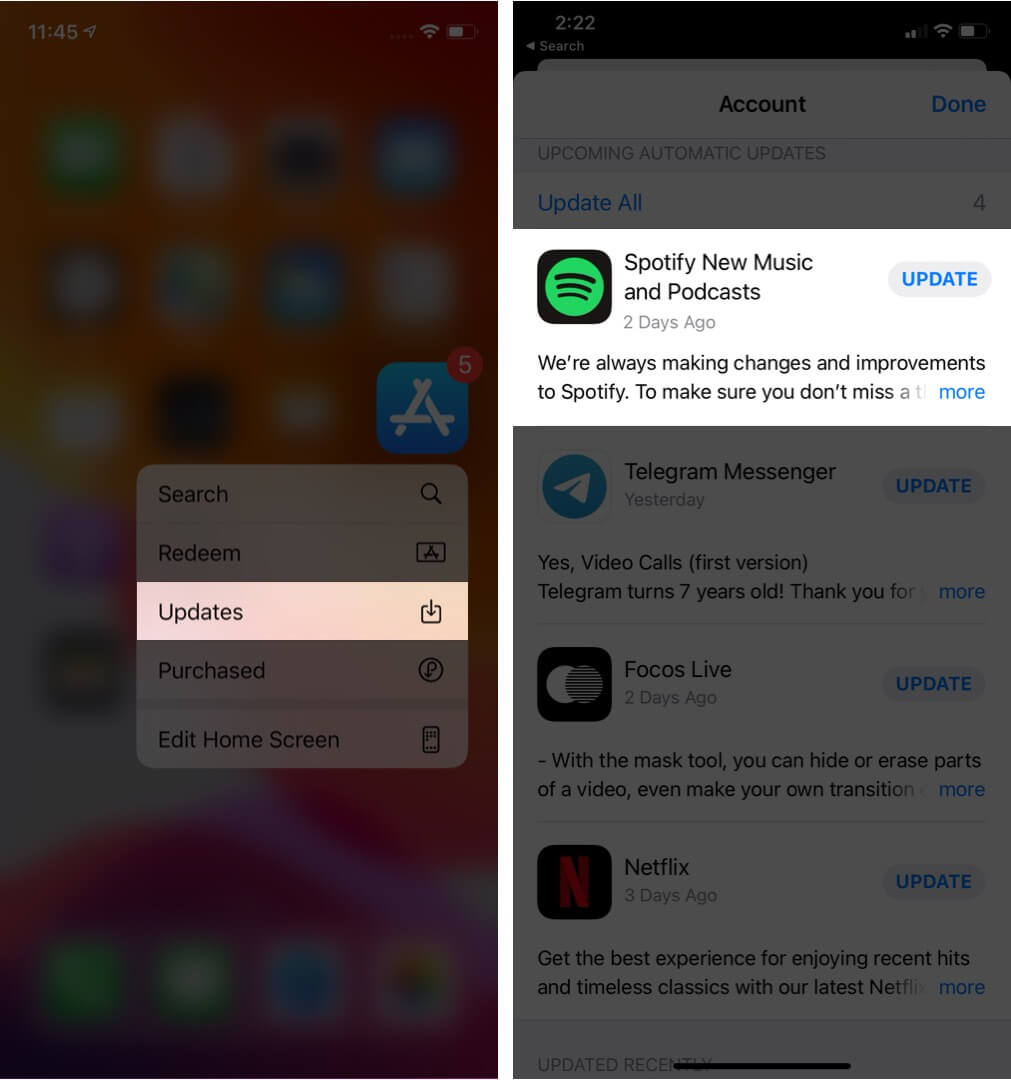
Fix 4. Aktualisieren Spotify App
Installation der neuesten Version Spotify Diese Version behebt möglicherweise bekannte Softwarefehler.
Lösung 5. Starten Sie Ihr Gerät neu.
Durch einen Neustart Ihres Computers oder Telefons können die Systemressourcen aktualisiert werden.
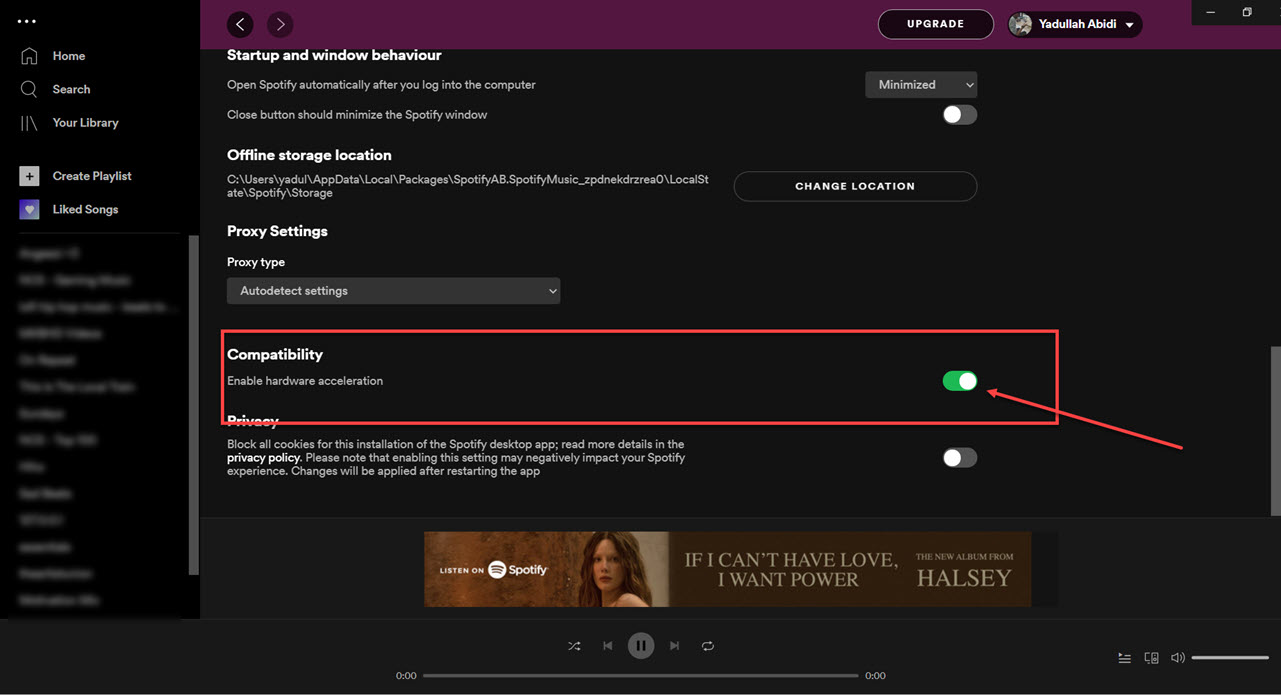
Fix 6. Deaktivieren Sie die Hardwarebeschleunigung
Sie können die Hardwarebeschleunigung deaktivieren. Dies behebt manchmal Einfrierprobleme.
Lösung 7. Überprüfen Spotify Server Status
Globalen Spotify Ausfälle können gelegentlich die Wiedergabe und die Anmeldedienste beeinträchtigen.
Teil 3. Der beste Weg zu vermeiden Spotify Wiedergabeprobleme
Viele Nutzer gehen davon aus, dass sie es heruntergeladen haben. Spotify Songs funktionieren immer offline, aber heruntergeladene Songs bleiben durch DRM geschützt, was bedeutet, dass die Musik nur innerhalb der Streaming-App funktioniert. Downloads können nicht frei übertragen werden. Wenn Sie häufig auf die Fehlermeldung „Spotify Wenn bei einer "Reagiert nicht"-Problematik ein beliebtes Tool ist DumpMedia Spotify Music ConverterDiese Software ermöglicht es Benutzern, zu konvertieren Spotify Musik in lokale Audioformate konvertieren für flexiblere Offline-Wiedergabe. Selbst wenn die Spotify Die App funktioniert nicht auf Ihrem Gerät. Spiel & Sport Spotify Lieder offline sofort auf einem anderen Musikplayer.
Kostenloser Download Kostenloser Download
🏆Hauptmerkmale von DumpMedia Spotify Music Converter
- Herunterladen Spotify Musik zu MP3WAV, FLAC und AAC
- Entfernen Spotify DRM-Schutz*
- Bewahren Sie die ursprüngliche Klangqualität
- Stapelweises Herunterladen von Wiedergabelisten und Alben
- Schnelle Umwandlung Geschwindigkeit
- Song-Metadaten und ID3-Tags beibehalten
- Unterstützung für die Offline-Wiedergabe auf jedem Gerät
Für Nutzer, die frustriert sind von Spotify Da die App instabil ist, fühlt sich die lokale Musikwiedergabe oft viel zuverlässiger an.
Konvertieren Spotify zu MP3 Schritt für Schritt
Schritt 1: Laden Sie DumpMedia Spotify Music Converter auf Ihrem Mac/PC. Starten Sie es, und die Benutzeroberfläche wird angezeigt. Verwenden Sie Ihre Spotify Premium-/Gratis-Konto zum Anmelden.
Kostenloser Download Kostenloser Download
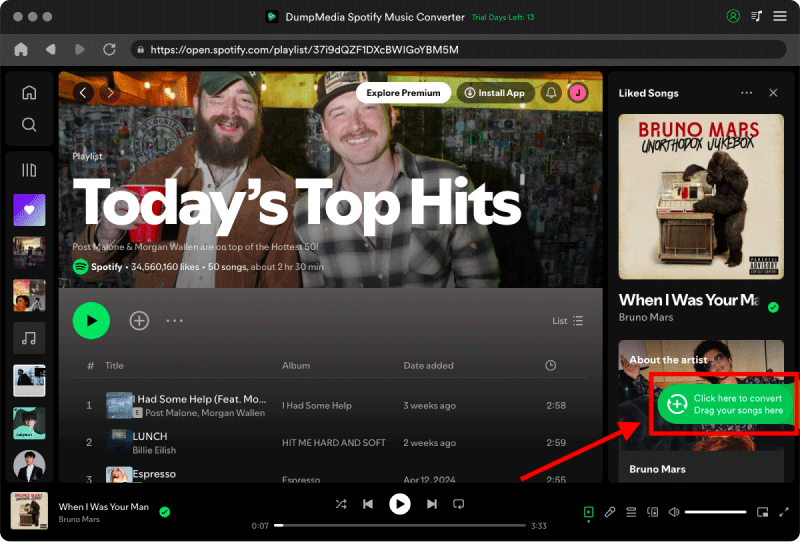
Schritt 2. Suchen Sie die Playlist, das Album oder den gewünschten Song, den Sie konvertieren möchten. Sie können einen einzelnen Song auf das „+“-Symbol rechts auf dem Bildschirm ziehen. Alternativ können Sie eine ganze Playlist/ein ganzes Album öffnen und auf das Symbol „Zum Konvertieren hinzufügen“ klicken, um die gesamte Liste in den Konverter zu laden.
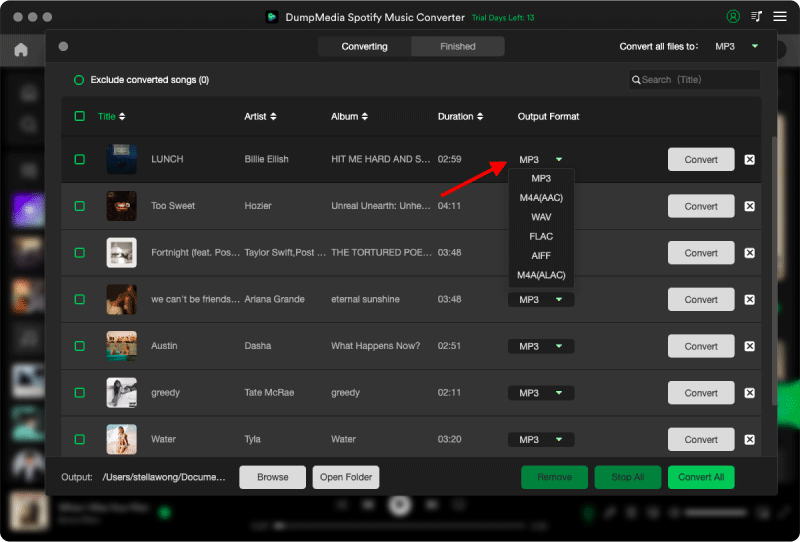
Schritt 3: Auswählen MP3 (Am besten kompatibel). Sie können auch die Bitrate oder die Abtastrate ändern. Für ein optimales Verhältnis wählen Sie 320 kbps.
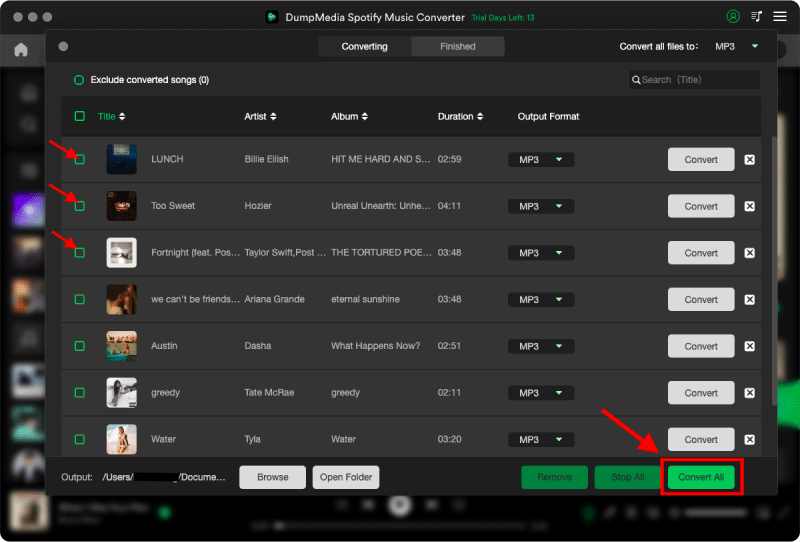
Schritt 4: Sobald die Einstellungen abgeschlossen sind, können Benutzer die Konvertierung durch Klicken auf das Symbol „Konvertieren“ durchführen. Dann DumpMedia wird heruntergeladen Spotify Lieder zu MP3 innerhalb von Sekunden dank seiner superschnellen Geschwindigkeit.
Teil 4. Häufig gestellte Fragen
Warum ist Spotify Reagiert nicht?
Spotify Die Website reagiert möglicherweise nicht mehr aufgrund von Internetproblemen, beschädigten Cache-Dateien, veralteter Software oder Serverproblemen.
Warum tut Spotify Immer wieder einfrieren?
Spotify Einfrierprobleme hängen oft mit Cache-Beschädigungen oder Konflikten mit der Hardwarebeschleunigung zusammen.
Warum ist Spotify Stürzt mein Handy ab?
Mobil Spotify Abstürze können durch geringen Speicherplatz, veraltete App-Versionen oder Softwarekonflikte verursacht werden.
Warum ist Spotify Offline-Modus funktioniert nicht?
Die Offline-Wiedergabe hängt weiterhin davon ab Spotify Autorisierung und App-Stabilität.
Is DumpMedia Spotify Music Converter sicher?
Ja. Es ist dafür konzipiert. Spotify Musikkonvertierung und lokale Wiedergabeverwaltung.
Hinweis: Streaming-Plattformen haben ihre eigenen Regeln und Überwachungssysteme. Als Drittanbieter-Tool DumpMedia Spotify Music Converter unterliegt auch deren Beschränkungen, die die Nutzung in bestimmten Fällen beeinträchtigen können. Spotify kann Maßnahmen ergreifen, wenn es Aktivitäten feststellt, die gegen seine Nutzungsbedingungen verstoßen; dies liegt vollständig in seiner Verantwortung. SpotifyErmessen.
Teil 5. Fazit
Die "Spotify Das Problem „Reagiert nicht“ kann durch Internetinstabilität, beschädigte Cache-Dateien, veraltete Software oder Spotify App-Probleme. Obwohl viele temporäre Lösungen die Wiedergabe wiederherstellen können, Spotify Streaming ist nach wie vor stark von der Stabilität der App und der Online-Verifizierung abhängig. Für Nutzer, die ein stabileres Offline-Hörerlebnis wünschen, DumpMedia Spotify Music Converter bietet eine praktische Möglichkeit zur Umwandlung Spotify Lieder in lokale MP3 Dateien für die flexible Wiedergabe auf verschiedenen Geräten.
Kostenloser Download Kostenloser Download
*DumpMedia funktioniert durch Entschlüsseln und Herunterladen Spotify Ihre Songs werden in DRM-freie Dateien umgewandelt, sodass Sie eine saubere, uneingeschränkte Kopie Ihrer Musikbibliothek für jedes Gerät erhalten. Die DRM-Entfernung lokaler Audiodateien ist nicht Teil dieser Funktion.