


Spotify DJ-Modus: So verwenden Sie ihn (Vollständiger Leitfaden 2026)
Wenn Sie kürzlich davon gehört haben Spotify Im DJ-Modus fragen Sie sich vielleicht, was dieser Modus genau bewirkt und wie man ihn benutzt. Spotify Der KI-DJ-Modus ist einer der SpotifyDie spannendsten Funktionen bieten ein personalisiertes Musikerlebnis dank künstlicher Intelligenz. Doch so leistungsstark die Software auch ist, sie hat auch Einschränkungen, die vielen Nutzern nicht bewusst sind. In diesem Leitfaden erfahren Sie mehr darüber. Spotify Was ist AI DJ und wie aktiviert man AI DJ? Spotify.
Inhaltsverzeichnis Teil 1. Was ist Spotify KI-DJ?Teil 2. So aktivieren Sie Spotify KI-DJ?Teil 3. Einschränkungen von Spotify KI-DJTeil 4. So sparen Sie Spotify DJ-Musik zur Offline-Nutzung?Teil 5. Häufig gestellte FragenTeil 6. Fazit
Teil 1. Was ist Spotify KI-DJ?
Spotify Der DJ-Modus ist ein personalisierter Musikguide, der wie ein virtueller Radiomoderator funktioniert und fortschrittliches maschinelles Lernen mit einer bemerkenswert realistischen KI-Stimme kombiniert. Er steht Premium-Abonnenten zur Verfügung und bietet mehr als nur zufällige Musikwiedergabe: Er stellt einen kontinuierlichen Musikstream zusammen, der auf Ihrem Hörverlauf, aktuellen Trends und sogar nostalgischen Hits basiert, die Sie seit Jahren nicht mehr gehört haben.
Hauptmerkmale von Spotify KI-DJ
- Personalisierte Songempfehlungen
- Kontinuierliche Wiedergabe ohne manuelle Eingabe
- KI-generierter Sprachkommentar
- Intelligente Stimmungs- und Genreübergänge
Aus diesem Grund Spotify Der DJ-Modus erfreut sich zunehmender Beliebtheit bei Nutzern, die ein müheloses Hörerlebnis bevorzugen.
Teil 2. So aktivieren Sie Spotify KI-DJ?
Wie kann ich zugreifen? Spotify DJ-Modus? Wenn Sie abonniert haben Spotify Premium, folge diesen Schritten:
Schritt 1. Stellen Sie sicher, dass Ihre App auf die neueste Version aktualisiert ist. Navigieren Sie zum Bereich „Startseite“.
Schritt 2. Suchen Sie in Ihrem Feed nach der DJ-Funktion. Hören Sie sofort los.
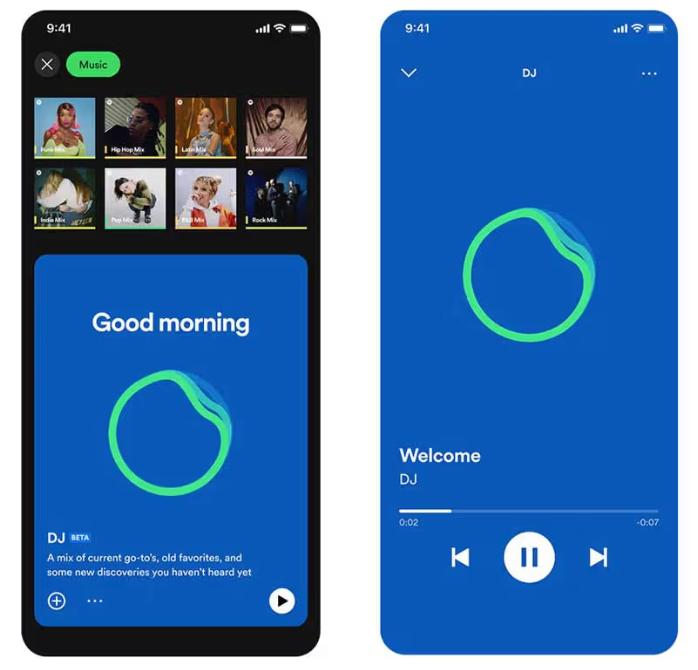
SpotifyDer KI-DJ von [Name des Anbieters] unterstützt jetzt eine „Wünsche“-Funktion. Genau wie bei einem menschlichen DJ können Sie Sprachbefehle oder Textnachrichten verwenden und beispielsweise sagen: „Wechsle zu einem ruhigeren Genre“ oder „Spiele mehr Songs von Jay-Z und Justin Bieber“. Die KI passt die Playlist dann sofort an.
Teil 3. Einschränkungen von Spotify KI-DJ
Spotify Der DJ-Modus zeichnet sich dadurch aus, dass er die manuelle Musiksuche überflüssig macht. Er eignet sich ideal zum Hören im Hintergrund, zum Entdecken neuer Songs und für ein radioähnliches Erlebnis. SpotifyDer KI-DJ von [Name des Unternehmens] ist beeindruckend, weist aber einige wichtige Einschränkungen auf.
1. Keine permanenten Downloads
Auch mit der Premium-Version lassen sich die Songs nicht wirklich herunterladen. Die Dateien sind in der App gesperrt und können nicht übertragen werden.
2. Keine Offline-Freiheit
Sie können die Musik herunterladen und offline hören, der Zugriff ist jedoch an ein Abonnement gebunden. Die Musik verschwindet, wenn Sie Ihr Abonnement kündigen.
3. Kein Export oder keine Weitergabe
DJ-Playlists können nicht exportiert und Mixe nicht extern gespeichert werden.
4. Eingeschränkte Kontrolle
Spotify Die Musikauswahl und -reihenfolge werden von der KI gesteuert. Vollständige Anpassungsmöglichkeiten sind nicht gegeben.
Diese Einschränkungen werden wichtig, wenn Sie mehr Kontrolle über Ihre Musik haben möchten.
Teil 4. So sparen Sie Spotify DJ-Musik zur Offline-Nutzung?
Wenn Sie genießen Spotify Sie möchten im DJ-Modus mehr Flexibilität und benötigen eine Möglichkeit, Songs dauerhaft zu speichern. Anstatt sich auf Folgendes zu verlassen: SpotifyAufgrund der eingebauten Einschränkungen von [Name des Programms/der App] wählen Sie Songs aus DJ-Empfehlungen aus und konvertieren sie in lokale Dateien. Dadurch haben Sie die volle Kontrolle über Ihre Musik. Am zuverlässigsten gelingt dies mit einem professionellen Tool wie [Name des Tools/der App]. DumpMedia Spotify Music Converter.
Kostenloser Download Kostenloser Download
🏅Warum wählen DumpMedia Spotify Music Converter:
- ⭐Integration mit Spotify Internet Spieler
- ⭐Arbeite für beide Spotify Premium und Spotify Kostenlose Benutzer
- ⭐Bietet Stapelkonvertierung mit bis zu 35-facher Geschwindigkeit
- ⭐Konvertieren Spotify Lieder zu MP3, WAV oder FLAC
- ⭐Behalten Sie ID3-Tags wie Künstler, Cover, Art usw. bei.
- ⭐Bewahren Sie die ursprüngliche Audioqualität
- ⭐100% sauber. Kein Risiko bei der Verwendung
Schritt für Schritt: Konvertieren Spotify DJ-Musik
Schritt 1: Laden Sie die Software herunter und installieren Sie sie auf Ihrem Computer. Sie funktioniert mit beiden WinWindows und Mac. Die Benutzeroberfläche ist benutzerfreundlich und daher auch für Anfänger leicht zu bedienen.
Kostenloser Download Kostenloser Download
Schritt 2: Öffnen Sie das integrierte Spotify Webplayer im Inneren DumpMedia und melde dich mit deinem an Spotify Konto. Durchsuchen Spotify Ziehen Sie die gewünschten Songs, Alben oder Wiedergabelisten per Drag & Drop in den Konverter.

Schritt 3: Im Einstellungsfenster auswählen MP3 als Ausgabeformat, um ein MP3 Download der ausgewählten Titel.

Schritt 4: Klicken Sie auf die Schaltfläche „Alle konvertieren“ und starten Sie die Konvertierung. DumpMedia Spotify Music Converter Unterstützt 35-mal schnellere Downloadgeschwindigkeiten, sodass Sie einfach warten können, bis der Konvertierungsprozess abgeschlossen ist.

Teil 5. Häufig gestellte Fragen
1. Was ist Spotify DJ-Modus?
Es handelt sich um eine KI-gestützte Funktion, die personalisierte Musik basierend auf Ihrem Geschmack abspielt.
2. ist SpotifyKostenloser KI-DJ?
Nein, dazu ist in der Regel ein Premium-Abonnement erforderlich.
3. Kann ich herunterladen Spotify DJ-Songs?
Nur innerhalb der App, nicht als lokale Dateien.
4. Kann ich meine eigene DJ-Playlist erstellen?
Ja, insbesondere wenn Sie lokale Kopien Ihrer Musik besitzen.
Teil 6. Fazit
Spotify Der DJ-Modus ist eine leistungsstarke Funktion, die das Entdecken neuer Musik einfacher und angenehmer macht. Allerdings hat er auch Einschränkungen, wie beispielsweise das Fehlen dauerhafter Downloads und den eingeschränkten Offline-Zugriff. Um alle Vorteile des DJ-Modus voll auszuschöpfen, sollten Sie ihn nutzen. SpotifyUm die Einschränkungen von AI DJ zu umgehen, ist die Verwendung eines zuverlässigen Tools zum Speichern Ihrer Musik die beste Lösung. So können Sie Ihre Lieblingstitel behalten, eigene Wiedergabelisten erstellen und Ihre Musikwiedergabe völlig frei gestalten.
Kostenloser Download Kostenloser Download
*DumpMedia funktioniert durch Entschlüsseln und Herunterladen Spotify Songs werden in DRM-freie Dateien konvertiert, sodass Sie eine saubere, uneingeschränkte Kopie Ihrer Musikbibliothek für jedes Gerät erhalten. Die Konvertierung lokaler Audiodateien ist nicht möglich.