


So spielen Sie nicht abspielbare Songs ab Spotify10 bewährte Lösungen, die funktionieren
Haben Sie schon einmal geöffnet Spotify Und dann stellen Sie fest, dass einer Ihrer Lieblingssongs plötzlich ausgegraut ist oder sich nicht mehr abspielen lässt? Falls ja, sind Sie nicht allein. Viele Nutzer suchen nach … wie man nicht spielbare lieder abspielt Spotify nach dem Auftreten von nicht verfügbaren Liedern, automatisch übersprungenen Liedern oder Fehlermeldungen. Die gute Nachricht ist, dass die meisten Spotify Wiedergabeprobleme lassen sich beheben. In dieser Anleitung erfahren Sie, wie Sie nicht verfügbare Lieder abspielen können. SpotifyErfahren Sie, warum Songs nicht mehr verfügbar sind, und entdecken Sie 10 bewährte Lösungen, mit denen Sie die normale Wiedergabe wiederherstellen können.
Inhaltsverzeichnis Teil 1. Warum sind manche Lieder nicht abspielbar auf Spotify?Teil 2. 10 Möglichkeiten, nicht spielbare Lieder abzuspielen auf SpotifyTeil 3. Kannst du „Nicht verfügbar“ spielen? Spotify Lieder offline?Teil 4. Die beste Methode, um sich zu schützen Spotify Lieder jederzeit abspielbarTeil 5. Häufig gestellte FragenTeil 6. Abschließende Gedanken
Teil 1. Warum sind manche Lieder nicht abspielbar auf Spotify?
Bevor ich lerne, wie man unspielbare Lieder spielt SpotifyEs ist hilfreich zu verstehen, warum das Problem auftritt.
Einige der häufigsten Gründe sind:
- Die Musiklizenzverträge sind abgelaufen.
- Zwischengespeicherte Dateien sind beschädigt.
- Ihr Premium-Abonnement ist abgelaufen.
- Der Song ist in Ihrem Land oder Ihrer Region nicht verfügbar.
- Der Künstler oder das Plattenlabel hat den Titel entfernt.
- Ihre Spotify App ist veraltet.
- Der Offline-Modus ist aktiviert.
- Lokale Dateien fehlen oder sind nicht verbunden.
- Spotify Es gibt vorübergehend Serverprobleme.
Sobald man die Ursache identifiziert hat, wird die Behebung des Problems wesentlich einfacher.
Teil 2. 10 Möglichkeiten, nicht spielbare Lieder abzuspielen auf Spotify
1. Überprüfen Sie Ihre Internetverbindung
Eine schwache Verbindung kann verursachen Spotify Die Lieder werden nicht richtig abgespielt. Heruntergeladene Lieder können zwar offline abgespielt werden, Spotify Für die Kontoverifizierung und das Streaming wird weiterhin eine stabile Internetverbindung benötigt.
versuchen:
- Wechsel zwischen WLAN und mobilen Daten
- Neustart Ihres Routers
- VPN-Dienste vorübergehend deaktivieren
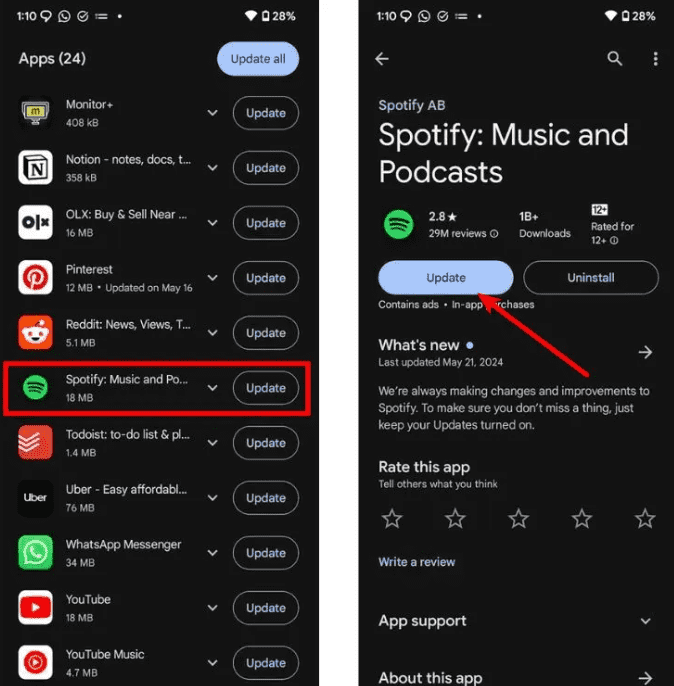
2. Aktualisieren Sie die Spotify App
Eine veraltete Version verwenden Spotify Dies kann zu Wiedergabeproblemen führen. Besuchen Sie den App Store Ihres Geräts und installieren Sie die neueste Version. Updates enthalten häufig Fehlerbehebungen, die das Problem beheben. Spotify Wiedergabeprobleme.
3. Abmelden und wieder anmelden
Durch Aktualisieren Ihrer Kontositzung können vorübergehende Synchronisierungsfehler behoben werden. Viele Nutzer berichten, dass diese einfache Maßnahme nicht verfügbare Titel wiederherstellt.
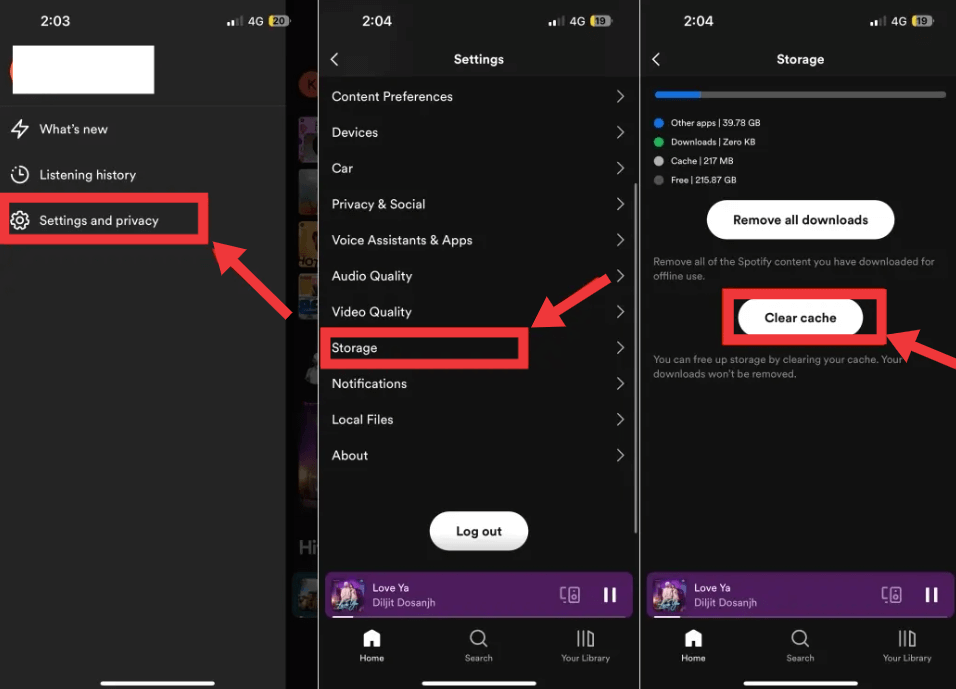
4. Klar Spotify Cache
Zwischengespeicherte Daten können mit der Zeit beschädigt werden. Ihre Wiedergabelisten werden dadurch nicht gelöscht, aber Wiedergabefehler können behoben werden.
- Öffne Spotify Einstellungen
- Wählen Sie Speicher
- Tippen Sie auf Cache löschen
5. Regionale Verfügbarkeit prüfen
Manchmal ist ein Lied nicht verfügbar, weil Spotify besitzt in Ihrem Land keine Streaming-Rechte. Falls Sie sich fragen, wie Sie nicht abspielbare Lieder auf dieser Plattform abspielen können. SpotifyDies ist einer der häufigsten Gründe.
Wenn ein Lied ausgegraut ist, versuchen Sie, es erneut zu suchen, um zu sehen, ob eine andere Version verfügbar ist. Sie können auch auf der Künstlerseite nachsehen, ob es dort erneut hochgeladen wurde, oder einfach abwarten, da Titel oft wieder verfügbar sind, sobald die Lizenzverträge erneuert werden.
6. Neu installieren Spotify
Wenn nach dem Ausprobieren grundlegender Lösungsansätze weiterhin Wiedergabeprobleme auftreten, müssen Sie das Programm möglicherweise neu installieren. Spotify Um möglicherweise beschädigte Installationsdateien zu entfernen, deinstallieren Sie zunächst die… Spotify App und starten Sie Ihr Gerät neu. Laden Sie anschließend die neueste Version von der offiziellen Website herunter. Spotify Besuchen Sie die Website und melden Sie sich erneut an. Dieser Vorgang stellt sicher, dass Ihre Anwendung aktuell und frei von internen Konflikten ist.
7. Überprüfen Sie Ihre lokalen Dateien
Wenn Sie versuchen, importierte Musik abzuspielen, vergewissern Sie sich, dass Ihre lokalen Dateien noch verfügbar sind.
Häufige Probleme sind:
- Die Originaldateien wurden verschoben.
- Dateinamen geändert.
- Speichergerät nicht angeschlossen.
- Synchronisierung fehlgeschlagen.
Diese Probleme führen oft dazu, dass Spotify Lokale Dateien scheinen nicht verfügbar zu sein.
Verwandte Artikel: Spotify Lokale Dateien werden nicht abgespielt? Bewährte Lösungen, die wirklich funktionieren.
8. Bestätigen Sie Ihr Premium-Abonnement.
Für einige heruntergeladene Lieder ist eine aktive Lizenz erforderlich. Spotify Premium Abonnement. Wenn Ihr Abonnement abgelaufen ist, Spotify Offline-Songs lassen sich möglicherweise nicht mehr abspielen. Überprüfen Sie Ihren Kontostatus und verlängern Sie gegebenenfalls Ihr Abonnement.
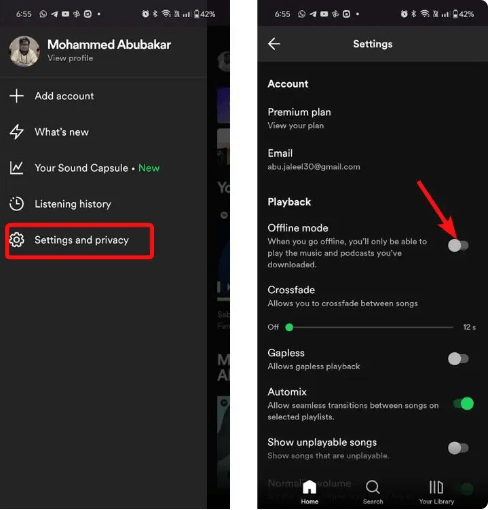
9. Schalten Sie den Offline-Modus aus
Wenn ein Lied "ausgegraut" (nicht abspielbar) ist auf SpotifyDies liegt typischerweise am Offline-Modus. Wenn der Offline-Modus aktiviert ist und keine Lieder heruntergeladen werden, Spotify Online-Musikstreaming funktioniert nicht. Deaktivieren Sie diese Funktion und starten Sie die App neu.
10. Warten Sie, ob das Lied entfernt wurde.
Manchmal liegt kein Fehler an Ihrem Gerät vor. Lieder können vorübergehend verschwinden, weil:
- Der Künstler hat sie entfernt.
- Die Plattenfirmen haben die Lizenzbestimmungen geändert.
- Spotify hat seinen Katalog aktualisiert.
In solchen Fällen kann es vorkommen, dass das Lied in Zukunft wieder verfügbar sein wird.
Teil 3. Kannst du „Nicht verfügbar“ spielen? Spotify Lieder offline?
Spotify Premium ermöglicht es Nutzern, Songs zum Offline-Hören herunterzuladen. Heruntergeladene Songs unterliegen jedoch weiterhin einigen Einschränkungen:
- Sie bleiben durch DRM geschützt.
- Sie verlangen eine regelmäßige Kontoüberprüfung.
- Sie funktionieren nicht mehr, wenn Ihr Premium-Abonnement abläuft.
- Sie können nicht auf USB-Laufwerke übertragen werden oder MP3 Spieler.
- Aus der Liste entfernte Lieder SpotifyDer Katalog von [Name des Unternehmens] ist möglicherweise auch nicht mehr verfügbar.
Offline-Downloads sind zwar praktisch, aber nicht von Dauer.
Teil 4. Die beste Methode, um sich zu schützen Spotify Lieder jederzeit abspielbar
Wenn Sie häufig auf nicht verfügbare Lieder stoßen oder mehr Flexibilität beim Offline-Hören wünschen, DumpMedia Spotify Music Converter bietet eine praktische Lösung. Mit DumpMediakönnen Sie konvertieren Spotify Songs, Alben und Playlists zu MP3WAV, FLAC, AAC und andere gängige Formate. Für Benutzer, die nach einer Möglichkeit suchen, nicht abspielbare Lieder abzuspielen auf SpotifyDie Konvertierung von Musik für die persönliche Offline-Verwaltung bietet mehr Flexibilität, insbesondere wenn Streaming-Beschränkungen oder Wiedergabeprobleme auftreten.
Kostenloser Download Kostenloser Download
👍Weitere Hauptmerkmale von DumpMedia Spotify Music Converter
- ✔️Zugriff auf die vollständige Musikbibliothek über das integrierte Spotify Internet Spieler
- ✔️Genießen Sie schnelle Konvertierungen mit 35-mal höherer Geschwindigkeit
- ✔️Metadateninformationen und ID3-Tags beibehalten
- ✔️Behalten Sie die ursprüngliche Audioqualität bei
- ✔️100% Sauber. Kein Risiko bei der Verwendung
- ✔️Kostenlose Updates und technischer Support
Herunterladen Spotify Lieder verwenden DumpMedia um Wiedergabeprobleme zu vermeiden
Schritt 1: Laden Sie DumpMedia Spotify Music Converter auf Ihrem Mac/PC. Starten Sie es, und die Benutzeroberfläche wird angezeigt. Verwenden Sie Ihre Spotify Premium-/Gratis-Konto zum Anmelden.
Kostenloser Download Kostenloser Download
Schritt 2. Wählen Sie nun die gewünschten Songs, Wiedergabelisten oder Alben zum Herunterladen aus. Öffnen Sie diese einfach und klicken Sie auf „Zur Konvertierung hinzufügen“. Alternativ können Sie die Wiedergabeliste per Drag & Drop in die Konvertierungsliste auf der rechten Seite ziehen.
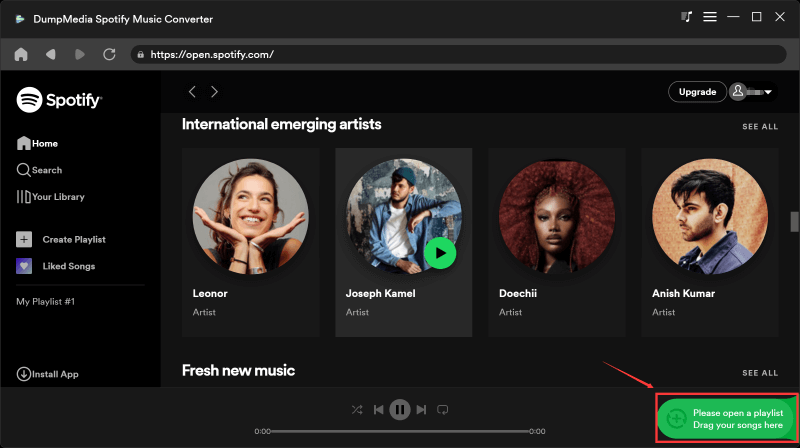
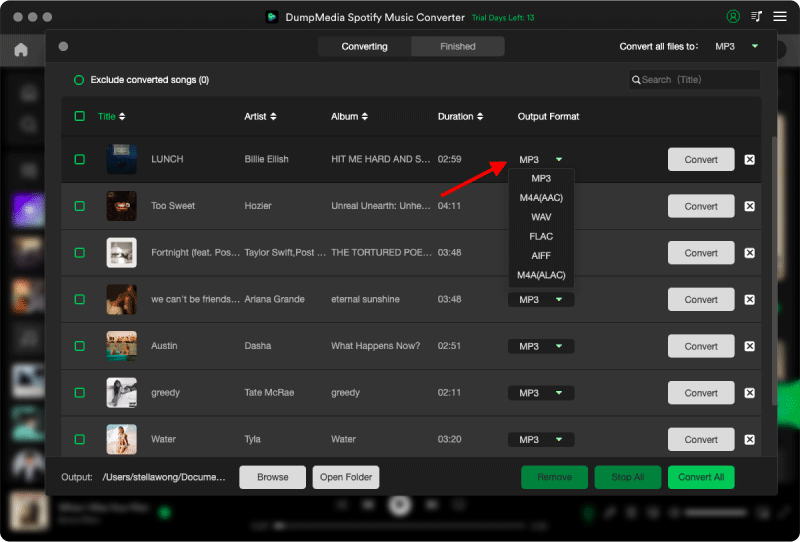
Schritt 3: Nach DumpMedia analysiert automatisch Lieder, das Format ist eingestellt auf MP3 Standardmäßig ist die Konvertierungsoberfläche aktiviert. Wenn Sie dies ändern möchten, klicken Sie auf „MP3Wählen Sie im Dropdown-Menü eine Option aus. Sie können auch die Bitrate oder die Abtastrate ändern. Für ein optimales Verhältnis wählen Sie 320 kbps.
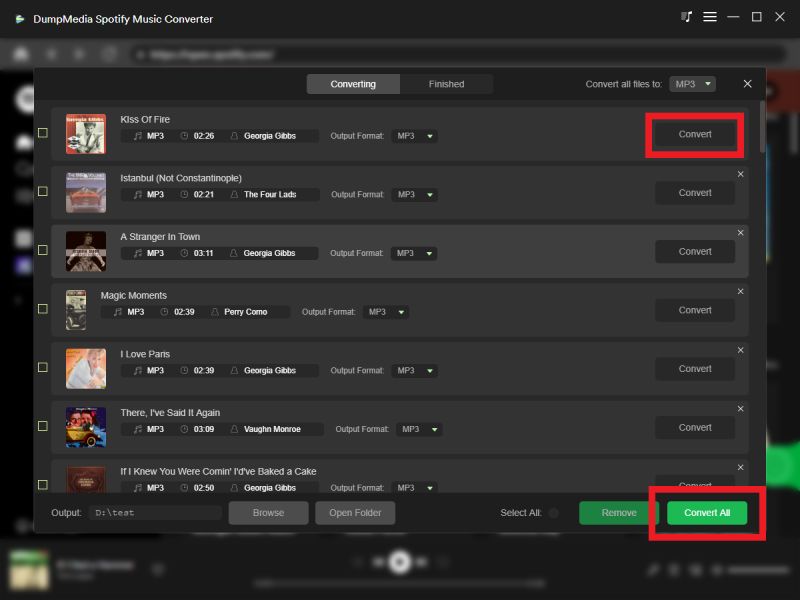
Schritt 4: Sobald die Einstellungen abgeschlossen sind, können Benutzer die Konvertierung durch Klicken auf das Symbol „Konvertieren“ durchführen. Dann DumpMedia wird heruntergeladen Spotify Lieder zu MP3 innerhalb von Sekunden dank seiner superschnellen Geschwindigkeit.
Teil 5. Häufig gestellte Fragen
Warum sind Lieder nicht abspielbar auf Spotify?
Aufgrund von Lizenzbeschränkungen, regionaler Verfügbarkeit, abgelaufenen Abonnements, beschädigtem Cache, App-Problemen oder fehlenden lokalen Dateien können Songs möglicherweise nicht abgespielt werden.
Warum sind Spotify Lieder ausgegraut?
Ausgegraute Lieder deuten in der Regel darauf hin, dass Spotify Derzeit besteht keine Berechtigung, den Titel in Ihrer Region zu streamen, oder der Inhalt wurde aus dem Katalog entfernt.
Kann ich nicht verfügbar spielen? Spotify Lieder?
Das hängt von der Ursache ab. Liegt das Problem an Ihrer App, dem Cache oder Ihrem Konto, können Sie die Wiedergabe oft durch Fehlerbehebungsmaßnahmen wiederherstellen. Wurde der Song aus Lizenzgründen entfernt, müssen Sie warten, bis er wieder verfügbar ist, oder nach einer alternativen Version suchen.
Kann heruntergeladen werden Spotify Verschwinden die Lieder?
Ja. Offline-Downloads setzen ein aktives Premium-Abonnement voraus. SpotifyLizenzvereinbarungen von [Name der Plattform]. Heruntergeladene Songs sind möglicherweise nicht mehr verfügbar, wenn Ihr Abonnement endet oder die Titel von [Name der Plattform] entfernt werden. Spotify.
Kann ich dauerhaft speichern Spotify Lieder?
SpotifyDie integrierten Downloads von [Name des Anbieters] sind verschlüsselt und an Ihr Konto gebunden. Wenn Sie mehr Flexibilität bei der persönlichen Offline-Wiedergabe wünschen, können Sie Tools wie [Name des Anbieters] verwenden. DumpMedia Spotify Music Converter umwandeln kann Spotify Musik in weit verbreitete Audioformate.
Teil 6. Abschließende Gedanken
Wenn Sie nach einer Anleitung gesucht haben, wie man nicht spielbare Lieder abspielen kann auf SpotifyDie gute Nachricht ist, dass sich die meisten Wiedergabeprobleme mit wenigen einfachen Schritten zur Fehlerbehebung lösen lassen. Wenn Sie mehr Kontrolle über Ihre persönliche Musiksammlung und mehr Flexibilität beim Offline-Hören wünschen, DumpMedia Spotify Music Converter bietet eine zuverlässige Möglichkeit, Ihre Daten zu konvertieren und zu verwalten. Spotify Musikwiedergabe auf einer Vielzahl kompatibler Geräte.