So verwenden Sie einen Online-Musikkonverter (Eine vollständige Anleitung)
Mit DumpMedia Mit dem Online-Musikkonverter können Sie Lieder schnell konvertieren in MP3 Laden Sie Dateien direkt aus Ihrem Browser herunter – keine Softwareinstallation erforderlich. Folgen Sie der unten stehenden Schritt-für-Schritt-Anleitung, um loszulegen.
Dieser Leitfaden gilt für:
- Spotify zu MP3 Konverter
- Apple Music zu MP3 Konverter
- Amazon Music zu MP3 Konverter
- YouTube Music zu MP3 Konverter
- Suno zu MP3 Konverter
Inhaltsverzeichnis Teil 1. Aktivierung DumpMedia Online-MusikkonverterTeil 2. Wie man Musik online herunterlädtTeil 3. Wie Sie Ihre DumpMedia KontoTeil 4. Häufig gestellte Fragen
Teil 1. Aktivierung DumpMedia Online-Musikkonverter
DumpMedia Online Music Converter benötigt keinen Lizenzschlüssel zur Aktivierung. Nach dem Kauf eines Abonnements wird dieses automatisch mit Ihrem registrierten Konto verknüpft. DumpMedia Konto, vorausgesetzt, dass:
- Die für Ihren Kauf verwendete E-Mail-Adresse ist dieselbe wie die E-Mail-Adresse, die Sie für Ihre Registrierung verwendet haben. DumpMedia -Konto.
Wie aktiviere ich meinen Online-Musikkonverter?
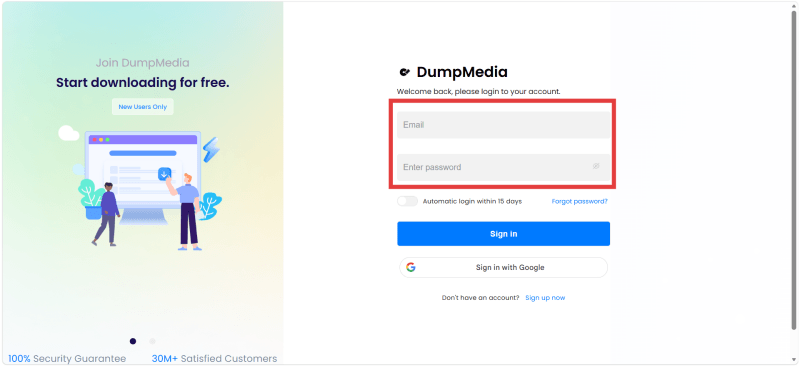
Schritt 1: Melden Sie sich einfach bei Ihrem an DumpMedia Konto im Kontocenter: https://space.dumpmedia.com/login
Schritt 2. Geben Sie Ihre registrierte E-Mail-Adresse und Ihr Passwort ein (Standardpasswort oder ein von Ihnen festgelegtes Passwort).
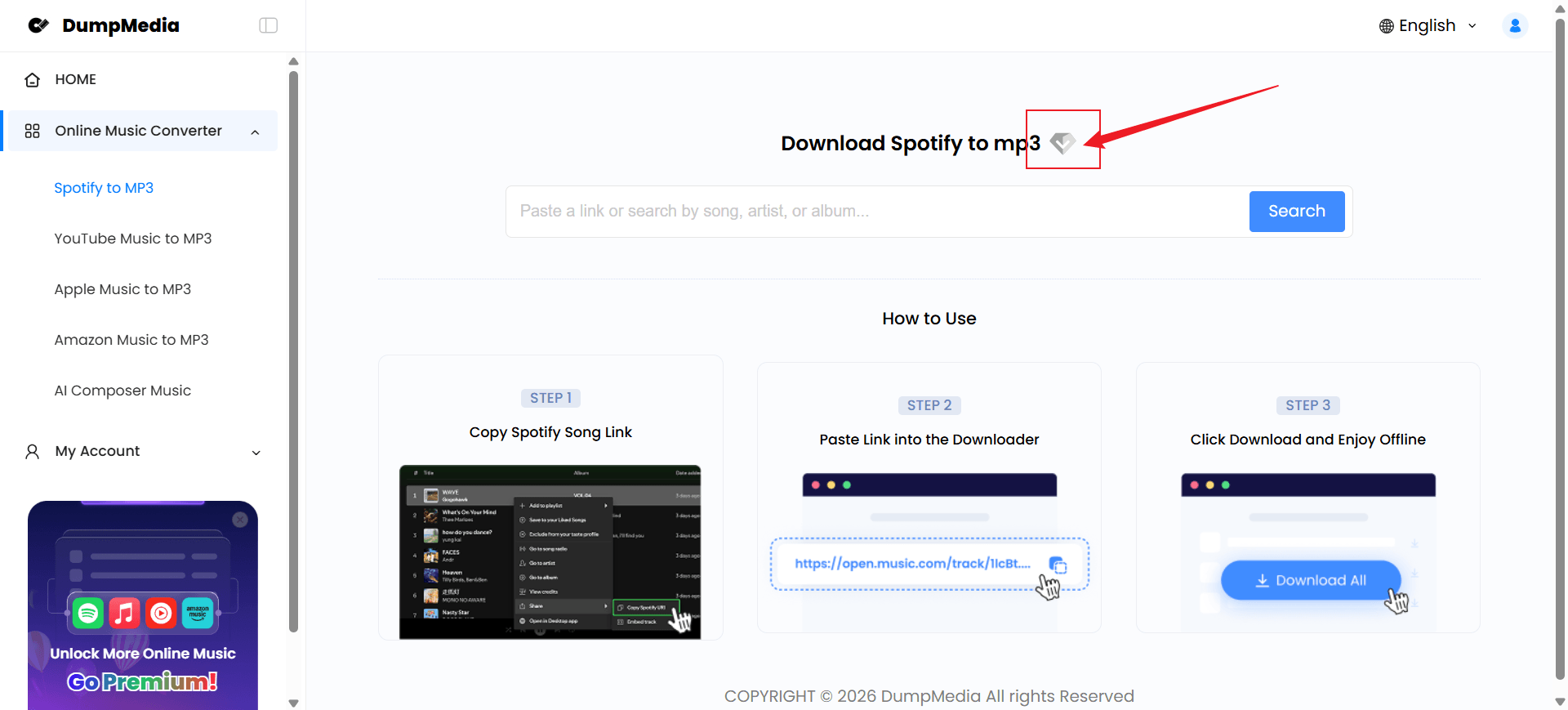
Schritt 3. Nach erfolgreicher Anmeldung wählen Sie „Online Music Converter“.
Schritt 4. Sobald Ihr Konto erfolgreich aktiviert wurde, sollte das Diamantsymbol neben dem Werkzeug hervorgehoben sein.
Wichtig:
- Falls Sie sich nicht anmelden können, klicken Sie bitte zuerst auf „Registrieren“, um ein Konto zu erstellen.
- Wenn Sie mit einer anderen E-Mail-Adresse gekauft haben, wird Ihr Abonnement möglicherweise nicht automatisch angezeigt. In diesem Fall kontaktieren Sie bitte den Kundenservice. DumpMedia Support-Team um Hilfe.
Teil 2. Wie man Musik online herunterlädt
Schritt 1. Öffnen Sie den Musikdienst über die Desktop-App, die mobile App oder den Webplayer.
Schritt 2. Suchen Sie das Lied, das Sie konvertieren möchten, und kopieren Sie dann dessen Freigabelink.
Schritt 3. Fügen Sie die kopierte Song-URL in das Suchfeld ein.
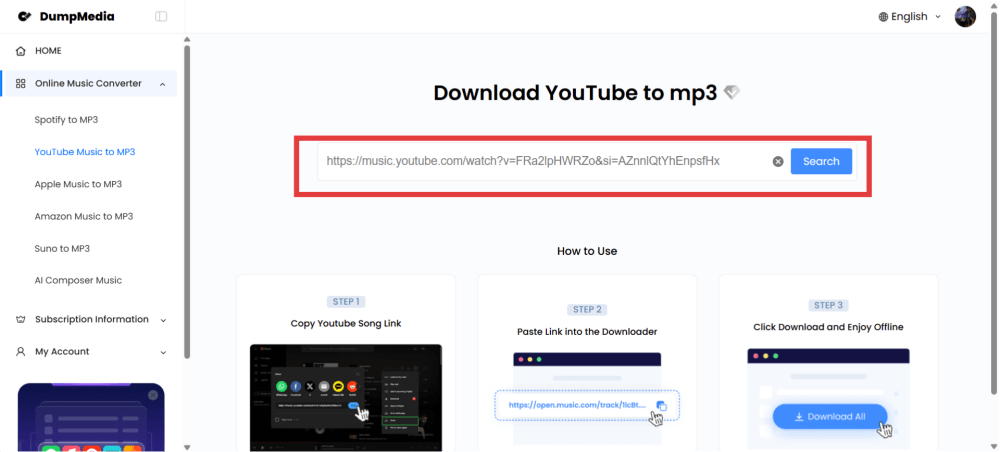
Schritt 4. Klicken Sie auf „Suchen“ und warten Sie, bis der Link verarbeitet wurde.
Schritt 5. Klicken Sie anschließend auf die Schaltfläche „Herunterladen“ oder „Konvertieren“, um die Musik herunterzuladen.
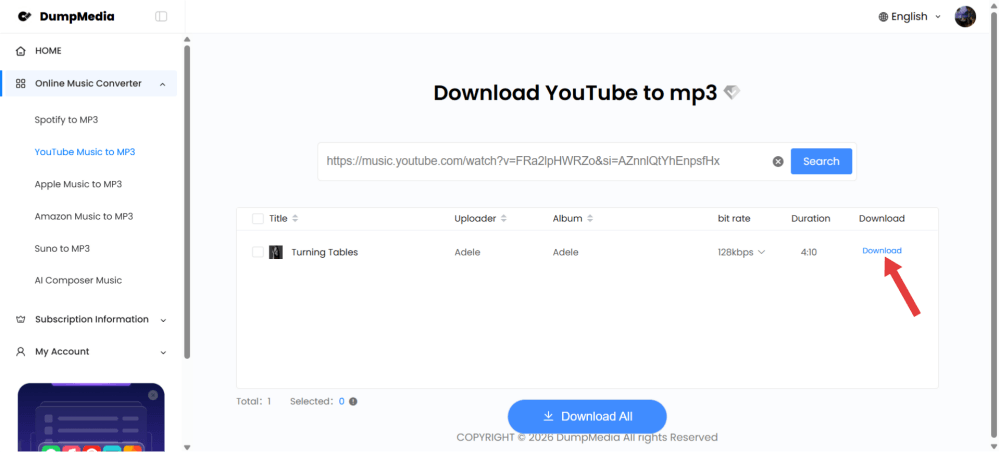
Je nach Internetverbindung und Serverauslastung dauert dies in der Regel nur wenige Minuten. Bitte warten Sie, bis die Konvertierung abgeschlossen ist.
Wichtig:
- Jeder Konvertierungsauftrag unterstützt bis zu 10 Songs gleichzeitig. Enthält Ihre Playlist mehr als 10 Titel, erstellen Sie einfach einen weiteren Konvertierungsauftrag, um die restlichen Songs herunterzuladen.
Teil 3. Wie Sie Ihre DumpMedia Konto
Für Ihren Komfort bietet unser Kundencenter eine eigene Option zur Verwaltung und Kündigung Ihres Abonnements.
- Kontocenter > Abonnementinformationen > Abonnementstatus
- Kontocenter > Mein Konto > Support kontaktieren > Abonnement
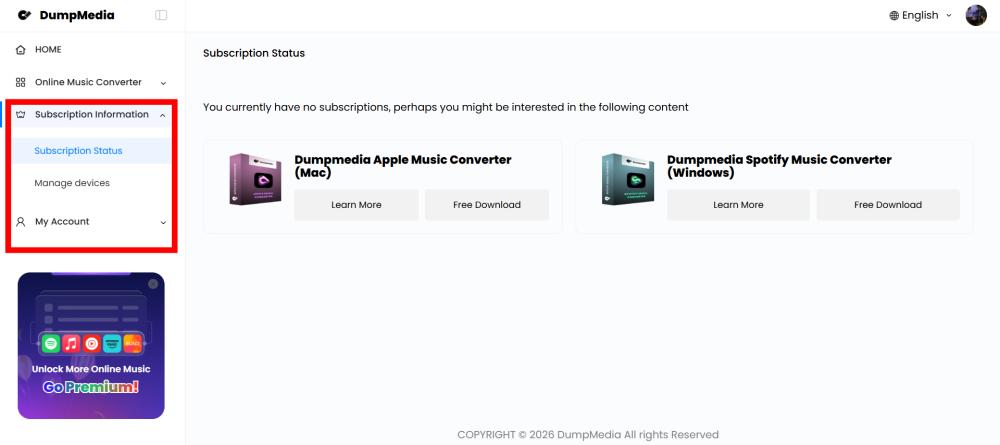
Falls Sie Ihr Konto nicht verwalten können, wenden Sie sich bitte an den DumpMedia Support-Team um Hilfe.
Teil 4. Häufig gestellte Fragen
Kann ich Wiedergabelisten konvertieren?
Ja, aber jede Konvertierungsaufgabe unterstützt maximal 10 Songs gleichzeitig. Die Online-Version eignet sich am besten für die Konvertierung einzelner Songs. Für ganze Wiedergabelisten oder Alben empfiehlt sich die Desktop-Version. DumpMedia Der Musikkonverter bietet eine umfassendere Lösung.
In welchen Formaten kann ich die Lieder herunterladen?
DumpMedia Der Online-Musikkonverter unterstützt derzeit MP3 als Ausgabeformat. Die Online-Version bietet im Vergleich zur Desktop-Version eine eingeschränkte Auswahl an Bitratenoptionen.
Falls Sie zusätzliche Ausgabeformate wie WAV, FLAC, AAC oder AIFF benötigen oder mehr Bitratenoptionen und erweiterte Audioeinstellungen wünschen, sollten Sie den Kauf in Erwägung ziehen. DumpMedia Musikkonverter (Desktop-Version), was eine größere Flexibilität bei der Musikkonvertierung und der individuellen Anpassung der Audioqualität ermöglicht.
Ist der Online-Konverter mit mobilen Geräten kompatibel?
Ja. Sie können darauf zugreifen. DumpMedia Online-Musikkonverter für die meisten modernen Browser auf WinWindows, Mac, Android, iPhone und Tablets.
Warum kann ich keine Musik herunterladen?
Um Ihnen besser helfen zu können, senden Sie uns bitte Screenshots des Problems sowie die Links zu den Liedern, die Sie herunterladen wollten. Dies hilft uns, das Problem genauer zu untersuchen. Sobald wir diese Informationen erhalten haben, werden wir unser Bestes tun, um das Problem schnellstmöglich für Sie zu lösen.
Unser Support-Team: Unterstützungdumpmedia.com €XNUMX