


So rippen Sie eine Hörbuch-CD auf MP3 (Kostenlose Methoden und bessere Alternativen)
Rippen einer Hörbuch-CD MP3 Das ist zwar immer noch möglich, aber nicht mehr die komfortabelste Art, Hörbücher zu genießen. Viele Nutzer müssen heutzutage mit mehreren CDs, fehlenden Metadaten und veralteter Hardware hantieren, nur um ihre Hörbuchsammlung zu konvertieren. In dieser Anleitung erfahren Sie, wie Sie Hörbuch-CDs rippen. MP3 Schritt für Schritt, inklusive der häufigsten Probleme, die auftreten können. Vor allem aber zeigen wir Ihnen eine bessere, moderne Alternative, mit der Sie Hörbücher ganz ohne CDs genießen können.
Inhaltsverzeichnis Teil 1. Kann man eine Hörbuch-CD rippen? MP3?Teil 2. Eine Hörbuch-CD rippen MP3 iTunes/Apple Music verwendenTeil 3. Eine Hörbuch-CD rippen MP3 Die Verwendung von WinWindows Media PlayerTeil 4. Häufige Probleme beim Rippen von Hörbuch-CDsTeil 5. So laden Sie Audible-Bücher herunter MP3 (Beste Lösung)Teil 6. Fazit
Teil 1. Kann man eine Hörbuch-CD rippen? MP3?
Ja, man kann Hörbuch-CDs immer noch rippen. MP3 Dateien lassen sich mit gängiger Mediensoftware kopieren. Sie benötigen jedoch einen Computer mit CD/DVD-Laufwerk, eine CD-Ripping-Software und ausreichend Zeit, um mehrere Discs zu verarbeiten.
Der Prozess selbst hat sich zwar kaum verändert, die dazugehörige Technologie ist jedoch veraltet. Viele moderne Laptops verfügen nicht mehr über ein CD-Laufwerk, wodurch CD-basierte Arbeitsabläufe weniger praktikabel sind als früher.
Teil 2. Eine Hörbuch-CD rippen MP3 iTunes/Apple Music verwenden
Wie man eine Hörbuch-CD rippt MP3Hier sind die besten Möglichkeiten, dies zu tun. Windows und Mac.
Schritt 1: Öffne iTunes/Musik > Einstellungen (oder Präferenzen) > Allgemein > Importeinstellungen. Wählen Sie „Importieren mit“ aus. MP3 Encoder. Aktivieren Sie die Option „Fehlerkorrektur beim Lesen von Audio-CDs verwenden“ (hilft bei zerkratzten Bibliotheks-CDs).
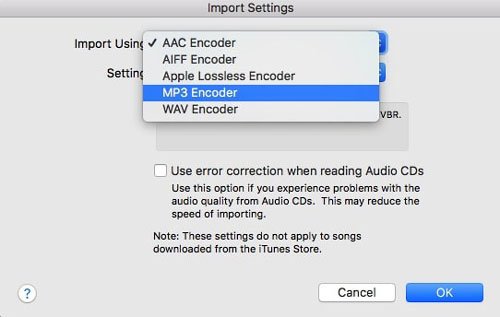
Schritt 2. Legen Sie die CD ein. Wenn die Titelliste erscheint, markieren Sie alle Titel (Strg+A oder Cmd+A).
Schritt 3. Klicken Sie auf die Optionen (drei Punkte) oder das Zahnradsymbol und wählen Sie CD-Tracks zusammenfügen.
Schritt 4: Klicken Sie auf „CD importieren“. Wiederholen Sie dies für jede CD. Die Software konvertiert dann jeden Titel in … MP3 Format.
Rippen einer Hörbuch-CD MP3 Die Verwendung von iTunes ist unkompliziert, aber gerade bei Hörbüchern sollte man auf die Kapitelorganisation und die Dateiverkettung achten, damit man nicht am Ende 100 winzige Dateien für ein einziges Buch hat.
Teil 3. Eine Hörbuch-CD rippen MP3 Die Verwendung von WinWindows Media Player
Wenn Sie eingeschaltet sind WinBei Dows 10 oder 11 können Sie die Windows Media Player Legacy zum Rippen von Hörbuch-CDs MP3.
Schritt 1: Öffne WinÖffnen Sie den Windows Media Player. Gehen Sie zu Rip-Einstellungen > Format und wählen Sie aus MP3.
Schritt 2. Gehen Sie zu Rip-Einstellungen > Audioqualität und wählen Sie 192 Kbps.
Schritt 3. Legen Sie Ihre CD ein und klicken Sie auf CD rippen.
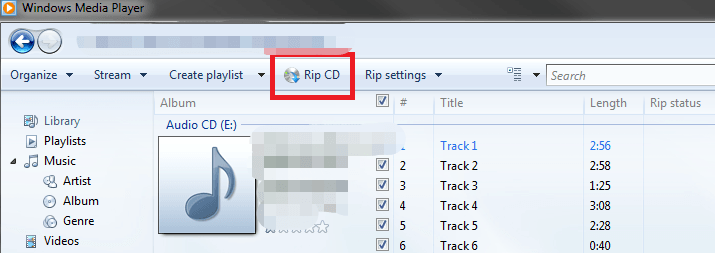
Dies ist eine der einfachsten kostenlosen Methoden, die es gibt. WinDer Dows Media Player verfügt nicht über eine Funktion zum Zusammenfügen von Titeln, daher erhalten Sie mehrere Dateien pro CD. Die Dateiverwaltung ist manuell.
Teil 4. Häufige Probleme beim Rippen von Hörbuch-CDs
Das Rippen von CDs ist zwar eine zuverlässige Methode, um die eigene Musikbibliothek zu digitalisieren, doch birgt dieser Prozess oft einige frustrierende Hürden:
- Hoher Zeitaufwand: Hörbücher umfassen häufig 10 oder mehr CDs, wodurch eine einfache Aufgabe zu einer langsamen, sich wiederholenden Angelegenheit wird.
- Fragmentierte Ausgabe: Viele Ripping-Tools exportieren jeden Track als separate Datei, sodass man am Ende Hunderte von kleinen Clips anstelle eines nahtlosen Hörbuchs erhält.
- Metadatenlücken: Automatisierte Datenbanken erkennen ältere oder Nischen-Hörbücher oft nicht, sodass Sie Titel, Autoren und Kapitelmarkierungen manuell eingeben müssen.
- Hardwareknappheit: Die meisten modernen Laptops und Desktop-PCs verfügen nicht mehr über interne optische Laufwerke, sodass der zusätzliche Aufwand und die Unordnung eines externen CD-Laufwerks hinzukommen.
Teil 5. So laden Sie Audible-Bücher herunter MP3 (Beste Lösung)
Aufgrund von Abspielbeschränkungen steigen viele Nutzer von CDs auf digitale Hörbuchplattformen um. Digitale Hörbücher bieten sofortigen Zugriff (keine physischen Datenträger) und Kompatibilität mit verschiedenen Geräten. Es gibt jedoch eine Herausforderung: Die meisten Plattformen (wie Audible) verwenden DRM-Schutz, der die Wiedergabemöglichkeiten einschränkt.
Wenn Sie die Flexibilität von MP3 Ohne die Verwendung von CDs ist der effizienteste Ansatz folgender: digitale Hörbücher umwandeln in MP3 Format. Das ist wo DumpMedia Akustischer Konverter nützlich wird.
Kostenloser Download Kostenloser Download
Warum DumpMedia Hörbarer Konverter?
- ✅ DRM-Schutz entfernen* Dieses Tool entfernt den DRM-Schutz und ermöglicht Ihnen so die volle Kontrolle über Ihre Dateien.
- ✅ Konvertieren Sie Audible in MP3 Leicht: Sie können Audible-Bücher schnell herunterladen auf MP3 und andere Formate wie M4A oder FLAC.
- ✅ Hochgeschwindigkeitskonvertierung: Konvertieren Sie ganze Hörbücher in wenigen Minuten.
- ✅ Verlustfreie Qualität: Kein Qualitätsverlust während der Konvertierung.
- ✅ Funktioniert auf mehreren Geräten: Hören Sie Ihre Hörbücher offline ab überall nach der Konvertierung.
Statt CDs zu rippen, können Sie eine vollständig digitale Hörbuchbibliothek erstellen, die auf jedem Gerät funktioniert.
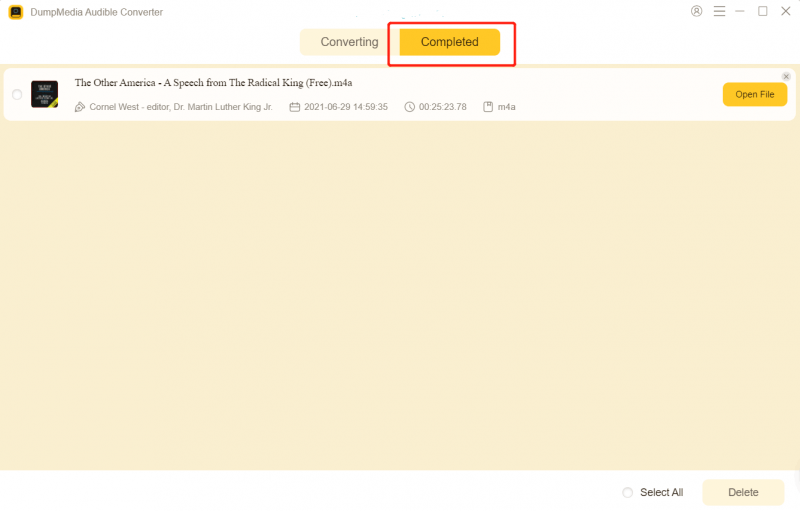
Anleitung von DumpMedia Audible Converter (Ein vollständiger Leitfaden) >>>
Teil 6. Fazit
Hörbuch-CDs rippen MP3 ist zwar auch 2026 noch möglich, aber zunehmend veraltet und ineffizient. Tools wie iTunes und WinDer Dows Media Player kann zwar seinen Zweck erfüllen, erfordert aber Zeit, Aufwand und Hardware, über die viele Benutzer heutzutage nicht mehr verfügen.
Wenn Sie eine schnellere und flexiblere Lösung suchen, sollten Sie auf digitale Hörbücher umsteigen und diese nutzen. DumpMedia Audible Converter ist die intelligentere Wahl. Keine CD-Laufwerke nötig, schnellere Verarbeitung (kein Disc-Wechsel) und echtes Offline-Hören. DumpMedia ein moderner Ersatz für herkömmliche CD-Workflows.
Kostenloser Download Kostenloser Download
*DumpMedia Funktioniert, indem Ihre Hörbücher entschlüsselt und in DRM-freie Dateien heruntergeladen werden, sodass Sie eine saubere, uneingeschränkte Kopie Ihrer Bibliothek für jedes Gerät erhalten.