


So laden Sie Musik von Amazon herunter MP3 Spieler (Schnelle, verlustfreie Methode)
Wenn Sie sich fragen wie man Musik von Amazon herunterlädt MP3 SpielerSie sind nicht allein. Viele Nutzer möchten ihre Lieblingsspiele genießen. Amazon Musik Viele hören Musik auf ihren Mobilgeräten, merken aber schnell, dass der DRM-Schutz Einschränkungen mit sich bringt. In diesem Leitfaden zeigen wir Ihnen genau, wie Sie Amazon-Songs auf Ihr Mobilgerät herunterladen können. MP3 Spieler, der die effizienteste und zuverlässigste Methode anwendet, die heute verfügbar ist.
Inhaltsverzeichnis Teil 1: Warum Sie Amazon Music nicht direkt herunterladen können MP3 SpielerTeil 2: Der beste Weg, Musik von Amazon herunterzuladen MP3 SpielerTeil 3: Häufig gestellte FragenTeil 4: Zusammenfassung
Teil 1: Warum Sie Amazon Music nicht direkt herunterladen können MP3 Spieler
Bevor ich lerne, wie man Musik von Amazon herunterlädt MP3 Für den Spieler ist es wichtig, die Einschränkung zu verstehen. Amazon Music-Titel (insbesondere von Prime und Unlimited) sind durch DRM (Digital Rights Management) geschützt. Das bedeutet:
- Lieder können nicht direkt übertragen werden auf MP3
- Die Dateien entsprechen nicht dem Standard. MP3 Format
- Die Wiedergabe ist auf die Amazon Music-App beschränkt.
Wenn Sie also versuchen, sich zu bewegen heruntergeladene Songs auf Ihre MP3 Für diesen Player funktionieren sie einfach nicht. Um dieses Problem zu lösen, benötigen Sie ein professionelles Tool, das den DRM-Schutz entfernen und die Dateien konvertieren kann. MP3 Format.
Teil 2: Der beste Weg, Musik von Amazon herunterzuladen MP3 Spieler
Die effektivste Lösung, um Musik von Amazon herunterzuladen MP3 Der Spieler verwendet DumpMedia Amazon Music ConverterDieses Tool wurde speziell entwickelt, um Nutzern bei der Konvertierung von Amazon Music zu helfen. MP3 und anderen gängigen Formaten, wodurch die Übertragung und Wiedergabe auf jedem beliebigen Gerät problemlos möglich ist. MP3 Player.
Kostenloser Download Kostenloser Download
Vorteile :
- Konvertieren Sie Amazon Music in MP3 leicht
- DRM-Schutz* automatisch entfernen
- Originale Audioqualität beibehalten (bis zu 320 kbps)
- Stapelweises Herunterladen von Wiedergabelisten und Alben
- Funktioniert bei beiden Windows und Mac
*DumpMedia Funktioniert, indem Ihre Hörbücher entschlüsselt und in DRM-freie Dateien heruntergeladen werden, sodass Sie eine saubere, uneingeschränkte Kopie Ihrer Bibliothek für jedes Gerät erhalten.
Laden Sie Amazon Music herunter MP3
Wie man Musik von Amazon herunterlädt MP3 Player? Folgen Sie diesen Schritten, um Ihre Amazon-Titel in Ihren Player zu importieren. MP3 zuerst:
Schritt 1: Öffnen Sie die Software auf Ihrem Computer. Sie funktioniert mit beiden. WinWindows und Mac. Die Benutzeroberfläche ist benutzerfreundlich und daher auch für Anfänger leicht zu bedienen.
Kostenloser Download Kostenloser Download
Schritt 2: Öffnen Sie den integrierten Amazon Music Webplayer in DumpMedia Melden Sie sich mit Ihrem Amazon Music-Konto an. Durchsuchen Sie Amazon Music und ziehen Sie die gewünschten Songs, Alben oder Playlists in den Konverter.
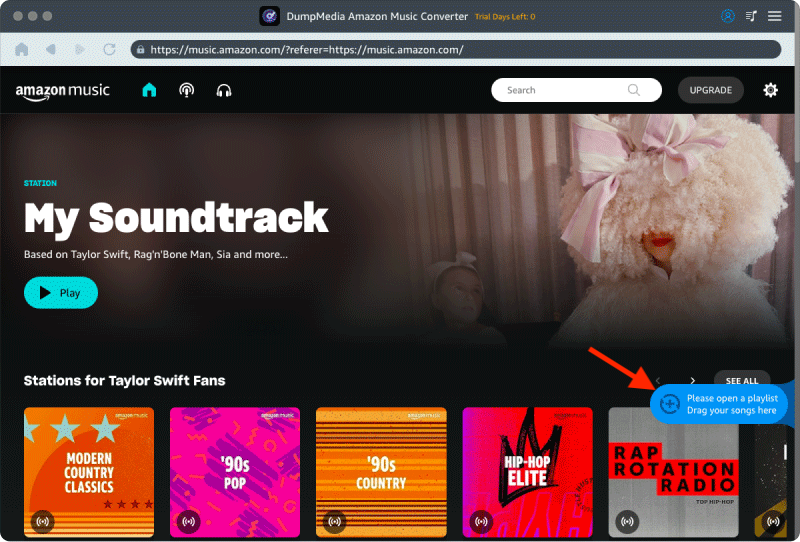
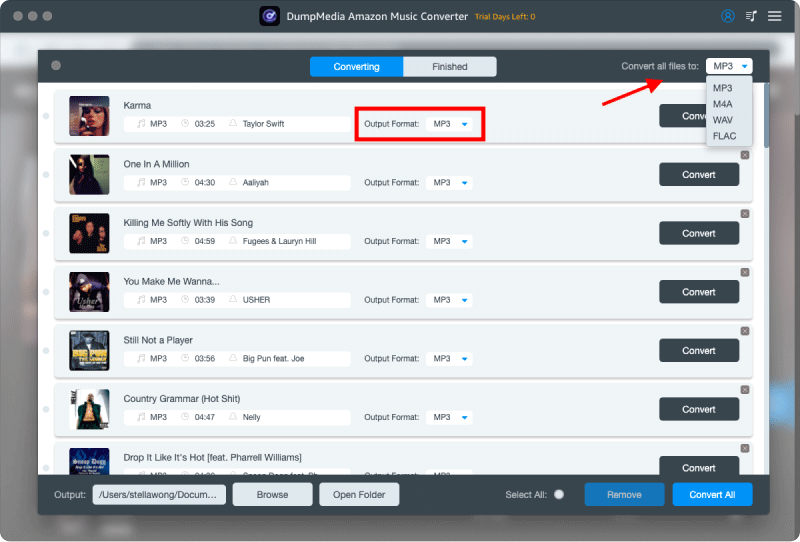
Schritt 3: Im Einstellungsfenster auswählen MP3 als Ausgabeformat, um ein MP3 Download der ausgewählten Titel.
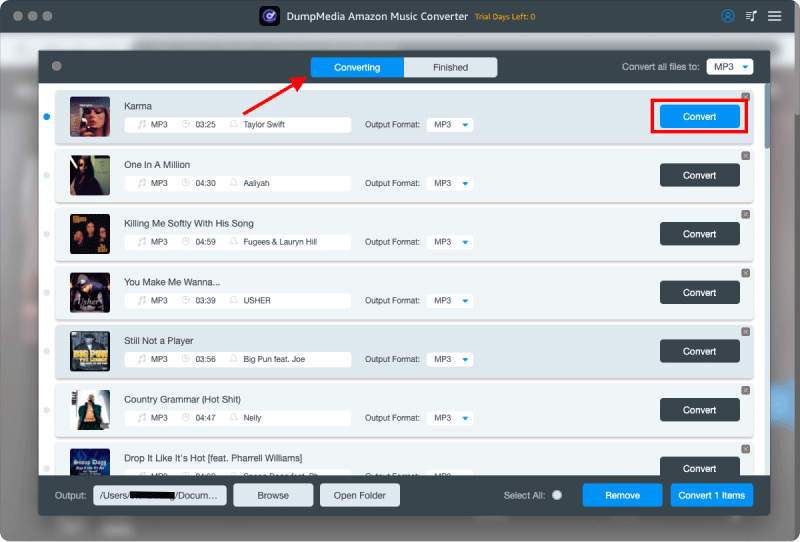
Schritt 4: Der letzte Schritt wäre das Klicken auf die Schaltfläche „Konvertieren“, um den Konvertierungsprozess zu starten.
Übertragen Sie Amazon Music auf MP3 Spieler
Wie man Musik von Amazon herunterlädt MP3 Spieler? Folgen Sie diesen Schritten:
Für die meisten Nicht-Apple-Geräte (wie z. B. Sony Walkman, Shanling, FiiO oder Standardgeräte) MP3 Spieler)
- verbinden Sie Ihren MP3 Verbinden Sie den Player mithilfe eines Datenkabels mit Ihrem Computer.
- Ihr Computer erkennt es als „Wechseldatenträger“ (sichtbar unter „Dieser PC“). Win(entweder in der Datei oder in der Finder-Seitenleiste auf dem Mac).
- Öffnen Sie auf Ihrem Computer den Ordner, in dem Ihre heruntergeladenen Amazon Music-Dateien gespeichert sind.
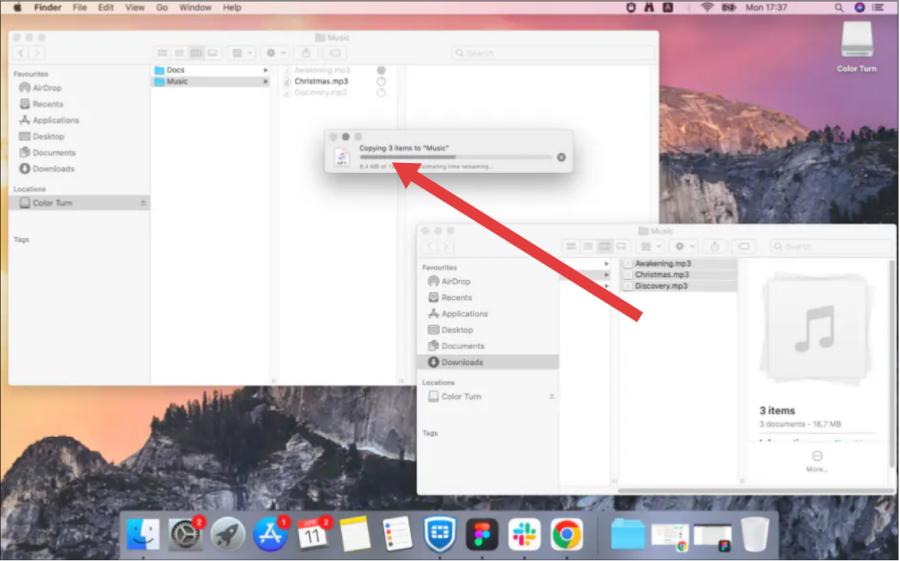
- Ziehen Sie die ausgewählten Musikdateien direkt in den Ordner „Musik“ auf Ihrem Computer. MP3 Player.
- Klicken Sie mit der rechten Maustaste auf das Laufwerk und wählen Sie „Auswerfen“, bevor Sie das Datenkabel abziehen, um eine Beschädigung der Dateien zu verhindern.
Für Apple-Geräte (iPod oder iOS-kompatibler Player)
- Verbinden Sie Ihr Gerät mit Ihrem Computer.
- Öffnen Sie Apple Music (Mac) oder iTunes (Windows).
- Importieren Sie Ihre lokale Amazon Music-Installation. MP3 Dateien in Ihre Bibliothek importieren (Datei > Importieren).
- Klicken Sie auf das Gerätesymbol, wählen Sie „Musik synchronisieren“ und klicken Sie dann auf „Anwenden“.
Teil 3: Häufig gestellte Fragen
Kann ich Amazon Music direkt auf einen Computer herunterladen? MP3 Spieler?
Nein. Aufgrund des DRM-Schutzes wird eine direkte Übertragung nicht unterstützt. Sie müssen die Dateien zuerst konvertieren.
Ist es sicher zu bedienen DumpMedia Amazon Music Converter?
Ja, es ist sicher und hat keine Auswirkungen auf Ihr Amazon Music-Konto oder die Originaldateien.
Geht die Audioqualität nach der Konvertierung verloren?
Nein. DumpMedia gewährleistet eine hohe Ausgabequalität, sodass Sie das ursprüngliche Hörerlebnis beibehalten können.
Teil 4: Zusammenfassung
Jetzt wissen Sie genau, wie Sie Musik von Amazon herunterladen können. MP3 Spieler auf einfachste und effektivste Weise. Anstatt sich mit DRM-Beschränkungen herumzuschlagen, nutzen Sie DumpMedia Mit dem Amazon Music Converter genießen Sie volle Kontrolle über Ihre Musik. Herunterladen DumpMedia Jetzt Amazon Music Converter verwenden und Ihre Lieblingssongs konvertieren MP3