


So laden Sie Amazon Prime Music offline auf jedes Gerät herunter
Viele Amazon Prime- Abonnenten möchten Amazon Music herunterladen, um ihre Lieblingssongs offline genießen zu können. Ob auf Reisen, unterwegs oder einfach nur zum Datensparen – Offline-Hören verbessert das Musikerlebnis deutlich. In diesem Leitfaden erklären wir, wie Sie Amazon Music-Songs auf verschiedenen Geräten herunterladen, gehen auf gängige Einschränkungen ein und zeigen Ihnen Möglichkeiten, Ihre Offline-Musikbibliothek flexibler zu verwalten.
Inhaltsverzeichnis Teil 1. Kann man Amazon Prime Music herunterladen? Teil 2. Wie lade ich Amazon Prime Music auf mein Mobilgerät herunter? Teil 3. Wie lade ich Amazon Prime Music auf meinen PC herunter? Teil 4. Warum sind manche Amazon Prime Music-Downloads nicht verfügbar? Teil 5. Wie kann ich Amazon Prime Music dauerhaft offline speichern? Teil 6. Häufig gestellte Fragen (FAQ) Teil 7. Fazit
Teil 1. Kann man Amazon Prime Music herunterladen?
Ja. Amazon Prime-Mitglieder können Amazon Prime-Musik über die offizielle Amazon Music-App herunterladen und offline hören. Heruntergeladene Songs lassen sich ohne aktive Internetverbindung abspielen, was das Offline-Hören ideal für Reisen, Flüge oder Gebiete mit schlechter Netzabdeckung macht.
Heruntergeladene Inhalte bleiben jedoch mit Ihrem Amazon Music-Konto und Ihrem Abonnementstatus verknüpft.
Teil 2. Wie lade ich Amazon Prime Music auf mein Handy herunter?
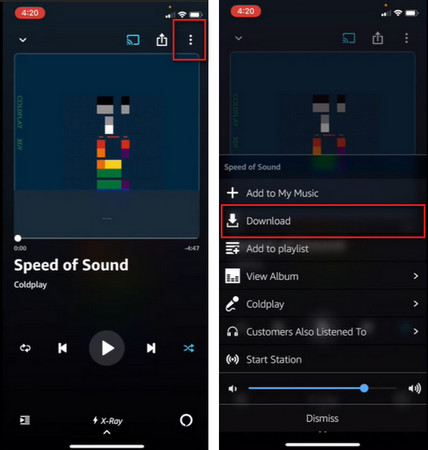
Am einfachsten lässt sich Amazon Prime-Musik offline herunterladen, indem man die Amazon Music-App auf dem Handy nutzt.
Laden Sie Amazon Prime Music auf Ihr Handy herunter
- Öffnen Sie die Amazon Music-App.
- Melden Sie sich mit Ihrem Amazon-Konto an.
- Finde die gewünschte Playlist, das Album oder den gewünschten Song.
- Tippe auf die Schaltfläche „Herunterladen“.
- Warten Sie, bis der Download abgeschlossen ist.
Nach der Installation können Sie die Musik auch ohne Internetverbindung abrufen.
Teil 3. Wie lade ich Amazon Prime Music auf den PC herunter?
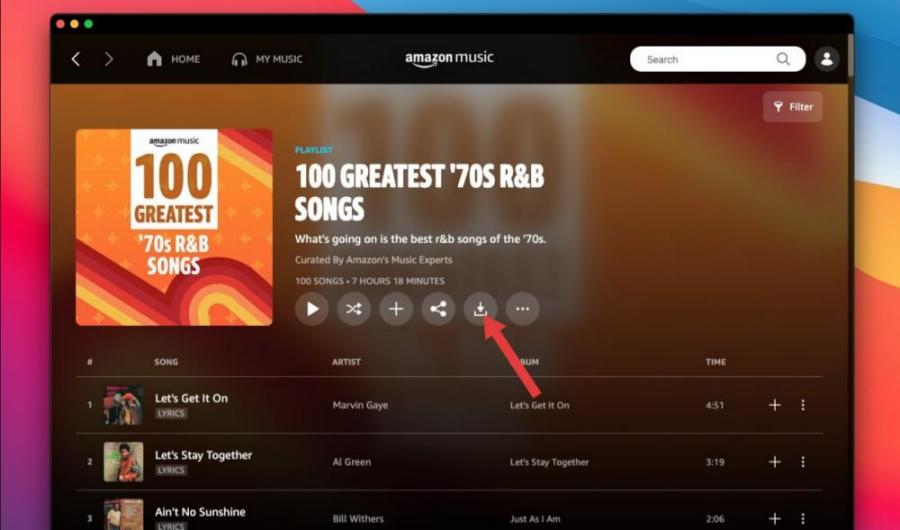
Viele Nutzer möchten Amazon Prime-Musik auch offline auf ihren Computern herunterladen. So geht's:
- Installieren Sie die Amazon Music Desktop-Anwendung.
- Melden Sie sich bei Ihrem Amazon-Konto an.
- Öffne deine Musikbibliothek.
- Wählen Sie die Musik aus, die Sie speichern möchten.
- Klicken Sie auf die Option „Herunterladen“.
Auf heruntergeladene Inhalte kann anschließend über die Amazon Music Desktop-App zugegriffen werden.
Teil 4. Warum sind einige Amazon Prime Music-Downloads nicht verfügbar?
Manchmal laden Nutzer Amazon Prime-Musik erfolgreich offline herunter, nur um später festzustellen, dass bestimmte Titel nicht mehr verfügbar sind. Dies kann verschiedene Gründe haben.
- Abonnementverifizierung: Für Offline-Downloads ist häufig eine Kontoverifizierung erforderlich. Schlägt die Verifizierung fehl, können die heruntergeladenen Lieder möglicherweise nicht abgespielt werden.
- Lizenzänderungen: Musikkataloge ändern sich häufig. Verliert Amazon die Lizenzrechte an bestimmten Titeln, sind diese Lieder möglicherweise nicht mehr verfügbar.
- Regionale Beschränkungen: Einige Lieder sind aufgrund des geografischen Standorts beschränkt. Reisen zwischen Ländern können die Verfügbarkeit gelegentlich beeinträchtigen.
- App- oder Synchronisierungsprobleme: Softwarefehler und Synchronisierungsprobleme können den Zugriff auf heruntergeladene Musik vorübergehend verhindern.
Teil 5. Wie kann man Amazon Prime Music dauerhaft offline nutzen?
Obwohl Amazon Nutzern das Herunterladen von Amazon Prime-Musik für die Offline-Nutzung ermöglicht, sind offizielle Downloads mit einigen Einschränkungen verbunden. Heruntergeladene Titel können in der Regel nur über die Amazon Music-App abgespielt werden. Nutzer können heruntergeladene Titel im Allgemeinen nicht einfach zwischen Geräten übertragen. Viele Nutzer, die nach Amazon Prime-Musik zum Download suchen, möchten eigentlich nur langfristig Zugriff auf ihre Musiksammlung behalten.
Für Nutzer, die mehr Flexibilität wünschen, DumpMedia Amazon Music Converter bietet eine praktische Lösung für die Verwaltung von Amazon Music-Inhalten. Die Software hilft Nutzern, Amazon Music-Songs in gängige Formate für die Offline-Wiedergabe zu konvertieren. Selbst wenn die Die Songs sind auf Amazon Music ausgegraut.Sie können Amazon Music-Songs sofort offline auf einem anderen Musikplayer abspielen.
Kostenloser Download Kostenloser Download
🏆Warum verwenden? DumpMedia Amazon Music Converter
- Laden Sie Amazon Music herunter MP3WAV, FLAC und AAC
- Integration mit dem Amazon Music Webplayer
- Bewahren Sie die ursprüngliche Klangqualität
- Stapelweises Herunterladen von Wiedergabelisten und Alben
- Schnelle Umwandlung Geschwindigkeit
- Song-Metadaten und ID3-Tags beibehalten
- Unterstützung für die Offline-Wiedergabe auf jedem Gerät
Durch die Konvertierung von Musik in weit verbreitete Audioformate können Nutzer ihre Lieblingssongs auf einer größeren Bandbreite von Geräten genießen.
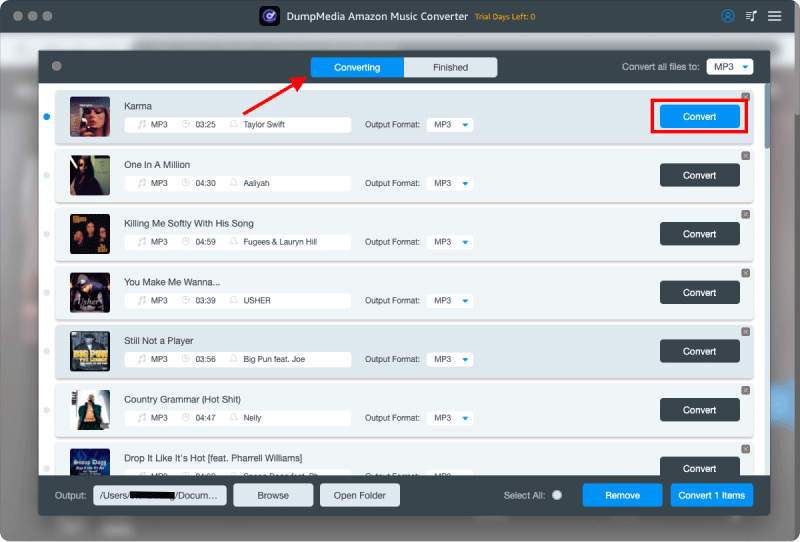
Konvertieren Sie Amazon Music in MP3 Schritt für Schritt
Schritt 1: Laden Sie DumpMedia Installieren Sie den Amazon Music Converter auf Ihrem Mac/PC. Starten Sie das Programm, und die Benutzeroberfläche wird angezeigt. Melden Sie sich mit Ihrem Amazon Music-Konto an.
Kostenloser Download Kostenloser Download
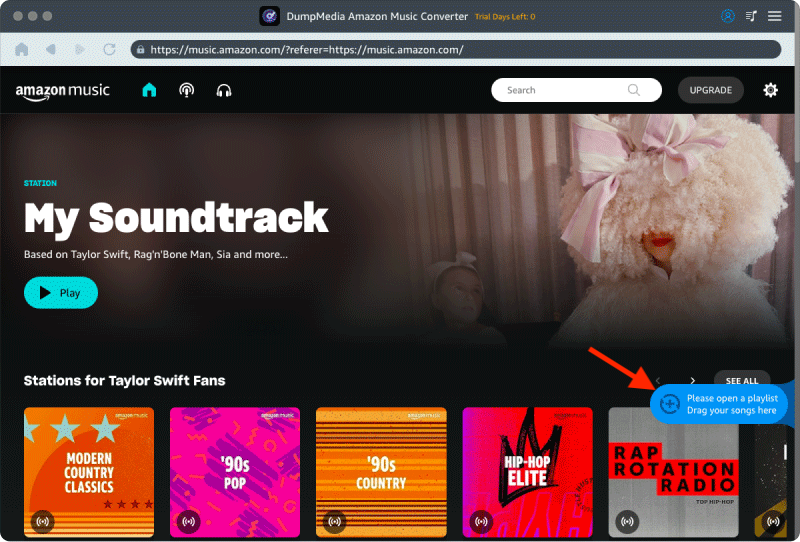
Schritt 2. Suchen Sie die Playlist, das Album oder den gewünschten Song, den Sie konvertieren möchten. Sie können einen einzelnen Song auf das „+“-Symbol rechts auf dem Bildschirm ziehen. Alternativ können Sie eine ganze Playlist/ein ganzes Album öffnen und auf das Symbol „Zum Konvertieren hinzufügen“ klicken, um die gesamte Liste in den Konverter zu laden.
Schritt 3: Auswählen MP3 (Am besten kompatibel). Sie können auch die Bitrate oder die Abtastrate ändern. Für ein optimales Verhältnis wählen Sie 320 kbps.
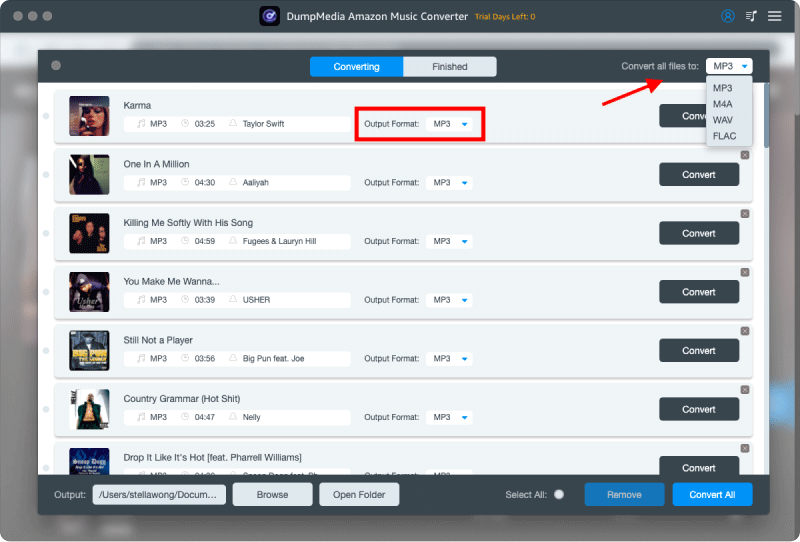
Schritt 4: Sobald die Einstellungen abgeschlossen sind, können Benutzer die Konvertierung durch Klicken auf das Symbol „Konvertieren“ durchführen. Dann DumpMedia wird Amazon Music-Songs herunterladen MP3 innerhalb von Sekunden dank seiner superschnellen Geschwindigkeit.
Teil 6. Häufig gestellte Fragen
Kann ich Amazon Prime Music offline herunterladen?
Ja. Geeignete Songs, Alben und Playlists können über die Amazon Music App zum Offline-Hören heruntergeladen werden.
Wo werden Amazon Music-Downloads gespeichert?
Downloads werden innerhalb der Amazon Music-Anwendung gespeichert und sind in der Regel nicht als Standard-Audiodateien verfügbar.
Verfallen Amazon Music-Downloads?
Heruntergeladene Inhalte sind möglicherweise nicht mehr verfügbar, wenn Abonnements auslaufen oder Lizenzänderungen erfolgen.
Kann ich Amazon Music-Downloads auf ein anderes Gerät übertragen?
Offizielle Downloads können in der Regel nicht so frei weitergegeben werden wie herkömmliche Downloads. MP3 Dateien.
Kann ich Amazon Prime Music offline herunterladen? MP3?
Amazon Music bietet normalerweise keine heruntergeladenen Songs an. MP3 Dateien werden über die offizielle App bereitgestellt.
Teil 7. Fazit
Viele Nutzer möchten Amazon Prime-Musik herunterladen, um sie offline genießen zu können, egal wo sie sich gerade befinden. Offizielle Downloads sind jedoch mit gewissen Einschränkungen verbunden, darunter die Abhängigkeit von einem Abonnement, Wiedergabebeschränkungen und eine begrenzte Flexibilität bei der Dateiformatierung. Wenn Sie diese Einschränkungen kennen, können Sie die beste Methode wählen, um Ihre Musiksammlung zu verwalten und ein komfortableres Offline-Hörerlebnis zu genießen.