


Varför är Spotify Så långsamt? Beprövade lösningar år 2026
Om du undrar varför Spotify är så långsamt, du är inte ensam. Många användare upplever buffring, lagg i uppspelning eller försenad inläsning när de använder Spotify, även med en stabil internetanslutning. I den här guiden kommer vi att förklara i detalj varför det är Spotify så långsam, vad orsakar det och hur du kan åtgärda det permanent. Ännu viktigare är att vi också visar dig en långsiktig lösning för att förbättra din Spotify lyssningsupplevelse utan avbrott.
Innehållsguide Del 1. Varför är Spotify Plötsligt långsam? Huvudorsaker förklaradeDel 2. Hur man fixar Spotify Att vara långsam permanentDel 3. Bästa sättet att förbättra sig Spotify LyssningsupplevelseDel 4. Vanliga frågorDel 5. Slutsats
Del 1. Varför är Spotify Plötsligt långsam? Huvudorsaker förklarade
Det finns flera anledningar till varför det är Spotify så långsamma, och de flesta av dem är relaterade till appens prestanda, nätverksförhållanden eller enhetsbegränsningar.
1. Dålig internetanslutning
En av de vanligaste anledningarna till varför Spotify är så långsam är instabil internethastighet. Även små fluktuationer kan orsaka buffring eller fördröjd uppspelning.
2. Spotify Cacheöverbelastning
Över tid, Spotify lagrar cachefiler för att förbättra prestandan. Men för mycket cachad data kan faktiskt göra appen långsammare och är en viktig anledning till varför det är Spotify så långsamt på många enheter.
3. Föråldrad appversion
Använda en föråldrad Spotify versionen kan leda till prestandaproblem. Buggar och kompatibilitetsproblem förklarar ofta varför det är Spotify Appen är så långsam efter uppdateringar.
4. Begränsningar i enhetens prestanda
Lågt minne eller äldre enheter kan ha svårt att hantera Spotify smidigt, vilket är en annan vanlig anledning till att Spotify appen är så långsam.
5. Bakgrundsappar som förbrukar resurser
Om flera appar körs i bakgrunden, Spotify kan lagga på grund av begränsade systemresurser, vilket bidrar till varför det är Spotify så långsamt under uppspelning.
6. Spotify Inställningar
Många användare rapporterar det Spotify blir bara långsam vid streaming av låtar. Detta är vanligtvis relaterat till justering av bithastighet för streaming eller adaptiv kvalitetsväxling. Dessa faktorer förklarar varför är Spotify så långsam, särskilt vid musikuppspelning men inte vid användning av andra appar.
Del 2. Hur man fixar Spotify Att vara långsam permanent
Är ditt Spotify Laggar, hackar eller tar det evigheter att ladda? Här är några effektiva sätt att förbättra prestandan:
1. Rensa Spotify Cache
Över tid, Spotify lagrar stora mängder tillfällig data och "cachade" spår för att snabba uppspelningen. En överdimensionerad eller skadad cache kan dock faktiskt ha motsatt effekt, vilket leder till betydande fördröjning. Om du rensar detta i appinställningarna tvingas programvaran att uppdatera sin datastruktur.
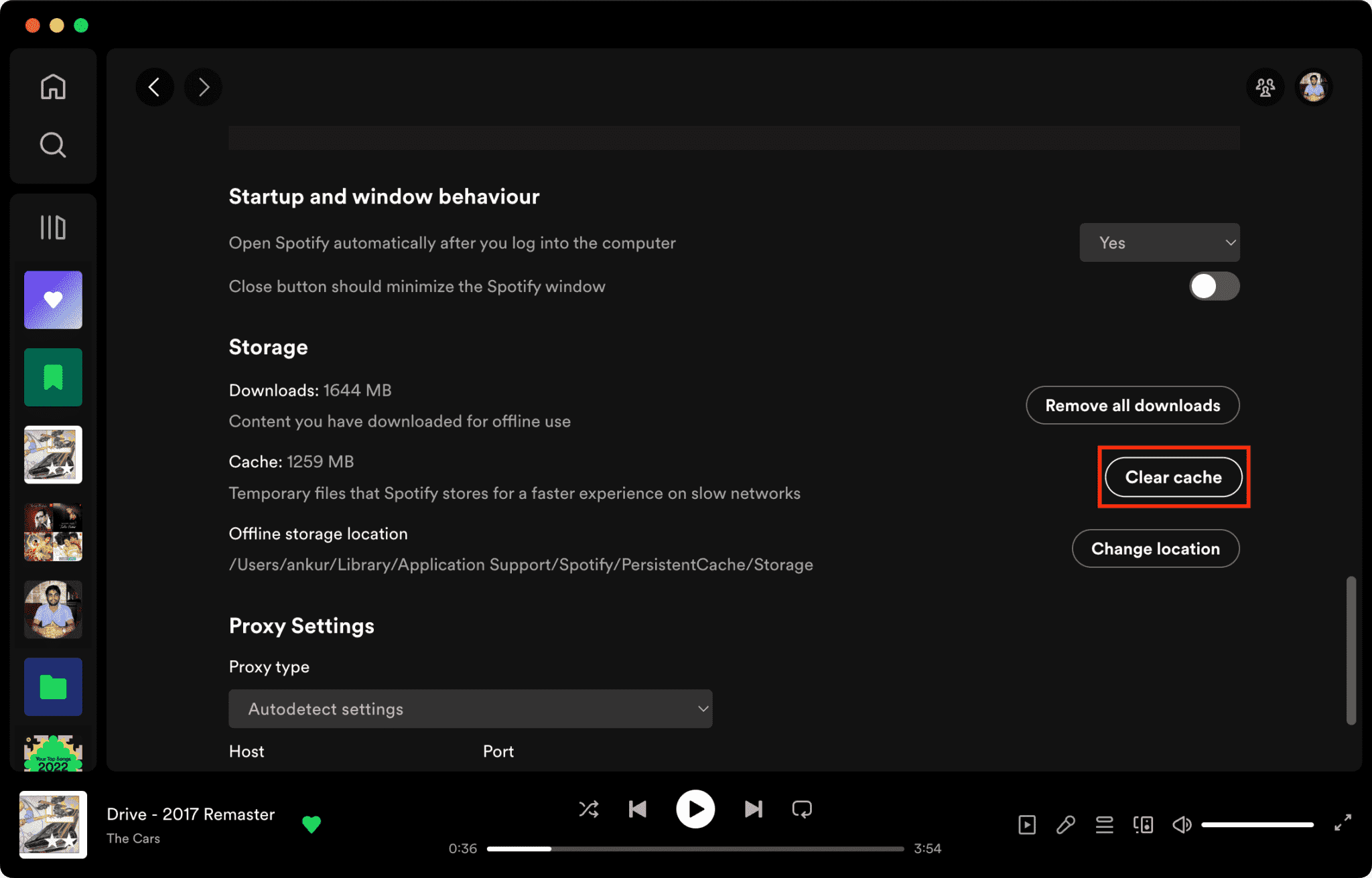
Relaterade Artikel: Hur man rensar Spotify Cache på dator/mobil >>>>>>
2. Starta om programmet
Att utföra en manuell omstart är ett grundläggande felsökningssteg som effektivt åtgärdar många underliggande orsaker till varför det är Spotify så långsamt. Den här processen tömmer programmets tillfälliga minne (RAM) och tvångsavslutar alla "zombietrådar" eller redundanta bakgrundsprocesser som kan förbruka systemresurser. Genom att rensa dessa flaskhalsar i exekveringen kan programvaran initiera en ren session, vilket ofta löser de ihållande hängningarna och gränssnittsfördröjningen som stör streamingupplevelsen.
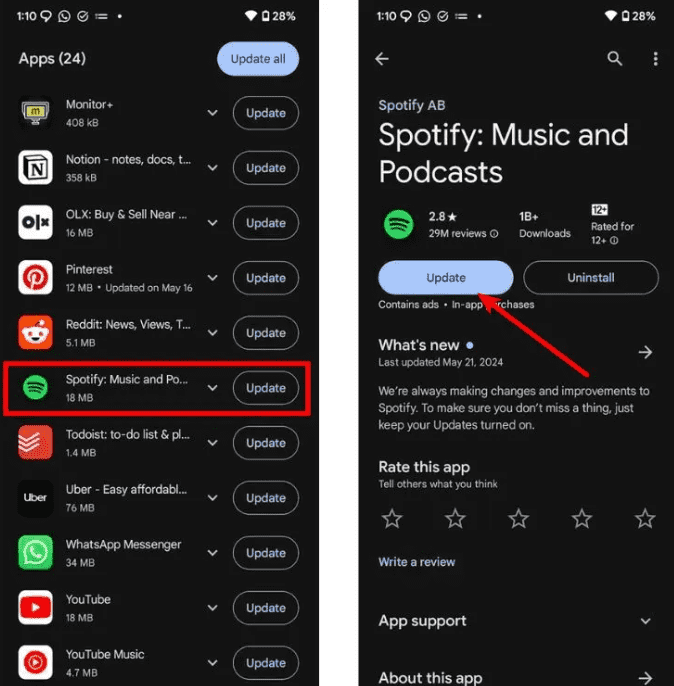
3. Uppdatera till den senaste versionen
Utvecklare släpper ofta patchar för att åtgärda minnesläckor och kompatibilitetsbuggar. Att köra en föråldrad version av Spotify betyder att du går miste om dessa viktiga prestandaoptimeringar.
4. Utför en ren ominstallation
Om prestandaproblemen kvarstår är en ren ominstallation ofta nödvändig. Detta tar bort alla tillhörande biblioteksfiler och registerposter som kan vara skadade, vilket ger en "fabriksny" miljö för programvaran.
5. Växla mellan Wi-Fi och mobildata
Nätverksbelastning eller en "DNS-hängning" kan ofta vara boven i dramat bakom långsamma laddningstider. Att byta anslutningstyp kan kringgå lokala nätverksstörningar och hjälpa till att identifiera om problemet ligger hos din internetleverantör (ISP) snarare än själva appen.
Dessa steg kan tillfälligt minska problem relaterade till varför är Spotify så långsamma, men de löser inte streaminginstabilitet permanent.
Del 3. Bästa sättet att förbättra sig Spotify Lyssningsupplevelse
Om du vill undvika buffring, lagg eller streamingfördröjningar helt och hållet är den mest effektiva lösningen att lyssna på musik offline utan att förlita dig på instabil streaming. Här rekommenderar vi DumpMedia Spotify Music Converter.
Gratis nedladdning Gratis nedladdning
Med det här verktyget kan du:
- Konvertera Spotify Musik till MP3, WAV, FLAC
- Lyssna offline utan buffring
- Undvik streamingförseningar helt
- Spela musik på vilken enhet som helst
- Behåll låtar permanent
Istället för att ständigt fråga varför Spotify Så långsamt att den här metoden eliminerar problemet vid källan: beroendet av livestreaming. Genom att använda konverteringsverktyg för att omvandla krypterade strömmar till lokaliserade tillgångar kan användare kringgå de inneboende begränsningarna hos onlineplattformar, såsom buffring, nätverksberoende, uppspelningsfördröjning med mera.
Hur man laddar ner Spotify Låtar till MP3
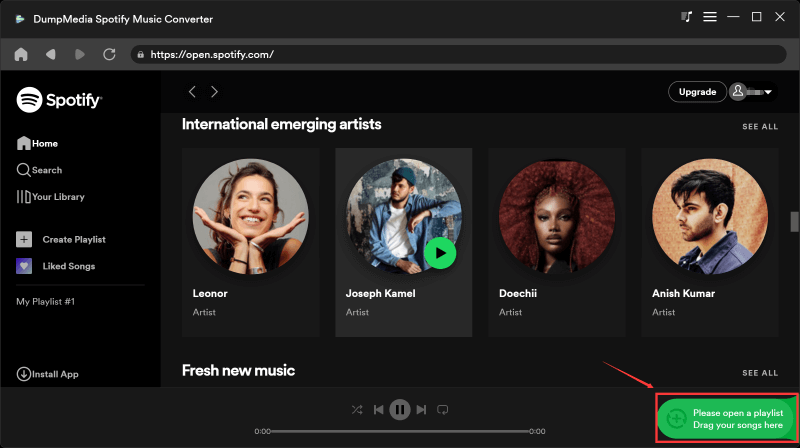
Steg 1. Ladda ned och installera DumpMedia Spotify Music Converter till din Mac/Windows. Starta den och du kommer att se gränssnittet. Använd din Spotify Premium/gratis konto för att logga in.
Gratis nedladdning Gratis nedladdning
Steg 2. Nu kan du navigera till de låtar du vill ladda ner. Du kan dra dem direkt till konverteringslistan.
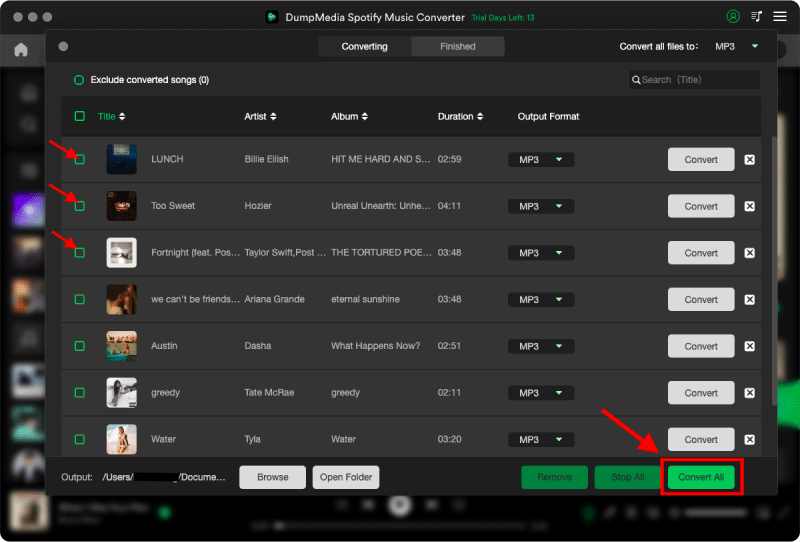
Steg 3. På konverteringsgränssnittet kan du välja utdataformat som MP3och ställ in samplingsfrekvens eller bithastighet under Inställningar. Välj även en mapp där filerna ska sparas.

Steg 4. Slutligen, tryck på knappen "Konvertera" längst ned på sidan, och programvaran kommer att påbörja konverteringsprocessen.
För avancerade användare som prioriterar en sömlös upplevelse med hög upplösning, DumpMedia Spotify Music Converter fungerar som en permanent lösning på streaminginstabilitet, och går bortom tillfälliga appfixar för att uppnå verklig offline-autonomi.
Del 4. Vanliga frågor
Varför är Spotify Appen så långsam på mobilen?
Vanligtvis på grund av svag signal, bakgrundsappar eller överbelastning av cache.
Varför är Spotify så långsamt på wifi?
Det kan orsakas av routerns instabilitet eller problem med DNS-routing.
Varför är Spotify Så långsamt men internet är snabbt?
Detta beror ofta på appens cache eller problem med enhetens prestanda.
Hur fixar jag det permanent Spotify eftersläpning?
Den mest pålitliga lösningen är att minska beroendet av streaming genom att använda verktyg för offline musikkonvertering.
Del 5. Slutsats
Om du ofta frågar varför Spotify så långsamt att problemet oftast inte är en enda orsak utan en kombination av nätverks-, enhets- och apprelaterade problem. Även om enkla åtgärder kan förbättra prestandan tillfälligt, kommer den mest stabila lyssningsupplevelsen från att helt eliminera streamingberoendet med hjälp av verktyg som DumpMedia Spotify Music Converter.

30% rabatt >>>