


Streamlabs SpotifyHur man spelar Spotify Musik på Streamlabs OBS
Många streamers vill använda Spotify musik under sändning Strömmar OBS för att skapa en bättre tittarupplevelse. Det är därför många användare söker efter Streamlabs Spotify lösningar online. Men att konfigurera Streamlabs med Spotify är inte så enkelt som många förväntar sig. I den här guiden kommer vi att förklara om Streamlabs OBS stöder Spotify, begränsningarna av Spotify streaming på Streamlabs, och det bästa sättet att använda Spotify musik mer flexibelt med Streamlabs OBS.
Innehållsguide Del 1. Stöder Streamlabs OBS? Spotify?Del 2. Bästa sättet att använda Spotify med Streamlabs OBSDel 3. Vanliga frågorDel 4. Sammanfattning
Del 1. Stöder Streamlabs OBS? Spotify?
En av de vanligaste frågorna relaterade till Streamlabs Spotify är om Streamlabs OBS officiellt stöder Spotify integration. Svaret är nej.
Varför Spotify Kan vara svårt att använda på Streamlabs OBS
Även om Streamlabs Spotify uppsättningar är populära bland streamers, Spotify strömning har flera tekniska och praktiska begränsningar.
För närvarande tillhandahåller inte Streamlabs OBS native Spotify integration för import eller hantering Spotify spår direkt i programvaran. De flesta streamers spelar helt enkelt upp Spotify musik i bakgrunden och låta Streamlabs OBS spela in skrivbordsljud.
Å andra sidan, Spotify låtar är skyddade av DRM-teknik, vilket förhindrar att användare får direkt åtkomst Spotify musikfiler. Musikfiler är inte åtkomliga utanför Spotify app. Detta gör det svårare att hantera lokal ljud i Streamlabs OBS.
Vad mer, Spotify Strömning kräver en stabil internetanslutning. Under direktsändningar kan dåliga nätverksförhållanden orsaka uppspelningsavbrott eller buffring. För professionella streamingmiljöer är lokal ljuduppspelning ofta mer tillförlitlig.
På grund av dessa begränsningar söker många användare efter Streamlabs Spotify lösningar letar så småningom efter mer stabila metoder för offline-uppspelning.
Del 2. Bästa sättet att använda Spotify med Streamlabs OBS
Även om Streamlabs Spotify integrationen är begränsad, det finns fortfarande en effektiv lösning. Den bästa lösningen är att konvertera Spotify låtar till lokala MP3 filer och sedan lägga till lokala musikfiler till Streamlabs OBS. Den här metoden ger bättre uppspelningskontroll och undviker många streamingrelaterade problem.
För att uppnå detta förlitar sig många användare på DumpMedia Spotify Music ConverterDenna professionella Spotify konverteraren hjälper användare att ladda ner och konvertera Spotify låtar till vanliga ljudformat som är kompatibla med Streamlabs OBS.
Gratis nedladdning Gratis nedladdning
🏆Viktiga funktioner hos DumpMedia Spotify Music Converter
- Ladda ner Spotify podcast eller musik till MP3, WAV, FLAC och AAC
- ta bort Spotify musik-DRM skydd*
- Behåll originalljudkvaliteten
- Ladda ner spellistor och album i batch
- Snabb omvandlingshastighet
- Bevara låtmetadata och ID3-taggar
- Stöd för offlineuppspelning på alla enheter
Hur man spelar Spotify Musik på Streamlabs OBS
Steg 1. Ladda ned och installera DumpMedia Spotify Music Converter på din Mac/PC. Starta den så ser du gränssnittet. Använd din Spotify Premium/gratis konto för att logga in.
Gratis nedladdning Gratis nedladdning
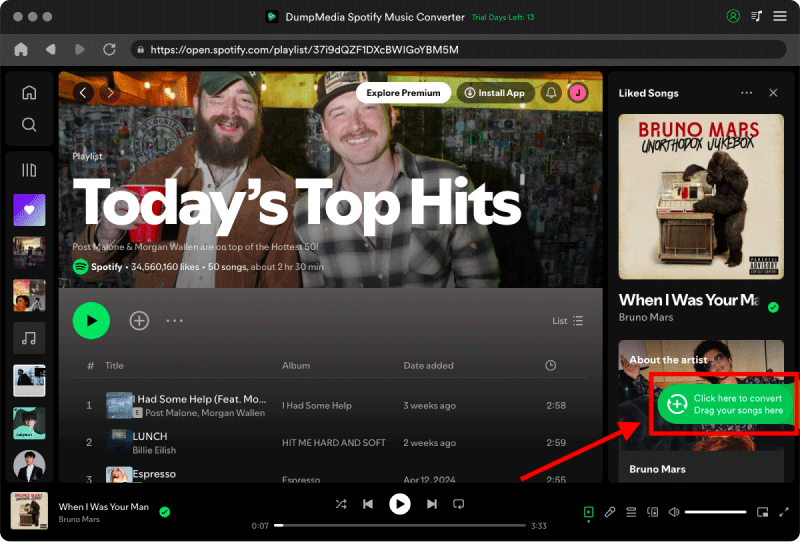
Steg 2. Hitta spellistan, albumet eller den specifika låten du vill konvertera. Du kan dra en enskild låt till "+"-ikonen på höger sida av skärmen. Alternativt kan du öppna en hel spellista/album och klicka på ikonen "Lägg till i konverter" för att ladda hela listan i konverteraren.
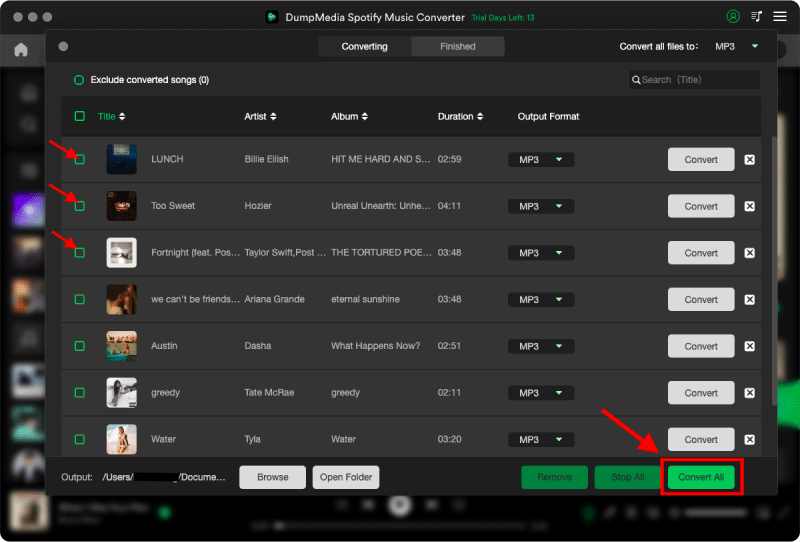
Steg 3. Välja MP3 (mest kompatibel). Du kan också ändra bithastighet eller samplingshastighet. För bästa balans, välj 320 kbps.

Steg 4. När inställningarna är klara kan användarna genomföra konverteringen genom att trycka på ikonen "Konvertera". DumpMedia kommer att konvertera Spotify låtar till MP3 inom några sekunder med sin supersnabba hastighet.
Steg 5. Starta Streamlabs OBS på din dator.
Steg 6. Importera den konverterade Spotify MP3 filer till din ljudkälla.
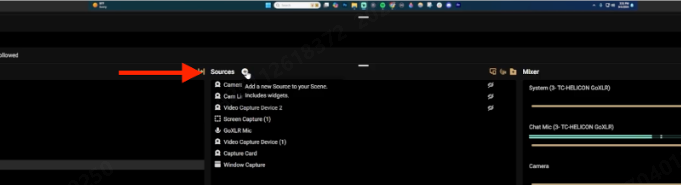
Steg 7. Justera ljudnivåerna för bakgrundsmusik, mikrofon, spelljud eller skrivbordsljud.
Nu kan du använda Streamlabs Spotify uppspelning jämnare under livestreams.
Del 3. Vanliga frågor
Kan Streamlabs OBS använda Spotify?
Ja, men Streamlabs OBS integrerar inte officiellt Spotify direkt. De flesta användare förlitar sig på ljudinspelning på skrivbordet eller lokal MP3 uppspelning.
Varför är Spotify Fungerar inte på Streamlabs OBS?
Problem med ljudrouting, DRM-begränsningar och ljudinställningar på skrivbordet kan förhindra Spotify uppspelningen fungerar inte korrekt.
Vilket är det bästa Streamlab-programmet? Spotify lösning?
Många streamers använder DumpMedia Spotify Music Converter att konvertera Spotify låtar till lokala MP3 filer för offline-uppspelning.
Kan jag använda Spotify musik under livesändningar?
Ja, men upphovsrättsrestriktioner kan gälla beroende på plattform och innehållsanvändning.
Kan jag använda Spotify Offline på Streamlabs OBS?
Officiella Spotify Nedladdningar offline förblir appbegränsade. Konverterad MP3 filer ger mer flexibel offline-uppspelning.
Is DumpMedia Spotify Music Converter säker?
Ja. Den är utformad för Spotify musikkonvertering och hantering av offlineuppspelning.
Del 4. Sammanfattning
Även om Streamlabs OBS inte officiellt stöder direkt Spotify integration, streamers kan fortfarande använda Spotify musik mer flexibelt genom lokal ljuduppspelning. För användare som letar efter en stabil Streamlabs Spotify lösning, DumpMedia Spotify Music Converter erbjuder ett effektivt sätt att konvertera Spotify låtar till lokala MP3 filer för offline-streaming och bättre ljudhantering.
Genom att använda lokala Spotify filer i Streamlabs OBS kan streamare förbättra uppspelningsstabiliteten, minska streamingavbrott och få mer kontroll över bakgrundsmusik under livesändningar.
Gratis nedladdning Gratis nedladdning
*DumpMedia fungerar genom att dekryptera och ladda ner Spotify låtar till DRM-fria filer, vilket gör att du får en ren, obegränsad kopia av ditt bibliotek för vilken enhet som helst. Dess funktionalitet inkluderar inte DRM-borttagning av lokala ljudfiler.

30% rabatt >>>