


Spotify till Virtual DJ: Använd Spotify Låtar på Virtual DJ
Många DJ:s och musikentusiaster vill få kontakt Spotify till Virtual DJ för att mixa spellistor, skapa liveset och uppträda offline. Processen är dock inte längre lika enkel som den brukade vara. I den här guiden kommer vi att förklara om Virtual DJ stöder Spotify och det bästa sättet att importera Spotify låtar till Virtual DJ med offline-uppspelning.
Innehållsguide Del 1. Stöder Virtual DJ Spotify?Del 2. Varför Spotify Kan inte arbeta direkt med Virtual DJ?Del 3. Bästa sättet att använda Spotify med virtuell DJDel 4. Hur man lägger till Spotify Låtar till Virtual DJ?Del 5. Vanliga frågorDel 6. Slutsats
Del 1. Stöder Virtual DJ Spotify?
En av de vanligaste frågorna kring anslutning Spotify till Virtual DJ är om Virtual DJ fortfarande stöder Spotify integration. Svaret är nej.
2020, Spotify justerade officiellt sin globala licensstrategi och upphörde med stödet för all DJ-programvara från tredje part (inklusive Virtuell DJ, djay Pro, Traktor, etc.) i syfte att minska juridiska risker i samband med kommersiella framträdanden och upphovsrätt. Användare kan inte längre ansluta direkt Spotify till Virtual DJ för streaminguppspelning.
Många äldre handledningar om hur man använder Spotify med Virtual DJ är nu föråldrade eftersom de skrevs tidigare Spotify upphörde med stöd för DJ-programvara. Eftersom det officiella API:et har upphört, om du vill använda Spotify musik i Virtual DJ måste du först ladda ner och konvertera Spotify spår till MP3 eller WAV-format med hjälp av en konverterare. Importera sedan dessa lokala filer till Virtual DJ.
Del 2. Varför Spotify Kan inte arbeta direkt med Virtual DJ?
Förstå varför Spotify att Virtual DJ inte längre fungerar officiellt är viktigt för DJ:s som letar efter pålitliga mixningslösningar. Kan man importera direkt Spotify låtar till Virtual DJ? Nu kör vi.
DRM-skydd
Spotify Låtar är skyddade av DRM (Digital Rights Management). Inte ens premiumanvändare kan fritt kopiera, överföra eller modifiera nedladdade spår. På grund av DRM-kryptering, offline Spotify filer fungerar bara inuti Spotify app.
Problem med strömningsstabilitet
Live-DJ-framträdanden kräver stabil uppspelning och låg latens. Streamingtjänster kan uppleva internetavbrott eller fördröjningar i laddningen av spår. För professionell DJ-mixning är lokala filer vanligtvis mer tillförlitliga än online-streaming. Det är därför många DJ:s som söker efter Spotify till Virtual DJ-lösningar föredrar nu konvertering Spotify låtar till lokala ljudformat.
Del 3. Bästa sättet att använda Spotify med virtuell DJ
Även om direkt Spotify till Virtual DJ-integration är inte tillgänglig, finns det fortfarande en praktisk lösning. Den bästa lösningen är att konvertera Spotify låtar till lokala MP3 filer och sedan importera de konverterade filerna till Virtual DJ. Den här metoden gör det möjligt för DJ:s att använda Spotify musik utan streamingbegränsningar.
För att uppnå detta förlitar sig många användare på DumpMedia Spotify Music Converter, ett proffs Spotify musiknedladdare och konverterare utformad för offline-uppspelning och kompatibilitet med DJ-programvara. Även om Spotify appen inte fungerar på din enhet kan du lek Spotify låtar offline på en annan musikspelare omedelbart.
Gratis nedladdning Gratis nedladdning
🏆Viktiga funktioner hos DumpMedia Spotify Music Converter
- Ladda ner Spotify Podcast eller musik till MP3, WAV, FLAC och AAC
- ta bort Spotify DRM-skydd för musik*
- Behåll originalljudkvaliteten
- Ladda ner spellistor och album i batch
- Snabb omvandlingshastighet
- Bevara låtmetadata och ID3-taggar
- Stöd för offlineuppspelning på alla enheter
Konvertera Spotify till MP3 Steg för steg
Steg 1. Ladda ned och installera DumpMedia Spotify Music Converter på din Mac/PC. Starta den så ser du gränssnittet. Använd din Spotify Premium/gratis konto för att logga in.
Gratis nedladdning Gratis nedladdning
Steg 2. Hitta spellistan, albumet eller den specifika låten du vill konvertera. Du kan dra en enskild låt till "+"-ikonen på höger sida av skärmen. Alternativt kan du öppna en hel spellista/album och klicka på ikonen "Lägg till i konverter" för att ladda hela listan i konverteraren.
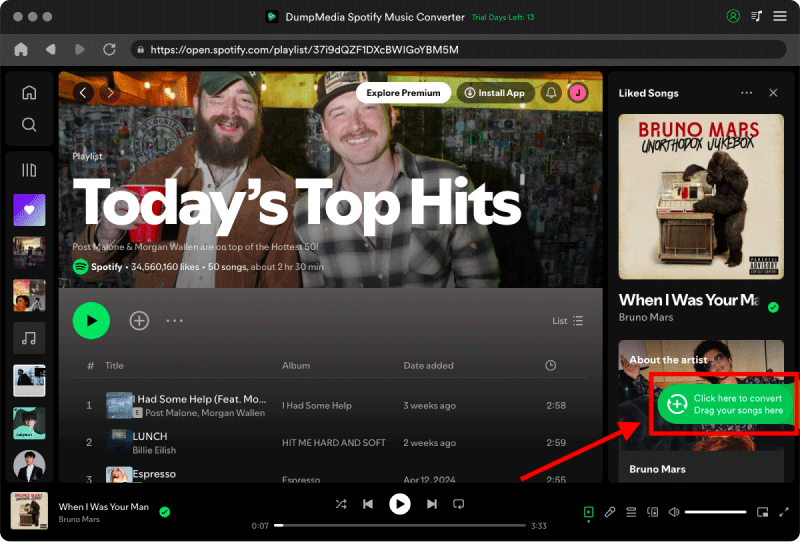
Steg 3. Välja MP3 (mest kompatibel). Du kan också ändra bithastighet eller samplingshastighet. För bästa balans, välj 320 kbps.

Steg 4. När inställningarna är klara kan användarna genomföra konverteringen genom att trycka på ikonen "Konvertera". DumpMedia kommer att konvertera Spotify låtar till MP3 inom några sekunder med sin supersnabba hastighet.

Del 4. Hur man lägger till Spotify Låtar till Virtual DJ?
Nu, lokalt konverterad Spotify Låtar kan importeras fritt till DJ-program. Så här lägger du till en låt från Spotify till Virtual DJ steg för steg.
Steg 1. Starta VirtualDJ på din dator. Längst ner till vänster i gränssnittet ser du mapplistan.
Steg 2. Expandera Lokal musik för att se dina standardsystemmappar (Musik, Videor, Skrivbord). Hitta mappen där du sparade din konverterade Spotify MP3s.
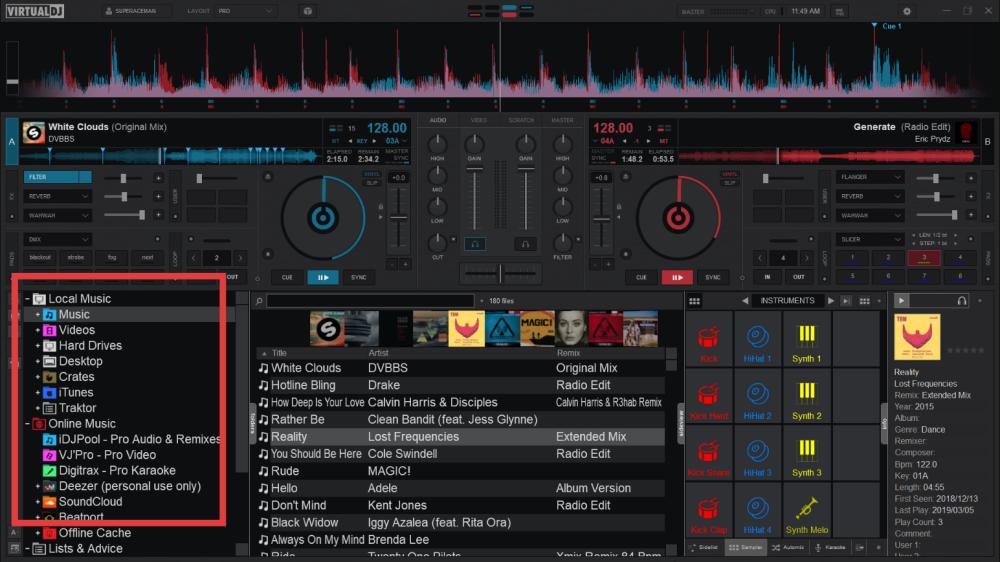
Nu kan du framgångsrikt använda Spotify till Virtual DJ utan officiell Spotify integration.
Del 5. Vanliga frågor
Kan Virtual DJ använda Spotify?
Nej. Spotify stöder inte längre officiellt Virtual DJ-integration.
Varför gjorde Spotify Sluta stödja DJ-mjukvara?
Spotify tog bort DJ-integrationer på grund av licensavtal och DRM-skyddspolicyer.
Vilken är den bästa Spotify till Virtual DJ-lösning?
konvertera Spotify låtar in MP3 filer med DumpMedia Spotify Music Converter är en av de bästa lösningarna.
Kan jag DJ:a offline med Spotify låtar?
Ja, efter konvertering Spotify spår till lokala ljudfiler.
Hur konverterar jag Spotify Låtar för Virtual DJ?
Du kan använda DumpMedia Spotify Music Converter att konvertera Spotify låtar in MP3 format för kompatibilitet med DJ-programvara.
Is DumpMedia Spotify Music Converter säker?
Ja. Den är utformad för offline Spotify uppspelning och musikkonvertering.
Del 6. Slutsats
Även om officiell Spotify Integration med Virtual DJ stöds inte längre, DJ:s kan fortfarande använda Spotify musik i Virtual DJ genom att konvertera spår till lokala låtar MP3 filer. För användare som letar efter en stabil Spotify till Virtual DJ-lösning, DumpMedia Spotify Music Converter ger ett effektivt sätt att ta bort Spotify uppspelningsbegränsningar och njut av DJ-mixning offline. Genom att konvertera Spotify låtar till kompatibla ljudformat kan DJ:s bygga pålitliga offline-bibliotek, förbättra mixningsstabiliteten och använda Spotify musik fritt i Virtual DJ.
Gratis nedladdning Gratis nedladdning
*DumpMedia fungerar genom att dekryptera och ladda ner Spotify låtar till DRM-fria filer, vilket gör att du får en ren, obegränsad kopia av ditt bibliotek för vilken enhet som helst. Dess funktionalitet inkluderar inte DRM-borttagning av lokala ljudfiler.

30% rabatt >>>