


Hur man överför Spotify till USB: Spela upp Spotify Musik överallt
Vill överföra Spotify till USB för offline-uppspelning? Många användare försöker flytta sina favoriter Spotify låtar till ett USB-minne för användning i bilar, högtalare eller andra enheter, men inser snabbt att det inte är så enkelt som att dra filer. Det största problemet är att Spotify Musik är skyddad och kan inte kopieras direkt. I den här guiden delar vi med oss av det bästa sättet att göra det möjligt.
Innehållsguide Del 1. Kan du ladda ner Spotify Musik direkt till USB?Del 2. Det enda sättet att överföra Spotify Musik till USBDel 3. Vanliga frågorDel 4. Slutsats
Del 1. Kan du ladda ner Spotify Musik direkt till USB?
Det korta svaret är nej. Du kan inte överföra direkt Spotify till USB. Här är varför:
- Spotify nedladdningar är krypterade
- Filerna lagras i ett skyddat format
- Musik kan endast spelas inom Spotify app
Även om du ladda ner låtar för offlinelyssning, dessa filer kan inte kopieras till ett USB-minne eller användas utanför SpotifyDetta innebär att överföra Spotify till USB kräver ett extra steg.
Del 2. Det enda sättet att överföra Spotify Musik till USB
För att lyckas överföra låtar från Spotify till USB-minnet måste du först konvertera spåren till DRM-fria MP3 formatDetta är det mest tillförlitliga sättet att säkerställa full kompatibilitet. När dina filer har konverterats blir de fullt tillgängliga, fritt överförbara och redo att spelas upp på vilken enhet som helst.
DumpMedia Spotify Music Converter är specifikt utformat för att överbrygga denna klyfta. Som ett professionellt verktyg förenklar det konverteringsprocessen genom att ta bort DRM-skyddet* samtidigt som det bibehåller 100% original ljudkvalitet. Oavsett om du vill säkerhetskopiera ett enskilt spår eller en massiv spellista, DumpMedia säkerställer att din musik är redo för alla USB-enheter med bara några få klick.
🏅 Fler fantastiska funktioner
- ⭐Integration med Spotify webbspelare
- ⭐ Jobba för båda Spotify Premium och Spotify Gratis användare
- ⭐Ge batchkonvertering med upp till 35x hastighet
- ⭐Behåll ID3-taggar som artist, omslag, konst, etc.
- ⭐Bevara den ursprungliga ljudkvaliteten
- ⭐100% rena. Ingen risk med att använda
Hur man konverterar Spotify Musik till MP3
Steg 1. Ladda ned och installera DumpMedia Spotify Music Converter till din Mac/Windows. Starta den och du kommer att se gränssnittet. Använd din Spotify Premium/gratis konto för att logga in.
Gratis nedladdning Gratis nedladdning
Steg 2. Nu kan du navigera till de låtar du vill ladda ner. Du kan dra ett album eller en spellista direkt för att lägga till alla låtar i konverteringslistan.
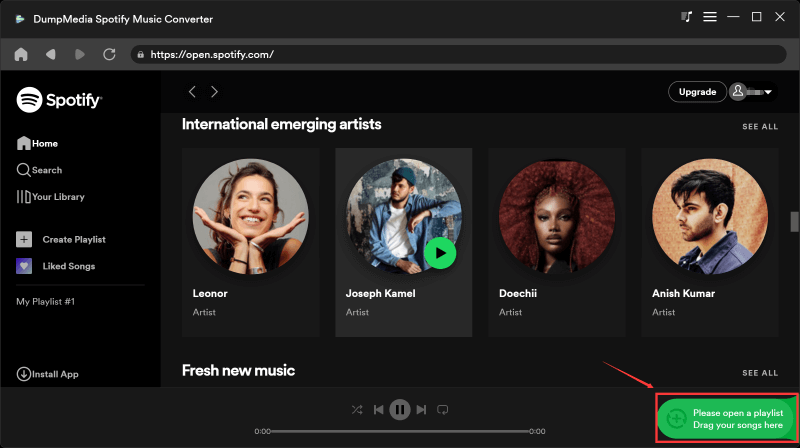
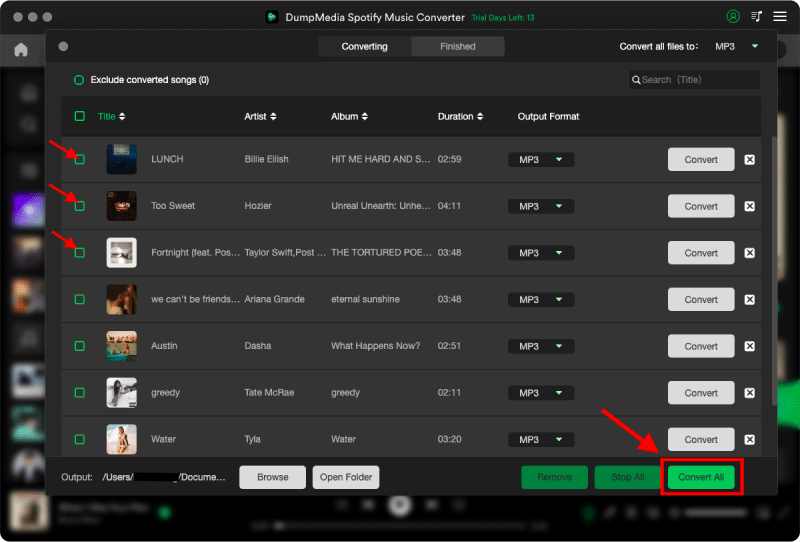
Steg 3. På konverteringsgränssnittet kan du välja utdataformat som MP3, och ställ in Sample Rate eller Bitrate på Preference. Välj även en mapp där musikfilerna ska sparas.

Steg 4. Tryck slutligen på knappen "Konvertera" längst ner på sidan, så startar programvaran konverteringsprocessen.
Överför konverterad Spotify Musik till USB
Efter konvertering, flytta låtar från Spotify till USB blir enkelt och snabbt.
Steg 1. Sätt i ditt USB-minne i datorn. Öppna mappen med den konverterade filen. MP3 filer.
Steg 2. Välj låtarna eller spellistorna. Dra och släpp dem till USB-enheten.
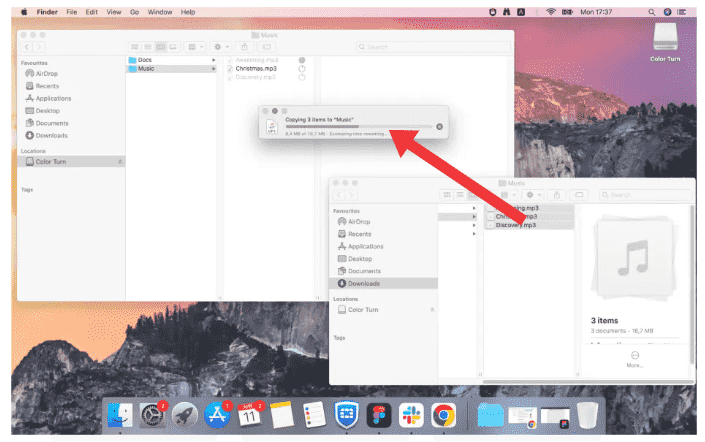
Steg 3. Mata ut USB-enheten på ett säkert sätt.
Del 3. Vanliga frågor
1. Kan jag överföra Spotify direkt till USB?
Nej, du kan inte överföra Spotify låtar direkt till USB. Spotify musiken är skyddad av DRM, och nedladdade låtar lagras i ett krypterat format som inte kan kopieras eller användas utanför Spotify app.
2. Hur överför jag Spotify Låtar till USB till min bil?
Att överföra Spotify musik till USB för uppspelning i bilen behöver du:
- Konvertera Spotify musik in i MP3 format
- Kopiera de konverterade filerna till din USB-enhet
Efter det borde din bilstereo kunna spela upp filerna normalt.
3. Vilket är det bästa formatet för Spotify till USB-överföring?
MP3 är det bästa formatet för Spotify låtar till USB eftersom det stöds av nästan alla enheter, inklusive bilstereo, högtalare och TV-apparater.
Andra format som WAV eller FLAC erbjuder högre kvalitet men är kanske inte kompatibla med alla USB-enheter.
4. Behöver jag Spotify Premie att överföra Spotify till USB?
Inte nödvändigtvis. Medan Spotify Premium möjliggör offlinelyssning i appen, överföring Spotify musik till USB kräver fortfarande att filerna konverteras till ett standardformat.
5. Är det säkert att använda Spotify omvandlare?
Alla verktyg är inte säkra. Vissa onlinetjänster kan innehålla annonser eller säkerhetsrisker. Det är viktigt att välja pålitlig programvara för att säkerställa stabil prestanda och skydda dina data.
Del 4. Slutsats
Överföra Spotify till USB är inte möjligt direkt på grund av DRM-skydd, men det blir enkelt när du förstår rätt process. Genom att konvertera Spotify musik in i MP3 och kopierar den till ett USB-minne, får du full flexibilitet och kompatibilitet mellan alla enheter. Om du vill ha ett smidigt och pålitligt sätt att flytta Spotify låtar till ett USB-minne med hjälp av ett professionellt verktyg som DumpMedia Spotify Music Converter är den mest effektiva lösningen.
Gratis nedladdning Gratis nedladdning
*DumpMedia fungerar genom att dekryptera och ladda ner Spotify låtar till DRM-fria filer, vilket gör att du får en ren, obegränsad kopia av ditt bibliotek för vilken enhet som helst. Dess funktionalitet inkluderar inte konvertering av lokala ljudfiler.