


Spotify DJ Mode: How to Use It (2026 Complete Guide)
If you've recently heard about Spotify DJ mode, you might be wondering what it actually does and how to use it. Spotify AI DJ Mode is one of Spotify’s most exciting features, offering a personalized music experience powered by artificial intelligence. But while it’s powerful, it also comes with limitations that many users don’t realize. In this guide, you’ll learn what Spotify AI DJ is and how to enable AI DJ on Spotify.
Innehållsguide Del 1. Vad är Spotify AI DJ?Del 2. Hur man aktiverar Spotify AI DJ?Part 3. Limitations of Spotify TILL DJ:sDel 4. Hur man sparar Spotify DJ Music for Offline Use?Del 5. Vanliga frågorDel 6. Slutsats
Del 1. Vad är Spotify AI DJ?
Spotify DJ mode is a personalized music guide that functions like a virtual radio host, blending advanced machine learning with a remarkably realistic AI voice. Available to Premium subscribers, it doesn't just shuffle songs; it curates a continuous stream of music based on your specific listening history, current trends, and even nostalgic hits you haven't played in years.
Viktiga egenskaper hos Spotify TILL DJ:s
- Personalized song recommendations
- Continuous playback without manual input
- AI-generated voice commentary
- Smart mood and genre transitions
Det här är varför Spotify DJ mode is becoming increasingly popular among users who prefer effortless listening.
Del 2. Hur man aktiverar Spotify AI DJ?
Hur du kommer åt Spotify DJ mode? If you have subscribed to Spotify Premium, Följ dessa steg:
Steg 1. Make sure your app is updated to the latest version. Navigate to the Home section.
Steg 2. Look for the DJ feature in your feed. Start listening instantly.
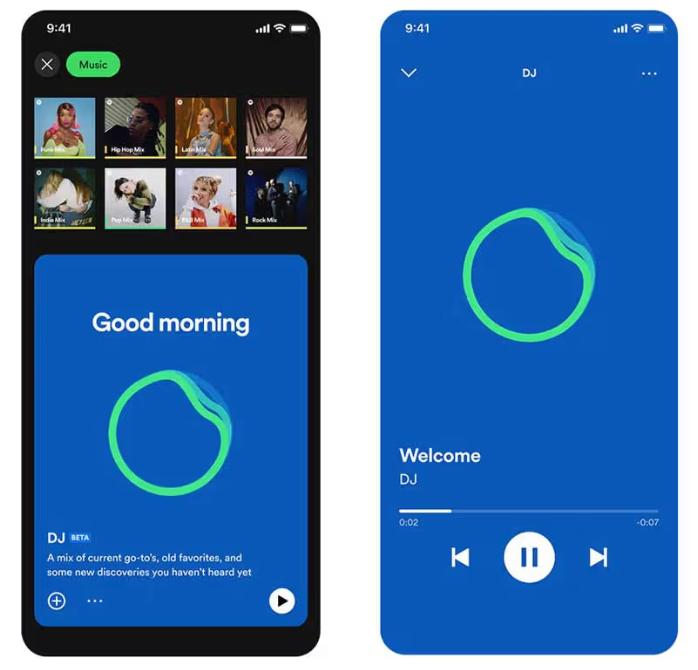
Spotify's AI DJ now supports a "Requests" feature. Just as you would speak to a human DJ, you can use voice commands or text messages, saying things like, "Switch to a softer genre" or "Play more songs by Jay Justin Bieber," and the AI will instantly adjust the playlist.
Part 3. Limitations of Spotify TILL DJ:s
Spotify DJ mode stands out because it removes the need to manually search for music. It is ideal for background listening, discovering new songs, and creating a radio-like experience. While Spotify’s AI DJ is impressive, it comes with several important limitations.
1. No Permanent Downloads
Even with Premium, songs are not truly downloadable. Files are locked in the app, and they cannot be transferred.
2. No Offline Freedom
You can download for offline listening, but access depends on a subscription. Music disappears if you cancel it.
3. No Export or Sharing
You cannot export DJ playlists and save mixes externally.
4. Begränsad kontroll
Spotify AI controls song selection and order. You don't have full customization.
These limitations become important if you want more control over your music.
Del 4. Hur man sparar Spotify DJ Music for Offline Use?
Om du tycker Spotify DJ mode but want more flexibility, you need a way to save songs permanently. Instead of relying on Spotify’s built-in limitations, you select songs from DJ recommendations and convert them into local files. This gives you full control over your music. The most reliable way to do this is by using a professional tool like DumpMedia Spotify Music Converter.
Gratis nedladdning Gratis nedladdning
🏅Varför välja DumpMedia Spotify Music Converter:
- ⭐Integration med Spotify webbspelare
- ⭐ Jobba för båda Spotify Premium och Spotify Gratis användare
- ⭐Ge batchkonvertering med upp till 35x hastighet
- ⭐Konvertera Spotify låtar till MP3, WAV eller FLAC
- ⭐Behåll ID3-taggar som artist, omslag, konst, etc.
- ⭐Bevara den ursprungliga ljudkvaliteten
- ⭐100% rena. Ingen risk med att använda
Step-by-Step: Convert Spotify DJ musik
Steg 1. Ladda ner och installera programvaran på din dator. Den fungerar med båda Windows och Mac. Gränssnittet är användarvänligt, vilket gör det enkelt för nybörjare.
Gratis nedladdning Gratis nedladdning
Steg 2. Öppna den inbyggda Spotify webbspelare inuti DumpMedia och logga in med din Spotify konto. Bläddra Spotify och dra låtarna, albumen eller spellistorna du vill ladda ner till konverteraren.

Steg 3. I inställningspanelen väljer du MP3 som utdataformat för att möjliggöra en MP3 nedladdning av dina valda låtar.

Steg 4. Press the "Convert All" button and start the conversion. DumpMedia Spotify Music Converter supports 35x faster speed download, so you can just wait for the conversion process to finish.

Del 5. Vanliga frågor
1. Vad är Spotify DJ mode?
It is an AI-powered feature that plays personalized music based on your taste.
2. Är Spotify’s AI DJ free?
No, it typically requires a Premium subscription.
3. Kan jag ladda ner Spotify DJ songs?
Only within the app, not as local files.
4. Can I create my own DJ playlist?
Yes, especially if you have local copies of your music.
Del 6. Slutsats
Spotify DJ mode is a powerful feature that makes music discovery easier and more enjoyable. However, it comes with limitations such as a lack of permanent downloads and restricted offline access. If you want to fully enjoy the benefits of Spotify’s AI DJ without these restrictions, using a reliable tool to save your music is the best solution. This allows you to keep your favorite tracks, build your own playlists, and enjoy complete freedom over your listening experience.
Gratis nedladdning Gratis nedladdning
*DumpMedia fungerar genom att dekryptera och ladda ner Spotify låtar till DRM-fria filer, vilket gör att du får en ren, obegränsad kopia av ditt bibliotek för vilken enhet som helst. Dess funktionalitet inkluderar inte konvertering av lokala ljudfiler.

30% rabatt >>>