


Noteburner Spotify Music Converter Recension: Är det fortfarande värt det?
Med Spotifys DRM-skydd, vänder sig många användare till tredjepartskonverterare för att ladda ner och hålla musik offline. NoteBurner är ett av de mest kända verktygen inom detta område, men fungerar det fortfarande bra? I den här NoteBurner Spotify Music Converter recension, vi kommer att bryta ner dess funktioner, verkliga prestanda, för- och nackdelar och jämföra den med ett mer effektivt alternativ så att du kan fatta rätt beslut.
Innehållsguide Del 1: Vad är NoteBurner Spotify Music Converter?Del 2: Verkligt test av NoteBurner Spotify Music ConverterDel 3: NoteBurner vs. Övrigt Spotify Omvandlare Del 4: Bästa alternativet (om du behöver bättre prestanda)Del 5: Vanliga frågorDel 6: Slutgiltig dom: Är NoteBurner värt det?
Del 1: Vad är NoteBurner Spotify Music Converter?
Innan vi dyker djupare in i denna NoteBurner Spotify Music Converter recension, låt oss kortfattat förstå vad den gör. NoteBurner Spotify Music Converter är ett skrivbordsverktyg utformat för att hjälpa användare att ladda ner och konvertera Spotify låtar i vanliga format som MP3, AAC, WAV och FLAC. Det fungerar genom att bearbeta Spotify spår via appen eller webbspelaren och spara dem lokalt.
Del 2: Verkligt test av NoteBurner Spotify Music Converter
För att skapa denna NoteBurner Spotify Music Converter För att göra recensionen mer tillförlitlig testade vi programvaran i verkliga situationer, inklusive nedladdning av spellistor, konvertering av flera spår och kontroll av utdatakvaliteten. Här är vad vi fann efter praktiska tester.
Testuppsättning
För denna NoteBurner Spotify Music Converter recension, vi använde följande uppställning:
- Windows 11 st
- Spotify Premiumkonto
- 100-låtars spellista (blandade genrer)
- Utmatningsformat: MP3 (320 kbps)
Vi fokuserade på tre viktiga mätvärden: hastighet, stabilitet och utskriftskvalitet.
Konverteringshastighet
NoteBurner påstår sig ha snabba konverteringshastigheter, men i faktiska tester var prestandan inkonsekvent.
- Små omgångar (5–10 låtar): relativt snabbt
- Stora spellistor (50+ låtar): märkbar avmattning
- CPU-användningen ökade avsevärt under konverteringen
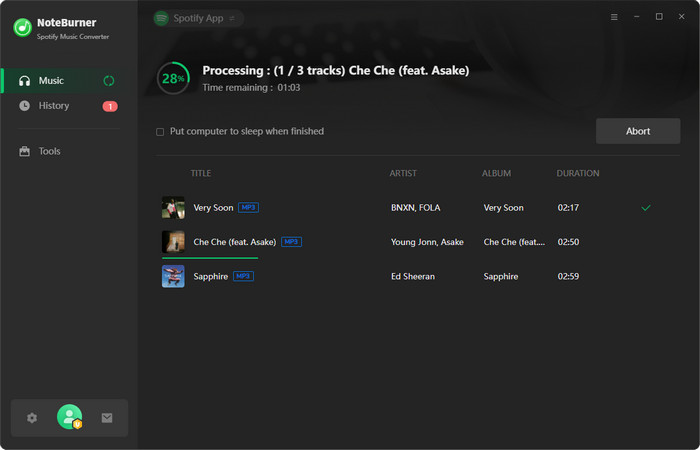
I vårt test tog det längre tid än väntat att konvertera en spellista med 100 låtar, särskilt jämfört med nyare verktyg. Hastigheten är acceptabel för tillfällig användning, men inte idealisk för flitiga användare.
Utdatakvalitet
I denna NoteBurner Spotify Music Converter Under granskningen kontrollerade vi också om de konverterade filerna behöll sin ursprungliga kvalitet.
Resultat:
- De flesta spåren behöll hyfsad ljudkvalitet
- Ingen större distorsion upptäckt
- Små skillnader i komprimering märktes dock i vissa låtar.
Metadataprestanda:
- ID3-taggar (artist, album, titel) var mestadels korrekta
- Albumomslag bevarades i de flesta fall
Bra kvalitet överlag, men inte helt förlustfri i alla scenarier.
Stabilitet och framgångsgrad
Stabilitet är där NoteBurner visar vissa svagheter.
Under testning:
- Några spår misslyckades med att konvertera vid första försöket
- Ibland fryser vid bearbetning av stora spellistor
- Krävde att omstarta konverteringsprocessen i vissa fall
Tillförlitlig för små uppgifter, men mindre stabil för storskaliga nedladdningar.
Slutsats: Från denna NoteBurner Spotify Music Converter recensionen är det tydligt att även om verktyget är funktionellt är det inte alltid det mest effektiva eller stabila alternativet, särskilt för flitiga användare.
Del 3: NoteBurner vs. Övrigt Spotify Omvandlare
Om du läser detta NoteBurner Spotify Music Converter recension, jämför du förmodligen alternativ. Så här står det sig mot en mer optimerad lösning.
| Leverans | Noteburner | DumpMedia |
| Konverteringshastighet | Medium | Snabbare |
| Stabilitet | Genomsnitt | Hög |
| Utdataformat | MP3, AAC, WAV, FLAC | mer flexibel |
| Enkel användning | Moderate | Nybörjarvänlig |
| Batchkonvertering | Begränsad prestanda | Smidigt och effektivt |
Del 4: Bästa alternativet (om du behöver bättre prestanda)
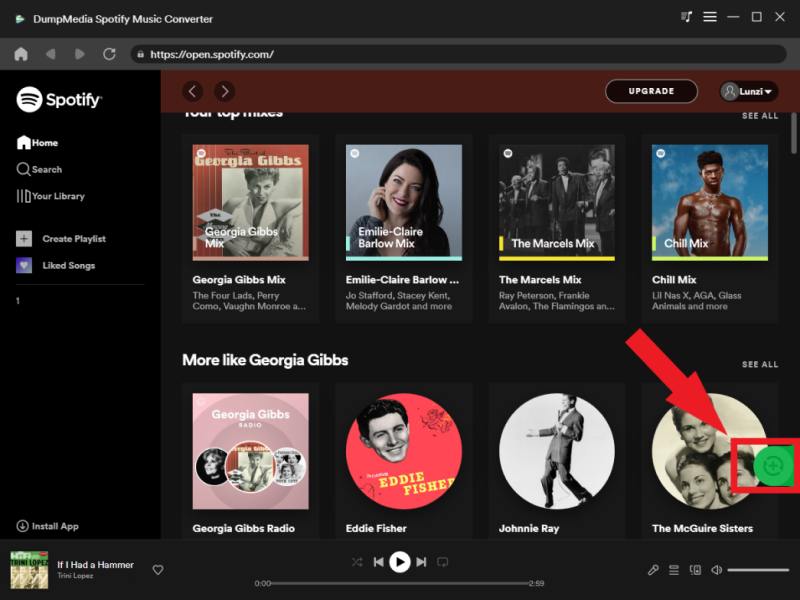
Efter att ha gått igenom denna NoteBurner Spotify Music Converter recension, kanske du undrar om det finns ett bättre alternativ. Om du har upplevt långsamma konverteringar, instabilitet eller begränsningar kan det göra en märkbar skillnad att byta verktyg. DumpMedia Spotify Music Converter är utformad för användare som vill ha snabbare konverteringshastigheter, stabil batchbehandling och högkvalitativa resultat utan förlust.
🏅 Fler fantastiska funktioner
- Konvertera Spotify Musik till MP3, WAV, FLAC
- Ta bort DRM-skyddet*
- Ladda ner spellistor i batch
- Bevara originalkvaliteten
Till skillnad från NoteBurner fokuserar den på prestandakonsekvens och ett smidigare arbetsflöde, vilket är avgörande om du laddar ner musik regelbundet.
Gratis nedladdning Gratis nedladdning
Så här använder du DumpMedia Spotify Music Converter (En komplett guide) >>>
Del 5: Vanliga frågor
1. Är NoteBurner Spotify Music Converter säkert att använda?
Ja, NoteBurner är generellt sett säkert att använda om det laddas ner från dess officiella webbplats. Prestanda och tillförlitlighet kan dock variera.
2. Har NoteBurner stöd? Spotify gratis konton?
Vissa funktioner kan fungera med gratiskonton, men full funktionalitet kräver vanligtvis en Spotify Premiumkonto.
3. Vilket är det bästa alternativet till NoteBurner?
Verktyg som DumpMedia Spotify Music Converter erbjuda bättre hastighet, stabilitet och övergripande prestanda.
4. Varför är NoteBurner ibland långsam?
Detta kan bero på systemprestanda, långa spellistor eller begränsningar i hur programvaran bearbetar Spotify spår.
Del 6: Slutgiltig dom: Är NoteBurner värt det?
Så, efter denna fullständiga NoteBurner Spotify Music Converter recension, här är det ärliga svaret:
- 👉 Ja — men bara för lättanvändare.
- 👉 Nej — om du bryr dig om hastighet, stabilitet och effektivitet.
Även om NoteBurner fortfarande fungerar, har det inte hållit jämna steg med nyare verktyg vad gäller prestanda. För användare som vill ha en smidigare och mer pålitlig upplevelse är det ett bättre val att byta till en mer optimerad konverterare.
Gratis nedladdning Gratis nedladdning
*DumpMedia fungerar genom att dekryptera och ladda ner Spotify låtar till DRM-fria filer, vilket gör att du får en ren, obegränsad kopia av ditt bibliotek för vilken enhet som helst. Dess funktionalitet inkluderar inte konvertering av lokala ljudfiler.

30% rabatt >>>