


Hur man delar en Spotify Spellista på mobil och dator
Oavsett om du har skapat den perfekta träningsmixen, ett soundtrack för en bilresa eller en samling av dina favoritlåtar, kanske du undrar hur du delar en Spotify spellista med andra. Som tur är, Spotify erbjuder flera sätt att dela spellistor. I den här guiden lär du dig hur du delar Spotify musik på iPhone, Android, dator och webben, felsök vanliga delningsproblem och upptäck ett mer flexibelt sätt att njuta av delad musik offline.
Innehållsguide Del 1: Kan du dela en Spotify Spellista?Del 2: Hur man delar Spotify Spellistor på mobil/dator?Del 3: Olika sätt att dela en Spotify spellistaDel 4: Varför kan jag inte dela min Spotify Spellista?Del 5: Dela Spotify Spellistor med mer flexibilitetDel 6: vanliga frågorDel 7: Slutliga tankar
Del 1: Kan du dela en Spotify Spellista?
Ja. Spotify låter användare dela både sina egna spellistor och många offentliga spellistor som skapats av andra.
Du kan dela en spellista via:
- En länk till en spellista
- Spotify Koder (QR-liknande koder)
- Textmeddelanden
- E-post
- X (tidigare Twitter)
- Messenger och andra chattappar
Alla som har länken till spellistan kan öppna den. Men om de kan lyssna på varje låt beror på deras Spotify konto och regional musiktillgänglighet.
Del 2: Hur man delar Spotify Spellistor på mobil/dator?
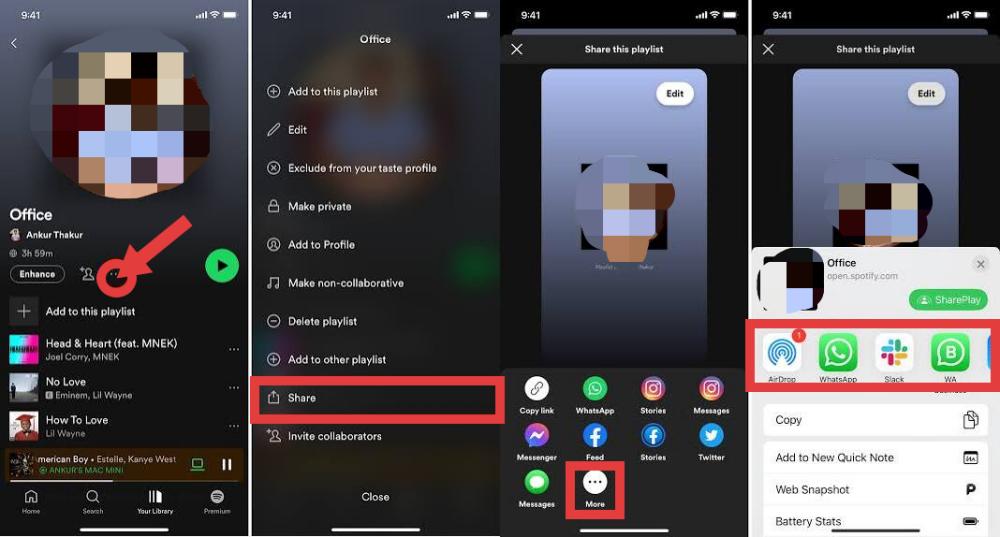
Dela Spotify Spellistor på iPhone
Om du använder Spotify Följ dessa steg på en iPhone eller Android-enhet.
- Öppna Spotify app.
- Tryck på Ditt bibliotek.
- Välj den spellista du vill dela.
- Tryck på menyn med tre punkter.
- Välj Dela.
- Välj ett av de tillgängliga delningsalternativen eller tryck på Kopiera länk.
Du kan nu skicka spellistan via Meddelanden, Mail, AirDrop eller appar för sociala medier.
Dela Spotify Spellistor på Android
- Öppet Spotify.
- Välj din spellista.
- Tryck på ikonen med tre punkter.
- Välj Dela.
- Välj en app eller kopiera länken till spellistan.
Om du letar efter hur du delar en Spotify spellista från din telefon är detta den snabbaste metoden.
Dela Spotify Spellistor på skrivbordet
Hur man delar en Spotify spellista med vänner? Du kan också dela spellistor från Spotify on WinDows, Mac eller webbspelaren.
- Öppet Spotify.
- Navigera till din spellista.
- Klicka på menyn med tre punkter.
- Välj Dela.
- Välj Kopiera spellistalänk.
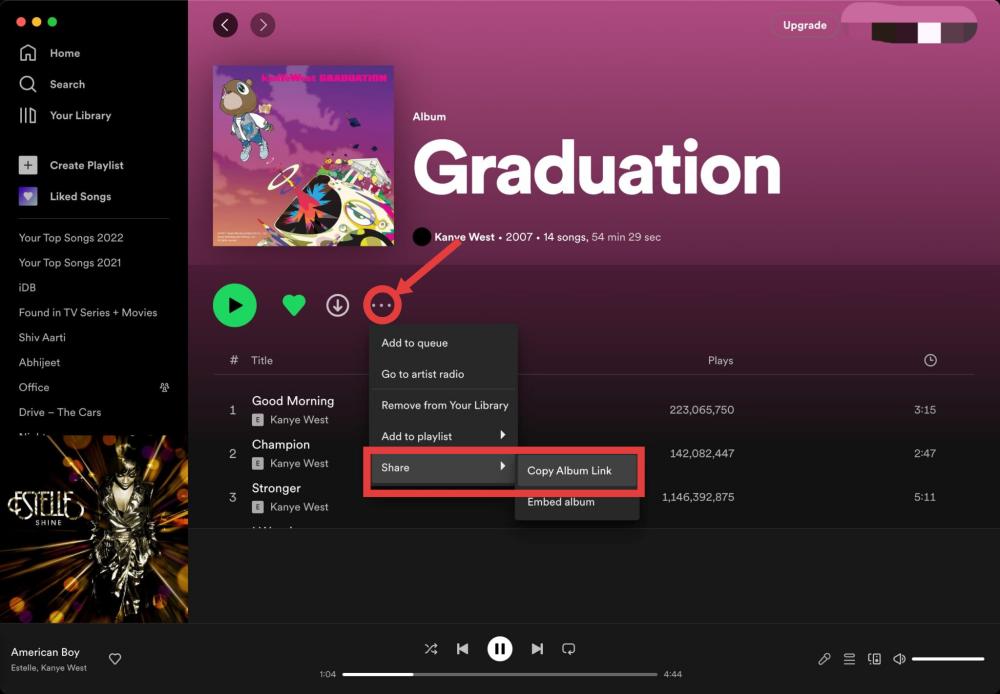
Klistra in den kopierade länken i ett e-postmeddelande, dokument eller meddelandeapp för att dela den med andra.
Del 3: Olika sätt att dela en Spotify spellista
Spotify erbjuder flera delningsalternativ beroende på hur du vill att andra ska komma åt din musik.
Dela med Spotify Koder
Spotify Koder är skannbara bilder som gör det möjligt för användare att öppna spellistor direkt. Spotify Koder är särskilt användbara för att dela musik personligen.
Hur man delar en Spotify spellista med koder:
- Öppna spellistan.
- Tryck på Dela.
- Visa Spotify Koda.
- Låt en annan användare skanna den med Spotify app.
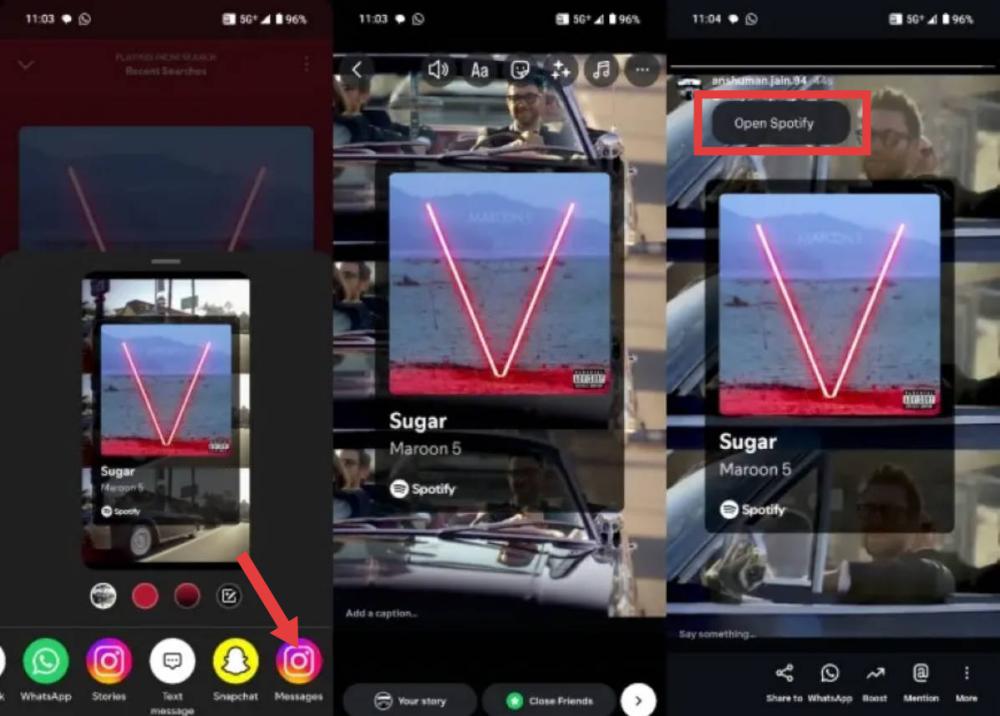
Dela på sociala medier
Spotify stöder direktdelning till flera sociala plattformar. Att dela dina spellistor på sociala medier är ett bra sätt att rekommendera musik till vänner och följare.
Populära alternativ inkluderar:
- Instagram Stories
- Snapchat
- X
Relaterade Artikel: Hur man lägger till Spotify till Instagram Story som bakgrundsmusik
Del 4: Varför kan jag inte dela min Spotify Spellista?
Om du har problem med att dela din spellista finns det flera vanliga orsaker.
Din spellista är privat
Privata spellistor är inte synliga för andra användare. Se till att spellistan är inställd på Offentlig innan du delar den.
Dålig internetanslutning
Spotify kräver en internetanslutning för att generera och dela länkar till spellistor. Kontrollera ditt Wi-Fi eller din mobildata om delningen inte fungerar.
Föråldrad Spotify Applikation
Äldre versioner av Spotify kan innehålla buggar som påverkar delningsfunktionerna. Uppdatera appen till den senaste versionen.
Spellistan har raderats
Om en spellista har raderats eller tagits bort från ditt bibliotek kommer delningslänken inte längre att fungera.
tillfällig Spotify Frågor
Ibland, Spotifys servrar kan uppleva tillfälliga problem som påverkar delning av spellistor. Att vänta några minuter och försöka igen löser ofta problemet.
Del 5: Dela Spotify Spellistor med mer flexibilitet
Dela en Spotify spellistan är praktisk, men mottagarna behöver i allmänhet tillgång till Spotify för att streama låtarna. Uppspelningen kan också påverkas av regional tillgänglighet, prenumerationstyp eller internetanslutning. Om du vill ha mer flexibilitet för personlig offline-lyssning och hantering av ditt musikbibliotek, DumpMedia Spotify Music Converter kan hjälpa till.
Gratis nedladdning Gratis nedladdning
Med DumpMedia, Du kan konvertera Spotify låtar, album och spellistor till MP3, WAV, FLAC, AAC och andra populära format. Detta gör att musik kan lagras lokalt och spelas upp på olika enheter. Även om Spotify appen inte fungerar på din enhet kan du lek Spotify låtar offline på en annan musikspelare omedelbart.
🏆Varför välja DumpMedia Spotify Music Converter
- Inbyggd Spotify Spelaren - för att logga in direkt på din Spotify biblioteket och välj alla låtar du gillar.
- Original ljudkvalitet bibehållen - behåll en bättre kvalitetsstatus för att spara Spotifys originalmusikeffekter.
- Behåll ID3-taggar och metadatainformation - extrahera musikfiler med original ID3-taggar samt metadatainformation.
- Hastigheten för nedladdning av spellistor i batch - säkerställa ultrasnabb nedladdningshastighet för spellistor, vilket kan accelerera snabbare och underlätta högre effektivitet i nedladdningen av musik.
- Anpassa utgångsinställningarna - att välja din favoritbitrate och samplingsfrekvens baserat på dina behov.
Detta är särskilt användbart om du vill hålla dina spellistor tillgängliga utan att vara helt beroende av streaming.
Dela Spotify Spellistor med hjälp av DumpMedia
Steg 1. Ladda ned och installera DumpMedia Spotify Music Converter på din Mac/PC. Starta den så ser du gränssnittet. Använd din Spotify Premium/gratis konto för att logga in.
Gratis nedladdning Gratis nedladdning
Steg 2. Sök efter Spotify låtar, spellistor eller album. Klicka bara på "Lägg till i konvertering" för att lägga till dem i konverteringslistan.
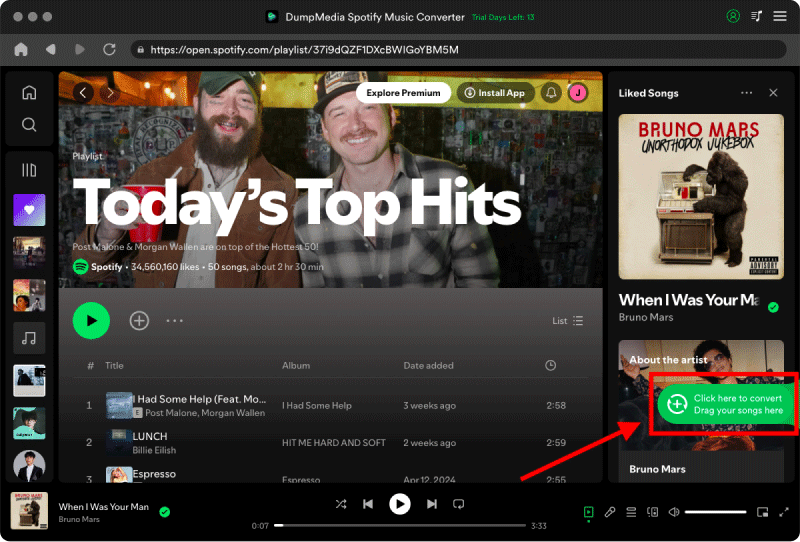
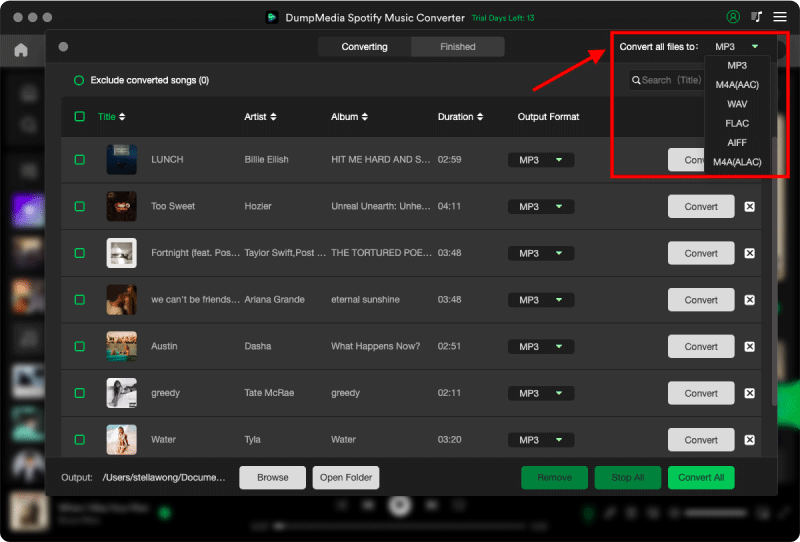
Steg 3. Efter DumpMedia automatiskt analyserar låtar, formatet är inställt på MP3 som standard i konverteringsgränssnittet. Om du vill ändra klickar du på "MP3" och välj en. Du kan också ändra bithastighet eller samplingshastighet. För bästa balans, välj 320 kbps.
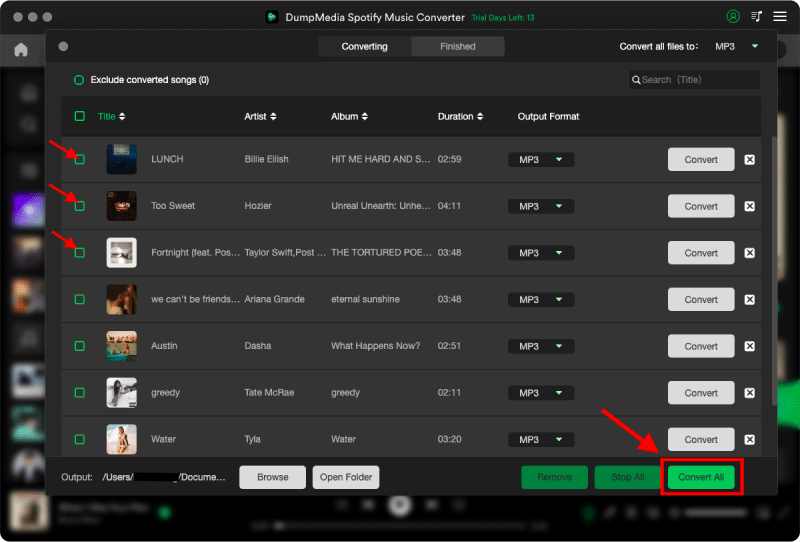
Steg 4. När inställningarna är klara kan användarna genomföra konverteringen genom att trycka på ikonen "Konvertera". DumpMedia kommer att ladda ner Spotify spellistor till MP3 inom några sekunder med sin supersnabba hastighet.
Dessa enkla steg kan förbättra upplevelsen för alla du delar din spellista med. Du kan nu dela musik på olika sätt.
Del 6: vanliga frågor
Hur delar jag en Spotify Spellista?
Öppna spellistan, tryck eller klicka på trepunktsmenyn, välj Dela och välj ett delningsalternativ eller kopiera länken till spellistan.
Kan någon lyssna på mig Spotify spellista utan Spotify Premie?
Ja. Gratis Spotify Användare kan vanligtvis öppna delade spellistor, även om uppspelning kan innehålla reklam och vissa begränsningar för mobil uppspelning beroende på Spotifys nuvarande politik.
Kan jag dela en privat Spotify Spellista?
Privata spellistor är inte tillgängliga för andra. För att dela en, ändra först dess synlighet till Offentlig.
Varför kan inte min vän öppna min spellista?
Spellistan kan vara privat, raderad, otillgänglig i deras region, eller så kan den delade länken vara felaktig.
Del 7: Slutliga tankar
Att lära sig att dela en Spotify spellistan är enkel när du väl känner till de tillgängliga alternativen. För användare som också vill ha mer flexibilitet i att hantera sitt personliga offline-musikbibliotek, DumpMedia Spotify Music Converter erbjuder ett effektivt sätt att konvertera Spotify spellistor till ljudformat som stöds i stor utsträckning samtidigt som högkvalitativt ljud och metadata bevaras.