


Hur man sätter på musik MP3 Spelare från Spotify i 2026
Hur man sätter på musik MP3 spelare från Spotify är fortfarande en av de vanligaste frågorna bland Spotify användare, främst på grund av Spotify tillåter inte direkta nedladdningar till någon MP3 enhet på grund av DRMOm du försöker överföra nedladdade filer Spotify spår, de flesta MP3 spelarna kommer inte att känna igen dem.
För att kringgå denna begränsning behöver du ett verktyg som kan konvertera Spotify musik till ett standardljudformat som t.ex. MP3. DumpMedia Spotify Music Converter är en av de mest pålitliga lösningarna för den här uppgiften. Om ditt mål är att flytta din Spotify bibliotek till en bärbar enhet för offline-lyssning, erbjuder den här konverteraren den snabbaste och enklaste metoden.
Innehållsguide Del 1. Varför du inte kan lägga Spotify Låtar på MP3 Spelare?Del 2. Hur man lägger Spotify Musik på MP3 Spelare?Del 3. FAQDel 4. För att summera det hela
Del 1. Varför du inte kan lägga Spotify Låtar på MP3 Spelare?
Spotify tillåter inte användare att överföra låtar direkt till en MP3 spelare eftersom alla Spotify Spåren är skyddade av Digital Rights Management (DRM). Denna DRM-kryptering förhindrar att användare kopierar, exporterar eller konverterar Spotifys ljudfiler till standardformat som MP3Även om du laddar ner låtar med hjälp av en Spotify Premium konto, förblir dessa filer i ett låst OGG-format som endast Spotify appen kan läsa. Som ett resultat, traditionell MP3 Spelare, särskilt icke-smarta enheter, kan inte känna igen eller spela upp dessa krypterade filer.
Kort sagt, DRM-systemet säkerställer att Spotify musik kan bara spelas inom Spotifys auktoriserade ekosystem. Det är därför det är bara att dra Spotify låtar till en MP3 spelaren kommer aldrig att fungera.
Hur man sätter på musik MP3 spelare från SpotifyFör att kringgå denna begränsning behöver du ett verktyg som kan bort SpotifyDRM-skydd och konvertera spår till universella format. DumpMedia Spotify Music Converter uppfyller just detta syfte. Den omvandlar Spotify låtar, album och spellistor DRM-fria MP3, M4A-, WAV- eller FLAC-filer, vilket gör dem kompatibla med alla MP3 spelaren och möjliggör verklig offline-ägarskap över din musik.
Del 2. Hur man lägger Spotify Musik på MP3 Spelare?
Hur man sätter på musik MP3 spelare från SpotifyInnan du lägger Spotify musik på din MP3 spelare, se till att du har DumpMedia Spotify Music Converter installerad.
Gratis nedladdning Gratis nedladdning
DumpMedia Spotify Music Converter vinner popularitet bland Spotify lyssnare för dess underbara musiknedladdningstjänst. Oavsett om du är användare av Spotify Gratis eller Spotify Premium, du kan ladda ner och konvertera Spotify låtar, spellistor och album till MP3, AAC, ALAC, FLAC eller andra format som använder DumpMediaÄnnu bättre är att nedladdningarna alltid kommer att vara tillgängliga även om din prenumeration löper ut.
Steg-för-steg-guide: Hur man lägger Spotify Musik på MP3 spelare
Steg 1. Öppna programvaran på din dator. Den fungerar med båda Windows och Mac. Gränssnittet är användarvänligt, vilket gör det enkelt för nybörjare.
Steg 2. Gå till Spotify och välj låten, albumet eller spellistan du vill konvertera. Programvaran kommer automatiskt att identifiera spåren.

Steg 3. Välj ett format som är kompatibelt med din MP3 spelare. Vanliga val är MP3, M4A, WAV eller FLAC. Du kan också ställa in utdatakvalitet och konverteringshastighet.

Steg 4. Klicka på knappen "Konvertera" för att påbörja konverteringsprocessen. DumpMedia Spotify Music Converter tar bort DRM och konverterar alla valda spår till ditt valda format. Konverteringen bevarar hög ljudkvalitet.

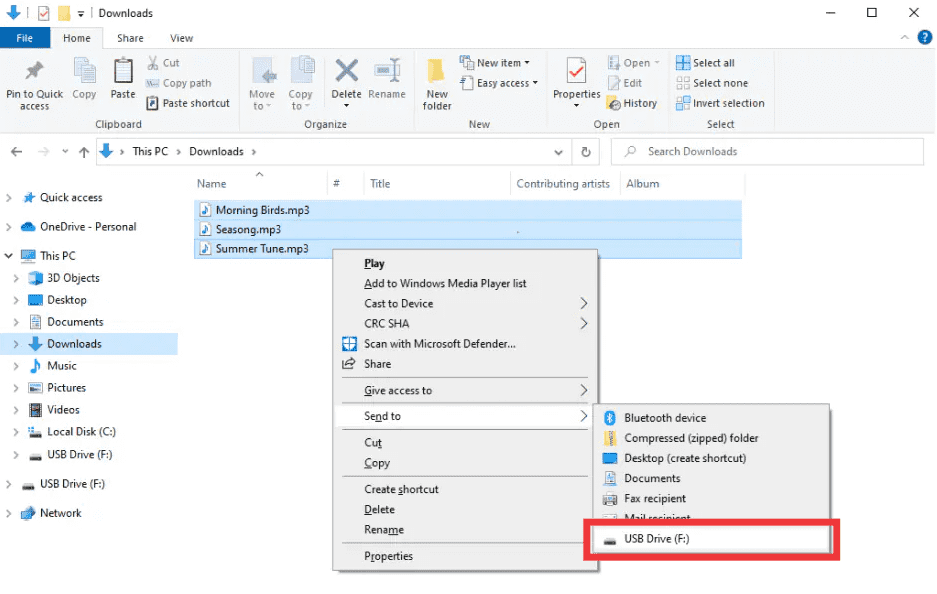
Steg 5. Hur man sätter på musik MP3 spelare från Spotify? Efter konverteringen, leta upp utdatamappen. Anslut din MP3 spelaren till din dator via USB och kopiera de konverterade filerna. Spotify Musiken är nu redo att spelas offline på vilken som helst MP3 enhet.
Del 3. FAQ
1. Kan jag lägga Spotify låtar direkt på MP3 spelare?
Nej. Spotifys spår är DRM-skyddade och kan inte exporteras direkt. Du behöver en konverterare som DumpMedia Spotify Music Converter för att göra dem kompatibla.
2. Hur konverterar jag Spotify spellistor till MP3?
Använda DumpMedia Spotify Music Converter: kopiera spellistlänkar, välj MP3 som utdata och konvertera. Överför sedan filer till din MP3 spelaren.
3. Är det lagligt att konvertera Spotify musik?
konvertera Spotify Musik för personligt bruk offline är generellt tillåtet. Undvik att distribuera konverterade filer till andra, vilket kan bryta mot upphovsrättslagar.
4. Vilka format kan jag använda för MP3 spelare?
MP3 är den vanligaste. DumpMedia Spotify Music Converter stöder även M4A, WAV och FLAC, alla kompatibla med de flesta enheter.
5. Kan jag överföra Spotify musik till flera enheter?
Ja. När den väl är konverterad med DumpMedia, Din Spotify Låtarna är DRM-fria och kan spelas upp på vilken som helst MP3 spelare, telefon eller surfplatta.
Del 4. För att summera det hela
Om du någonsin undrat hur man lägger musik på en MP3 spelare från Spotify, lösningen är tydlig: Spotifys DRM förhindrar direkta överföringar, men DumpMedia Spotify Music Converter tar bort dessa begränsningar. Den konverterar dina favoritlåtar, album eller spellistor till MP3 eller andra universella format, vilket bibehåller hög kvalitet och möjliggör offline-uppspelning på vilken enhet som helst.
Prova DumpMedia Spotify Music Converter idag och njut Spotify musik var som helst, när som helst, inga fler begränsningar, inga fler DRM-problem.