


Kan du ladda ner Spotify på iPod Nano? Verklig lösning förklarad
Många användare älskar fortfarande att använda iPod Nano på grund av dess lätta design, offline-uppspelning och långa batteritid. En vanlig fråga dyker dock upp ständigt: Kan du ladda ner Spotify på iPod Nano?
Det korta svaret är nej. Du kan inte installera direkt Spotify på en iPod Nano. Men du kan fortfarande spela Spotify på iPod Nano indirekt genom att konvertera Spotify låtar in MP3 filer och överföra dem manuellt. I den här guiden kommer vi att förklara den verkliga metoden för att spela upp permanent Spotify musik offline på äldre iPods.
InnehållsguideDel 1. Kan du ladda ner Spotify App på iPod Nano?Del 2. Bästa sättet att sätta Spotify Musik på iPod Nano Del 3. Hur man överför Spotify MP3 Filer till iPod Nano?Del 4. Vanliga frågorDel 5. Slutsats
Del 1. Kan du ladda ner Spotify App på iPod Nano?
Det är absolut omöjligt att köra Spotify app direkt på en iPod Nano. Även om iPod Nano är en klassisk hårdvara är dess tekniska arkitektur fundamentalt inkompatibel med moderna streamingtjänster.
Varför är "Ladda ner" Spotify på iPod Nano" inte möjligt?
Hårdvarubegränsningar: iPod Nano (även den sista 7:e generationens modell) körs på ett slutet, proprietärt operativsystem som inte stöder installation av tredjepartsapplikationer. Den saknar en Wi-Fi-modul (7:e generationen stöder Bluetooth enbart för ljudöverföring) och kan därför inte ansluta till internet för att strömma innehåll.
DRM-skydd: Spotifys musik består av krypterade filer som skyddas av Digital Rights Management (DRM). Även om du skulle ladda ner Spotifys "offlinefiler" via en dator, kan dessa filer bara spelas upp inom Spotify klienten i sig och kan inte importeras direkt till en iPod.
Officiellt stöd har upphört: Apple slutade tillverka iPod Nano 2017, och Spotify har aldrig utvecklat en version av sin tjänst som är kompatibel med enheter som inte är internetanslutna.
Del 2. Bästa sättet att sätta Spotify Musik på iPod Nano
Finns det ett sätt att spela Spotify på en iPod nano? Den mest effektiva lösningen är att konvertera Spotify musik in i MP3 formatera först. Men Spotify Låtar är skyddade av DRM, vilket innebär att nedladdade spår bara fungerar inuti SpotifyDet är just därför användare som söker efter hur man laddar ner Spotify på iPod Nano behöver vanligtvis en Spotify musikkonverterare. För att spela upp Spotify låtar på iPod Nano kan du använda DumpMedia Spotify Music Converter.
Gratis nedladdning Gratis nedladdning
DumpMedia Spotify Music Converter förenklar konverteringsprocessen genom att borttagning av DRM-skydd* samtidigt underhållande 100% original ljudkvalitet. Oavsett om du vill säkerhetskopiera ett enskilt spår, en podcast eller en enorm spellista, DumpMedia säkerställer att din musik är redo för de flesta medieenheter med bara några få klick.
🏅 Fler fantastiska funktioner
- ⭐Konvertera Spotify Musik till MP3, WAV, FLAC
- ⭐Integration med Spotify webbspelare
- ⭐ Jobba för båda Spotify Premium och Spotify Gratis användare
- ⭐Ge batchkonvertering med upp till 35x hastighet
- ⭐Behåll ID3-taggar som artist, omslag, konst, etc.
- ⭐Bevara den ursprungliga ljudkvaliteten
- ⭐100% rena. Ingen risk med att använda
Steg för att ladda ner Spotify Songs
Steg 1. Ladda ned och installera DumpMedia Spotify Music Converter till din Mac/Windows. Starta den och du kommer att se gränssnittet. Använd din Spotify Premium/gratis konto för att logga in.
Gratis nedladdning Gratis nedladdning
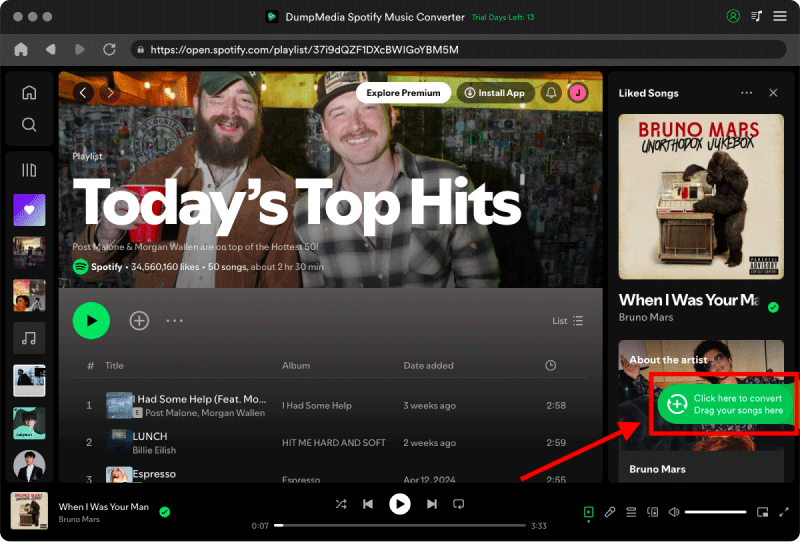
Steg 2. Nu kan du navigera till låten du vill ladda ner. Du kan dra den direkt till konverteringslistan.
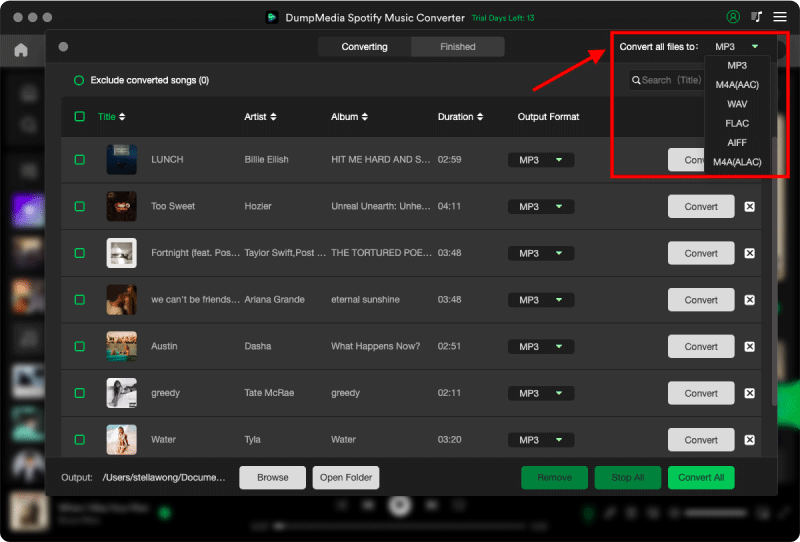
Steg 3. På konverteringsgränssnittet kan du välja utdataformat som MP3och ställ in samplingsfrekvens eller bithastighet under Inställningar. Välj även en mapp där filerna ska sparas.
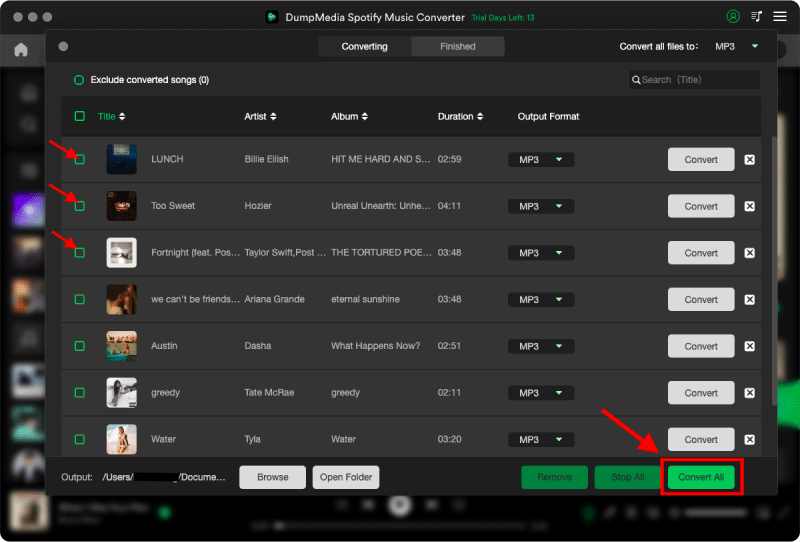
Steg 4. Det sista steget är att klicka på knappen "Konvertera", vilket borde vara uppenbart redan eftersom DumpMedia Spotify Music Converter har ett enkelt gränssnitt.
Nu kan du äntligen ladda ner Spotify på iPod Nano och spela låtar offline utan begränsningar.
Del 3. Hur man överför Spotify MP3 Filer till iPod Nano?
Hur man överför nedladdade filer Spotify filer till iPod Nano? Eftersom iPod Nano inte har Wi-Fi måste du använda en kabelanslutning och lämplig programvara beroende på ditt operativsystem.
Använda Finder (macOS Catalina och senare)
- Anslut din iPod Nano till din Mac med en USB-kabel.
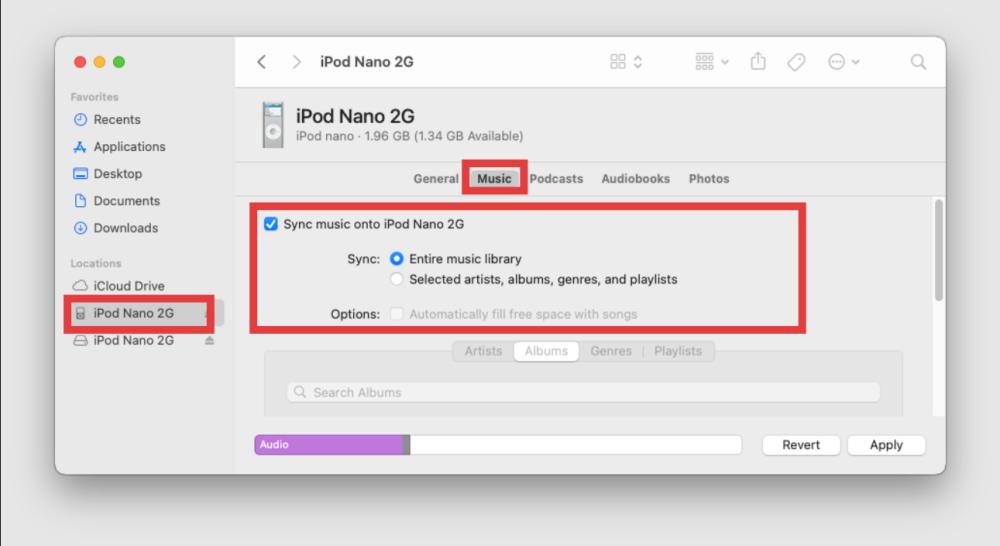
- Öppna ett Finder-fönster. Du kommer att se din iPods namn under avsnittet "Platser" i sidofältet. Klicka på det.
- Klicka på fliken Musik i huvudknappfältet.
- Markera "Synkronisera musik till [Din iPods namn]".
- Välj "Valda artister, album, genrer och spellistor".
- Hitta din importerade Spotify mappar eller spellistor och kontrollera dem.
- Klicka på knappen Verkställ i det nedre högra hörnet för att starta överföringen.
Dra och släpp musik
Om du föredrar "Dra och släpp"-metoden framför den traditionella "Synkronisering"-processen varierar stegen avsevärt mellan Mac och Windows på grund av hur varje system hanterar iPodens interna lagring. Så här hanterar du manuellt din Spotify MP3s.
Windows:
- Anslut din iPod Nano till datorn.
- Klicka på enhetsikonen > Sammanfattning > Markera "Hantera musik och videor manuellt". Klicka på Verkställ.
- Öppna iTunes och se till att din iPod-ikon är synlig.
- Öppna Windows-mapp som innehåller din konverterade Spotify MP3s.
- Välj de låtar du vill ha.
- Dra och släpp dem direkt till avsnittet "Enheter" i iTunes-sidofältet (specifikt till din iPods namn).
- Du kommer att se en förloppsindikator högst upp medan filerna kopieras.
Mac:
- Anslut din iPod Nano till datorn.
- Klicka på din iPod i sidofältet > Stanna kvar på fliken Allmänt > Markera "Hantera musik, filmer och TV-program manuellt". Klicka på Verkställ.
- Öppna två Finder-fönster.
- In WinNed 1, navigera till din iPod Nano (under Platser). Klicka på fliken Musik.
- In Window 2, öppna mappen där din Spotify MP3s lagras.
- Markera dina filer och dra dem direkt till iPod Nano-fönstret.
- Vänta tills cirkelikonen "Synkroniserar" bredvid iPodens namn i sidofältet slutar snurra innan du kopplar bort den.
Del 4. Vanliga frågor
Kan jag ladda ner direkt Spotify på iPod Nano?
Nej. Spotify stöder inte officiellt iPod Nano-enheter.
Kan iPod Nano spela Spotify musik?
Ja, men bara efter konvertering Spotify låtar in MP3 filer.
Vilket är det bästa sättet att ladda ner Spotify på iPod Nano?
Den bästa metoden är att använda DumpMedia Spotify Music ConverterEfter konverteringen blir låtarna lokala MP3 filer och uppspelningen blir permanent.
Kan jag behålla Spotify låtar för alltid efter konvertering?
Ja. När den väl har konverterats till MP3 filer, låtar kan lagras permanent och överföras fritt.
Del 5. Slutsats
Även Spotify inte officiellt stöder iPod Nano, finns det fortfarande ett pålitligt sätt att ladda ner Spotify på iPod Nano med hjälp av MP3 konvertering. Genom att konvertera Spotify musik till kompatibla ljudfiler kan användare njuta av offline-uppspelning, överföra låtar fritt, kringgå streamingbegränsningar och spara musiken permanent. För användare som fortfarande älskar klassiska iPods är detta fortfarande den bästa lösningen.
Gratis nedladdning Gratis nedladdning
*DumpMedia fungerar genom att dekryptera och ladda ner Spotify låtar till DRM-fria filer, vilket gör att du får en ren, obegränsad kopia av ditt bibliotek för vilken enhet som helst. Dess funktionalitet inkluderar inte DRM-borttagning av lokala ljudfiler.

30% rabatt >>>