


Hur man laddar ner musik från Amazon till MP3 Spelare (snabb, förlustfri metod)
Om du undrar hur man laddar ner musik från Amazon till MP3 Spelaren, du är inte ensam. Många användare vill njuta av sina favoriter Amazon Music spår på bärbara enheter, men inser snabbt att det finns begränsningar på grund av DRM-skydd. I den här guiden visar vi dig exakt hur du laddar ner Amazon-låtar till din MP3 spelare med den mest effektiva och pålitliga metoden som finns tillgänglig idag.
Innehållsguide Del 1: Varför du inte kan ladda ner Amazon Music direkt till MP3 spelareDel 2: Bästa sättet att ladda ner musik från Amazon till MP3 spelareDel 3: vanliga frågorDel 4: Sammanfattning
Del 1: Varför du inte kan ladda ner Amazon Music direkt till MP3 spelare
Innan du lär dig hur man laddar ner musik från Amazon till MP3 spelaren är det viktigt att förstå begränsningen. Amazon Music-spår (särskilt från Prime och Unlimited) är skyddade av DRM (Digital Rights Management). Det betyder:
- Låtar kan inte överföras direkt till MP3 spelare
- Filerna är inte i standard MP3 format
- Uppspelning är begränsad till Amazon Music-appen
Så om du försöker röra dig nedladdade låtar till din MP3 spelaren, de fungerar helt enkelt inte. För att lösa problemet behöver du ett professionellt verktyg som kan ta bort DRM och konvertera filer till MP3 format.
Del 2: Bästa sättet att ladda ner musik från Amazon till MP3 spelare
Den mest effektiva lösningen för att ladda ner musik från Amazon MP3 spelaren använder DumpMedia Amazon Music ConverterDet här verktyget är specifikt utformat för att hjälpa användare att konvertera Amazon Music till MP3 och andra vanliga format, vilket gör det enkelt att överföra och spela upp på vilken som helst MP3 spelaren.
Gratis nedladdning Gratis nedladdning
Viktiga fördelar:
- Konvertera Amazon Music till MP3 lätt
- Ta bort DRM-skyddet* automatiskt
- Bevara originalljudkvaliteten (upp till 320 kbps)
- Ladda ner spellistor och album i batch
- Fungerar på båda Windows och Mac
*DumpMedia fungerar genom att dekryptera och ladda ner dina ljudböcker till DRM-fria filer, vilket gör att du får en ren, obegränsad kopia av ditt bibliotek för vilken enhet som helst.
Ladda ner Amazon Music till MP3
Hur man laddar ner musik från Amazon till MP3 spelare? Följ dessa steg för att lägga in dina Amazon-låtar MP3 först:
Steg 1: Öppna programvaran på din dator. Den fungerar med båda Windows och Mac. Gränssnittet är användarvänligt, vilket gör det enkelt för nybörjare.
Gratis nedladdning Gratis nedladdning
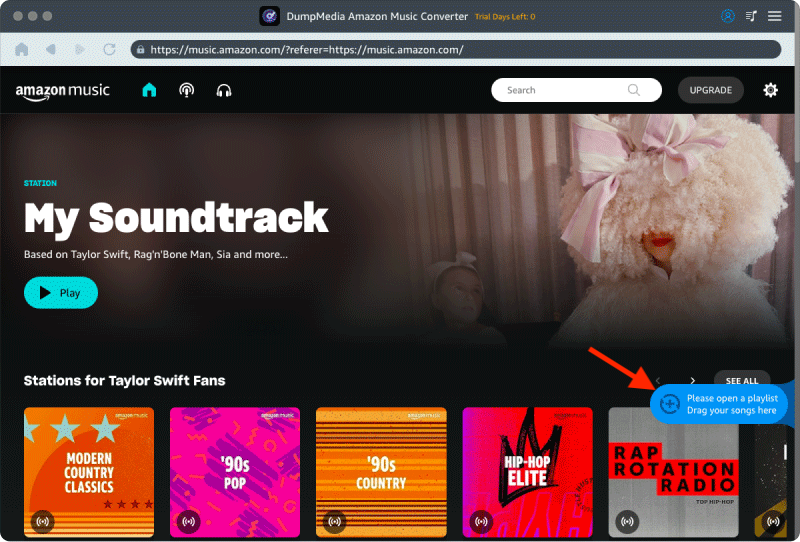
Steg 2: Öppna den inbyggda Amazon Music-webbspelaren inuti DumpMedia och logga in med ditt Amazon Music-konto. Bläddra bland Amazon Music och dra de låtar, album eller spellistor du vill ladda ner till konverteraren.
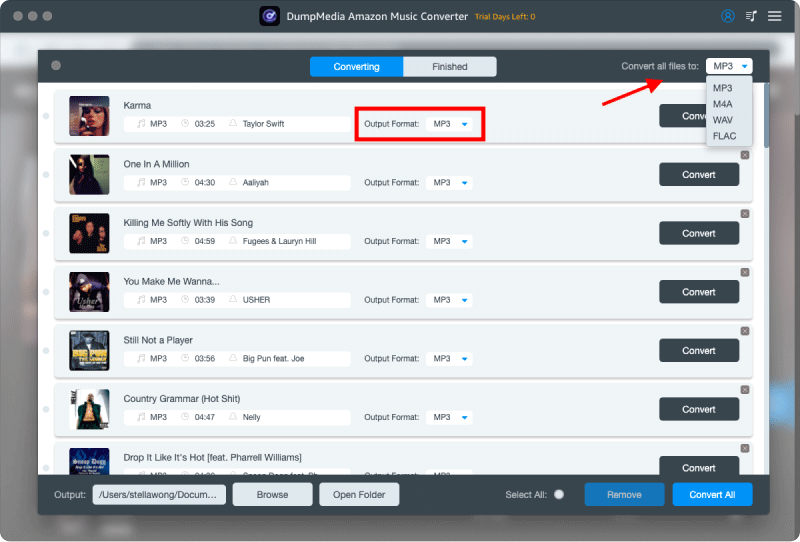
Steg 3: I inställningspanelen väljer du MP3 som utdataformat för att möjliggöra en MP3 nedladdning av dina valda låtar.
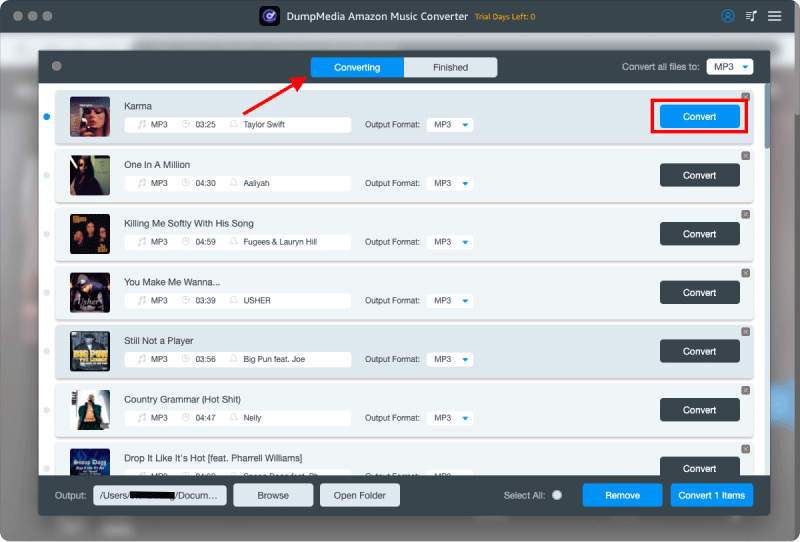
Steg 4: Det sista steget är att trycka på knappen "Konvertera" för att starta konverteringsprocessen.
Överför Amazon Music till MP3 spelare
Hur man laddar ner musik från Amazon till MP3 spelare? Följ dessa steg:
För de flesta enheter som inte är från Apple (som Sony Walkman, Shanling, FiiO eller standardenheter) MP3 spelare)
- Anslut MP3 spelaren till din dator med en datakabel.
- Din dator kommer att känna igen den som en "Flyttbar disk" (synlig under "Den här datorn" på Windows eller i Finders sidofält på Mac).
- Öppna mappen på din dator där dina nedladdade Amazon Music-filer finns.
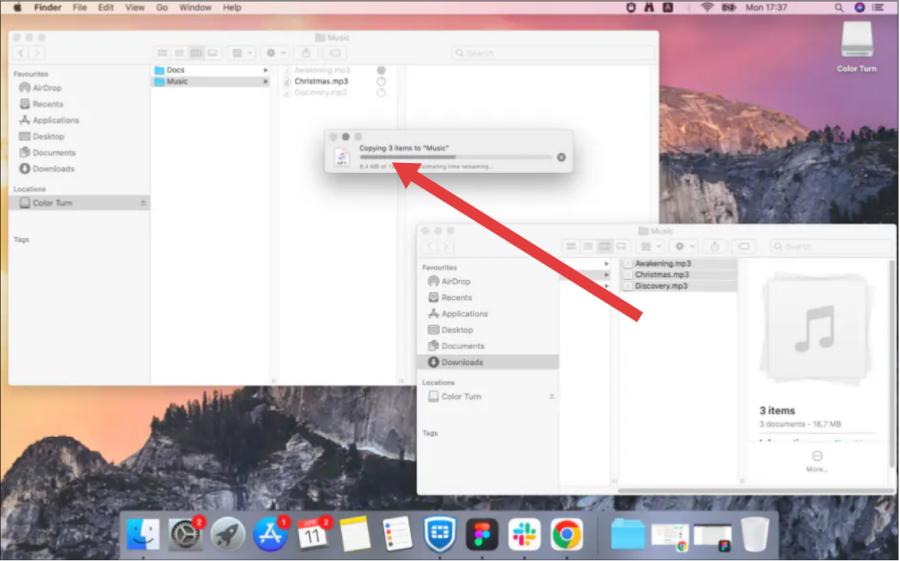
- Dra de valda musikfilerna direkt till mappen "Musik" på din MP3 spelaren.
- Högerklicka på enheten och välj "Mata ut" innan du kopplar ur datakabeln för att förhindra att filer skadas.
För Apple-enheter (iPod eller iOS-kompatibel spelare)
- Anslut enheten till din dator.
- Öppna Apple Music (Mac) eller iTunes (Windows).
- Importera din lokala Amazon Music MP3 filer till ditt bibliotek (Arkiv > Importera).
- Klicka på enhetsikonen, välj "Synkronisera musik" och klicka sedan på "Verkställ".
Del 3: vanliga frågor
Kan jag ladda ner Amazon Music direkt till en MP3 spelare?
Nej. På grund av DRM-skydd stöds inte direktöverföring. Du måste konvertera filerna först.
Är det säkert att använda DumpMedia Amazon Music Converter?
Ja, det är säkert och påverkar inte ditt Amazon Music-konto eller originalfiler.
Kommer jag att förlora ljudkvalitet efter konverteringen?
Nej. DumpMedia garanterar högkvalitativ ljudkvalitet, så att du kan behålla den ursprungliga lyssningsupplevelsen.
Del 4: Sammanfattning
Nu vet du exakt hur man laddar ner musik från Amazon till MP3 spelaren på det enklaste och mest effektiva sättet. Istället för att kämpa med DRM-begränsningar, använd DumpMedia Med Amazon Music Converter kan du njuta av fullständig frihet över din musik. DumpMedia Amazon Music Converter nu och börja konvertera dina favoritlåtar till MP3 i dag!

30% rabatt >>>