


Transferência Spotify para o Apple Music: Guia completo (2026)
Muitos ouvintes que inicialmente usaram Spotify eventualmente decidem transferir suas bibliotecas de música para Apple Music Para melhor integração com dispositivos Apple, gerenciamento aprimorado da biblioteca ou por preferência pessoal. No entanto, um grande desafio ao migrar de plataforma é manter suas playlists cuidadosamente selecionadas.
Felizmente, várias ferramentas podem te ajudar. transferência Spotify para a Apple Music De forma rápida e eficiente. Neste guia, mostraremos os melhores métodos para realizar essa transferência. Spotify Vamos migrar suas playlists para o Apple Music. Também abordaremos ferramentas online alternativas e dicas práticas para tornar o processo de migração mais tranquilo e preciso.
Guia de conteúdo Parte 1. Por que os usuários desejam transferir Spotify Listas de reprodução no Apple MusicParte 2. Melhor maneira de transferir Spotify Listas de reprodução no Apple MusicParte 3. Ferramentas online alternativas para transferência Spotify Listas de reprodução no Apple MusicParte 4. FAQsParte 5. Conclusão
Parte 1. Por que os usuários desejam transferir Spotify Listas de reprodução no Apple Music
Antes de explorar as ferramentas disponíveis, é útil entender por que muitos usuários decidem migrar para a nuvem. Spotify para o Apple Music em primeiro lugar.
- Mudando de ecossistema musical: Para usuários que dependem muito de dispositivos Apple, o Apple Music oferece uma experiência de audição mais integrada.
- Preservar playlists existentes: Perder playlists durante a troca de plataforma pode ser frustrante. É por isso que as ferramentas de migração de playlists são tão importantes.
- A transferência manual é ineficiente: essa abordagem apresenta diversos problemas, como o fato de que procurar cada música individualmente leva horas; algumas faixas podem ser esquecidas, a ordem da lista de reprodução pode não corresponder à original, entre outros.
Devido a esses desafios, a maioria dos usuários depende de ferramentas especializadas para realizar a transferência. Spotify para o Apple Music automaticamente.
Parte 2. Melhor maneira de transferir Spotify Listas de reprodução no Apple Music
Entre as ferramentas disponíveis, DumpMedia Qualquer conversor de música é uma das soluções mais confiáveis para usuários que desejam transferir Spotify Para o Apple Music de forma rápida e precisa. Seu recurso dedicado de Transferência de Playlists simplifica todo o processo de migração e garante que as playlists sejam recriadas corretamente.
Download grátis Download grátis
DumpMedia funciona em ambos WinO recurso de Transferência de Listas de Reprodução é compatível com Windows e macOS, tornando-o acessível a uma ampla gama de usuários. Ele foi projetado especificamente para a migração de listas de reprodução entre plataformas. Aqui estão algumas de suas funcionalidades mais valiosas:
- Transferência em lote de listas de reprodução: você pode mover várias listas de reprodução de uma só vez, em vez de transferi-las individualmente.
- Correspondência Inteligente de Faixas: O software identifica automaticamente as músicas correspondentes no Apple Music, melhorando a precisão da transferência.
- Preservação de metadados: informações importantes como títulos de músicas, artistas, álbuns e ordem da lista de reprodução podem ser mantidas durante a migração.
Guia passo a passo para transferir Spotify para a Apple Music
Siga estes passos simples para concluir o processo de migração.
Passo 1. Baixe e instale DumpMedia Qualquer conversor de música no seu Wincomputador dows ou Mac. Após a instalação, execute o programa para acessar a interface principal.
Download grátis Download grátis
Passo 2. Acesse a função Transferência de Lista de Reprodução dentro do programa. Selecione Spotify como uma fonte.

Passo 3. Selecione o Apple Music como a plataforma para onde deseja transferir sua playlist.
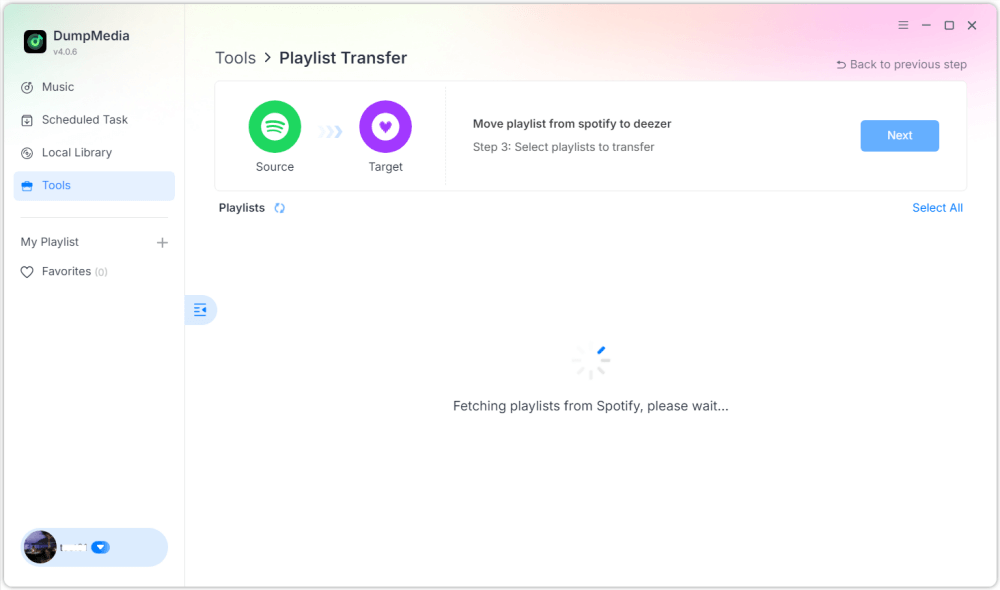
Passo 4. Encontre as listas de reprodução das quais deseja transferir. Spotify Acesse o Apple Music e selecione todas as playlists que deseja mover.

Passo 5. Clique em Converter para iniciar a transferência.
Etapa 6. A transferência foi concluída. Clique em "Acessar o Apple Music". Suas playlists foram transferidas para o novo serviço e você já pode começar a aproveitar seu novo serviço de streaming de música.
Para usuários com grandes coleções de música, esta solução oferece uma das maneiras mais fáceis de transferir arquivos. Spotify para o Apple Music sem erros ou faixas faltando.
Parte 3. Ferramentas online alternativas para transferência Spotify Listas de reprodução no Apple Music
Embora o software para desktop seja geralmente a opção mais confiável, alguns usuários preferem ferramentas online por não exigirem instalação. Diversos serviços online permitem a transferência de arquivos. Spotify Acesse o Apple Music diretamente do navegador. Duas opções populares são TuneMyMusic e Soundiiz.
Usando o TuneMyMusic
O TuneMyMusic é um serviço online simples de transferência de playlists que suporta diversas plataformas de música. Ele oferece uma interface fácil de usar para usuários que desejam transferir playlists entre serviços.
Passo 1. Visite o site da TuneMyMusic e clique em “Vamos começar”.
Passo 2. Selecionar Spotify como sua plataforma de origem e faça login em sua conta.
Passo 3. Selecione a lista de reprodução que deseja migrar ou cole o URL da lista de reprodução.
Passo 4. Inicie sessão na sua conta Apple Music para autorizar a transferência.

Passo 5. Clique em “Começar a transferir minhas músicas”. O serviço irá identificar as músicas e criar a playlist no Apple Music.
Usando o Soundiiz
Soundiiz é outra plataforma online poderosa para gerenciamento de playlists que oferece suporte a diversos serviços de streaming.
Passo 1. Cadastre-se ou faça login no painel de controle do Soundiiz.
Passo 2. Autorizar Spotify Assim, o Soundiiz poderá acessar suas playlists.
Passo 3. Adicione o Apple Music como um serviço conectado.
Passo 4. Escolha a lista de reprodução que deseja transferir.
Passo 5. Clique em Converter e escolha Apple Music como destino.
Após a conclusão do processo, a playlist deverá aparecer na sua biblioteca do Apple Music.
Limitações das ferramentas online
Embora as ferramentas online sejam convenientes, podem apresentar diversas desvantagens:
- As versões gratuitas geralmente limitam o número de músicas transferidas.
- A precisão da correspondência pode variar.
- Listas de reprodução grandes podem demorar mais para serem processadas.
- A conectividade com a internet afeta o desempenho.
Parte 4. FAQs
Posso transferir Spotify Para assistir ao Apple Music gratuitamente?
Algumas ferramentas online oferecem transferência gratuita de listas de reprodução, mas podem limitar o número de músicas. As ferramentas premium geralmente oferecem transferências mais rápidas e recursos adicionais.
Todas as músicas serão transferidas com sucesso?
A maioria das músicas pode ser encontrada nos dois serviços, mas ocasionalmente, algumas faixas podem estar indisponíveis devido a diferenças de licenciamento.
Quanto tempo demora para transferir as listas de reprodução?
O tempo necessário depende do tamanho da lista de reprodução. Listas menores podem ser transferidas em poucos minutos, enquanto bibliotecas maiores podem levar mais tempo.
Posso transferir várias listas de reprodução de uma só vez?
Sim. Algumas ferramentas, incluindo DumpMedia O Any Music Converter suporta transferências em lote, permitindo que você mova várias listas de reprodução simultaneamente.
É seguro usar ferramentas de transferência de listas de reprodução?
Ferramentas confiáveis utilizam métodos de autenticação seguros para conectar-se às suas contas de streaming. Sempre escolha serviços confiáveis ao realizar transferências. Spotify para a Apple Music.
Parte 5. Conclusão
Transferir playlists entre serviços de streaming não precisa mais ser complicado. Com as ferramentas certas, você pode fazer isso facilmente. Spotify sincronize rapidamente com o Apple Music, mantendo sua biblioteca de músicas intacta. Graças ao seu poderoso recurso de Transferência de Playlists, DumpMedia permite que você transfira Spotify Transfira músicas para o Apple Music com precisão, mantenha a estrutura das suas playlists e migre várias playlists com facilidade. Escolhendo o método certo, você pode curtir suas músicas favoritas no Apple Music sem perder as playlists que você levou anos para criar.