


Como transferir Spotify Lista de reprodução para o Amazon Music?
Os serviços de streaming de música transformaram a maneira como as pessoas ouvem música. No entanto, trocar de plataforma às vezes pode ser inconveniente, especialmente quando você tem playlists cuidadosamente selecionadas e construídas ao longo do tempo. Muitos usuários que antes dependiam de Spotify pode decidir experimentar Amazon Música pela sua integração com dispositivos Amazon, extensa biblioteca musical e compatibilidade com alto-falantes inteligentes habilitados para Alexa.
Felizmente, diversas ferramentas agora permitem transferir playlists entre serviços de streaming automaticamente. Neste guia, explicaremos os métodos mais eficazes para isso. transferência Spotify lista de reprodução para Amazon Music usando ferramentas online, software para computador e aplicativos móveis. Seja você usando WinSeja para Windows, Mac, iOS ou Android, você encontrará uma solução que o ajudará a migrar suas listas de reprodução de forma rápida e precisa.
Guia de conteúdo Parte 1. Transferência Spotify Listas de reprodução para Amazon Music OnlineParte 2. Transferência Spotify Adicionar listas de reprodução ao Amazon Music Windows/MacParte 3. Transferência Spotify Adicionar listas de reprodução ao Amazon Music no iOSParte 4. Transferência Spotify Adicionar listas de reprodução ao Amazon Music no AndroidParte 5. FAQsParte 6. Conclusão
Parte 1. Transferência Spotify Listas de reprodução para Amazon Music Online
Para usuários que desejam um método rápido e simples sem instalar software, as ferramentas online de transferência de playlists são uma opção conveniente. Esses serviços permitem conectar suas contas de streaming por meio de um navegador da web e migrar automaticamente as playlists entre as plataformas.
Uma das ferramentas online mais populares para esse fim é o TuneMyMusic. O TuneMyMusic é uma ferramenta de migração de playlists baseada na web que suporta diversas plataformas de streaming. Ele permite que os usuários transfiram suas playlists para outras plataformas. Spotify Adicione sua playlist ao Amazon Music em apenas alguns passos.
Características principais
- Funciona diretamente no seu navegador web.
- Compatível com diversas plataformas de streaming.
- Interface simples com instruções passo a passo.
- Não requer instalação de software
Passos para transferir Spotify Adicione sua playlist ao Amazon Music com o TuneMyMusic.
Passo 1. Acesse o site da TuneMyMusic e clique no botão “Vamos começar” para iniciar o processo.
Passo 2. Escolha Spotify Selecione a plataforma de origem e faça login na sua conta. A ferramenta solicitará permissão para acessar suas listas de reprodução.
Passo 3. Após a conexão, você pode selecionar a lista de reprodução específica que deseja migrar ou colar o link da lista. O sistema carregará todas as músicas dessa lista.
Passo 4. Em seguida, escolha o Amazon Music como serviço de destino e faça login na sua conta da Amazon para autorizar a transferência.

Passo 5. Clique em “Começar a transferir minhas músicas”. A ferramenta combinará automaticamente músicas de Spotify com o catálogo do Amazon Music.
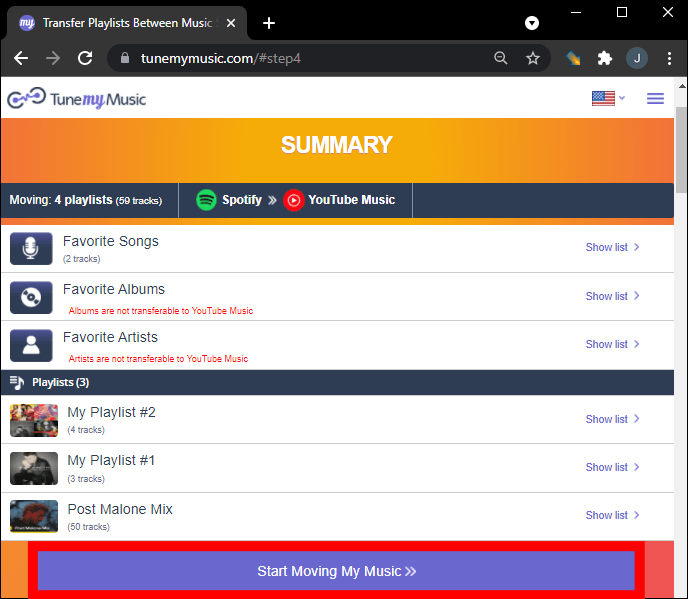
Passo 6. Após a conclusão do processo, abra sua biblioteca do Amazon Music para confirmar se a lista de reprodução foi criada com sucesso.
Utilizar uma ferramenta online como o TuneMyMusic é uma das maneiras mais rápidas de transferir músicas. Spotify Para listas de reprodução pequenas ou médias, utilize o Amazon Music. No entanto, para usuários com grandes bibliotecas de música ou que desejam mais estabilidade, uma solução para desktop pode ser a melhor opção.
Parte 2. Transferência Spotify Adicionar listas de reprodução ao Amazon Music Windows/Mac
Se você deseja uma solução mais confiável e com mais recursos, usar um software para desktop costuma ser a melhor opção. DumpMedia Qualquer conversor de música É um programa poderoso projetado para gerenciar e converter músicas, oferecendo também um recurso dedicado à transferência de listas de reprodução. DumpMedia permite que os usuários transfiram Spotify Adicione sua lista de reprodução ao Amazon Music de forma eficiente, preservando as informações da lista e os metadados das músicas.
Download grátis Download grátis
Principais funcionalidades
- suportes Windows e macOS
- Recurso dedicado de transferência de listas de reprodução
- Migração em lote de listas de reprodução
- correspondência inteligente de trilhas
- Mantém metadados como artista, álbum e títulos das faixas.
- Processamento local estável sem limitações do navegador
Essas características fazem dele um dos métodos de transferência mais eficientes. Spotify Adicione listas de reprodução ao Amazon Music para usuários com listas de reprodução extensas.
Guia Passo a Passo
Passo 1. Baixe e instale DumpMedia Qualquer conversor de música no seu Wincomputador dows ou Mac. Execute o programa após a instalação.
Download grátis Download grátis
Passo 2. Escolha Ferramentas > Transferência de lista de reprodução. Selecione Spotify como uma fonte.

Passo 3. Selecione Amazon Music como destino.
Passo 4. Selecione o que deseja transferir. Oferecemos suporte às suas músicas, artistas, álbuns favoritos e às suas playlists personalizadas.

Passo 5. Clique em Converter para iniciar a transferência.
Etapa 6. A transferência foi concluída. Clique em "Acessar o Amazon Music". Suas playlists foram transferidas para um novo serviço e você já pode começar a curtir suas novas playlists no Amazon Music.
Comparado aos serviços online, este método oferece mais estabilidade e maior precisão nas transferências. Spotify lista de reprodução no Amazon Music.
Parte 3. Transferência Spotify Adicionar listas de reprodução ao Amazon Music no iOS
Se preferir usar um dispositivo móvel, vários aplicativos podem ajudá-lo na transferência. Spotify Transfira suas playlists para o Amazon Music diretamente do seu iPhone ou iPad. Uma das opções mais populares é o SongShift. O SongShift é um aplicativo de migração de playlists bastante conhecido, desenvolvido para usuários de iOS. Ele é compatível com diversos serviços de streaming de música e oferece uma interface intuitiva para a transferência de playlists.
Principais funcionalidades
- Interface móvel fácil de usar
- Suporta múltiplas plataformas de streaming
- Permite a transferência em lote de listas de reprodução.
- Desenvolvido especificamente para dispositivos iOS
Passos para transferir Spotify Adicione sua playlist ao Amazon Music com o SongShift.
Passo 1. Baixe o SongShift da App Store e abra o aplicativo. Autorize. Spotify para que o aplicativo possa acessar suas listas de reprodução.
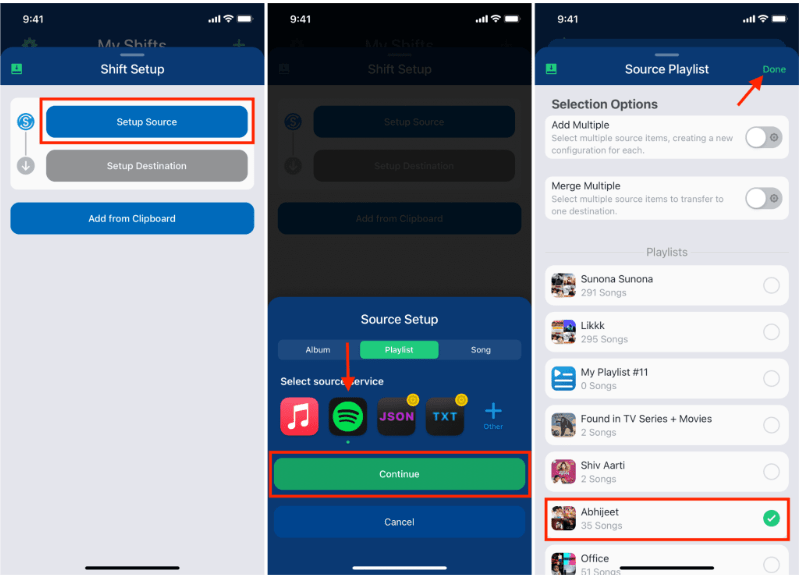
Passo 2. Adicione o Amazon Music como seu serviço de destino fazendo login na sua conta da Amazon.
Passo 3. Escolha o Spotify lista de reprodução que você deseja migrar.
Passo 4. Toque em Iniciar Shift e deixe o aplicativo combinar músicas em todas as plataformas.
Após a conclusão do processo, sua playlist deverá aparecer no Amazon Music. O SongShift é uma opção conveniente para usuários que desejam transferir suas músicas. Spotify Adicione sua lista de reprodução ao Amazon Music sem usar um computador.
Parte 4. Transferência Spotify Adicionar listas de reprodução ao Amazon Music no Android
Usuários de Android também podem transferir playlists entre serviços de streaming usando aplicativos dedicados. Uma solução bastante utilizada é o FreeYourMusic. O FreeYourMusic é uma ferramenta multiplataforma para transferência de músicas que funciona em Android, iOS, Windows e macOS. Permite aos usuários mover listas de reprodução entre serviços de streaming com o mínimo de esforço.
Principais funcionalidades
- Compatível com diversas plataformas de streaming.
- Processo de transferência simples
- Funciona em vários dispositivos
- Permite a transferência em lote de listas de reprodução.
Passos para transferir Spotify Adicione sua playlist ao Amazon Music com o FreeYourMusic.
Passo 1. Baixe o FreeYourMusic da Google Play Store e abra o aplicativo. Selecione Spotify como plataforma de origem e faça login na sua conta.
Passo 2. Escolha Amazon Music e faça login na sua conta.
Passo 3. Escolha o Spotify lista de reprodução que você deseja migrar.
Passo 4. Toque em Transferir para iniciar a migração. O aplicativo irá identificar as músicas e recriar a playlist no Amazon Music.
Parte 5. FAQs
1. Posso transferir Spotify Adicionar playlists ao Amazon Music gratuitamente?
Algumas ferramentas oferecem transferência gratuita de listas de reprodução com limitações, como um número máximo de músicas por transferência. As versões premium geralmente removem essas restrições.
2. Todas as músicas serão transferidas com sucesso?
A maioria das músicas será transferida com sucesso, mas ocasionalmente algumas faixas podem não estar disponíveis em ambas as plataformas devido a diferenças de licenciamento.
3. Quanto tempo demora a transferência das listas de reprodução?
O tempo necessário depende do tamanho da sua lista de reprodução. Listas menores podem ser transferidas em poucos minutos, enquanto as maiores podem demorar mais.
4. É seguro usar ferramentas de transferência de listas de reprodução?
Ferramentas confiáveis usam autenticação segura para acessar suas contas. Sempre escolha aplicativos confiáveis ao realizar transferências. Spotify lista de reprodução no Amazon Music.
Parte 6. Conclusão
Seja qual for sua preferência — um serviço online, um programa para computador ou um aplicativo para celular —, existem diversas maneiras de transferir dados. Spotify Transfira suas listas de reprodução para o Amazon Music de forma rápida e eficiente. Para usuários que desejam resultados mais estáveis e precisos, especialmente para listas de reprodução extensas. DumpMedia O Any Music Converter oferece uma das melhores soluções.