


Como transferir músicas da Apple para Spotify: Guia Completo
A fidelidade digital é fluida. À medida que os entusiastas da música buscam maior compatibilidade entre plataformas e novos algoritmos de descoberta, muitos estão migrando para plataformas digitais. Apple Music para SpotifyNo entanto, a maior barreira para a mudança não é a taxa de assinatura, mas sim o medo de perder uma década de história musical. Felizmente, diversas ferramentas agora tornam isso possível. transferir o Apple Music para Spotify automaticamente. Neste guia, exploraremos os métodos mais eficazes para transferir músicas do Apple Music para Spotify em diferentes dispositivos.
Guia de conteúdo Parte 1. Transferir a lista de reprodução do Apple Music para Spotify on Windows/MacParte 2. Transferir a lista de reprodução do Apple Music para Spotify OnlineParte 3. Transferir a lista de reprodução do Apple Music para Spotify em iOS/AndroidParte 4. FAQsParte 5. Para resumir tudo
Parte 1. Transferir a lista de reprodução do Apple Music para Spotify on Windows/Mac
Uma das maneiras mais confiáveis de transferir músicas do Apple Music para Spotify É possível usar uma ferramenta dedicada para desktop que ofereça recursos avançados de migração de listas de reprodução. Uma opção altamente recomendada é DumpMedia Qualquer conversor de música, que inclui uma poderosa função de Transferência de Listas de Reprodução.
Download grátis Download grátis
DumpMedia Any Music Converter é um aplicativo profissional para desktop projetado para gerenciar e converter músicas entre plataformas. Ele funciona tanto em... Windows e macOS. Com seu recurso integrado de Transferência de Listas de Reprodução, os usuários podem transferir músicas do Apple Music para outros dispositivos de forma eficiente. Spotify preservando a estrutura da lista de reprodução e os metadados das músicas.
Características principais
- Função de transferência de lista de reprodução: DumpMedia Permite mover listas de reprodução inteiras em vez de transferir músicas individualmente. Isso economiza um tempo considerável ao lidar com grandes coleções de música.
- Migração em lote de listas de reprodução: você pode selecionar várias listas de reprodução e transferi-las simultaneamente, facilitando o gerenciamento de grandes bibliotecas.
- Desempenho estável em desktops: Desde DumpMedia Por funcionar localmente no seu computador, oferece um processo de transferência mais estável do que muitas ferramentas baseadas em navegador.
- Combinação inteligente de músicas: o software identifica automaticamente músicas correspondentes em Spotifyo catálogo, garantindo que a lista de reprodução transferida contenha as faixas corretas.
- Preservação de metadados: os títulos das músicas, nomes dos artistas, álbuns e ordem das listas de reprodução permanecem intactos durante o processo de transferência.
Guia Passo a Passo
Passo 1. Primeiro, faça o download DumpMedia Baixe o Any Music Converter do site oficial. Instale o programa no seu dispositivo. WinAbra o aplicativo em um computador Windows ou Mac e execute-o. Em seguida, selecione Ferramentas > Transferência de lista de reprodução.
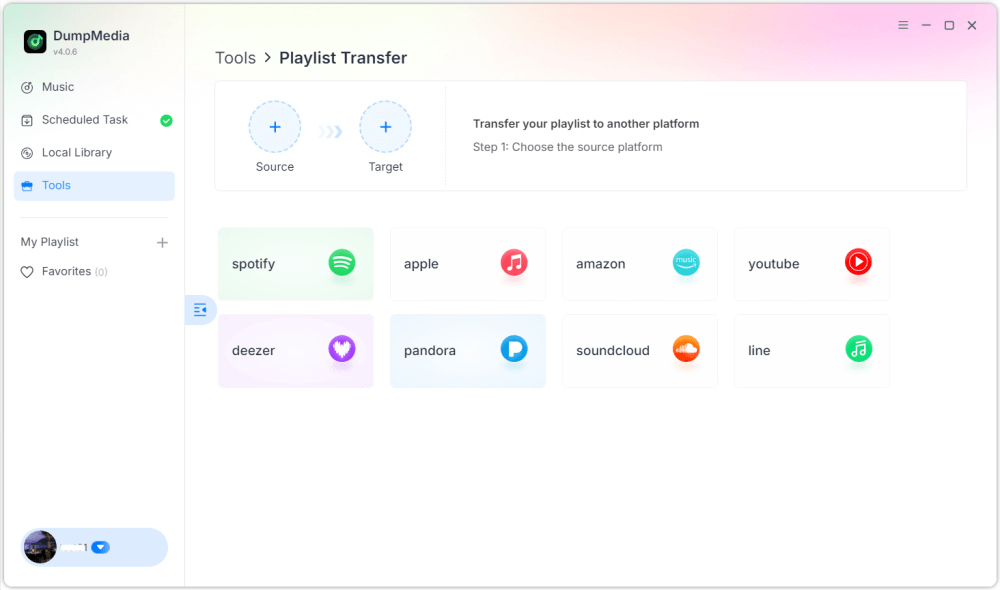
Passo 2. Selecione Apple Music como fonte. Em seguida, selecione Spotify como plataforma alvo.
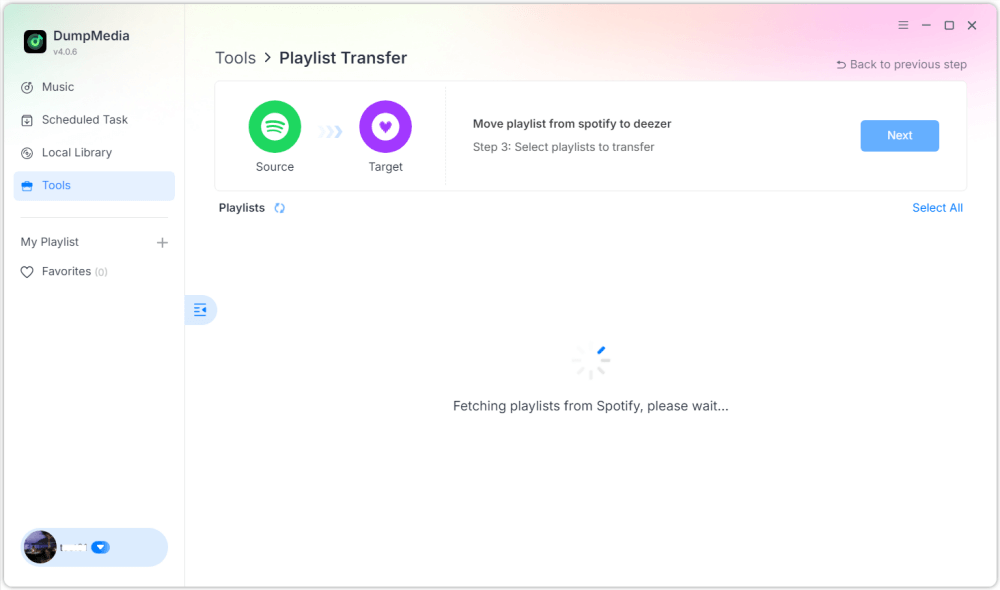
Passo 3. Encontre as listas de reprodução que deseja transferir do Apple Music para Spotifye selecione todas as listas de reprodução que deseja mover.

Passo 4. Clique no botão Converter para iniciar a migração da lista de reprodução. DumpMedia irá recriar a lista de reprodução automaticamente em Spotify.
Passo 5. A transferência foi concluída. Clique em "Ir para". SpotifySuas playlists foram transferidas para um novo serviço e você já pode começar a aproveitar seu novo serviço de streaming de música.
Utilizar este método em um computador é uma das maneiras mais eficientes de transferir músicas do Apple Music para o seu dispositivo. Spotify, especialmente se você tiver várias listas de reprodução ou uma grande biblioteca de músicas.
Parte 2. Transferir a lista de reprodução do Apple Music para Spotify Online
Se preferir não instalar software adicional, uma ferramenta online de transferência de listas de reprodução também pode ajudá-lo a transferir músicas do Apple Music para o seu dispositivo. Spotify rapidamente. Uma opção popular é o Soundiiz. O Soundiiz é uma plataforma de gerenciamento de playlists baseada na nuvem que permite aos usuários transferir playlists entre diversos serviços de streaming de música. Como funciona inteiramente em um navegador, é compatível com praticamente qualquer dispositivo.
Principais funcionalidades
- Interface baseada na web, sem necessidade de instalação.
- Compatível com diversas plataformas de streaming de música.
- Ferramentas de conversão de listas de reprodução
- Gerenciamento de listas de reprodução em lote
Passos para transferir músicas do Apple Music para Spotify com Soundiiz
Passo 1. Acesse o site da Soundiiz e crie uma conta. Faça login na sua conta do Apple Music e conceda permissão à Soundiiz para acessar suas playlists.
Passo 2. Em seguida, conecte seu Spotify conta.
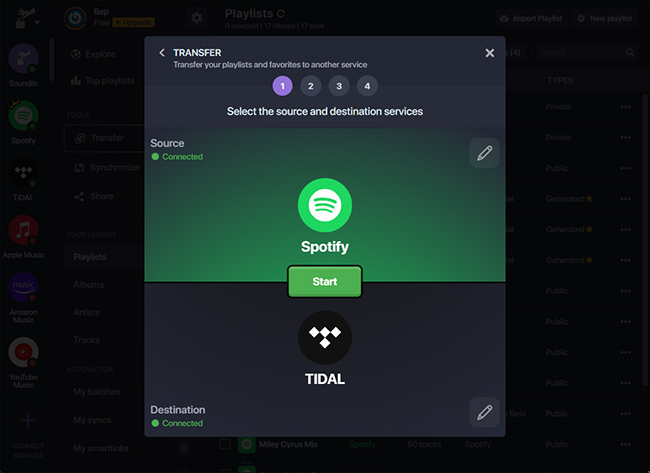
Passo 3. Navegue pelas suas playlists do Apple Music e selecione aquela que deseja transferir. Clique em Converter e escolha. Spotify como a plataforma de destino.
Passo 4. A Soundiiz começará a combinar músicas e recriar a playlist em Spotify.
Ferramentas online como o Soundiiz são uma opção conveniente para usuários que desejam transferir músicas do Apple Music para outros dispositivos. Spotify Sem a necessidade de instalar software no computador. No entanto, podem apresentar limitações, como limites de transferência ou processamento mais lento para listas de reprodução grandes.
Parte 3. Transferir a lista de reprodução do Apple Music para Spotify em iOS/Android
Se você preferir gerenciar suas playlists diretamente de um smartphone, diversos aplicativos móveis podem ajudá-lo a transferir o Apple Music para o seu dispositivo. Spotify Facilmente. Dois dos aplicativos mais usados são o FreeYourMusic e o SongShift.
Usando o FreeYourMusic (iOS e Android)
O FreeYourMusic é uma ferramenta multiplataforma para transferência de músicas, disponível para dispositivos iOS e Android. Ele permite que os usuários transfiram playlists entre diferentes serviços de streaming diretamente de seus celulares.
- Instale o aplicativo FreeYourMusic na App Store ou no Google Play.
- Abra o aplicativo e selecione Apple Music como plataforma de origem.
- Inicie sessão na sua conta Apple Music.
- Escolha Spotify como a plataforma de destino.
- Selecione a lista de reprodução que deseja migrar.
- Toque em Transferir para iniciar o processo.
Em poucos minutos, sua playlist deverá aparecer em Spotify.
Usando o SongShift (somente para iOS)
O SongShift é outro aplicativo móvel popular desenvolvido especificamente para usuários de iOS. Ele permite a transferência rápida de listas de reprodução entre vários serviços de música.
- Baixe o SongShift na App Store.
- Conecte seu Apple Music e Spotify contas.
- Toque em Criar turno.
- Selecione o Apple Music como fonte e Spotify como destino.
- Selecione a lista de reprodução que deseja transferir.
- Inicie o processo de transferência.
Usar aplicativos móveis é uma excelente opção se você quiser transferir músicas do Apple Music para outro dispositivo. Spotify diretamente do seu celular, sem precisar usar um computador.
Parte 4. FAQs
1. Posso transferir o Apple Music para Spotify de graça?
Algumas ferramentas oferecem transferências gratuitas de listas de reprodução com limitações, como um número máximo de músicas. As versões pagas geralmente permitem transferências ilimitadas e processamento mais rápido.
2. Todas as músicas serão transferidas com sucesso?
A maioria das músicas será transferida corretamente, mas ocasionalmente algumas faixas podem não aparecer se não estiverem disponíveis na plataforma de destino.
3. Quanto tempo demora a transferência?
O tempo necessário depende do tamanho da lista de reprodução. Listas menores podem ser transferidas em poucos minutos, enquanto as maiores podem demorar mais.
4. É seguro usar ferramentas de transferência de listas de reprodução?
Ferramentas confiáveis utilizam métodos de autenticação seguros para se conectar às suas contas de música. Sempre escolha um software confiável ao transferir músicas do Apple Music para outro dispositivo. Spotify.
Parte 5. Para resumir tudo
Mudar de plataforma de streaming de música não significa mais perder suas playlists cuidadosamente selecionadas. Com as ferramentas modernas de migração de playlists, agora é mais fácil do que nunca transferir músicas do Apple Music para outras plataformas. Spotify Sem precisar reconstruir sua biblioteca de músicas manualmente. Ao escolher o método que melhor se adapta ao seu dispositivo e ao tamanho da sua lista de reprodução, você pode transferir músicas do Apple Music com sucesso para o seu dispositivo. Spotify e continue a desfrutar das suas músicas favoritas sem interrupções na sua nova plataforma de streaming.

30% de desconto >>>