


Como transferir Spotify Como acessar o Deezer facilmente: Guia completo
Muitos ouvintes que originalmente usaram Spotify podem decidir posteriormente transferir suas bibliotecas de música para Deezer Por suas características únicas, como áudio de alta qualidade, recomendações personalizadas e compatibilidade com diversos dispositivos inteligentes, o Google Play se destaca. No entanto, a maior preocupação ao migrar de plataforma é como transferir playlists sem precisar recriá-las manualmente. Recriar playlists música por música pode levar horas, principalmente se você tiver centenas de faixas.
Felizmente, diversas ferramentas agora permitem que os usuários movam listas de reprodução automaticamente de um local para outro. Spotify para DeezerEconomizando tempo e garantindo que suas músicas favoritas permaneçam organizadas. Neste guia, exploraremos as maneiras mais eficazes de migrar. Spotify Adicione playlists ao Deezer e responda a algumas perguntas frequentes para ajudá-lo a concluir o processo sem problemas.
Guia de conteúdo Parte 1. Transferência Spotify Listas de reprodução para Deezer OnlineParte 2. Transferência Spotify Playlists para Deezer em Windows/MacParte 3. FAQsParte 4. Conclusão
Parte 1. Transferência Spotify Listas de reprodução para Deezer Online
Uma das maneiras mais fáceis de mover listas de reprodução Spotify Para migrar para o Deezer, você pode usar um serviço online de transferência de playlists. Essas ferramentas funcionam diretamente no seu navegador e não exigem instalação. Elas se conectam às suas contas de música e recriam automaticamente as playlists na nova plataforma.
Uma ferramenta online bastante utilizada para essa tarefa é o TuneMyMusic. O TuneMyMusic é uma ferramenta de migração de música baseada em navegador, projetada para ajudar os usuários a transferir playlists entre diferentes serviços de streaming. Ele oferece suporte a muitas plataformas populares e proporciona um fluxo de trabalho simples para a migração. Spotify playlists para o Deezer.
Características principais
- Funciona diretamente em um navegador da web.
- Compatível com vários serviços de streaming de música
- Interface simples, passo a passo
- Não requer instalação de software
- Permite a importação de links de listas de reprodução ou contas.
Devido à sua simplicidade, o TuneMyMusic é frequentemente recomendado para usuários que desejam transferir listas de reprodução de Spotify Acesse o Deezer rapidamente, sem precisar instalar aplicativos adicionais.
Guia Passo a Passo
Passo 1. Acesse o site da TuneMyMusic e clique no botão “Vamos começar” para iniciar o processo de transferência da playlist.
Passo 2. Selecionar Spotify como plataforma de origem. Você será solicitado a fazer login em sua conta. Spotify Crie uma conta e conceda permissão para que a ferramenta acesse suas listas de reprodução. Após a autorização, o serviço exibirá suas listas de reprodução disponíveis.
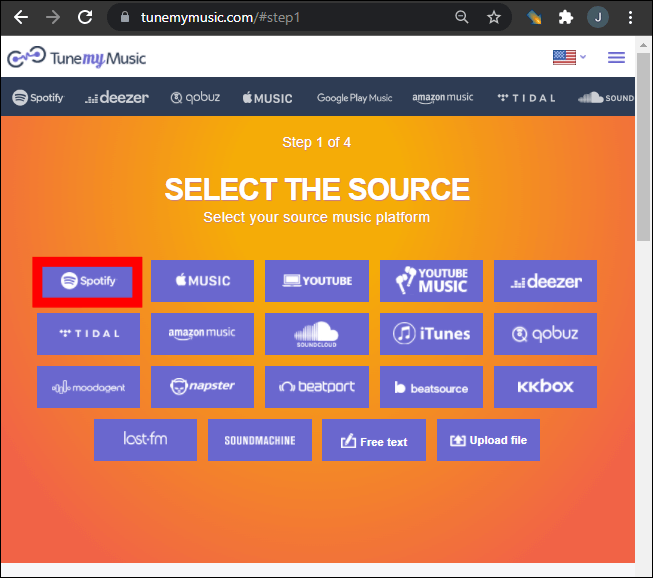
Passo 3. Você pode escolher uma playlist específica da sua biblioteca ou colar um link para ela. O TuneMyMusic carregará automaticamente todas as músicas contidas nessa playlist.
Passo 4. Em seguida, selecione Deezer como plataforma de destino. Faça login na sua conta Deezer e permita que a ferramenta crie playlists na sua biblioteca.
Passo 5. Clique em “Iniciar a Transferência das Minhas Músicas”. O sistema começará a combinar músicas entre Spotify e Deezer.
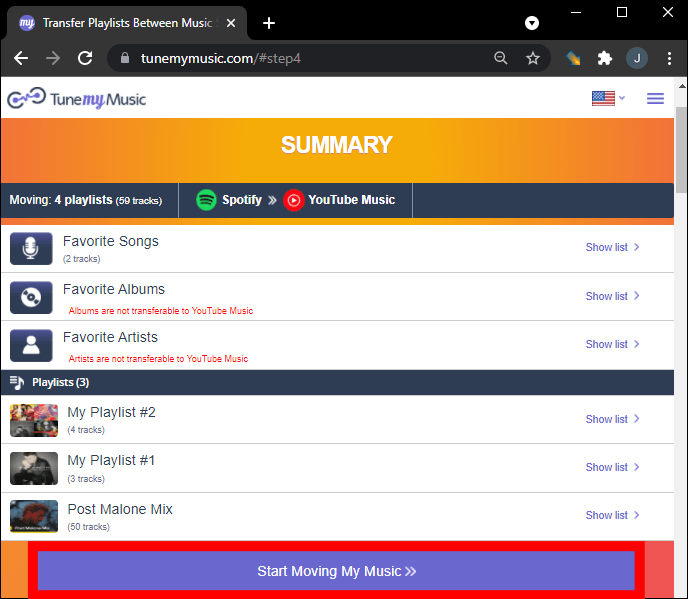
Passo 6. Assim que a transferência estiver concluída, abra sua biblioteca do Deezer para confirmar se a playlist foi recriada com sucesso.
Utilizando este método, muitos usuários podem mover listas de reprodução rapidamente de um local para outro. Spotify Para o Deezer em poucos minutos.
Limitações das ferramentas online
Embora as ferramentas online sejam convenientes, elas podem apresentar algumas limitações:
- As versões gratuitas podem limitar o número de músicas transferidas.
- Listas de reprodução grandes podem demorar mais para serem processadas.
- A precisão da correspondência de músicas pode variar.
- A conectividade com a internet afeta a velocidade de transferência.
Devido a essas limitações, usuários com grandes bibliotecas de música geralmente preferem uma solução para computador para transferir listas de reprodução. Spotify para o Deezer de forma mais confiável.
Parte 2. Transferência Spotify Playlists para Deezer em Windows/Mac
Para usuários que desejam maior estabilidade e melhor gerenciamento de listas de reprodução, o software para desktop costuma ser a opção mais confiável. Uma solução altamente recomendada é DumpMedia Qualquer conversor de música, que inclui um dedicado Transferência de lista de reprodução recurso.
Download grátis Download grátis
DumpMedia O Any Music Converter é um poderoso aplicativo para desktop projetado para ajudar os usuários a gerenciar e converter músicas entre plataformas. Ele oferece suporte a ambos WinO software é compatível com macOS e oferece ferramentas avançadas para migração de listas de reprodução. Ele permite que os usuários transfiram listas de reprodução de um dispositivo para outro. Spotify para o Deezer de forma eficiente, preservando a estrutura da lista de reprodução e as informações das faixas.
Principais funcionalidades
- O programa inclui uma função integrada de transferência de listas de reprodução que ajuda a mover listas de reprodução inteiras entre plataformas de streaming.
- Os usuários podem migrar várias listas de reprodução simultaneamente, em vez de transferi-las uma a uma.
- Os títulos das músicas, os artistas, as informações do álbum e a ordem da lista de reprodução são mantidos durante o processo de migração.
- Como o software é executado localmente no seu computador, ele é menos afetado por interrupções de rede em comparação com ferramentas baseadas em navegador.
Guia passo a passo para transferir Spotify Playlists
Passo 1. Baixe e instale DumpMedia Qualquer conversor de música no seu Wincomputador dows ou Mac. Execute o programa após a instalação.
Download grátis Download grátis
Passo 2. Escolha Ferramentas > Transferência de lista de reprodução. Selecione Spotify como uma fonte.
Passo 3. Selecione Deezer como destino.
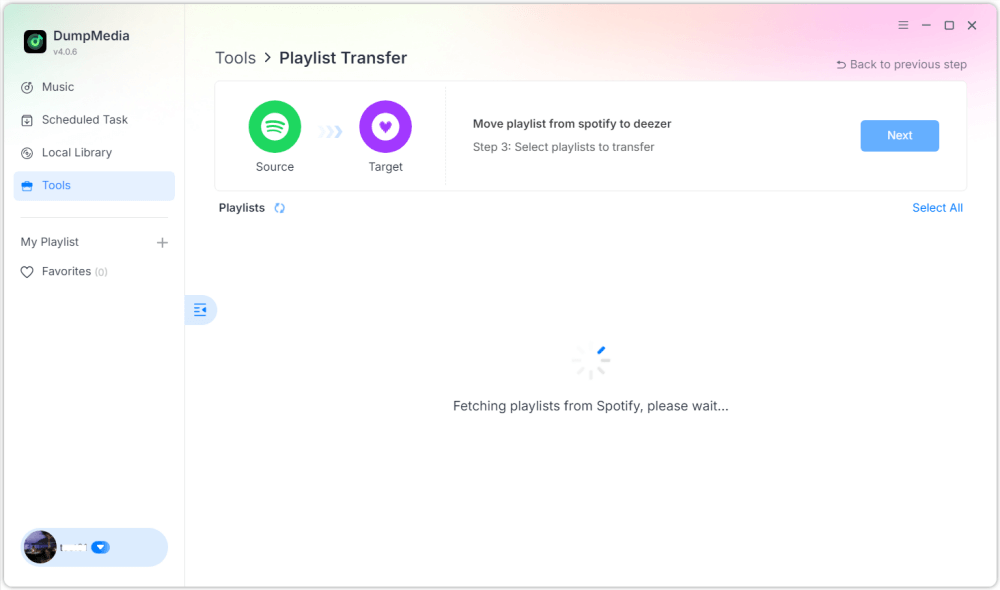
Passo 4. Selecione o que deseja transferir. Oferecemos suporte às suas músicas, artistas, álbuns favoritos e às suas playlists personalizadas.

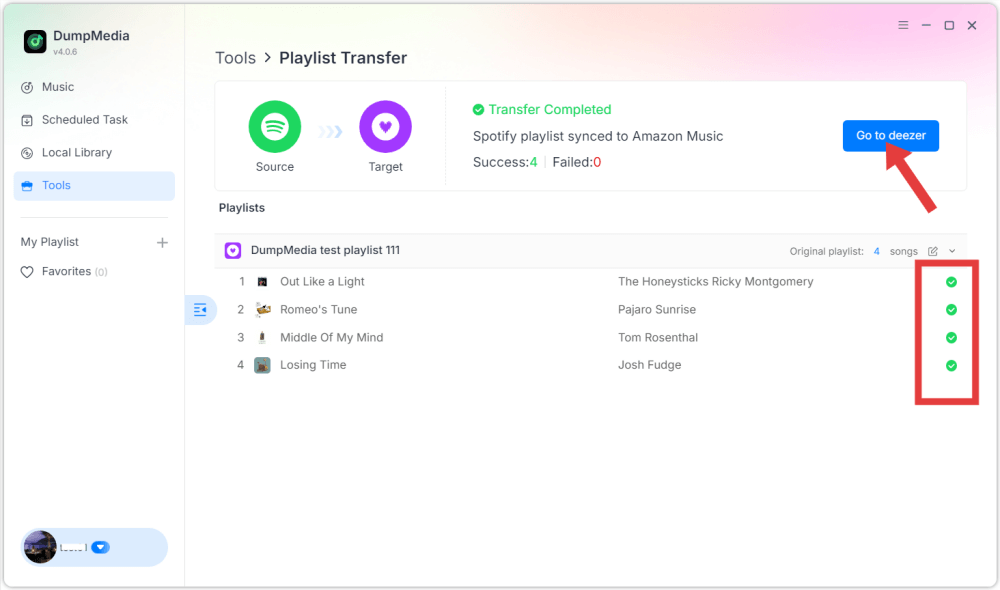
Passo 5. Clique em Converter para iniciar a transferência.
Passo 6. A transferência está concluída. Clique em "Ir para o Deezer". Sua playlist deverá aparecer agora com as músicas correspondentes.
Parte 3. FAQs
1. Posso transferir Spotify Como adicionar playlists ao Deezer gratuitamente?
Algumas ferramentas online oferecem transferência gratuita de listas de reprodução com recursos limitados. No entanto, essas versões gratuitas podem restringir o número de músicas que podem ser transferidas de uma só vez. As ferramentas premium geralmente removem essas restrições e oferecem transferências mais rápidas.
2. Todas as músicas serão transferidas com sucesso?
A maioria das músicas será transferida com sucesso, pois ambas as plataformas possuem catálogos musicais extensos. No entanto, ocasionalmente, algumas faixas podem não aparecer na playlist de destino caso não estejam disponíveis no Deezer.
3. Quanto tempo demora a transferência das listas de reprodução?
O tempo de transferência depende do tamanho da lista de reprodução. Listas pequenas podem levar apenas alguns minutos, enquanto listas maiores, contendo centenas de músicas, podem demorar mais.
4. É seguro usar ferramentas de transferência de listas de reprodução?
Ferramentas confiáveis usam sistemas de autenticação seguros para se conectar às suas contas de streaming. Sempre escolha aplicativos confiáveis e evite serviços desconhecidos ao migrar playlists de outros serviços. Spotify para Deezer.
Parte 4. Conclusão
Mudar de serviço de streaming de música não significa mais perder suas playlists cuidadosamente organizadas. Com as ferramentas modernas de migração de playlists, você pode transferir facilmente sua biblioteca de músicas de um serviço para outro. Spotify para o Deezer sem precisar recriar playlists manualmente. Se você tem uma grande coleção de músicas ou deseja maior confiabilidade, um software para desktop como o DumpMedia O Any Music Converter oferece uma solução mais estável e eficiente.