


iTunes Match vs Apple Music: Guia de Comparação Completo
Entender a diferença real entre o iTunes Match e o Apple Music é essencial para que os usuários decidam qual serviço da Apple melhor se adapta aos seus hábitos de audição. Embora ambos os serviços envolvam acesso à música na nuvem, seus objetivos, recursos e limitações são muito diferentes. Este guia oferece uma comparação clara e detalhada do iTunes Match e do Apple Music, ajudando você a tomar uma decisão informada e mostrando como os usuários do Apple Music podem manter suas músicas livres de DRM para reprodução offline.
Sumário Parte 1. O que são o iTunes Match e o Apple Music? Parte 2. Qual a diferença entre o iTunes Match e o Apple Music? Parte 3. Bônus: Mantenha suas músicas do Apple Music sem DRM para ouvir offline Parte 4. Perguntas frequentes Parte 5. Conclusão
Parte 1. O que são o iTunes Match e o Apple Music?
O que é o iTunes Match?
O iTunes Match é o serviço de armazenamento de músicas em nuvem da Apple, desenvolvido para usuários que já possuem uma coleção pessoal de músicas. MP3Biblioteca /AAC.
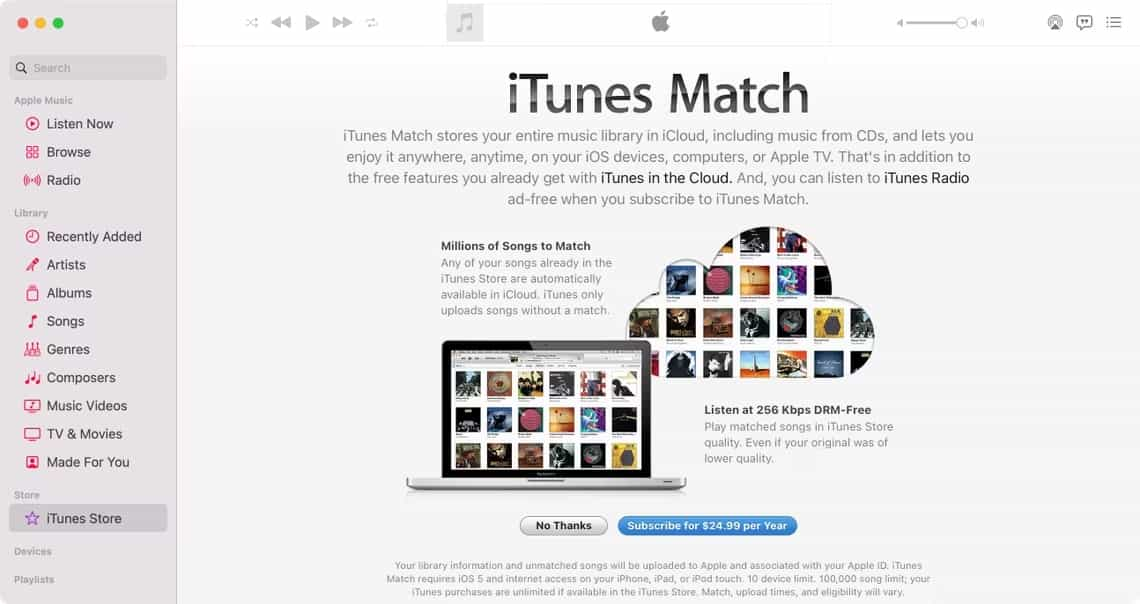
Preço: O iTunes Match está disponível como uma assinatura anual, em vez de um serviço mensal. Nos Estados Unidos, o custo do iTunes Match é de US$ 24.99 por ano.
Principais funcionalidades do iTunes Match
- Combina e carrega sua biblioteca de músicas pessoal para iCloud
- Permite o acesso às suas músicas carregadas/sincronizadas em todos os dispositivos Apple.
- Suporta até 100,000 faixas.
- Permite baixar novamente músicas em AAC de 256 kbps.
- Sem acesso ao catálogo de streaming do Apple Music
- Todos os arquivos correspondentes ou enviados estão livres de DRM.
Ideal para: O iTunes Match é perfeito para usuários que possuem uma grande biblioteca de músicas offline e simplesmente desejam sincronizá-la entre dispositivos sem restrições de DRM.
O que é Apple Music?
O Apple Music é uma plataforma completa de streaming de música que oferece um vasto catálogo, playlists selecionadas e recursos modernos de audição indisponíveis no iTunes Match.
Preço: O preço do Apple Music é estruturado em torno de assinaturas mensais, com diferentes planos dependendo de como você pretende usar o serviço:
- Plano Individual: $ 10.99 por mês
- Plano de estudante: $ 5.99 por mês
- Plano Familiar: US$ 16.99 por mês (dividido entre até seis pessoas)
Principais funcionalidades do Apple Music
- Acesso a mais de 100 milhões de músicas
- Listas de reprodução personalizadas, recomendações e conteúdo exclusivo.
- Rádio de música da Apple
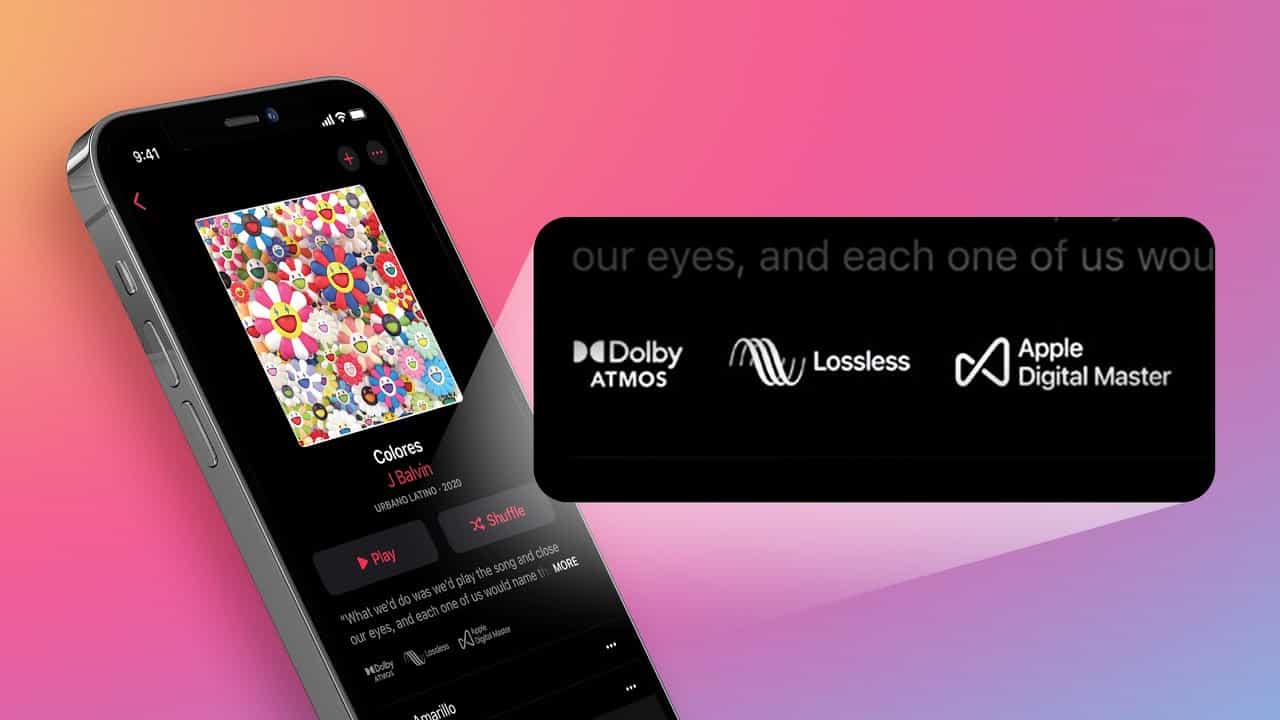
- Opções de áudio sem perdas e áudio espacial
- Downloads offline com DRM
- Disponível para iOS e macOS. Windows, Android e muito mais
Ideal para: O Apple Music é ideal para quem gosta de streaming, de descobrir novas músicas e de ter acesso a um catálogo global.
Parte 2. Qual a diferença entre o iTunes Match e o Apple Music?
Para entender as diferenças entre o iTunes Match e o Apple Music, é preciso considerar como eles lidam com bibliotecas, streaming, acesso e proteção DRM de maneiras distintas. Abaixo, explicamos as principais diferenças.
1. Finalidade e Funcionalidade Principal
A principal diferença entre o iTunes Match e o Apple Music reside em seus propósitos. O iTunes Match foi desenvolvido para usuários que já possuem uma grande biblioteca musical pessoal e desejam fazer upload, combinar e sincronizar esses arquivos entre dispositivos por meio do iCloud. Em contrapartida, o Apple Music é um serviço completo de streaming por assinatura que oferece acesso a mais de 100 milhões de músicas, playlists selecionadas, estações de rádio e conteúdo exclusivo. Um serviço se concentra em gerenciar as músicas que você possui; o outro oferece acesso a um catálogo de streaming imenso.
2. Propriedade musical e proteção DRM
A titularidade é um dos principais pontos de divergência entre o iTunes Match e o Apple Music. As músicas baixadas pelo iTunes Match não possuem DRM, o que significa que você pode mantê-las para sempre, transferi-las livremente e reproduzi-las em qualquer dispositivo sem restrições.
As faixas do Apple Music, no entanto, incluem proteção DRM. Isso significa que as músicas do Apple Music ouvidas offline param de funcionar se você cancelar sua assinatura e não podem ser copiadas, transferidas ou reproduzidas em dispositivos não autorizados, a menos que sejam convertidas usando uma ferramenta apropriada.
3. Acesso a serviços de streaming e descoberta de música
O iTunes Match não inclui nenhuma biblioteca de streaming e sua finalidade é armazenar e sincronizar músicas que você já possui. O Apple Music, por outro lado, oferece acesso ilimitado a milhões de músicas em streaming, playlists personalizadas, recomendações baseadas em algoritmos e lançamentos exclusivos. Usuários que gostam de descobrir novas músicas ou explorar um catálogo global acharão o Apple Music muito superior.
4. Opções de Qualidade de Áudio
Ao comparar o iTunes Match com o Apple Music, a qualidade de áudio desempenha um papel fundamental. O iTunes Match oferece faixas compatíveis em AAC de 256 kbps, o que é aceitável para a maioria dos usuários, mas não oferece alta resolução. O Apple Music, por sua vez, suporta formatos de qualidade superior, como Lossless e Lossless de Alta Resolução, e até mesmo Dolby Atmos/Áudio Espacial em dispositivos compatíveis. Usuários que buscam experiências de áudio premium se beneficiarão mais com o Apple Music.
5. Compatibilidade entre dispositivos
O iTunes Match permite que suas músicas carregadas ou correspondentes sejam sincronizadas em todos os dispositivos Apple e permite que você baixe arquivos sem DRM em cada um deles. O Apple Music oferece compatibilidade mais ampla, incluindo iOS, macOS, Windows, Android e CarPlayPorém, suas restrições de DRM limitam a liberdade com que as faixas baixadas podem ser movidas ou armazenadas. O iTunes Match oferece liberdade; o Apple Music oferece conveniência e maior disponibilidade de aplicativos.
6. O que acontece após o cancelamento
A experiência pós-assinatura é uma das diferenças práticas mais claras entre o iTunes Match e o Apple Music. Se você cancelar o iTunes Match, mantém permanentemente todas as suas músicas baixadas sem DRM. Se cancelar o Apple Music, todas as músicas offline protegidas por DRM se tornam imediatamente indisponíveis para reprodução. Usuários do Apple Music que desejam acesso a longo prazo às suas músicas baixadas devem convertê-las para formatos sem DRM antes do cancelamento.
Você precisa tanto do iTunes Match quanto do Apple Music?
A maioria dos usuários não precisa de ambos. O Apple Music já inclui a sincronização com o iCloud para sua biblioteca do Apple Music, tornando o iTunes Match redundante para muitos assinantes.
O iTunes Match é a opção ideal e econômica se você deseja principalmente sincronizar uma biblioteca local extensa de músicas. MP3e oferece downloads sem DRM de alta qualidade, sem a necessidade de um catálogo de streaming.
Por outro lado, o Apple Music é a melhor opção para quem ouve lançamentos diariamente, gosta de recomendações personalizadas e prioriza recursos premium como áudio sem perdas e áudio espacial. Compreender essas diferenças garante que você escolha o serviço que melhor se adapta aos seus hábitos de audição.
Parte 3. Bônus: Mantenha as músicas do Apple Music sem DRM para ouvir offline.
Como as faixas do Apple Music incluem DRM, os usuários não podem mantê-las ou transferi-las após o cancelamento da assinatura. Para preservar as músicas do Apple Music para uso offline, elas devem ser convertidas para formatos sem DRM. DumpMedia Conversor de música da Apple Foi desenvolvido para usuários que escolhem o Apple Music em vez do iTunes Match e desejam acesso permanente às suas músicas.
Lembrete importante: DumpMedia O Apple Music Converter não funciona com o iTunes e deve ser usado apenas com faixas de streaming do Apple Music.
Download grátis Download grátis
Principal benefício de DumpMedia Conversor de música da Apple
- Converter músicas da Apple para MP3, M4A, WAV ou FLAC
- Remover DRM do Apple Music de downloads
- Mantenha as tags ID3, os metadados e a alta qualidade de áudio.
- Reproduza músicas do Apple Music em qualquer dispositivo (MP3 reprodutores, telefones Android, áudio automotivo, TVs, etc.)
- Guarde seus arquivos convertidos permanentemente.
Isso oferece uma vantagem prática para usuários que comparam o iTunes Match com o Apple Music e decidem com base na propriedade de arquivos a longo prazo.
Guia de DumpMedia Conversor de música da Apple
Passo 1. Baixe e instale DumpMedia Conversor de música da Apple. Versões para PC e Mac estão disponíveis.
Download grátis Download grátis
Passo 2. Abra DumpMediaEm seguida, acesse a aba Biblioteca. Selecione as músicas que deseja converter da sua biblioteca do Apple Music marcando a caixa de seleção ao lado de cada música.

Passo 3. Escolha um formato de saída que você goste e certifique-se de definir uma pasta de destino. Os demais parâmetros de saída podem ser configurados conforme sua preferência.

Passo 4. Depois de concluir a configuração, basta marcar a caixa de seleção "Converter tudo" que você verá imediatamente na parte inferior da tela.

Parte 4. FAQ
1. O iTunes Match ainda está disponível?
Sim. A Apple continua oferecendo suporte a ele como uma assinatura independente.
2. Devo assinar o iTunes Match se já tenho o Apple Music?
Geralmente não. O Apple Music inclui a sincronização da biblioteca, reduzindo a necessidade do iTunes Match.
3. Os downloads do Apple Music são protegidos por DRM?
Sim. As músicas do Apple Music permanecem protegidas por DRM, a menos que sejam convertidas.
4. Qual oferece melhor qualidade de áudio: iTunes Match ou Apple Music?
O Apple Music oferece áudio sem perdas e áudio espacial, enquanto o iTunes Match usa AAC de 256 kbps.
Parte 5. Conclusão
Ao comparar o iTunes Match com o Apple Music, a escolha final depende de se você prioriza a posse das suas músicas ou o acesso a uma vasta biblioteca de streaming. O iTunes Match é a melhor opção para usuários que já possuem uma grande coleção pessoal e desejam acesso permanente e sem DRM às suas músicas em todos os seus dispositivos. Já o Apple Music é a escolha superior para ouvintes que priorizam o streaming de milhões de faixas, a descoberta de novos artistas e o aproveitamento de recursos modernos, como playlists selecionadas, áudio sem perdas e áudio espacial.
Para assinantes do Apple Music que desejam manter suas faixas reproduzíveis offline sem as limitações do DRM, existe uma ferramenta especializada como DumpMedia O Apple Music Converter oferece esse controle exclusivamente para conteúdo do Apple Music, não para o iTunes Match.