


Spotify Não está respondendo? Corrija em 2026.
Muitos usuários se deparam com o problema frustrante em que Spotify não está respondendo Ao tentar reproduzir música, abrir listas de reprodução ou usar o modo offline, às vezes ocorre um erro. Spotify app O programa congela completamente, trava inesperadamente ou para de funcionar durante a reprodução. Spotify Problemas com aplicativos são extremamente comuns. Neste guia, explicaremos o porquê. Spotify Para de funcionar repentinamente, como resolver problemas comuns. Spotify Problemas com o aplicativo e como desfrutar de uma reprodução de música offline mais estável.
Guia de conteúdo Parte 1. Por que é Spotify O aplicativo não está respondendo?Parte 2. Como corrigir Spotify O aplicativo não está respondendo?Parte 3. Melhor Maneira de Evitar Spotify Problemas de reproduçãoParte 4. FAQsParte 5. Conclusão
Parte 1. Por que é Spotify O aplicativo não está respondendo?
Há várias razões do por que Spotify Não responde durante a reprodução de música ou o uso do aplicativo.
Má conexão com a Internet
Spotify Depende muito de uma conexão de internet estável para streaming e verificação de conta. Conexões de rede fracas podem causar problemas. Spotify Congelar ou parar de responder.
Corrompido Spotify Esconderijo
Arquivos temporários armazenados dentro Spotify Podem ficar corrompidos com o tempo, causando falhas no aplicativo e problemas de reprodução.
desatualizado Spotify App
Mais antigo Spotify versões podem conter bugs que acionam o "Spotify erro "não está respondendo".
Spotify Problemas de servidor
Às vezes Spotify As interrupções do servidor afetam a reprodução do usuário e o desempenho do aplicativo em todo o mundo.
Conflitos de software em segundo plano
Conflitos relacionados a softwares antivírus, configurações de firewall ou aceleração de hardware também podem causar problemas. Spotify para parar de responder.
Problemas de compatibilidade de dispositivos
Sistemas operacionais mais antigos ou dispositivos não compatíveis podem ter dificuldades para executar a versão mais recente. Spotify aplicativo funcionando perfeitamente.
Estas são algumas das causas mais comuns por trás do "Spotify problema "não está respondendo".
Parte 2. Como corrigir Spotify O aplicativo não está respondendo?
If Spotify Se o aplicativo não estiver respondendo no seu dispositivo, tente as seguintes soluções.
Correção 1. Reinicie Spotify
Completamente perto Spotify e abra o aplicativo novamente. Essa solução simples costuma resolver problemas temporários de reprodução.
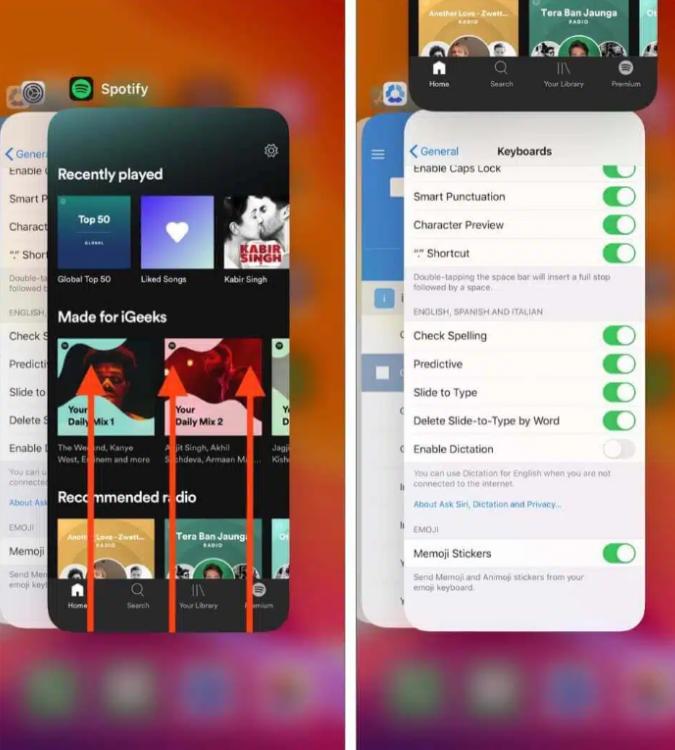
No iOS (iPhone/iPad): Deslize o dedo para cima a partir da borda inferior da tela e pause no meio (ou clique duas vezes no botão Início em dispositivos mais antigos). Encontre o Spotify Visualize o cartão e deslize-o completamente para cima, removendo-o da tela.
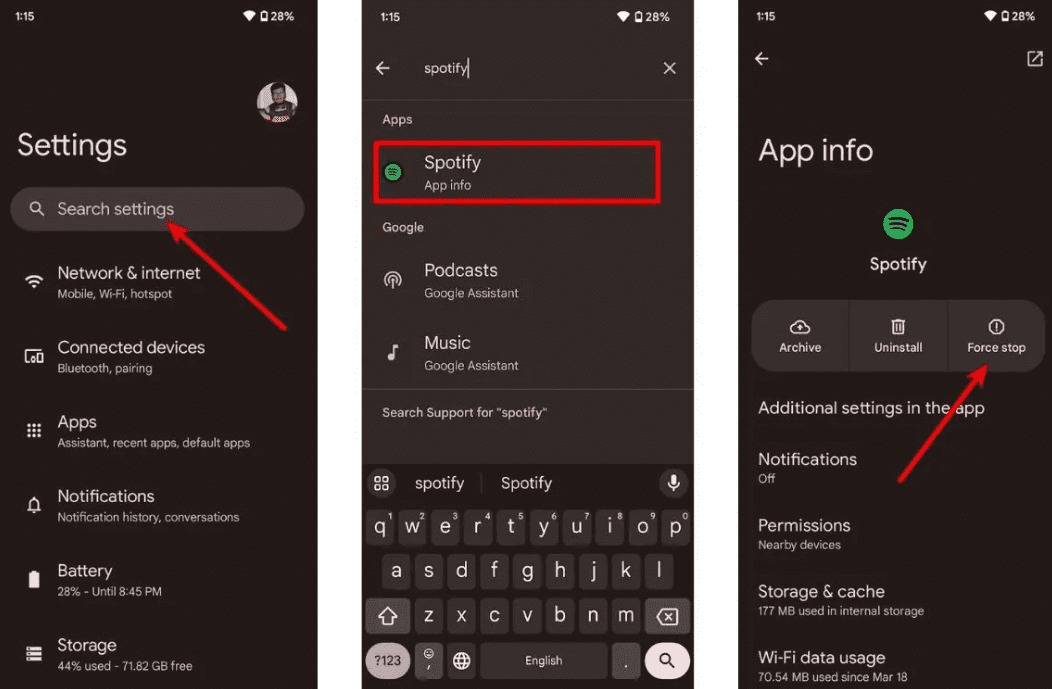
No Android: Acesse Configurações > Aplicativos > Spotify e toque em Forçar parada. Isso encerra todas as tarefas em segundo plano em execução. Abra Spotify da sua gaveta de aplicativos.
No macOS: Clique Spotify na barra de menu superior e selecione Sair. Spotifyou simplesmente clique na janela e pressione Command (⌘) + Q.
On Windows (10/11): Clique em Arquivo no canto superior esquerdo da tela. Spotify Abra a janela e selecione Sair (clicar no "X" no canto superior direito geralmente apenas minimiza a janela para a bandeja do sistema, em vez de fechá-la).
Correção 2. Verifique sua conexão com a Internet
Alterne entre Wi-Fi e dados móveis para testar a estabilidade da conexão.
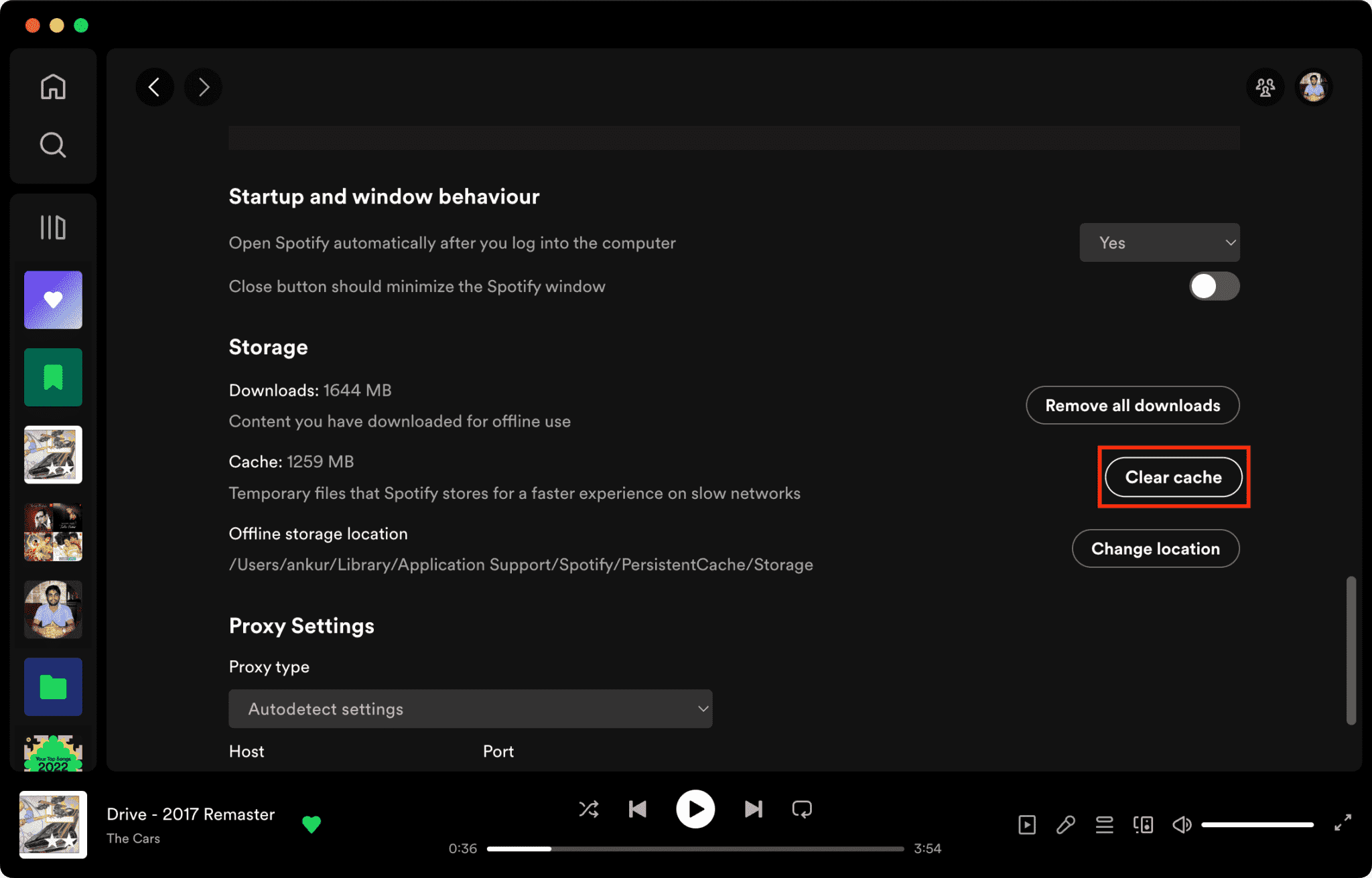
Correção 3. Limpar Spotify Esconderijo
Arquivos de cache corrompidos são um dos principais motivos para isso. Spotify Não está respondendo.
Como limpar Spotify Cache no Mac/Windows/iPhone/Android >>>>
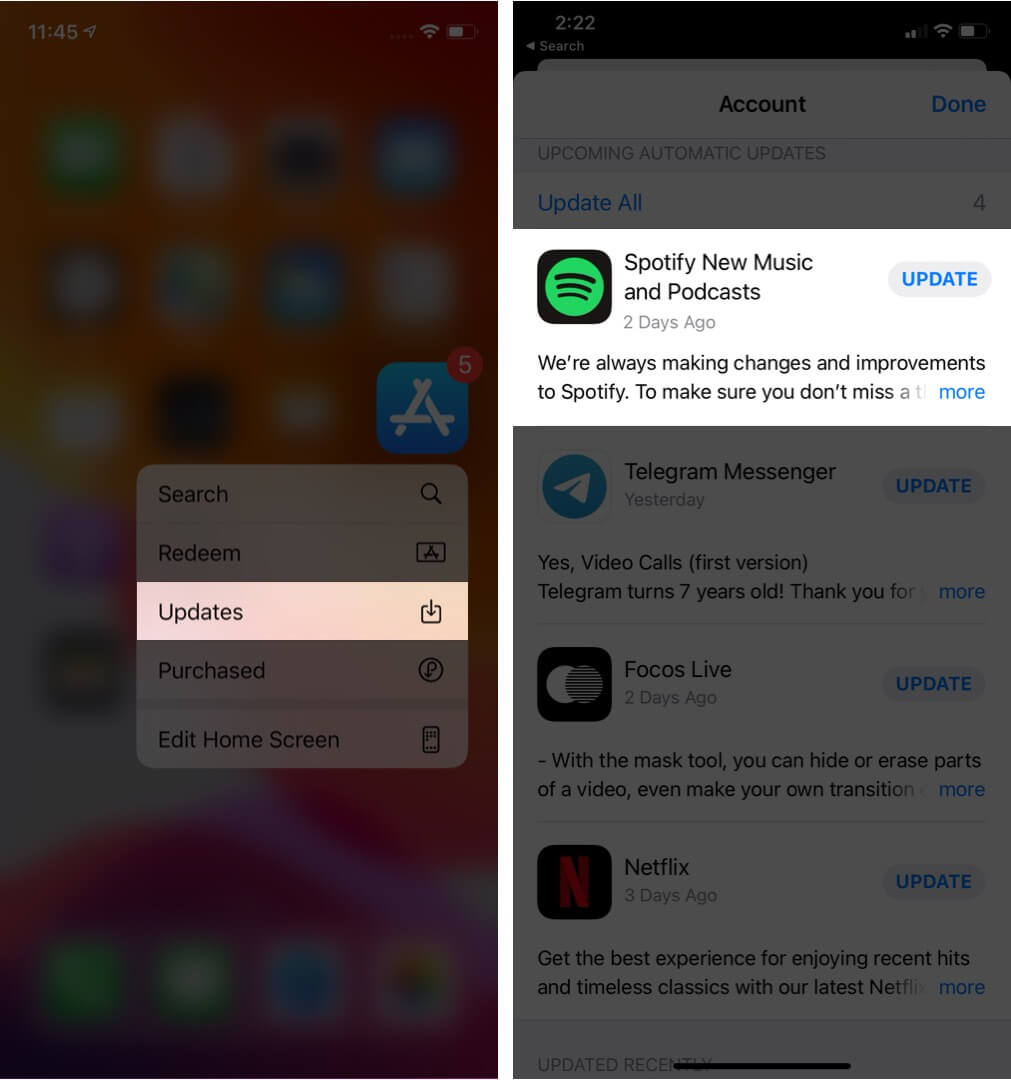
Correção 4. Atualização Spotify App
Instalando a versão mais recente Spotify Esta versão pode corrigir erros de software conhecidos.
Correção 5. Reinicie seu dispositivo
Reiniciar o computador ou o celular pode atualizar os recursos do sistema.
Correção 6. Desative a aceleração de hardware
Você pode desativar a aceleração de hardware. Isso às vezes resolve problemas de travamento.
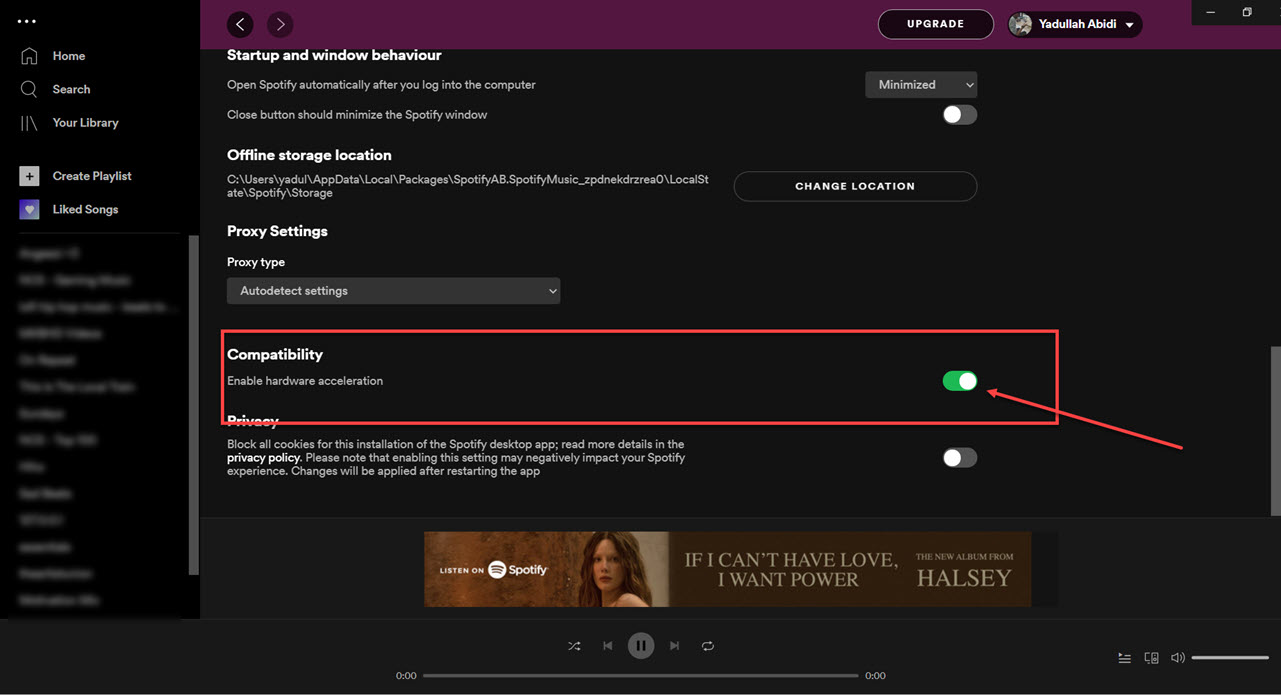
Correção 7. Verificar Spotify Status do servidor
Cobertura Spotify As interrupções afetam ocasionalmente os serviços de reprodução e login.
Parte 3. Melhor Maneira de Evitar Spotify Problemas de reprodução
Muitos usuários presumem que fizeram o download. Spotify As músicas sempre funcionarão offline, mas as músicas baixadas permanecem protegidas por DRM, o que significa que a música só funciona dentro do aplicativo de streaming. Os downloads não podem ser transferidos livremente. Se você se deparar frequentemente com a mensagem "Spotify Para resolver o problema "não está respondendo", uma ferramenta popular é DumpMedia Spotify Music ConverterEste software permite aos usuários converter Spotify música em formatos de áudio locais para reprodução offline mais flexível. Mesmo que o Spotify Se o aplicativo não estiver funcionando no seu dispositivo, você pode play Spotify músicas off-line em outro reprodutor de música imediatamente.
Download grátis Download grátis
🏆Principais características de DumpMedia Spotify Music Converter
- Baixar Spotify música para MP3, WAV, FLAC e AAC
- Eliminar Spotify Proteção DRM*
- Mantenha a qualidade de som original.
- Baixar listas de reprodução e álbuns em lote
- Velocidade de conversão rápida
- Preserve os metadados da música e as tags ID3.
- Compatível com reprodução offline em qualquer dispositivo.
Para usuários frustrados por Spotify Em relação à instabilidade do aplicativo, a reprodução de música local geralmente parece muito mais confiável.
Converter Spotify para MP3 Passo a Passo
Passo 1. Baixe e instale DumpMedia Spotify Music Converter No seu Mac/PC. Inicie o programa e você verá a interface. Use o seu Spotify Conta Premium/Gratuita para efetuar login.
Download grátis Download grátis
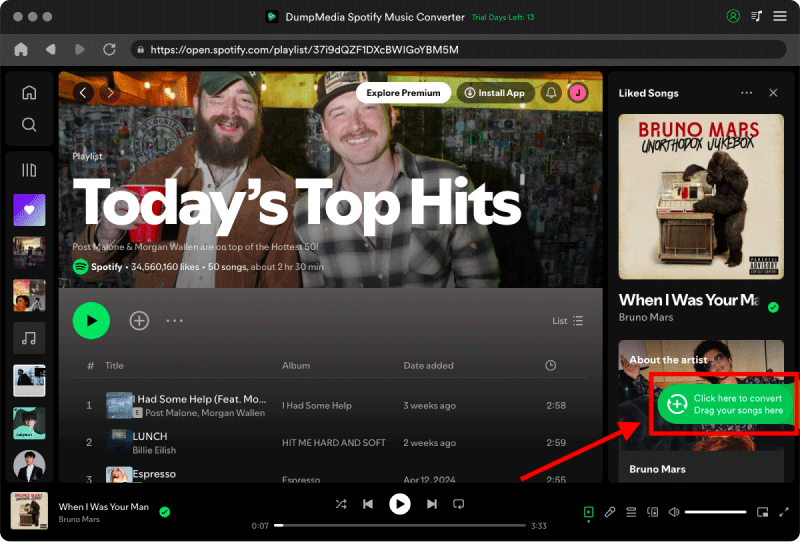
Passo 2. Encontre a lista de reprodução, o álbum ou a música específica que deseja converter. Você pode arrastar uma única música para o ícone "+" no lado direito da tela. Como alternativa, abra uma lista de reprodução/álbum inteiro e clique no ícone "Adicionar à conversão" para carregar toda a lista no conversor.
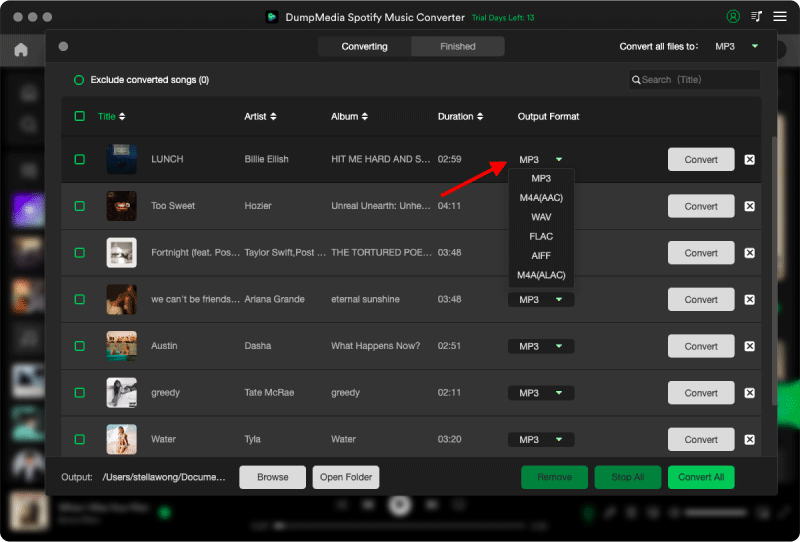
Passo 3. Selecionar MP3 (mais compatível). Você também pode alterar a taxa de bits ou a taxa de amostragem. Para obter o melhor equilíbrio, escolha 320 kbps.
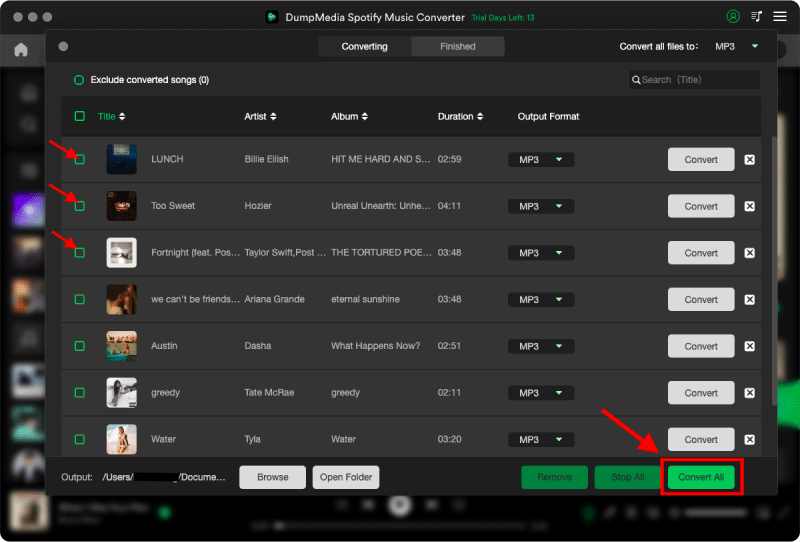
Passo 4. Após a conclusão das configurações, os usuários podem processar a conversão clicando no ícone "Converter". DumpMedia vai baixar Spotify canções para MP3 Em segundos, graças à sua velocidade ultrarrápida.
Parte 4. FAQs
Por que é Spotify Não está respondendo?
Spotify Pode parar de responder devido a problemas de internet, arquivos de cache corrompidos, software desatualizado ou problemas no servidor.
Porque Spotify Continua congelando?
Spotify Problemas de congelamento geralmente estão relacionados à corrupção do cache ou a conflitos de aceleração de hardware.
Por que é Spotify Meu celular está travando?
Mobile Spotify As falhas podem ser causadas por pouco espaço de armazenamento, versões desatualizadas do aplicativo ou conflitos de software.
Por que é Spotify O modo offline não está funcionando?
A reprodução offline ainda depende de Spotify autorização e estabilidade do aplicativo.
Is DumpMedia Spotify Music Converter seguro?
Sim. Ele foi projetado para Spotify Conversão de música e gerenciamento de reprodução local.
Observação: as plataformas de streaming têm suas próprias regras e sistemas de monitoramento. Como ferramenta de terceiros, DumpMedia Spotify Music Converter também está sujeito às suas restrições, que podem afetar o uso em determinados casos. Spotify poderá tomar medidas caso detecte atividades que violem seus Termos de Serviço; isso fica inteiramente a critério do usuário. Spotifyarbítrio.
Parte 5. Conclusão
O "Spotify O problema "não está respondendo" pode ser causado por instabilidade na internet, arquivos de cache corrompidos, software desatualizado ou Spotify problemas com o aplicativo. Embora muitas soluções temporárias possam ajudar a restaurar a reprodução, Spotify O streaming ainda depende muito da estabilidade do aplicativo e da verificação online. Para usuários que desejam uma experiência de audição offline mais estável, DumpMedia Spotify Music Converter Oferece uma maneira prática de converter Spotify músicas em locais MP3 Arquivos para reprodução flexível em diferentes dispositivos.
Download grátis Download grátis
*DumpMedia Funciona descriptografando e baixando Spotify Converta músicas em arquivos sem DRM, permitindo que você obtenha uma cópia limpa e irrestrita da sua biblioteca para qualquer dispositivo. Sua funcionalidade não inclui a remoção de DRM de arquivos de áudio locais.