


Como transferir Spotify Para USB: Reproduzir Spotify Música em qualquer lugar
Deseja transferir Spotify Para USB para reprodução offline? Muitos usuários tentam transferir seus arquivos favoritos. Spotify Muitas pessoas tentam transferir músicas para um pen drive para usar em carros, caixas de som ou outros dispositivos, mas logo percebem que não é tão simples quanto arrastar arquivos. O principal problema é que Spotify A música é protegida e não pode ser copiada diretamente. Neste guia, compartilharemos a melhor maneira de tornar isso possível.
Guia de conteúdo Parte 1. Você pode baixar Spotify Música diretamente para USB?Parte 2. A única maneira de transferir Spotify Música para USBParte 3. FAQsParte 4. Conclusão
Parte 1. Você pode baixar Spotify Música diretamente para USB?
A resposta curta é não. Você não pode transferir diretamente. Spotify para USB. Eis o porquê:
- Spotify Os downloads são criptografados.
- Os arquivos são armazenados em um formato protegido.
- A música só pode ser reproduzida dentro do Spotify app
Mesmo se você baixar músicas para ouvir off-lineEsses arquivos não podem ser copiados para uma unidade USB nem usados fora dela. SpotifyIsso significa transferir. Spotify A conexão via USB requer uma etapa adicional.
Parte 2. A única maneira de transferir Spotify Música para USB
Para transferir músicas com sucesso de Spotify Para adicionar um dispositivo USB, você primeiro precisa... Converter as faixas para um formato sem DRM MP3 formatoEsta é a maneira mais confiável de garantir total compatibilidade. Uma vez convertidos, seus arquivos ficam totalmente acessíveis, podem ser transferidos livremente e estão prontos para reprodução em qualquer dispositivo.
DumpMedia Spotify Music Converter foi especificamente projetado para preencher essa lacuna. Como uma ferramenta de nível profissional, simplifica o processo de conversão removendo a proteção DRM* e mantendo a integridade do conteúdo. 100% Qualidade de áudio original. Seja para fazer backup de uma única faixa ou de uma playlist enorme, DumpMedia Garante que sua música esteja pronta para qualquer dispositivo USB com apenas alguns cliques.
🏅Mais recursos incríveis
- ⭐Integração com Spotify jogador da web
- ⭐Trabalhe para ambos Spotify Prêmio e Spotify Usuários gratuitos
- ⭐Fornece conversão em lote com velocidade de até 35x
- ⭐Mantenha tags ID3 como artista, capa, arte, etc.
- ⭐Preserve a qualidade original do áudio
- ⭐100% limpo. Nenhum risco em usar
Como converter Spotify Música para MP3
Passo 1. Baixe e instale DumpMedia Spotify Music Converter para o seu Mac/Windows. Inicie-o e você verá a interface. Use seu Spotify Conta Premium/Gratuita para efetuar login.
Download grátis Download grátis
Passo 2. Agora você pode navegar até as músicas que deseja baixar. Você pode arrastar um álbum ou uma lista de reprodução diretamente para adicionar todas as músicas à lista de conversão.
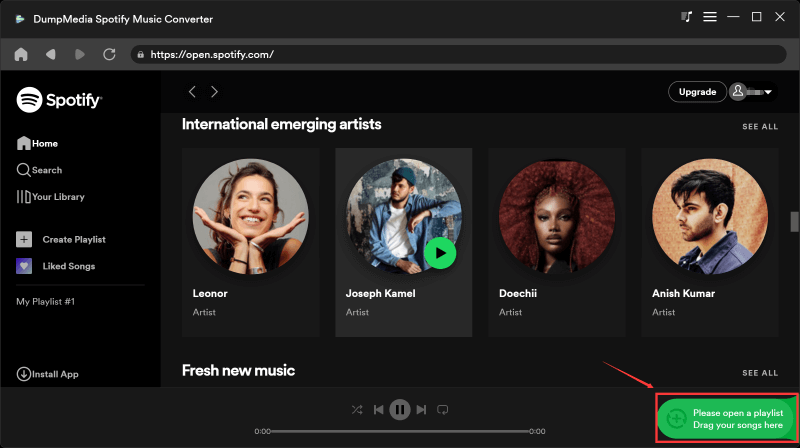
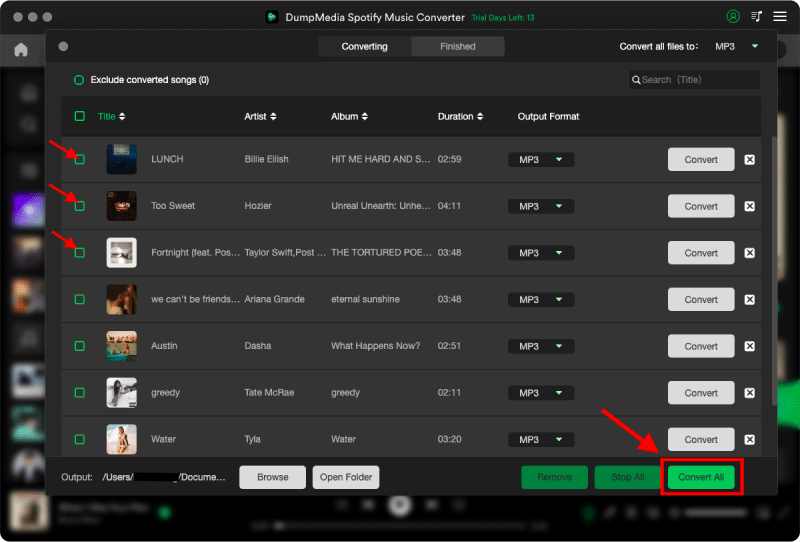
Passo 3. Na interface de conversão, você pode escolher o formato de saída como MP3, e defina Sample Rate ou Bitrate em Preference. Escolha também uma pasta onde os arquivos de música serão salvos.

Passo 4. Por fim, toque no botão "Converter" na parte inferior da página e o software iniciará o processo de conversão.
Transferência convertida Spotify Música para USB
Após a conversão, movendo músicas de Spotify A transferência para USB torna-se simples e rápida.
Passo 1. Insira a sua unidade USB no computador. Abra a pasta com os arquivos convertidos. MP3 arquivos.
Passo 2. Selecione as músicas ou listas de reprodução. Arraste e solte-as na unidade USB.
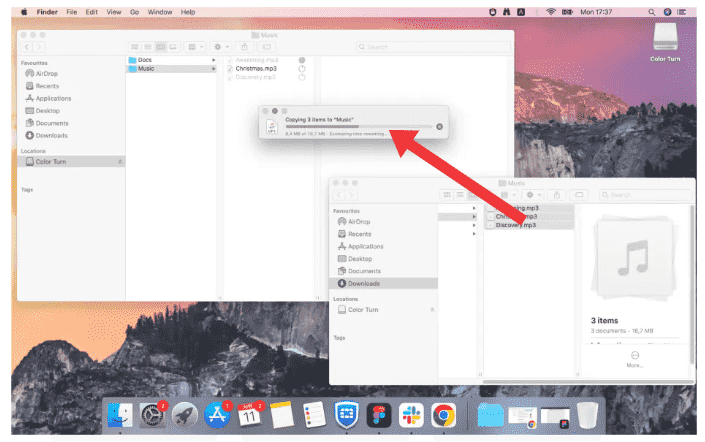
Passo 3. Remova o dispositivo USB com segurança.
Parte 3. FAQs
1. Posso transferir Spotify Conectar diretamente via USB?
Não, você não pode transferir. Spotify Músicas diretamente para USB. Spotify A música é protegida por DRM e as músicas baixadas são armazenadas em um formato criptografado que não pode ser copiado ou usado fora do sistema. Spotify app.
2. Como faço para transferir? Spotify Músicas para gravar em um pen drive para o meu carro?
Transferir Spotify Para transferir músicas para um dispositivo USB para reprodução no carro, você precisa:
- Converter Spotify música em MP3 formato
- Copie os arquivos convertidos para sua unidade USB.
Depois disso, o aparelho de som do seu carro deverá reproduzir os arquivos normalmente.
3. Qual é o melhor formato para Spotify Para transferência via USB?
MP3 é o melhor formato para Spotify Transfira músicas para um dispositivo USB, pois ele é compatível com quase todos os aparelhos, incluindo aparelhos de som automotivos, caixas de som e TVs.
Outros formatos, como WAV ou FLAC, oferecem maior qualidade, mas podem não ser compatíveis com todos os dispositivos USB.
4. Eu preciso de...? Spotify Prêmio para transferência Spotify para USB?
Não necessariamente. Enquanto Spotify Premium Permite ouvir offline dentro do aplicativo, transferindo arquivos. Spotify A transferência de músicas para um dispositivo USB ainda requer a conversão dos arquivos para um formato padrão.
5. É seguro usar Spotify conversores?
Nem todas as ferramentas são seguras. Alguns serviços online podem conter anúncios ou apresentar riscos de segurança. É importante escolher um software confiável para garantir um desempenho estável e proteger seus dados.
Parte 4. Conclusão
Transferir Spotify A transferência direta para USB não é possível devido à proteção DRM, mas torna-se fácil ao compreender o processo correto. Ao converter... Spotify música em MP3 Ao copiar o arquivo para um pen drive, você desbloqueia total flexibilidade e compatibilidade com todos os dispositivos. Se você busca uma maneira prática e confiável de transferir arquivos, essa é a solução ideal. Spotify músicas para um USB, usando uma ferramenta profissional como DumpMedia Spotify Music Converter é a solução mais eficaz.
Download grátis Download grátis
*DumpMedia Funciona descriptografando e baixando Spotify Converta suas músicas em arquivos sem DRM, permitindo que você obtenha uma cópia limpa e irrestrita da sua biblioteca para qualquer dispositivo. Sua funcionalidade não inclui a conversão de arquivos de áudio locais.