


Como Jogar Spotify no iPod Classic em 2026
O iPod Classic Continua sendo um dos reprodutores de música portáteis mais amados de todos os tempos. Graças à sua grande capacidade de armazenamento, longa duração da bateria e interface de usuário simples, muitos entusiastas da música ainda o utilizam hoje. No entanto, uma pergunta comum persiste: você consegue reproduzir Spotify No iPod Classic? Este guia explica porquê. Spotify Não funciona nativamente no iPod Classic e a melhor maneira de reproduzir Spotify Músicas no iPod Classic sem limitações.
Guia de conteúdo Parte 1. Você pode jogar Spotify No iPod Classic da Apple?Parte 2. Como baixar Spotify Músicas para o iPod Classic?Parte 3. Como transferir Spotify Músicas para o iPod Classic?Parte 4. FAQsParte 5. Conclusão
Parte 1. Você pode jogar Spotify No iPod Classic da Apple?
Muitos usuários estão procurando maneiras de jogar. Spotify No iPod Classic, espere instalar o Spotify aplicativo diretamente. Infelizmente, isso não é possível.
O iPod Classic foi projetado antes que os serviços modernos de streaming de música se tornassem populares. Ao contrário dos smartphones e dispositivos mais recentes, ele não permite a instalação de novos aplicativos. Spotify ou conecte-se a Spotifyinfraestrutura de streaming.
No entanto, isso não significa que você não possa jogar. Spotify músicas no iPod Classic. Se Spotify As músicas são convertidas em formatos de áudio compatíveis, como... MP3Eles podem ser transferidos para o dispositivo da mesma forma que qualquer outro arquivo de música.
Parte 2. Como baixar Spotify Músicas para o iPod Classic?
Spotify As faixas são protegidas pela tecnologia de Gestão de Direitos Digitais (DRM). Portanto, os downloads permanecem vinculados a Spotify contas. Este é um dos maiores obstáculos para os usuários que desejam jogar Spotify no iPod Classic. A solução mais eficaz é usar DumpMedia Spotify Music ConverterEste software permite aos usuários converter Spotify músicas em formatos compatíveis com o iPod Classic, tornando a reprodução muito mais fácil. Spotify Reproduza músicas no seu iPod Classic sem depender de streaming.
Download grátis Download grátis
🏆Principais características de DumpMedia Spotify Music Converter
- Baixar Spotify música para MP3, WAV, FLAC e AAC
- Mantenha a qualidade de som original.
- Baixar listas de reprodução e álbuns em lote
- Velocidade de conversão rápida
- Preserve os metadados da música e as tags ID3.
- Compatível com reprodução offline em qualquer dispositivo.
Essas características fazem dele uma solução ideal para usuários que desejam jogar. Spotify no iPod Classic.
Baixar Spotify Músicas para iPod Classic
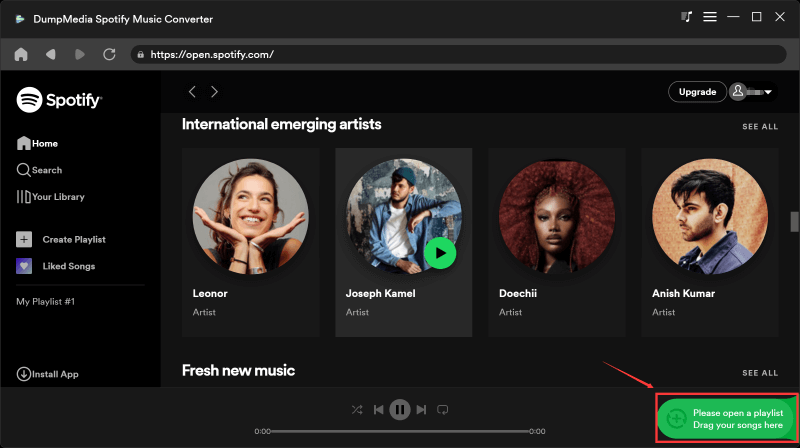
Passo 1. Baixe e instale DumpMedia Spotify Music Converter No seu Mac/PC. Inicie o programa e você verá a interface. Use o seu Spotify Conta Premium/Gratuita para efetuar login.
Download grátis Download grátis
Passo 2. Encontre a lista de reprodução, o álbum ou a música específica que deseja converter. Você pode arrastar uma única música para o ícone "+" no lado direito da tela. Como alternativa, abra uma lista de reprodução/álbum inteiro e clique no ícone "Adicionar à conversão" para carregar toda a lista no conversor.
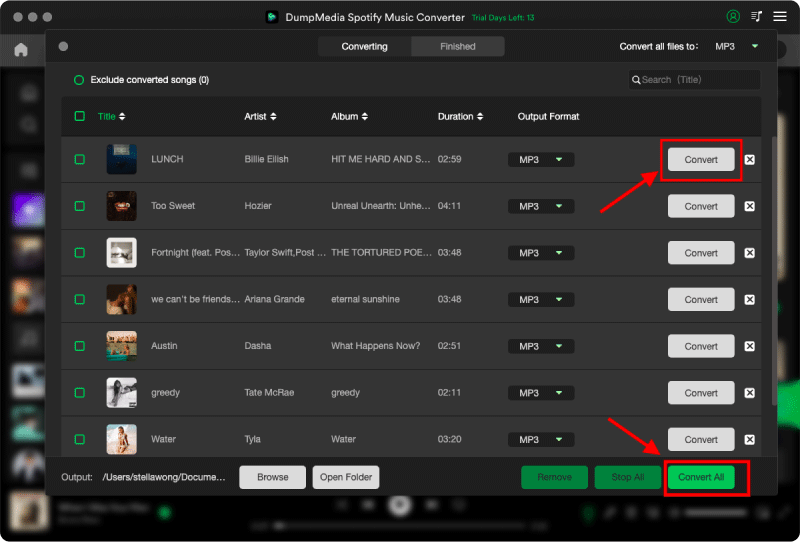
Passo 3. Selecionar MP3 (mais compatível). Você também pode alterar a taxa de bits ou a taxa de amostragem. Para obter o melhor equilíbrio, escolha 320 kbps.

Passo 4. Após a conclusão das configurações, os usuários podem processar a conversão clicando no ícone "Converter". DumpMedia vai baixar Spotify canções para MP3 Em segundos, graças à sua velocidade ultrarrápida.
Parte 3. Como transferir Spotify Músicas para o iPod Classic?
Após converter as músicas, o próximo passo é sincronizá-las com o seu iPod Classic.
Para Windows ou Macs mais antigos (macOS Mojave e versões anteriores):
- Abra o iTunes e conecte seu iPod Classic usando um cabo USB de 30 pinos.
- Clique no ícone do iPod que aparece no canto superior esquerdo da janela.
- Acesse a aba Música.
- Verifique a opção Sincronizar Música. Você pode escolher sincronizar toda a sua biblioteca de músicas ou listas de reprodução, artistas, álbuns e gêneros selecionados.
- Clique em Aplicar ou Sincronizar no canto inferior direito.
Para Macs mais recentes (macOS Catalina e posterior):
- Conecte seu iPod Classic via USB.
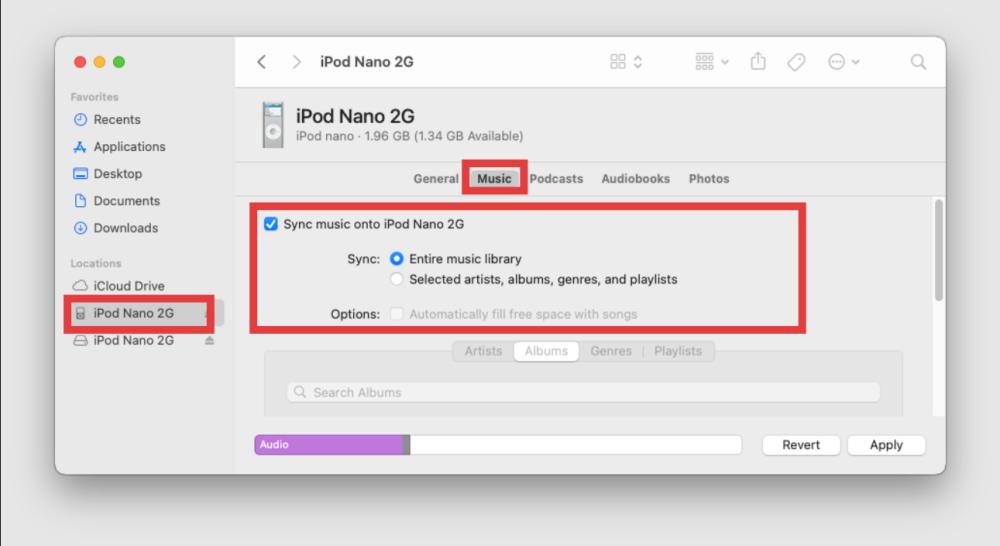
- Abra uma janela do Finder. Seu iPod deverá aparecer na barra lateral em Locais.
- Clique no iPod e, em seguida, clique na aba Música.
- Selecione "Sincronizar músicas no [Nome do iPod]" e escolha seus álbuns ou listas de reprodução preferidos.
- Clique em Aplicar para iniciar a transferência.
Parte 4. FAQs
lata Spotify Executar diretamente no iPod Classic?
Não. Spotify Não oferece um aplicativo oficial para o iPod Classic.
Posso baixar Spotify Músicas diretamente para o iPod Classic?
Não. Spotify As músicas devem primeiro ser convertidas para formatos de áudio compatíveis antes da transferência.
Qual formato de áudio funciona melhor no iPod Classic?
MP3 é geralmente o formato mais compatível para usuários que desejam jogar Spotify no iPod Classic.
Será que Spotify Funciona no iPod Nano?
Spotify Não funciona diretamente no iPod Nano, mas as músicas convertidas podem ser transferidas para reprodução offline.
Eu posso usar Spotify Apenas o Premium é necessário para jogar. Spotify no iPod Classic?
Não. Spotify Os downloads Premium permanecem criptografados e não podem ser transferidos diretamente para um iPod Classic.
Parte 5. Conclusão
Apesar Spotify Embora não haja suporte oficial para o iPod Classic, ainda existe uma maneira prática de reproduzir o conteúdo. Spotify no iPod Classic. Convertendo Spotify Converta as músicas para formatos compatíveis e sincronize-as pelo iTunes, para que os usuários possam curtir suas playlists favoritas em um dos reprodutores de música mais icônicos da Apple. Para usuários que buscam uma solução confiável, DumpMedia Spotify Music Converter facilita a conversão Spotify Transfira músicas para o iPod Classic e desfrute da reprodução offline sem as limitações da reprodução apenas por streaming.