


Spotify Modo DJ: Como usar (Guia completo de 2026)
Se você ouviu falar recentemente sobre Spotify O modo DJ, você pode estar se perguntando o que ele realmente faz e como usá-lo. Spotify O Modo DJ com IA é um dos SpotifyUm dos recursos mais interessantes do [nome da plataforma] é a oferta de uma experiência musical personalizada, impulsionada por inteligência artificial. Mas, embora seja poderosa, também apresenta limitações que muitos usuários desconhecem. Neste guia, você aprenderá o que está acontecendo. Spotify O que é o AI DJ e como ativá-lo no Spotify.
Guia de conteúdo Parte 1. O que é Spotify IA DJ?Parte 2. Como Habilitar Spotify IA DJ?Parte 3. Limitações de Spotify DJ de IAParte 4. Como Economizar Spotify Música de DJ para uso offline?Parte 5. FAQsParte 6. Conclusão
Parte 1. O que é Spotify IA DJ?
Spotify O modo DJ é um guia musical personalizado que funciona como um locutor de rádio virtual, combinando aprendizado de máquina avançado com uma voz de IA incrivelmente realista. Disponível para assinantes Premium, ele não apenas reproduz músicas aleatoriamente; ele seleciona uma sequência contínua de músicas com base no seu histórico de audição, tendências atuais e até mesmo sucessos nostálgicos que você não ouve há anos.
Características principais de Spotify DJ de IA
- Recomendações de músicas personalizadas
- Reprodução contínua sem entrada manual
- comentários de voz gerados por IA
- Transições inteligentes de humor e gênero
É por isso Spotify O modo DJ está se tornando cada vez mais popular entre os usuários que preferem ouvir música sem esforço.
Parte 2. Como Habilitar Spotify IA DJ?
Como acessar Spotify Modo DJ? Se você se inscreveu em Spotify Premium, Siga esses passos:
Passo 1. Certifique-se de que seu aplicativo esteja atualizado para a versão mais recente. Navegue até a seção Início.
Passo 2. Procure a funcionalidade DJ no seu feed. Comece a ouvir instantaneamente.
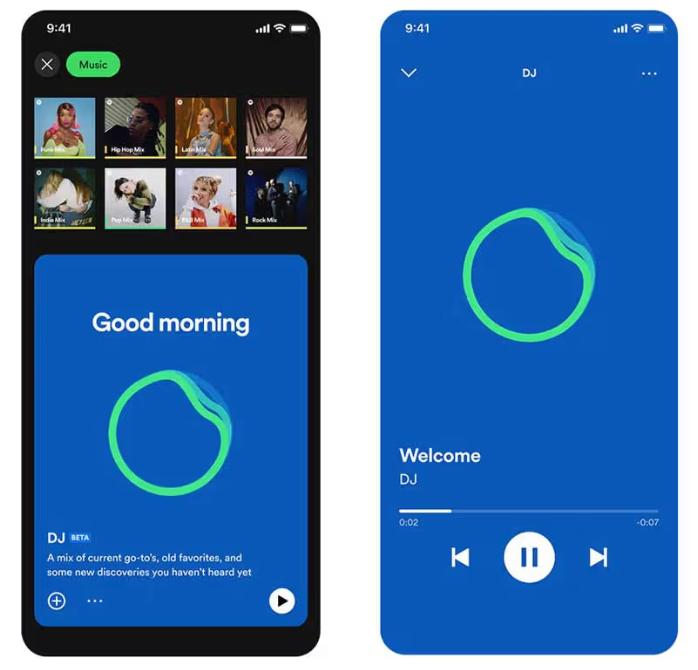
SpotifyO DJ de IA agora oferece suporte ao recurso "Pedidos". Assim como você faria com um DJ humano, você pode usar comandos de voz ou mensagens de texto, dizendo coisas como "Mude para um gênero mais suave" ou "Toque mais músicas do Jay Justin Bieber", e a IA ajustará instantaneamente a playlist.
Parte 3. Limitações de Spotify DJ de IA
Spotify O modo DJ se destaca por eliminar a necessidade de buscar músicas manualmente. É ideal para ouvir música em segundo plano, descobrir novas canções e criar uma experiência semelhante à de uma rádio. SpotifyO recurso AI DJ é impressionante, mas apresenta algumas limitações importantes.
1. Sem downloads permanentes
Mesmo com a versão Premium, as músicas não podem ser baixadas de fato. Os arquivos ficam bloqueados no aplicativo e não podem ser transferidos.
2. Sem liberdade offline
Você pode baixar para ouvir offline, mas o acesso depende de uma assinatura. As músicas desaparecem se você cancelar a assinatura.
3. Proibida a exportação ou o compartilhamento
Não é possível exportar listas de reprodução de DJ nem salvar mixes externamente.
4. Controle Limitado
Spotify A IA controla a seleção e a ordem das músicas. Você não tem total controle de personalização.
Essas limitações tornam-se importantes se você deseja ter mais controle sobre sua música.
Parte 4. Como Economizar Spotify Música de DJ para uso offline?
Se você gosta Spotify Modo DJ, mas deseja mais flexibilidade? Precisa de uma forma de salvar músicas permanentemente? Em vez de depender de SpotifyApesar das limitações inerentes ao aplicativo, você pode selecionar músicas a partir de recomendações de DJs e convertê-las em arquivos locais. Isso lhe dá controle total sobre sua música. A maneira mais confiável de fazer isso é usando uma ferramenta profissional como o [nome do programa/ferramenta]. DumpMedia Spotify Music Converter.
Download grátis Download grátis
🏅Por que escolher DumpMedia Spotify Music Converter:
- ⭐Integração com Spotify jogador da web
- ⭐Trabalhe para ambos Spotify Prêmio e Spotify Usuários gratuitos
- ⭐Fornece conversão em lote com velocidade de até 35x
- ⭐Converter Spotify canções para MP3, WAV ou FLAC
- ⭐Mantenha tags ID3 como artista, capa, arte, etc.
- ⭐Preserve a qualidade original do áudio
- ⭐100% limpo. Nenhum risco em usar
Passo a passo: Converter Spotify Música DJ
Passo 1. Baixe e instale o software no seu computador. Ele funciona com ambos. WinO sistema operacional é compatível com Windows e Mac. A interface é intuitiva, facilitando o uso para iniciantes.
Download grátis Download grátis
Passo 2. Abra o menu integrado Spotify web player dentro DumpMedia e faça o login com o seu Spotify conta. Navegar Spotify Arraste as músicas, álbuns ou listas de reprodução que deseja baixar para o conversor.

Passo 3. No painel de configurações, selecione MP3 como formato de saída para permitir um MP3 Baixe as faixas selecionadas.

Passo 4. Pressione o botão "Converter tudo" e inicie a conversão. DumpMedia Spotify Music Converter Suporta velocidade de download 35 vezes mais rápida, para que você possa simplesmente esperar que o processo de conversão seja concluído.

Parte 5. FAQs
1. O que é Spotify Modo DJ?
É uma funcionalidade com inteligência artificial que reproduz músicas personalizadas com base no seu gosto.
2. É SpotifyO DJ de IA é gratuito?
Não, normalmente requer uma assinatura Premium.
3. Posso baixar Spotify Músicas de DJ?
Somente dentro do aplicativo, não como arquivos locais.
4. Posso criar minha própria playlist de DJ?
Sim, especialmente se você tiver cópias locais das suas músicas.
Parte 6. Conclusão
Spotify O modo DJ é um recurso poderoso que torna a descoberta de músicas mais fácil e agradável. No entanto, ele apresenta limitações, como a falta de downloads permanentes e acesso offline restrito. Se você quiser aproveitar ao máximo os benefícios do modo DJ, precisará de uma versão mais completa do software. SpotifySem essas restrições, usar uma ferramenta confiável para salvar suas músicas é a melhor solução. Isso permite que você mantenha suas faixas favoritas, crie suas próprias playlists e desfrute de total liberdade sobre sua experiência musical.
Download grátis Download grátis
*DumpMedia Funciona descriptografando e baixando Spotify Converte músicas em arquivos sem DRM, permitindo que você obtenha uma cópia limpa e irrestrita da sua biblioteca para qualquer dispositivo. Sua funcionalidade não inclui a conversão de arquivos de áudio locais.