


Como colocar música MP3 Jogador de Spotify em 2026
Como colocar música MP3 jogador de Spotify continua sendo uma das perguntas mais comuns entre Spotify usuários, principalmente porque Spotify Não permite downloads diretos para nenhum lugar. MP3 dispositivo devido a DRMSe você tentar transferir arquivos baixados... Spotify pistas, a maioria MP3 Os jogadores não os reconhecerão.
Para contornar essa limitação, você precisa de uma ferramenta que possa converter. Spotify música em um formato de áudio padrão, como MP3. DumpMedia Spotify Music Converter é uma das soluções mais confiáveis para essa tarefa. Se o seu objetivo é mover o seu Spotify Para transferir arquivos da sua biblioteca para um dispositivo portátil e ouvi-los offline, este conversor oferece o método mais rápido e simples.
Guia de conteúdo Parte 1. Por que você não pode colocar Spotify Canções em MP3 Jogador?Parte 2. Como Colocar Spotify Música ligada MP3 Jogador?Parte 3. FAQParte 4. Para resumir tudo
Parte 1. Por que você não pode colocar Spotify Canções em MP3 Jogador?
Spotify não permite que os usuários transfiram músicas diretamente para um MP3 jogador porque todos Spotify As faixas são protegidas por Gestão de Direitos Digitais (DRM). Essa criptografia DRM impede que os usuários copiem, exportem ou convertam o conteúdo. Spotifyconverter arquivos de áudio em formatos padrão como MP3Mesmo se você baixar músicas usando um Spotify Premium conta, esses arquivos permanecem em um formato OGG bloqueado que somente o Spotify O aplicativo consegue ler. Como resultado, o tradicional MP3 Os reprodutores, especialmente os dispositivos não inteligentes, não conseguem reconhecer ou reproduzir esses arquivos criptografados.
Em resumo, o sistema DRM garante que Spotify A música só pode ser reproduzida dentro de Spotifyecossistema autorizado. É por isso que simplesmente arrastar Spotify músicas para um MP3 O reprodutor nunca funcionará.
Como colocar música MP3 jogador de SpotifyPara contornar essa limitação, você precisa de uma ferramenta capaz de removendo Spotifyproteção DRM da e convertendo faixas em formatos universais. DumpMedia Spotify Music Converter cumpre exatamente esse propósito. Converte Spotify Converta músicas, álbuns e playlists em conteúdo sem DRM. MP3, arquivos M4A, WAV ou FLAC, tornando-os compatíveis com qualquer MP3 reprodutor e permitindo a verdadeira propriedade offline de sua música.
Parte 2. Como Colocar Spotify Música ligada MP3 Jogador?
Como colocar música MP3 jogador de SpotifyAntes de colocar Spotify música em seu MP3 jogador, certifique-se de que você tem DumpMedia Spotify Music Converter instalado.
Download grátis Download grátis
DumpMedia Spotify Music Converter está ganhando popularidade entre Spotify ouvintes por seu maravilhoso serviço de download de músicas. Não importa se você é um usuário de Spotify Grátis ou Spotify Premium, você pode baixar e convertem Spotify músicas, listas de reprodução e álbuns para MP3, AAC, ALAC, FLAC ou outros formatos usando DumpMediaMelhor ainda, os downloads estarão sempre disponíveis, mesmo que sua assinatura expire.
Guia passo a passo: Como instalar Spotify Música ligada MP3 jogador
Passo 1. Abra o software no seu computador. Ele funciona com ambos. WinO sistema operacional é compatível com Windows e Mac. A interface é intuitiva, facilitando o uso para iniciantes.
Passo 2. Acesse Spotify Selecione a música, o álbum ou a lista de reprodução que deseja converter. O software detectará as faixas automaticamente.

Passo 3. Selecione um formato compatível com o seu MP3 jogador. As opções comuns são MP3, M4A, WAV ou FLAC. Você também pode definir a qualidade de saída e a velocidade de conversão.

Passo 4. Clique no botão "Converter" para iniciar o processo de conversão. DumpMedia Spotify Music Converter Removerá o DRM e converterá todas as faixas selecionadas para o formato escolhido. A conversão preserva a alta qualidade de áudio.

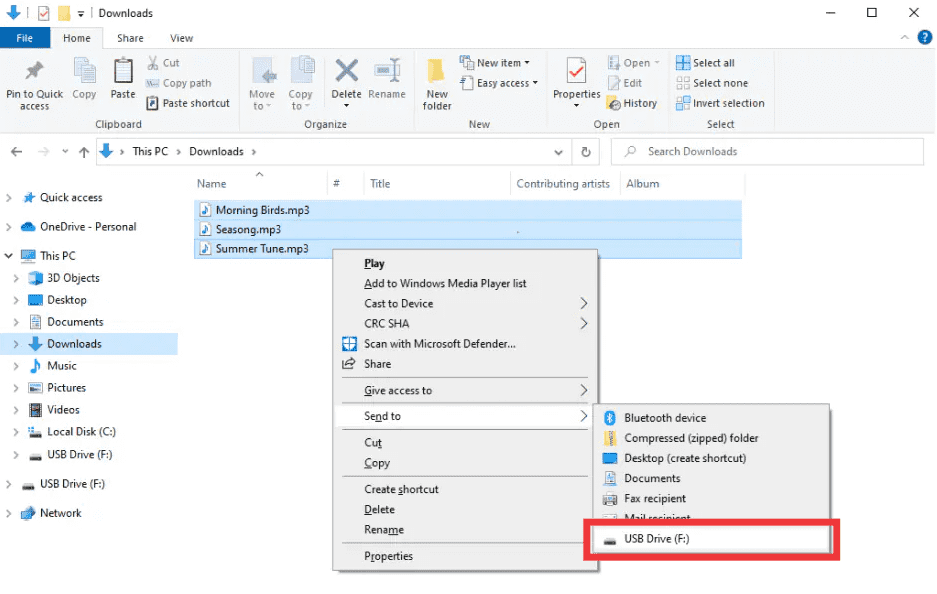
Passo 5. Como colocar música MP3 jogador de SpotifyApós a conversão, localize a pasta de saída. Conecte seu MP3 Transfira o player para o seu computador via USB e copie os arquivos convertidos. Seu Spotify Agora você pode reproduzir suas músicas offline em qualquer dispositivo. MP3 dispositivo.
Parte 3. FAQ
1. Posso colocar Spotify músicas diretamente em MP3 jogadoras?
Não. SpotifyAs faixas de [nome do artista] são protegidas por DRM e não podem ser exportadas diretamente. Você precisa de um conversor como [nome do conversor]. DumpMedia Spotify Music Converter para torná-los compatíveis.
2. Como faço para converter Spotify listas de reprodução para MP3?
Uso DumpMedia Spotify Music Converter: copiar links de listas de reprodução, selecionar MP3 como saída e converta. Em seguida, transfira os arquivos para o seu MP3 jogador.
3. É legal converter Spotify música?
Convertendo Spotify O uso pessoal offline de músicas geralmente é permitido. Evite distribuir arquivos convertidos para terceiros, pois isso pode violar as leis de direitos autorais.
4. Quais formatos posso usar para MP3 jogadoras?
MP3 é o mais comum. DumpMedia Spotify Music Converter Também suporta M4A, WAV e FLAC, todos compatíveis com a maioria dos dispositivos.
5. Posso transferir Spotify Reproduza música em vários dispositivos?
Sim. Uma vez convertido com DumpMedia, O seu Spotify As músicas não possuem DRM e podem ser reproduzidas em qualquer dispositivo. MP3 reprodutor, telefone ou tablet.
Parte 4. Para resumir tudo
Se você já se perguntou como colocar música em um MP3 jogador de SpotifyA solução é clara: SpotifyO DRM do sistema impede transferências diretas, mas DumpMedia Spotify Music Converter Remove essas restrições. Converte suas músicas, álbuns ou playlists favoritos em MP3 ou outros formatos universais, preservando a alta qualidade e permitindo a reprodução offline em qualquer dispositivo.
Experimente DumpMedia Spotify Music Converter hoje e aproveite Spotify Música em qualquer lugar, a qualquer hora, sem mais limites, sem mais problemas com DRM.

30% de desconto >>>