


Conversor do YouTube para o Apple Music: Como transferir playlists facilmente
A migração do YouTube Music para o Apple Music tornou-se cada vez mais comum, especialmente para usuários que desejam aproveitar o ecossistema da Apple, o áudio sem perdas, o áudio espacial e a integração perfeita com iPhone, iPad e Mac. Como transferir playlists do YouTube Music para o Apple Music sem recriar manualmente centenas de músicas? Neste guia, explicaremos o que um conversor de YouTube para Apple Music realmente faz, apresentaremos as melhores ferramentas de transferência de playlists e mostraremos como migrar suas playlists de forma eficiente.
Sumário Parte 1. É possível transferir playlists do YouTube Music para o Apple Music? Parte 2. Melhores ferramentas de conversão do YouTube Music para o Apple Music Parte 3. Dicas para uma transferência de playlists bem-sucedida Parte 4. Perguntas frequentes Parte 5. Resumo
Parte 1. É possível transferir playlists do YouTube Music para o Apple Music?
Sim. Embora o YouTube Music e o Apple Music não ofereçam um recurso de migração integrado, ferramentas de terceiros para transferência de playlists simplificam o processo.
A maioria dos conversores de YouTube para Apple Music utiliza metadados como títulos de músicas, nomes de artistas e informações de álbuns para encontrar faixas correspondentes no Apple Music. Quanto melhor o algoritmo de correspondência, mais precisas serão as suas playlists transferidas.
Parte 2. Melhores ferramentas de conversão de músicas do YouTube para o Apple Music
Existem diversos conversores de YouTube para Apple Music que podem te ajudar a transferir playlists do YouTube Music para o Apple Music. Cada um tem seus pontos fortes e limitações.
1. TuneMyMusic
Transferir suas playlists do YouTube Music para o Apple Music usando o TuneMyMusic é um processo simples. Como o TuneMyMusic utiliza APIs oficiais dos principais serviços de streaming, ele é geralmente considerado um método confiável e seguro para migrar sua biblioteca de músicas.
Como trabalhar:
- Acesse tunemymusic.com e clique no botão "Vamos começar".
- Escolha o YouTube Music como sua plataforma de origem e siga as instruções para conceder à TuneMyMusic acesso à sua conta.
- Selecione as listas de reprodução, álbuns ou faixas específicas que deseja transferir.
- Escolha o Apple Music como serviço de destino e autorize-o também.
- Clique em "Iniciar Transferência" para começar a migração. Você pode fechar o navegador ou sair da página; o processo será executado em segundo plano.
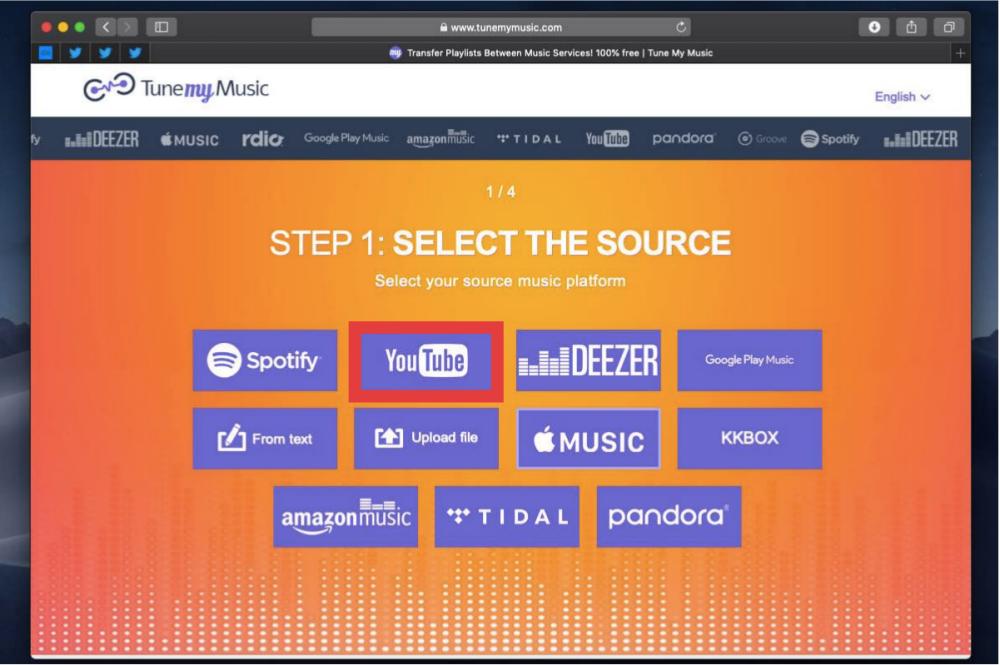
Embora o TuneMyMusic utilize algoritmos avançados para encontrar suas músicas, ocasionalmente ele pode associar uma faixa a uma versão diferente (por exemplo, uma versão "Single" em vez de uma versão "Álbum") ou não encontrar uma correspondência se a música não estiver disponível no Apple Music.
2. SongShift
Usar o SongShift para transferir suas playlists do YouTube Music para o Apple Music é uma excelente opção, já que é uma das ferramentas mais bem avaliadas para essa finalidade. Veja como usar o serviço.
- Baixe e abra o aplicativo SongShift.
- Acesse a aba "Conexões" e vincule o YouTube Music e o Apple Music.
- Toque no ícone "+" e selecione "Configurar fonte", escolhendo YouTube Music.
- Escolha as listas de reprodução que deseja mover.
- Após a verificação inicial, o SongShift mostrará as músicas que não puderam ser encontradas automaticamente. Você pode pesquisar e corrigir manualmente essas incompatibilidades.
- Após a confirmação, o aplicativo finalizará a transferência para sua biblioteca do Apple Music.
Como a Apple integrou a tecnologia do SongShift diretamente no aplicativo Apple Music, você pode nem precisar baixar um aplicativo separado para realizar a tarefa. Veja como:
- Abra o aplicativo Ajustes no seu iPhone ou iPad. Role o menu para baixo e encontre a seção Aplicativos.
- Na lista de todos os seus aplicativos baixados, selecione Música.
- Selecione "Transferir músicas de outros serviços de música".
- Aqui você encontrará uma lista de outros serviços de streaming de música dos quais você pode transferir músicas. Selecione YouTube Music.
- Insira suas credenciais do YouTube Music quando solicitado.
- Selecione as listas de reprodução que deseja mover e toque em Adicionar à Biblioteca.
- O aplicativo funcionará em segundo plano para encontrar as suas músicas compatíveis com o catálogo do Apple Music. Você receberá uma notificação assim que o processo for concluído.
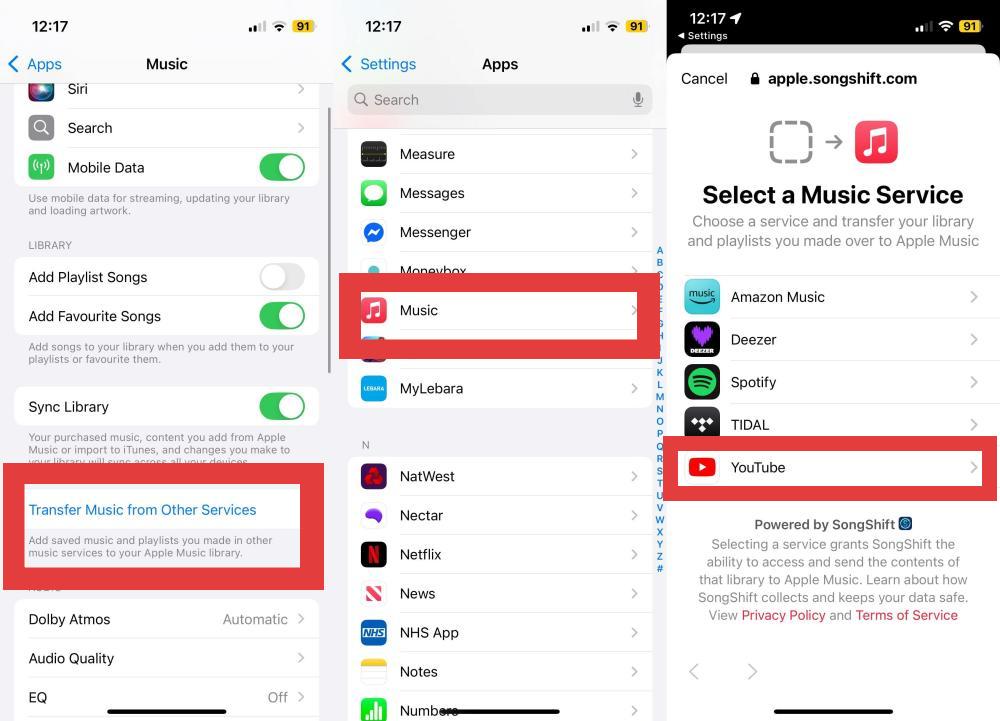
O SongShift é muito eficaz na correspondência, mas como depende de metadados (títulos, artistas), tenha em mente que uploads não oficiais (como uma gravação ao vivo enviada por um usuário) podem não ser mapeados com sucesso para uma faixa de estúdio oficial no Apple Music.
Este é um parágrafo
3. Som
O Soundiiz foi desenvolvido para usuários que gerenciam múltiplas plataformas de streaming. Diferentemente de aplicativos exclusivos para dispositivos móveis, ele funciona diretamente no seu navegador, o que é muito conveniente se você prefere gerenciar sua biblioteca a partir de um computador.
No entanto, a desvantagem é que a versão gratuita limita a transferência a uma lista de reprodução por vez (até 200 faixas). Se você tiver apenas uma lista de reprodução desse tamanho ou algumas pequenas, o Soundiiz funciona perfeitamente — basta seguir os passos abaixo.
- Acesse soundiiz.com e crie uma conta.
- Acesse a aba "Plataformas" e conecte suas contas do YouTube Music e do Apple Music seguindo as instruções de login de cada uma.
- Clique no botão "Transferir" no menu à esquerda.
- Selecione "Playlists" (você também pode selecionar álbuns, artistas ou faixas).
- Escolha o YouTube Music como fonte.
- Selecione as listas de reprodução que deseja mover.
- Siga as instruções finais para confirmar sua seleção, escolha Apple Music como destino e o Soundiiz iniciará o processo de correspondência.
O Soundiiz é amplamente considerado como tendo um dos mecanismos de correspondência mais maduros do setor, estando ativo desde 2013. No entanto, como acontece com todos os serviços de transferência, ele depende de metadados; se um vídeo específico do YouTube não existir como uma faixa oficial no Apple Music, o sistema o ignorará.
4. DumpMedia Qualquer conversor de música
Se você está procurando um conversor confiável de YouTube para Apple Music, DumpMedia Qualquer conversor de música Oferece um recurso prático de Transferência de Listas de Reprodução, projetado para simplificar a migração de músicas.
DumpMediaO recurso de Transferência de Playlists do [nome da plataforma] transfere playlists inteiras, álbuns ou apenas faixas selecionadas, de acordo com suas necessidades. Mantenha a ordem e os metadados das playlists para que sua experiência musical permaneça consistente na nova plataforma. Em vez de recriar suas playlists manualmente, DumpMedia Ajuda a automatizar todo o processo de migração, economizando tempo e esforço significativos.
Download grátis Download grátis
Mais recursos de DumpMedia Qualquer conversor de música
- Baixe músicas de SpotifyApple Music, YouTube Music e muito mais.
- Baixe audiolivros da Audible em formatos de áudio comuns.
- Baixe músicas sem DRM MP3, M4A, AAC e FLAC.
- Reproduza músicas com a qualidade de som original e tags ID3.
- Processe downloads de música em lotes com velocidade 35 vezes maior.
- Ofereça operação sem esforço com reprodutores de música da web integrados.
- Ferramentas adicionais como reprodutor de música, conversor de formatos e editor de ID3.
Transfira suas playlists do YouTube Music para o Apple Music usando o seguinte comando: DumpMedia
Passo 1. Baixe e instale DumpMedia Qualquer conversor de música para seu Mac/PC.
Download grátis Download grátis
Passo 2. Selecione Ferramentas > Transferência de lista de reprodução.
Passo 3. Escolha o YouTube Music como fonte.
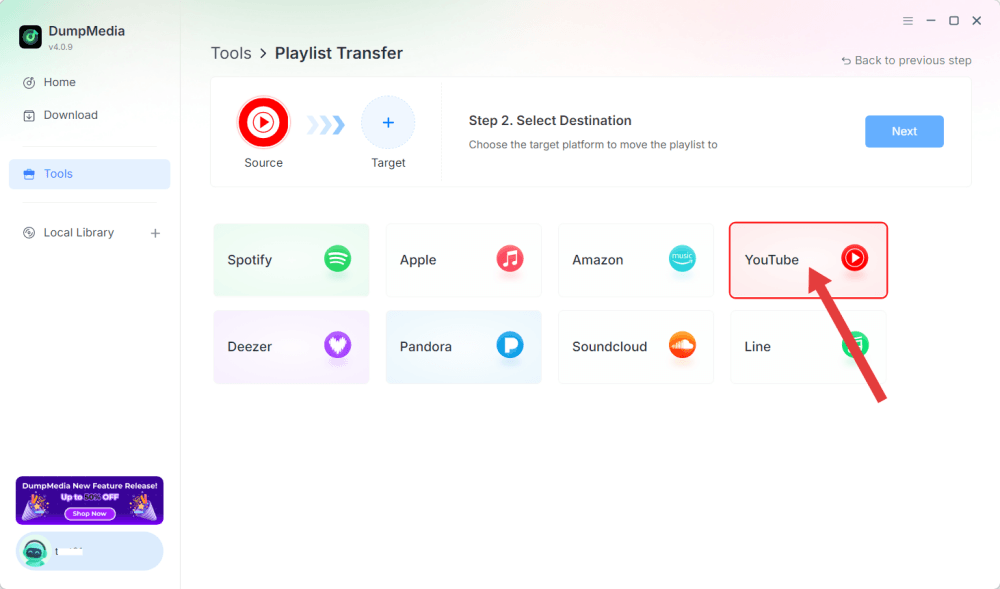
Passo 4. Defina o Apple Music como destino.
Passo 5. Encontre as listas de reprodução que deseja transferir e selecione todas as listas de reprodução que deseja mover.
Passo 6. Clique em Converter para iniciar a transferência.
Etapa 7. A transferência foi concluída. Clique em "Ir para o Apple Music". Suas playlists foram transferidas para um novo serviço.
Parte 3. Dicas para uma transferência de playlist bem-sucedida
Para obter os melhores resultados ao usar um conversor de YouTube para Apple Music, tenha em mente estas dicas.
Verificar disponibilidade da música
Nem todas as músicas possuem licença em todos os países. Se uma faixa não estiver disponível no Apple Music na sua região, ela poderá não ser transferida.
Análise das partidas da lista de reprodução
A maioria das ferramentas de transferência de listas de reprodução fornece um relatório mostrando quais músicas foram correspondidas com sucesso e quais requerem atenção manual.
Sincronizar entre dispositivos
Assim que suas playlists estiverem disponíveis no Apple Music, ative a Biblioteca de Música do iCloud para acessá-las em todos os seus dispositivos Apple.
Parte 4. Perguntas Frequentes
Posso transferir playlists do YouTube Music para o Apple Music?
Sim. Diversas ferramentas de migração de playlists podem recriar automaticamente suas playlists do YouTube Music no Apple Music.
Todas as músicas serão transferidas com sucesso?
Nem sempre. O sucesso depende de a música existir no catálogo da Apple Music e da disponibilidade de licenciamento regional.
A transferência de listas de reprodução é gratuita?
Muitas ferramentas oferecem transferências gratuitas com limitações, enquanto recursos avançados podem exigir um plano pago.
Qual o melhor conversor de YouTube para Apple Music?
Se seu objetivo principal é a migração de playlists, escolha uma ferramenta com alta precisão na correspondência de músicas, velocidade de transferência rápida e suporte para múltiplas plataformas de streaming, como... DumpMedia Qualquer conversor de música.
Posso mover álbuns e artistas?
Sim. Muitos serviços permitem a transferência de álbuns, artistas seguidos e coleções salvas.
Os nomes das minhas listas de reprodução permanecerão os mesmos?
Na maioria dos casos, sim. Os nomes das listas de reprodução geralmente são preservados durante o processo de transferência.
Parte 5. Considerações Finais
Em vez de procurar manualmente cada música novamente, um conversor de YouTube para Apple Music pode migrar automaticamente suas playlists, músicas curtidas, álbuns e biblioteca de músicas com o mínimo de esforço. Entre as soluções disponíveis, DumpMedia O Any Music Converter se destaca por seu recurso dedicado à transferência de playlists, facilitando a migração do YouTube Music para o Apple Music e preservando sua experiência de audição. Se você planeja migrar para o ecossistema musical da Apple, usar um conversor confiável de YouTube para Apple Music é a maneira mais rápida e eficiente de levar suas playlists com você.