


Spotify Reageert niet? Los het op in 2026.
Veel gebruikers ondervinden het frustrerende probleem waarbij Spotify reageert niet Tijdens het afspelen van muziek, het openen van afspeellijsten of het gebruik van de offline modus. Soms Spotify gebruiken Het programma loopt volledig vast, crasht onverwacht of stopt met werken tijdens het afspelen. Spotify Problemen met apps komen zeer vaak voor. In deze handleiding leggen we uit waarom. Spotify Als het apparaat plotseling stopt met werken, hoe los ik dit op? Spotify Problemen met de app en hoe je kunt genieten van stabielere offline muziekweergave.
Inhoudsopgave Deel 1. Waarom is Spotify Reageert de applicatie niet?Deel 2. Hoe op te lossen Spotify De applicatie reageert niet?Deel 3. Beste manier om te vermijden Spotify AfspeelproblemenDeel 4. Veelgestelde vragenDeel 5. Conclusie
Deel 1. Waarom is Spotify Reageert de applicatie niet?
Er zijn veel redenen waarom Spotify reageert niet tijdens het afspelen van muziek of het gebruik van de app.
Slechte internetverbinding
Spotify De app is sterk afhankelijk van een stabiele internetverbinding voor streaming en accountverificatie. Zwakke netwerkverbindingen kunnen problemen veroorzaken. Spotify Bevriezen of niet meer reageren.
beschadigd Spotify cache
Tijdelijke bestanden opgeslagen in Spotify Deze bestanden kunnen na verloop van tijd beschadigd raken, wat kan leiden tot app-crashes en afspeelproblemen.
Achterhaald Spotify app
Ouder Spotify versies kunnen bugs bevatten die de "Spotify "Reageert niet" foutmelding.
Spotify Serverproblemen
Soms Spotify Serverstoringen hebben wereldwijd gevolgen voor de weergave door gebruikers en de prestaties van de app.
Achtergrondsoftwareconflicten
Ook conflicten met antivirussoftware, firewallinstellingen of hardwareversnelling kunnen de oorzaak zijn. Spotify om te stoppen met reageren.
Problemen met apparaatcompatibiliteit
Oudere besturingssystemen of niet-ondersteunde apparaten kunnen problemen ondervinden bij het uitvoeren van de nieuwste versie. Spotify De app werkt soepel.
Dit zijn enkele van de meest voorkomende oorzaken van de "Spotify "Reageert niet"-probleem.
Deel 2. Hoe op te lossen Spotify De applicatie reageert niet?
If Spotify Als de app niet reageert op uw apparaat, probeer dan de volgende oplossingen.
Oplossing 1. Opnieuw opstarten Spotify
Helemaal dichtbij Spotify en open de app opnieuw. Deze simpele oplossing verhelpt vaak tijdelijke afspeelproblemen.
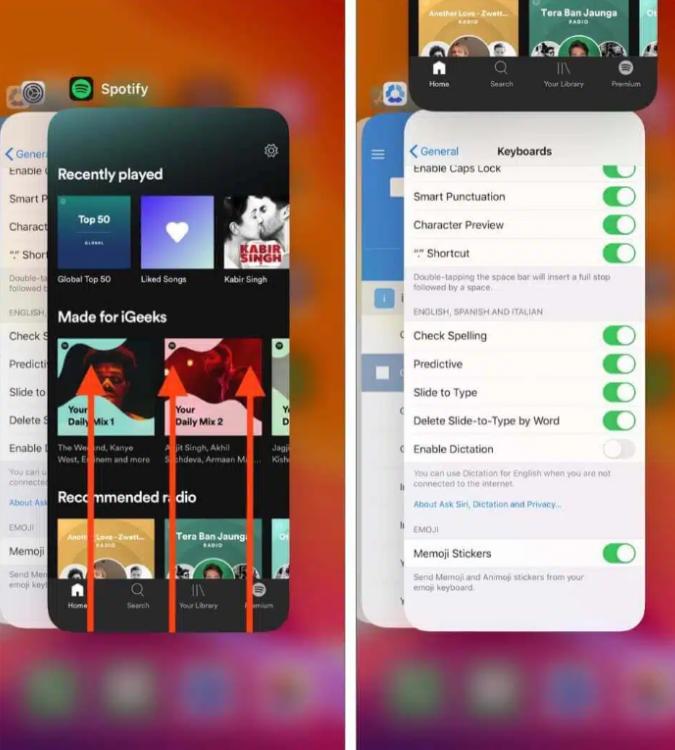
Op iOS (iPhone/iPad): Veeg vanaf de onderkant van het scherm omhoog en pauzeer halverwege (of dubbelklik op de Home-knop op oudere apparaten). Zoek de Spotify Bekijk de previewkaart en veeg deze volledig omhoog en van het scherm af.
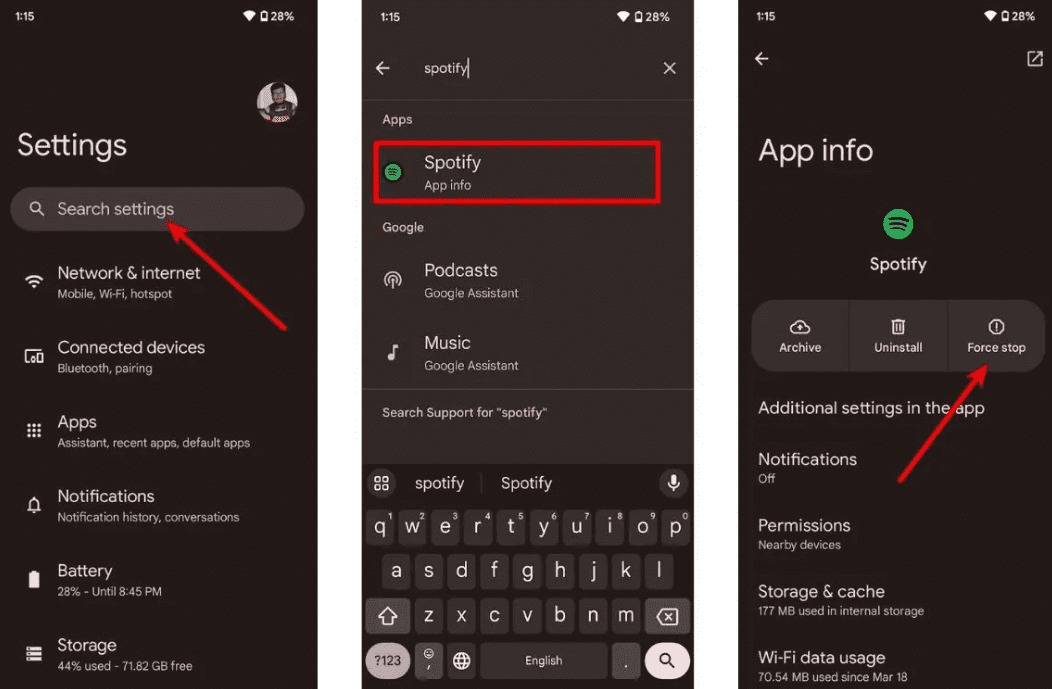
Op Android: Ga naar Instellingen > Apps > Spotify en tik op 'Geforceerd stoppen'. Hiermee worden alle vastgelopen achtergrondprocessen beëindigd. Openen Spotify vanuit uw app-lade.
Op macOS: Klik Spotify Selecteer in de bovenste menubalk 'Afsluiten'. SpotifyOf klik gewoon op het venster en druk op Command (⌘) + Q.
On Windows (10/11): Klik op Bestand in de linkerbovenhoek van het scherm. Spotify Selecteer het venster en kies Afsluiten (door op de "X" in de rechterbovenhoek te drukken, wordt het venster vaak alleen naar het systeemvak geminimaliseerd in plaats van gesloten).
Oplossing 2. Controleer uw internetverbinding
Schakel tussen wifi en mobiele data om de stabiliteit van de verbinding te testen.
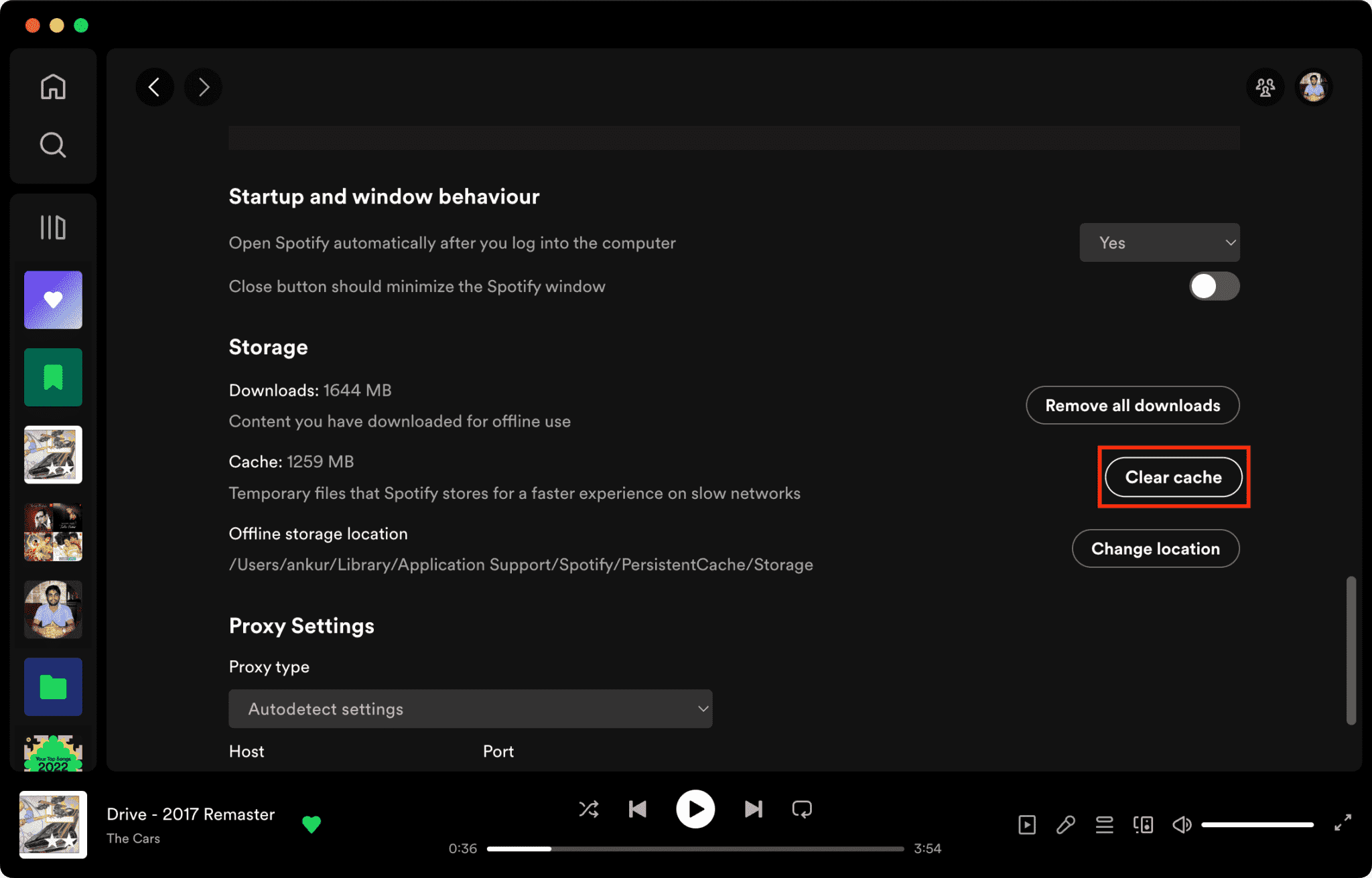
Oplossing 3. Wis Spotify cache
Beschadigde cachebestanden zijn een belangrijke reden waarom Spotify reageert niet.
Hoe te wissen Spotify Cache op Mac/Windows/iPhone/Android >>>>
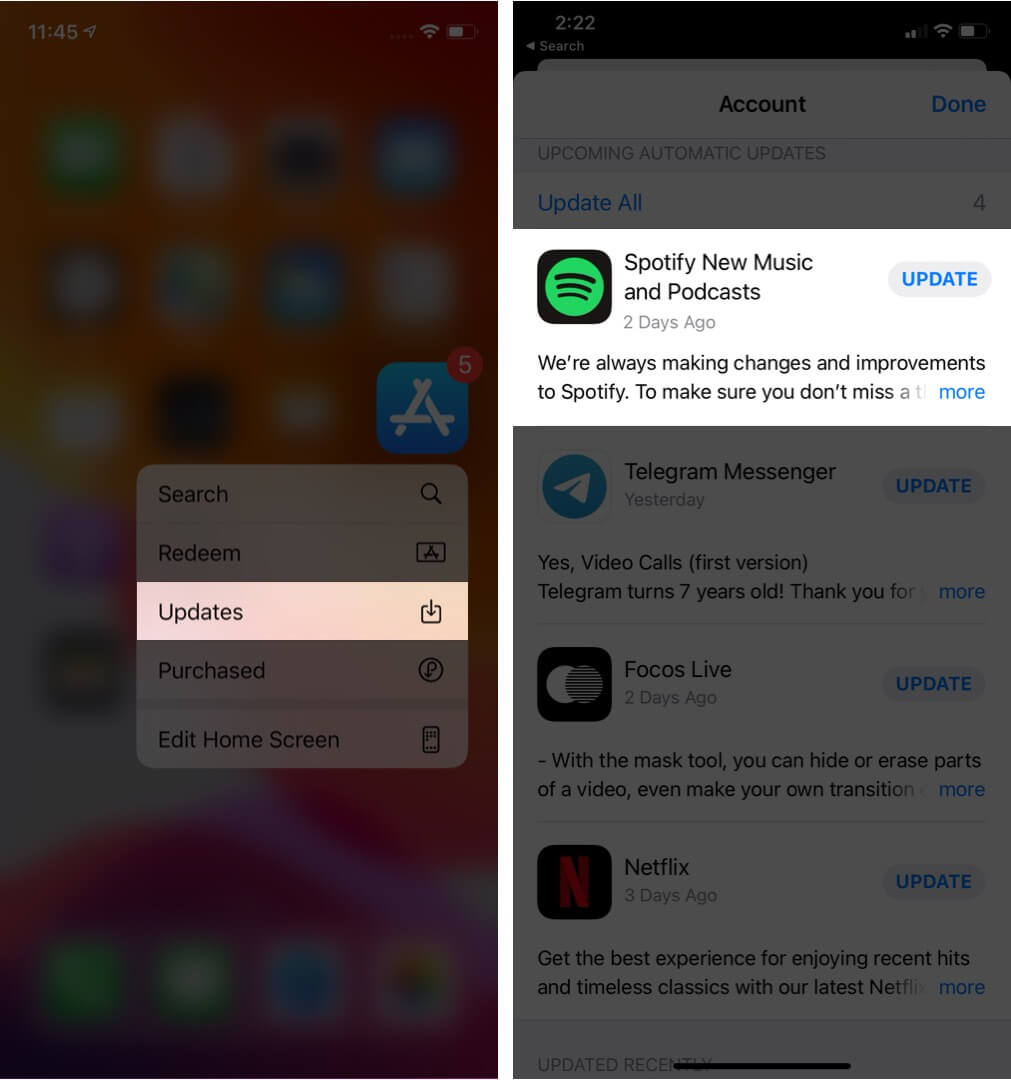
Oplossing 4. Bijwerken Spotify app
De nieuwste versie installeren Spotify Deze versie verhelpt mogelijk bekende softwarefouten.
Oplossing 5. Start uw apparaat opnieuw op
Door uw computer of telefoon opnieuw op te starten, kunt u de systeembronnen vernieuwen.
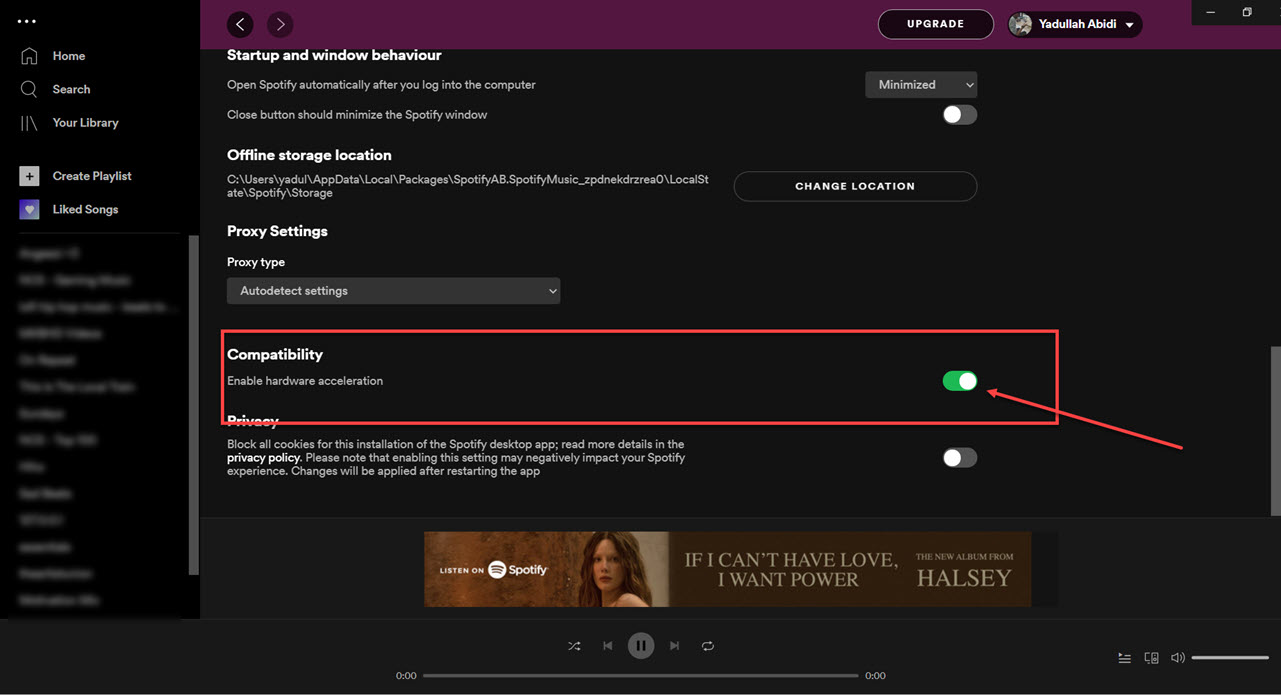
Oplossing 6. Schakel hardwareversnelling uit
Je kunt hardwareversnelling uitschakelen. Dit lost soms vastloop-problemen op.
Fix 7. Controleer Spotify Server Status
Globaal Spotify Storingen kunnen af en toe van invloed zijn op afspeel- en inlogdiensten.
Deel 3. Beste manier om te vermijden Spotify Afspeelproblemen
Veel gebruikers gaan ervan uit dat gedownloade bestanden Spotify Nummers werken altijd offline, maar gedownloade nummers blijven beschermd door DRM, wat betekent dat muziek alleen binnen de streaming-app werkt. Downloads kunnen niet vrij worden overgedragen. Als je regelmatig de foutmelding "Spotify Bij het probleem "reageert niet" is een populaire tool DumpMedia Spotify Music ConverterDeze software stelt gebruikers in staat om te converteren. Spotify muziek converteren naar lokale audioformaten voor flexibelere offline weergave. Zelfs als de Spotify Als de app niet werkt op uw apparaat, kunt u spelen Spotify nummers offline onmiddellijk op een andere muziekspeler.
Gratis downloaden Gratis downloaden
🏆Belangrijkste kenmerken van DumpMedia Spotify Music Converter
- Downloaden Spotify muziek naar MP3, WAV, FLAC en AAC
- verwijderen Spotify DRM-beveiliging*
- Behoud de oorspronkelijke geluidskwaliteit.
- Download afspeellijsten en albums in batches.
- Snelle conversiesnelheid
- Behoud songmetadata en ID3-tags.
- Ondersteuning voor offline afspelen op elk apparaat.
Voor gebruikers die gefrustreerd zijn door Spotify App-instabiliteit is een nadeel; lokaal afspelen van muziek voelt vaak veel betrouwbaarder aan.
Converteren Spotify naar MP3 Stap voor Stap
Stap 1. Download en installeer DumpMedia Spotify Music Converter op je Mac/pc. Start het programma en je ziet de interface. Gebruik je Spotify Premium/gratis account om in te loggen.
Gratis downloaden Gratis downloaden
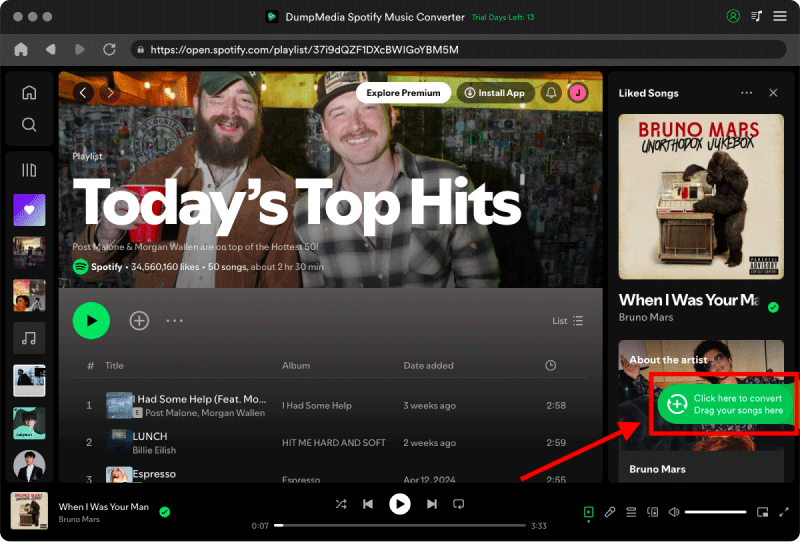
Stap 2. Zoek de afspeellijst, het album of het specifieke nummer dat u wilt converteren. U kunt een enkel nummer naar het "+" pictogram aan de rechterkant van het scherm slepen. U kunt ook een volledige afspeellijst/album openen en op het pictogram "Toevoegen aan converteren" klikken om de volledige lijst in de converter te laden.
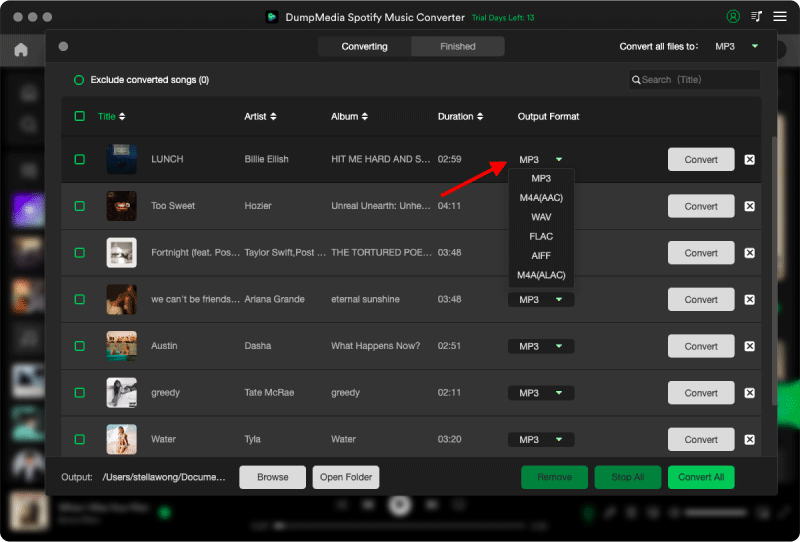
Stap 3. Selecteren MP3 (meest compatibel). Je kunt ook de bitrate of de samplefrequentie aanpassen. Kies voor de beste balans 320 kbps.
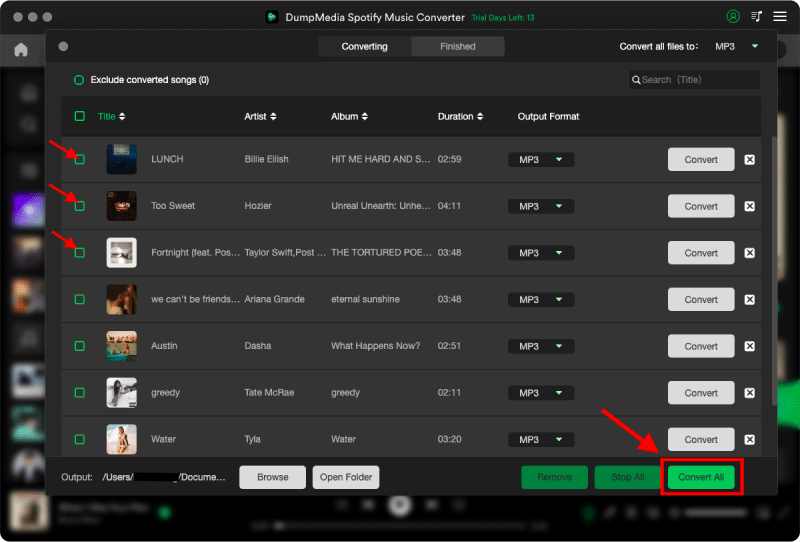
Stap 4. Zodra de instellingen zijn voltooid, kunnen gebruikers de conversie uitvoeren door op het pictogram 'Converteren' te klikken. DumpMedia zal downloaden Spotify liedjes om MP3 Binnen enkele seconden dankzij de supersnelle snelheid.
Deel 4. Veelgestelde vragen
Waarom is Spotify Reageert niet?
Spotify Het systeem reageert mogelijk niet meer vanwege internetproblemen, beschadigde cachebestanden, verouderde software of serverproblemen.
Waarom doet Spotify Blijven bevriezen?
Spotify Vastloop-problemen houden vaak verband met beschadigde cache of conflicten met hardwareversnelling.
Waarom is Spotify Mijn telefoon loopt vast?
Mobile Spotify Storingen kunnen worden veroorzaakt door te weinig opslagruimte, verouderde app-versies of softwareconflicten.
Waarom is Spotify Werkt de offline modus niet?
Offline afspelen is nog steeds afhankelijk van Spotify autorisatie en app-stabiliteit.
Is DumpMedia Spotify Music Converter veilig?
Ja. Het is ontworpen voor Spotify Muziekconversie en lokaal afspeelbeheer.
Let op: streamingplatforms hebben hun eigen regels en monitoringsystemen. Als tool van derden, DumpMedia Spotify Music Converter is ook onderworpen aan hun beperkingen, die in bepaalde gevallen van invloed kunnen zijn op het gebruik. Spotify kan actie ondernemen als het activiteiten detecteert die in strijd zijn met de Servicevoorwaarden; dit is geheel naar eigen inzicht. Spotifydiscretie.
Deel 5. Conclusie
de "Spotify Het probleem "reageert niet" kan worden veroorzaakt door instabiliteit van de internetverbinding, beschadigde cachebestanden, verouderde software of Spotify App-problemen. Hoewel veel tijdelijke oplossingen kunnen helpen om de weergave te herstellen, Spotify Streaming is nog steeds sterk afhankelijk van de stabiliteit van de app en online verificatie. Voor gebruikers die offline stabieler willen luisteren, DumpMedia Spotify Music Converter biedt een praktische manier om te converteren Spotify liedjes in lokale MP3 Bestanden voor flexibele weergave op verschillende apparaten.
Gratis downloaden Gratis downloaden
*DumpMedia werkt door te decoderen en te downloaden Spotify Zet nummers om naar DRM-vrije bestanden, zodat je een schone, onbeperkte kopie van je muziekbibliotheek kunt verkrijgen voor elk apparaat. Deze functie omvat niet het verwijderen van DRM van lokale audiobestanden.