


Spotify DJ-modus: Hoe gebruik je hem (complete handleiding 2026)?
Als je onlangs hebt gehoord over Spotify Je vraagt je misschien af wat de DJ-modus precies doet en hoe je die gebruikt. Spotify De AI DJ-modus is een van de SpotifyEen van de meest opwindende functies van is het bieden van een gepersonaliseerde muziekervaring, mogelijk gemaakt door kunstmatige intelligentie. Maar hoewel het krachtig is, kent het ook beperkingen waar veel gebruikers zich niet van bewust zijn. In deze gids leer je wat Spotify Wat is AI DJ en hoe schakel je AI DJ in? Spotify.
Inhoudsopgave Deel 1. Wat is Spotify AI-DJ?Deel 2. Hoe in te schakelen Spotify AI-DJ?Deel 3. Beperkingen van Spotify AI DJDeel 4. Hoe op te slaan? Spotify DJ-muziek voor offline gebruik?Deel 5. Veelgestelde vragenDeel 6. Conclusie
Deel 1. Wat is Spotify AI-DJ?
Spotify De DJ-modus is een gepersonaliseerde muziekgids die functioneert als een virtuele radiopresentator, waarbij geavanceerde machine learning wordt gecombineerd met een opmerkelijk realistische AI-stem. Deze functie is beschikbaar voor Premium-abonnees en doet meer dan alleen nummers willekeurig afspelen; het stelt een continue muziekstream samen op basis van je specifieke luistergeschiedenis, actuele trends en zelfs nostalgische hits die je al jaren niet meer hebt gedraaid.
Belangrijkste kenmerken van Spotify AI DJ
- Gepersonaliseerde songaanbevelingen
- Continue afspelen zonder handmatige invoer
- AI-gegenereerd spraakcommentaar
- Slimme overgangen tussen stemmingen en genres.
Dit is waarom Spotify De DJ-modus wordt steeds populairder onder gebruikers die moeiteloos naar muziek willen luisteren.
Deel 2. Hoe in te schakelen Spotify AI-DJ?
Hoe toegang krijgt Spotify DJ-modus? Als je je hebt geabonneerd op Spotify Premium, Volg deze stappen:
Stap 1. Zorg ervoor dat uw app is bijgewerkt naar de nieuwste versie. Ga naar het gedeelte 'Home'.
Stap 2. Zoek de DJ-functie in je feed. Begin direct met luisteren.
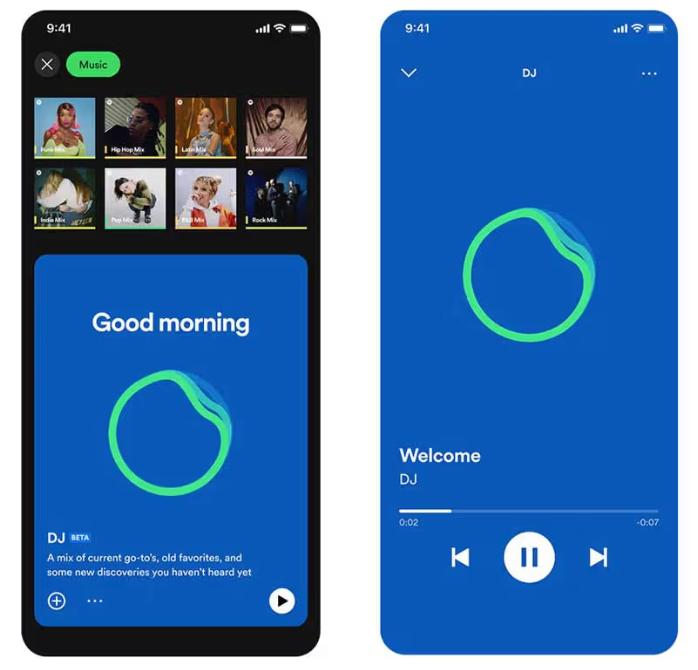
SpotifyDe AI-dj van [naam app] ondersteunt nu een 'verzoek'-functie. Net zoals je met een menselijke dj zou praten, kun je spraakopdrachten of tekstberichten gebruiken, bijvoorbeeld: "Schakel over naar een rustiger genre" of "Speel meer nummers van Jay Justin Bieber", en de AI past de afspeellijst direct aan.
Deel 3. Beperkingen van Spotify AI DJ
Spotify De DJ-modus onderscheidt zich doordat je niet meer handmatig naar muziek hoeft te zoeken. Het is ideaal voor achtergrondmuziek, het ontdekken van nieuwe nummers en het creëren van een radio-achtige ervaring. SpotifyDe AI-dj van is indrukwekkend, maar kent wel een aantal belangrijke beperkingen.
1. Geen permanente downloads
Zelfs met Premium zijn nummers niet echt te downloaden. De bestanden zijn vergrendeld in de app en kunnen niet worden overgedragen.
2. Geen offline vrijheid
Je kunt de muziek downloaden om offline te luisteren, maar toegang is afhankelijk van een abonnement. De muziek verdwijnt als je je abonnement opzegt.
3. Exporteren of delen is niet toegestaan.
Je kunt DJ-afspeellijsten niet exporteren en mixen niet extern opslaan.
4. Beperkte controle
Spotify De AI bepaalt de selectie en volgorde van de nummers. Je hebt geen volledige aanpassingsmogelijkheid.
Deze beperkingen worden belangrijk als je meer controle over je muziek wilt hebben.
Deel 4. Hoe op te slaan? Spotify DJ-muziek voor offline gebruik?
Als je geniet Spotify Als je een DJ-modus wilt, maar meer flexibiliteit, heb je een manier nodig om nummers permanent op te slaan. In plaats van te vertrouwen op... SpotifyMet de ingebouwde beperkingen van [naam van de tool], selecteer je nummers uit DJ-aanbevelingen en converteer je ze naar lokale bestanden. Dit geeft je volledige controle over je muziek. De meest betrouwbare manier om dit te doen is door een professionele tool zoals [naam van de tool] te gebruiken. DumpMedia Spotify Music Converter.
Gratis downloaden Gratis downloaden
🏅Waarom kiezen voor DumpMedia Spotify Music Converter:
- ⭐Integratie met Spotify webspeler
- ⭐Werken voor beide Spotify Premium en Spotify Gratis gebruikers
- ⭐Bied batchconversie met een snelheid tot 35x
- ⭐Converteren Spotify liedjes om MP3, WAV of FLAC
- ⭐Behoud ID3-tags zoals artiest, cover, kunst, enz.
- ⭐Behoud de originele audiokwaliteit
- ⭐100% schoon. Geen risico bij gebruik
Stapsgewijs: Converteren Spotify DJ Muziek
Stap 1. Download en installeer de software op uw computer. Het werkt met beide. WinWindows en Mac. De interface is gebruiksvriendelijk, waardoor het gemakkelijk is voor beginners.
Gratis downloaden Gratis downloaden
Stap 2. Open de ingebouwde Spotify webspeler binnenin DumpMedia en log in met uw Spotify account. Bladeren Spotify Sleep de nummers, albums of afspeellijsten die je wilt downloaden naar de converter.

Stap 3. Selecteer in het instellingenpaneel MP3 als uitvoerformaat om een MP3 Download de door jou geselecteerde nummers.

Stap 4. Druk op de knop "Alles converteren" en start de conversie. DumpMedia Spotify Music Converter Ondersteunt 35x snellere downloadsnelheden, dus u kunt gewoon wachten tot het conversieproces is voltooid.

Deel 5. Veelgestelde vragen
1. Wat is Spotify DJ-modus?
Het is een door AI aangedreven functie die gepersonaliseerde muziek afspeelt op basis van jouw smaak.
2.Is SpotifyIs de AI-dj van 's gratis?
Nee, daarvoor is doorgaans een Premium-abonnement vereist.
3. Kan ik downloaden Spotify DJ-nummers?
Alleen binnen de app, niet als lokale bestanden.
4. Kan ik mijn eigen DJ-afspeellijst maken?
Ja, vooral als je lokale kopieën van je muziek hebt.
Deel 6. Conclusie
Spotify De DJ-modus is een krachtige functie die het ontdekken van muziek makkelijker en leuker maakt. Er zijn echter wel beperkingen, zoals het ontbreken van permanente downloads en beperkte offline toegang. Als je optimaal wilt profiteren van de voordelen van... SpotifyZonder deze beperkingen is een AI-dj die gebruikmaakt van een betrouwbare tool om je muziek op te slaan de beste oplossing. Zo kun je je favoriete nummers bewaren, je eigen afspeellijsten samenstellen en genieten van volledige vrijheid tijdens het luisteren.
Gratis downloaden Gratis downloaden
*DumpMedia werkt door te decoderen en te downloaden Spotify Zet nummers om naar DRM-vrije bestanden, zodat je een schone, onbeperkte kopie van je muziekbibliotheek kunt verkrijgen voor elk apparaat. Deze functionaliteit omvat niet de conversie van lokale audiobestanden.