


Hoe op te nemen Spotify naar MP3 Online (Eenvoudige methoden en het beste alternatief)
Als je op zoek bent naar manieren om op te nemen Spotify naar MP3 Online ben je niet de enige. Veel gebruikers willen besparen. Spotify liedjes als MP3 bestanden voor offline luisteren, back-up of persoonlijk gebruik. Bij het opnemen echter... Spotify liedjes om MP3De meeste gebruikers komen er al snel achter dat niet alle tools stabiele resultaten of audio van hoge kwaliteit leveren. Sommige tools falen door... SpotifySommige methoden maken gebruik van encryptie, terwijl andere de geluidskwaliteit aanzienlijk verminderen. In deze handleiding laten we je zien hoe je kunt opnemen. Spotify liedjes om MP3 online, vergelijk beschikbare methoden en introduceer een betrouwbaarder alternatief voor conversie. Spotify muziek in MP3 Efficiënt formatteren.
Inhoudsopgave Deel 1: Hoe op te nemen Spotify Muziek naar MP3 Online?Deel 2: Is het veilig om op te nemen? Spotify Muziek naar MP3?Deel 3: Beste manier om te converteren Spotify naar MP3 (Aanbevolen oplossing)Deel 4: Vergelijking: Online Recorder vs. Spotify ConverterDeel 5: veelgestelde vragenDeel 6: samenvatting
Deel 1: Hoe op te nemen Spotify Muziek naar MP3 Online?
Wanneer gebruikers zoeken naar hoe ze moeten opnemen Spotify muziek naar MP3 Online verwachten ze meestal een snelle, browsergebaseerde oplossing. Hieronder staan twee veelgebruikte online tools die beweren je te helpen bij het opnemen. Spotify naar MP3 online.
1. Apowersoft online audiorecorder
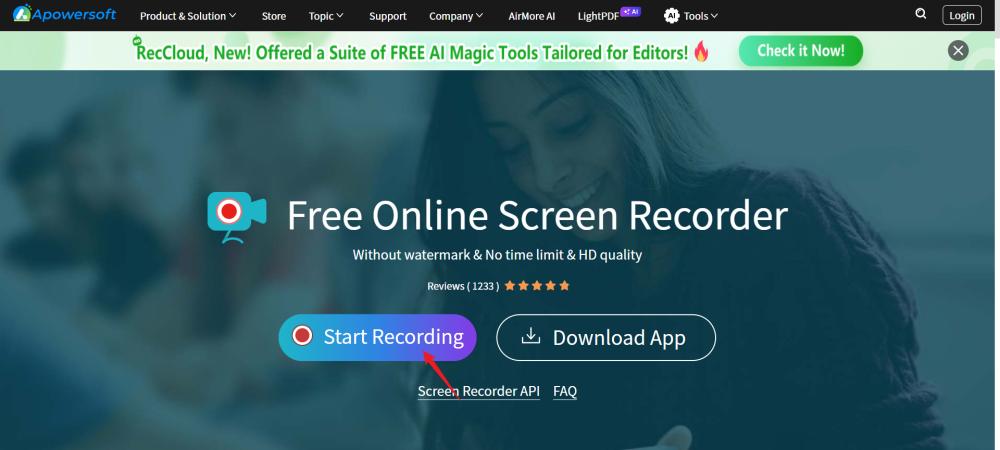
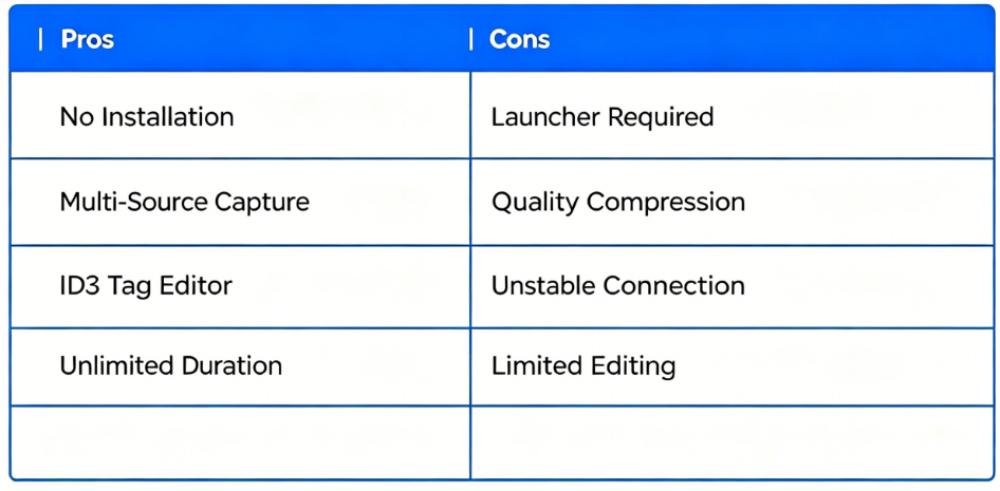
Apowersoft is een van de populairste tools voor het opnemen van gegevens. Spotify naar MP3 online. De tool maakt gebruik van een lichtgewicht "launcher" om de verbinding tussen uw browser en de geluidskaart van uw computer te leggen. Het kan systeemgeluid, microfooningang of beide tegelijk opnemen. Zodra de opname is voltooid, kan de audio in verschillende formaten worden opgeslagen, waaronder MP3, WAV en AAC, en gebruikers kunnen eenvoudige ID3-tags toevoegen om hun bestanden te ordenen.
Stappen om op te nemen Spotify Muziek naar MP3 with Apowersoft
- Bezoek Apowersoft Online Audio Recorder
- Selecteer “Opname starten”
- Play Spotify muziek in je browser
- Stop de opname en download. MP3 filet
2. Chrome-extensie voor audio-opname
Een andere manier om op te nemen Spotify naar MP3 Online wordt gebruikgemaakt van Chrome-extensies zoals Audio Capture. Deze extensie werkt volledig binnen de Chrome-omgeving. Het legt de audio vast die momenteel in het actieve tabblad wordt afgespeeld en codeert deze in een audiobestand. MP3 of een WAV-bestand. Zodra de opname is voltooid, wordt een nieuw tabblad geopend waar de gebruiker het bestand lokaal kan opslaan. Het wordt met name gewaardeerd vanwege de eenvoud en het feit dat er geen externe launcher nodig is.
Stappen om op te nemen Spotify Muziek naar MP3 with Audio Capture
- Installeer Chrome Audio Capture
- Open Spotify Webspeler
- Start opname-extensie
- Exporteer het bestand als MP3
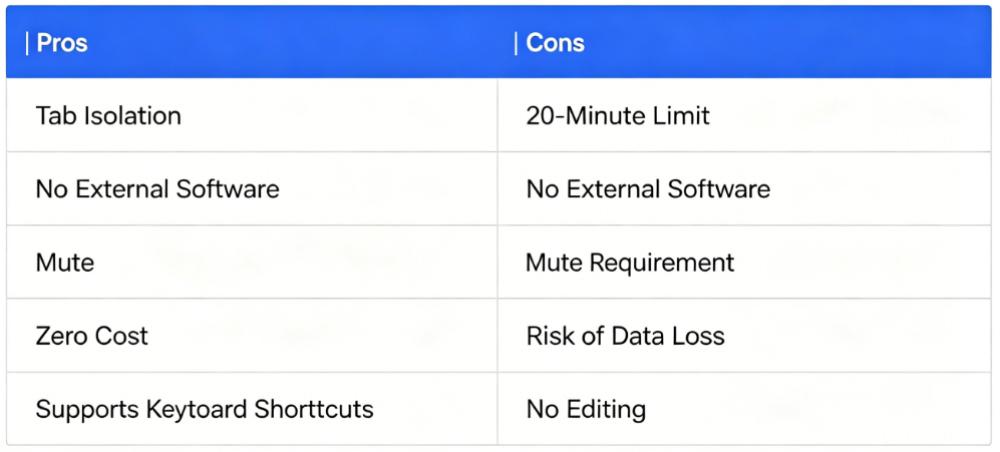
Hoewel je met deze tools kunt opnemen Spotify naar MP3 Online gaan ze vaak gepaard met beperkingen die de bruikbaarheid en kwaliteit beïnvloeden.
Deel 2: Is het veilig om op te nemen? Spotify Muziek naar MP3?
Bij het proberen op te nemen Spotify liedjes om MP3 Online is veiligheid een belangrijk aandachtspunt. Over het algemeen vereisen online opnameprogramma's toestemming voor audio-opnames. Sommige tools slaan bovendien tijdelijk gegevens op. Hoewel de meeste betrouwbare tools veilig zijn, moeten gebruikers toch voorzichtig zijn bij het gebruik van welke opnamemethode dan ook. Spotify liedjes om MP3 online, met name extensies van derden. Daarnaast, Spotify Het maakt gebruik van DRM-beveiliging, waardoor directe opname instabiel of inconsistent kan worden.
Deel 3: Beste manier om te converteren Spotify naar MP3 (Aanbevolen oplossing)
In plaats van te vertrouwen op onbetrouwbare methoden voor het vastleggen van gegevens Spotify naar MP3 Online is een betrouwbaardere oplossing het gebruik van een speciale converter. DumpMedia Spotify Music Converter is een professioneel hulpmiddel dat is ontworpen om te converteren Spotify volgt in MP3 met hoge kwaliteit en stabiliteit.
Gratis downloaden Gratis downloaden
🏅Waarom kiezen voor DumpMedia Spotify Music Converter:
- ⭐Integratie met Spotify webspeler
- ⭐Werken voor beide Spotify Premium en Spotify Gratis gebruikers
- ⭐Bied batchconversie met een snelheid tot 35x
- ⭐Converteren Spotify liedjes om MP3, WAV of FLAC
- ⭐Behoud ID3-tags zoals artiest, cover, kunst, enz.
- ⭐Behoud de originele audiokwaliteit
- ⭐100% schoon. Geen risico bij gebruik
Waarom het beter is dan proberen op te nemen Spotify naar MP3 online:
- Geen browserbeperkingen
- Geen audioverlies
- Geen instabiliteit bij het opnemen
- Werkt direct met Spotify tracks
In plaats van herhaaldelijk te proberen op te nemen Spotify naar MP3 Online biedt deze oplossing een directe conversiemethode die betrouwbaarder en schaalbaarder is.
Stappen om te converteren Spotify naar MP3
Stap 1. Download en installeer de software op uw computer. Het werkt met beide. WinWindows en Mac. De interface is gebruiksvriendelijk, waardoor het gemakkelijk is voor beginners.
Gratis downloaden Gratis downloaden
Stap 2. Open de ingebouwde Spotify webspeler binnenin DumpMedia en log in met uw Spotify account. Bladeren Spotify Sleep de nummers, albums of afspeellijsten die je wilt downloaden naar de converter.
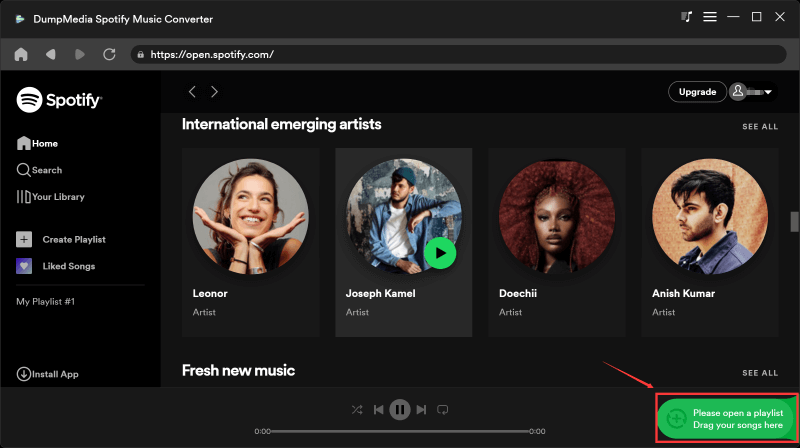
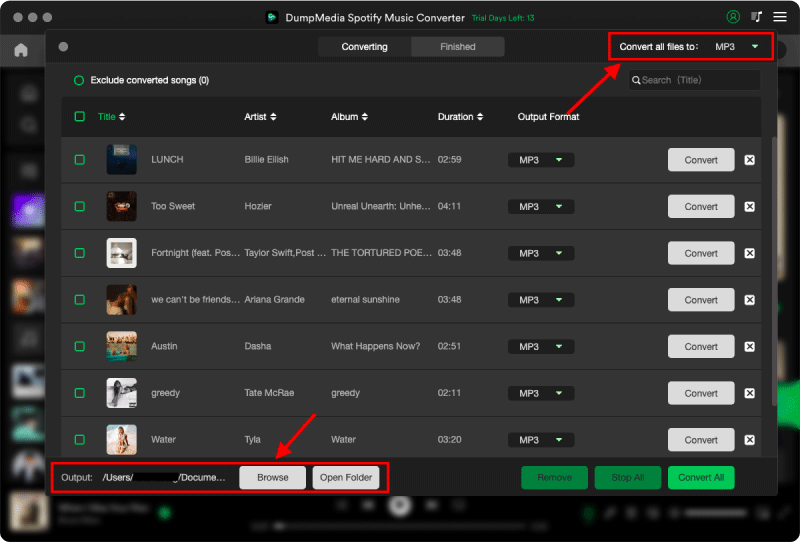
Stap 3. Selecteer in het instellingenpaneel MP3 als uitvoerformaat om een MP3 Download de door jou geselecteerde nummers.
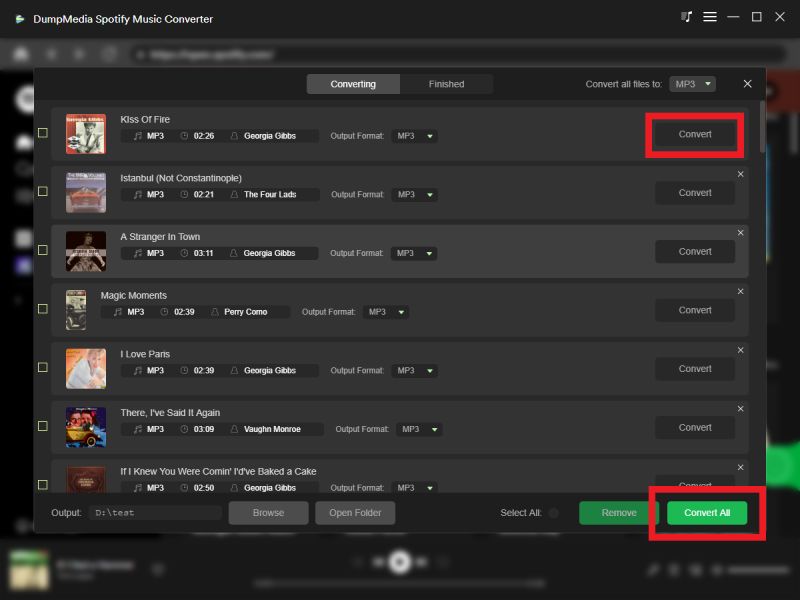
Stap 4. Druk op de knop "Alles converteren" en start de conversie. DumpMedia Spotify Music Converter Ondersteunt 35x snellere downloadsnelheden, dus u kunt gewoon wachten tot het conversieproces is voltooid.
Deel 4: Vergelijking: Online Recorder vs. Spotify Converter
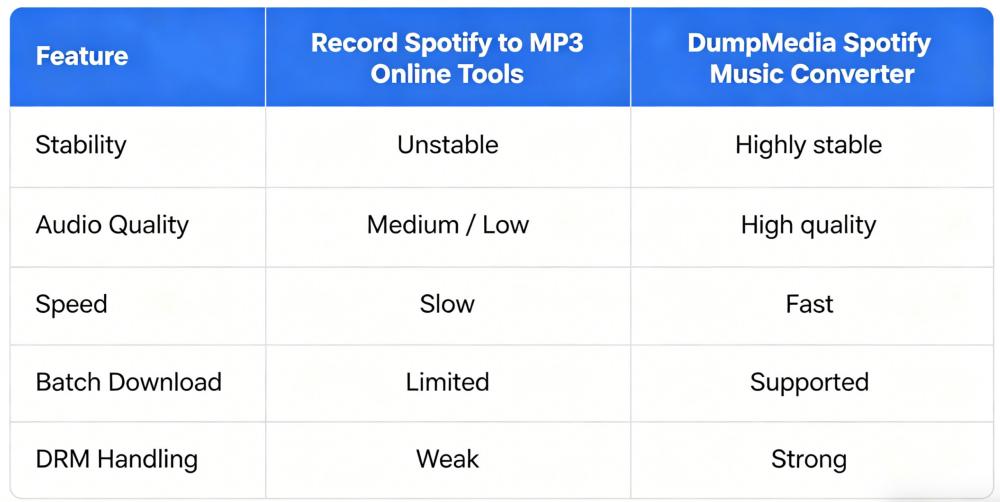
Zoals hierboven weergegeven, kunt u proberen op te nemen. Spotify naar MP3 Online converters bieden een aanzienlijk betere ervaring.
Deel 5: veelgestelde vragen
Kan ik echt opnemen? Spotify muziek naar MP3 gratis online?
Ja, je kunt tools proberen waarmee je kunt opnemen. Spotify liedjes om MP3 online, maar de meeste hebben beperkingen qua kwaliteit en stabiliteit.
Is het legaal om op te nemen? Spotify naar MP3 online?
Opnemen Spotify In sommige regio's is het gebruik van muziek voor persoonlijk gebruik toegestaan, maar herdistributie is verboden.
Waarom mislukt online opnemen soms?
Spotify maakt gebruik van versleutelde streaming, wat opnames vereenvoudigt. Spotify naar MP3 Online methoden zijn onbetrouwbaar.
Wat is het beste alternatief voor opnemen? Spotify muziek naar MP3 online?
Een speciale converter zoals DumpMedia Spotify Music Converter is het meest stabiele alternatief.
Deel 6: samenvatting
Hoewel veel gebruikers proberen op te nemen Spotify naar MP3 De realiteit is dat online tools vaak te kampen hebben met instabiliteit, slechte kwaliteit en technische beperkingen. Als u een betrouwbare en hoogwaardige oplossing nodig hebt, kunt u beter overstappen op een professionele tool zoals... DumpMedia Spotify Music Converter is de beste optie. In plaats van steeds opnieuw te proberen op te nemen Spotify muziek naar MP3 Online, met behulp van een speciale converter, zorgt dit voor betere prestaties, een hogere audiokwaliteit en een soepelere gebruikerservaring.