


Hoe speel je het? Spotify Muziek via Sonos-luidsprekers in 2026
Sonos-luidsprekers staan bekend om hun uitstekende geluidskwaliteit en naadloze multiroom-audio-ervaring. Als je een Spotify Als gebruiker zul je blij zijn te horen dat Sonos direct integreert met Spotifywaardoor je gemakkelijk je favoriete afspeellijsten, albums en podcasts kunt streamen. In deze handleiding leer je hoe je dat doet. spelen Spotify muziek via Sonos-luidsprekersLos veelvoorkomende verbindingsproblemen op en ontdek alternatieve manieren om ervan te genieten. Spotify Luister naar muziek op Sonos, zelfs als de internetverbinding beperkt is.
Inhoudsopgave Deel 1: Biedt Sonos ondersteuning? Spotify?Deel 2: Hoe verbinding te maken Spotify naar Sonos-luidsprekers?Deel 3: Veelvoorkomende problemen tijdens het spelen Spotify op SonosDeel 4: hoe te spelen Spotify Sonos offline gebruiken zonder Premium?Deel 5: veelgestelde vragenDeel 6: Eindoordeel
Deel 1: Biedt Sonos ondersteuning? Spotify?
Ja, Sonos officieel ondersteunt Spotify integratie. U kunt uw verbinding tot stand brengen. Spotify Koppel je account direct aan de Sonos-app en bedien de weergave via de Sonos-app. Spotify app en spraakassistenten zoals Alexa en Google Assistant.
De meeste moderne Sonos-producten ondersteunen dit. Spotify, Waaronder:
- Sonos One
- Sonos Tijdperk 100
- Sonos Tijdperk 300
- Sonos Beam
- Sonos boog
- Sonos verhuist
- Sonos zwerven
Hierdoor is het makkelijk om te spelen. Spotify Luister naar muziek via Sonos-luidsprekers in je hele huis.
Deel 2: Hoe verbinding te maken Spotify naar Sonos-luidsprekers?
Om uw . te verbinden Spotify Om verbinding te maken met je Sonos-luidsprekers kun je twee hoofdmethoden gebruiken: de officiële Sonos-app of Spotify Verbinden. Beide vereisen een Spotify Premium abonnement.
Methode 1: De Sonos-app gebruiken (aanbevolen voor gecentraliseerde bediening)
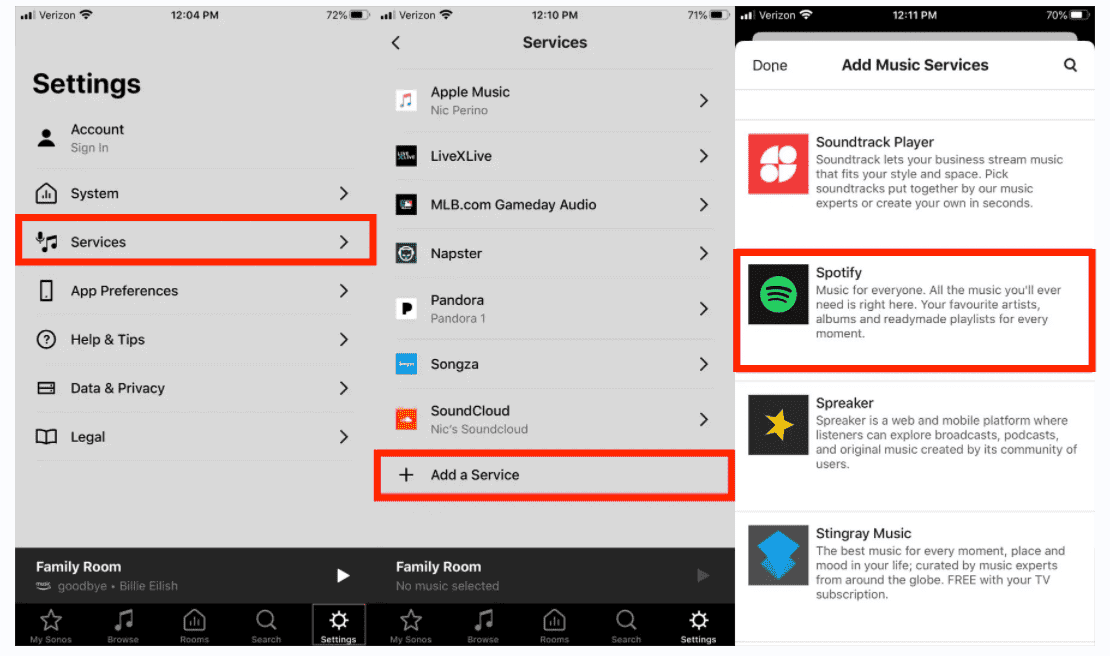
Als u al uw muziekservices en kamergroeperingen liever op één plek beheert, voeg dan toe Spotify rechtstreeks naar de Sonos-app en afspelen Spotify muziek op Sonos-speakers.
- Open de Sonos-app op je mobiele apparaat.
- Ga naar Instellingen (tandwielpictogram). Selecteer Diensten en spraak.
- Tik onder 'Muziek en inhoud' op 'Een service toevoegen'. Selecteer Spotify van de lijst.
- Tik op 'Toevoegen aan Sonos' en volg de instructies op het scherm om in te loggen op je apparaat. Spotify account.
- Zodra de autorisatie is verleend, uw Spotify Je muziek verschijnt onder het tabblad 'Bladeren' of 'Muziek' in de Sonos-app, zodat je je bibliotheek direct vanuit daar kunt afspelen.
Methode 2: gebruiken Spotify Verbinden (Direct streamen)
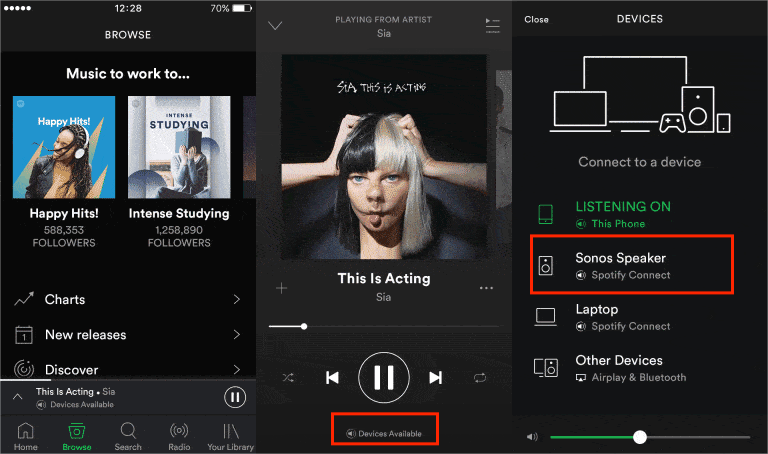
Voor veel gebruikers Spotify Verbinden is de makkelijkste manier om te spelen. Spotify muziek afspelen op Sonos-luidsprekers. Met deze methode kunt u gebruikmaken van de Spotify Gebruik de app gewoon zoals je gewend bent, als afstandsbediening voor je luidsprekers.
- Open de Spotify app op je telefoon, tablet of computer. Start een willekeurig nummer.
- Tik op het pictogram 'Apparaten' (een luidsprekersymbool in een scherm) linksonder of rechtsonder in het scherm 'Nu afspelen'.
- Er verschijnt een lijst met beschikbare apparaten. Selecteer uw Sonos-luidspreker of de naam van de ruimte in de lijst.
- De muziek wordt direct naar je Sonos-luidspreker overgeschakeld en de app regelt nu het volume en de weergave voor die luidspreker.
Belangrijke tips
- Wi-Fi-verbinding: Zorg ervoor dat uw mobiele apparaat en uw Sonos-luidsprekers op hetzelfde Wi-Fi-netwerk zijn aangesloten.
- Premium-abonnement: directe integratie en Spotify Verbindingsfuncties vereisen over het algemeen Spotify Premium. Als gratis gebruiker kunt u beperkingen ondervinden.
- Multiroom-bediening: Zodra u muziek begint af te spelen via Spotify Met Connect kun je de Sonos-app gebruiken om meerdere speakers te groeperen, zodat je in verschillende kamers dezelfde muziek kunt afspelen.
Deel 3: Veelvoorkomende problemen tijdens het spelen Spotify op Sonos
Hoewel Spotify Sonos en andere apparaten werken goed samen, hoewel er af en toe problemen kunnen optreden.
Sonos wordt niet weergegeven op Spotify
Als je je luidsprekers niet ziet in de Spotify Probeer de volgende stappen in de lijst 'Apparaten' van de app:
- Controleer de netwerkverbinding: zorg ervoor dat uw telefoon/tablet en uw Sonos-luidsprekers op exact hetzelfde wifi-netwerk zijn aangesloten.
- Vernieuw de authenticatie: In de Spotify Ga in de app naar je accountinstellingen, tik op Privacy en beveiliging en schakel 'Alleen lokale apparaten weergeven' uit en vervolgens weer in.
- Accountkoppeling: Zorg ervoor dat uw Spotify Het account is correct gekoppeld aan uw Sonos-systeem via de Sonos-app (Instellingen > Services en spraak > SpotifyProbeer de service te verwijderen en opnieuw toe te voegen als deze vast lijkt te zitten.
- Routerfuncties met een "slimme" functie: Sommige routers hebben functies zoals "Smart Setup", "Airtime Fairness" of "Auto-Optimize" die de communicatie blokkeren die Sonos nodig heeft om met elkaar te communiceren. SpotifyHet uitschakelen hiervan in de routerinstellingen lost vaak het probleem op van "verdwijnende" luidsprekers.
De muziek stopt, slaat over of hapert.
Als je muziek willekeurig stopt of nummers overslaat, is de oorzaak meestal een overbelasting van het lokale netwerk:
- Start de "keten" opnieuw op: schakel je router uit, wacht 30 seconden en schakel hem vervolgens weer in. Zodra de internetverbinding volledig hersteld is, start je je Sonos-luidsprekers en de app op je telefoon/controller opnieuw op.
- Streaminglimieten: Houd er rekening mee dat Spotify Meestal is er maar één actieve stream per account toegestaan. Als iemand anders jouw account gebruikt... Spotify Als u een account op een ander apparaat gebruikt, kan het afspelen van Sonos-muziek stoppen.
"Kan niet afspelen" of foutcodes
Als u specifieke afspeelfouten ontvangt:
- Update alles: zorg ervoor dat zowel de Sonos-app als de Spotify De apps worden bijgewerkt naar de nieuwste versies.
- Controleer op advertenties: Als je een gratis gebruiker bent Spotify Gebruikers ondervinden vaak problemen met de weergave, omdat Sonos niet geoptimaliseerd is voor de reclameblokken die in de gratis versie voorkomen. Spotify Premium wordt ten zeerste aanbevolen voor een stabiele ervaring met Sonos.
Deel 4: hoe te spelen Spotify Sonos offline gebruiken zonder Premium?
Veel gebruikers zoeken naar manieren om te spelen. Spotify Muziek afspelen op Sonos-luidsprekers offline. Echter, Spotify Downloads blijven beschermd binnen de Spotify ecosysteem. Zelfs met Spotify Premium-nummers zijn versleuteld en downloads kunnen niet zomaar gekopieerd worden. Deze beperking zorgt er vaak voor dat gebruikers op zoek gaan naar alternatieve afspeelmethoden.
Een voordeel van Sonos is de ondersteuning voor lokale muziekbibliotheken. Sonos kan gangbare formaten afspelen, zoals... MP3, WAV, AAC en FLAC. Als uw Spotify De nummers zijn beschikbaar in een van deze formaten en je kunt ze aan elk apparaat toevoegen. Deze methode biedt een betrouwbaardere weergave.
Als je een lokale muziekbibliotheek voor Sonos wilt opbouwen, moet je converteren... Spotify Het converteren van nummers naar compatibele audioformaten kan een praktische oplossing zijn. DumpMedia Spotify Music Converter is speciaal ontworpen voor Spotify Premium- en gratis gebruikers die meer flexibiliteit willen over hun muziekbibliotheken.
Gratis downloaden Gratis downloaden
Met DumpMedia, Kunt u gemakkelijk converteren Spotify liedjes in MP3WAV, FLAC en andere formaten die afgespeeld kunnen worden op MP3 spelers, telefoons, autoradio's of andere apparaten. Zelfs als de Spotify app werkt niet Op je apparaat kun je spelen Spotify Speel de nummers direct offline af op een andere muziekspeler.
🏆Belangrijkste voordelen van DumpMedia Spotify Music Converter
- Ingebouwd Spotify speler - om direct in te loggen op uw Spotify Bibliotheek en kies alle nummers die je leuk vindt.
- De oorspronkelijke geluidskwaliteit is behouden. - behoud een betere kwaliteitsstatus om te besparen Spotifyoriginele muziekeffecten.
- Bewaar ID3-tags en metadata-informatie - Extraheer muziekbestanden met de originele ID3-tags en metadata-informatie.
- Downloadsnelheid van afspeellijsten in batches - Zorg voor een ultrasnelle downloadsnelheid van afspeellijsten, wat het downloaden van muziek aanzienlijk kan versnellen en efficiënter maakt.
- Pas de uitvoerinstellingen aan - om de bitrate en samplefrequentie te kiezen die het beste bij uw behoeften passen.
Na de conversie kunt u opslaan Spotify sla nummers lokaal op en speel ze af via Sonos zonder afhankelijk te zijn van... Spotify streaming. Dit biedt een flexibele manier om te spelen. Spotify Luister naar muziek op Sonos-luidsprekers en behoud tegelijkertijd toegang tot je favoriete nummers.
Converteren Spotify Muziek naar MP3 Stap voor Stap
Stap 1. Download en installeer DumpMedia Spotify Music Converter op je Mac/pc. Start het programma en je ziet de interface. Gebruik je Spotify Premium/gratis account om in te loggen.
Gratis downloaden Gratis downloaden
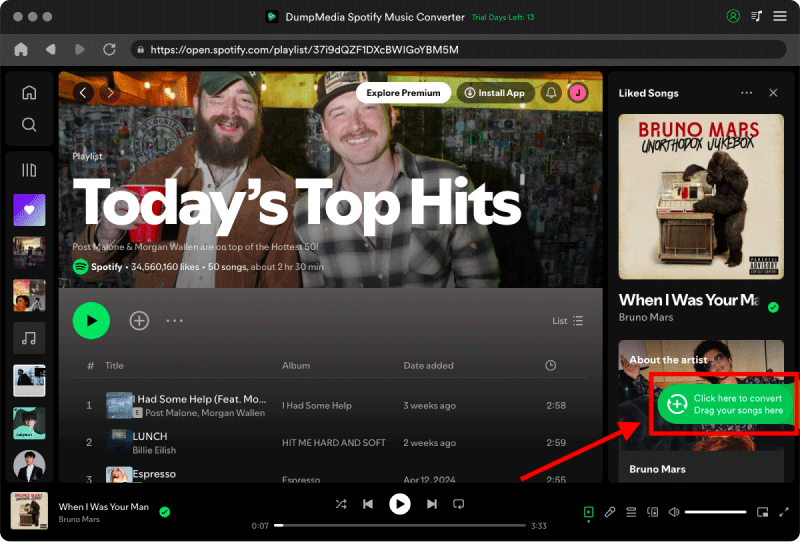
Stap 2. Zoek naar Spotify nummers, afspeellijsten of albums. Klik eenvoudig op "Toevoegen aan conversie" om ze aan de conversielijst toe te voegen.
Stap 3. Na DumpMedia Het programma analyseert nummers automatisch; het formaat is ingesteld op MP3 standaard ingeschakeld in de conversie-interface. Als u dit wilt wijzigen, klikt u op "MP3"Selecteer het dropdownmenu en kies er een. Je kunt ook de bitrate of de samplefrequentie wijzigen. Voor de beste balans kies je 320 kbps.
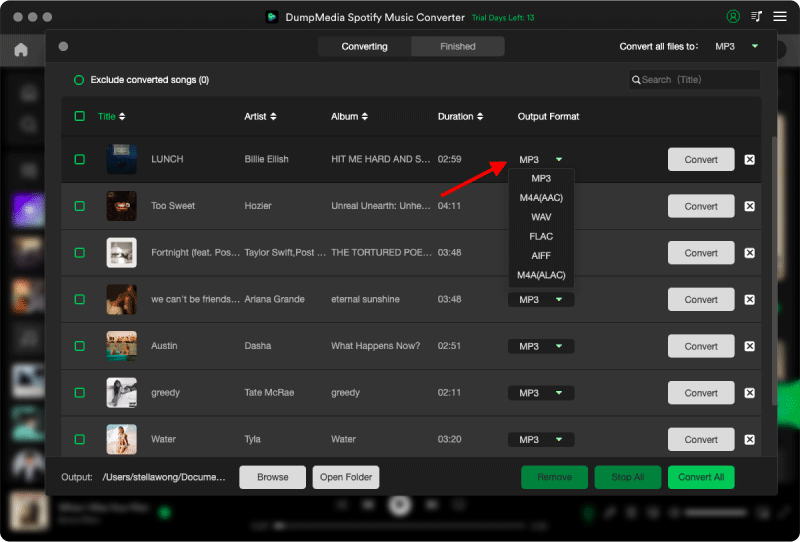
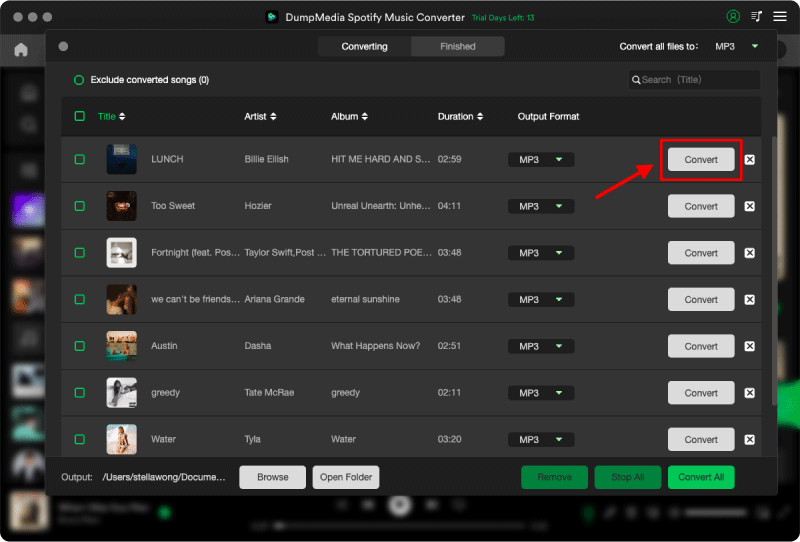
Stap 4. Zodra de instellingen zijn voltooid, kunnen gebruikers de conversie uitvoeren door op het pictogram 'Converteren' te klikken. DumpMedia zal downloaden Spotify liedjes om MP3 Binnen enkele seconden dankzij de supersnelle snelheid.
Deel 5: veelgestelde vragen
Waarom niet? Spotify Speel je het af op Sonos?
Veelvoorkomende oorzaken zijn netwerkproblemen, verouderde software of problemen met accountautorisatie.
Kan ik gebruiken Spotify Gratis op Sonos?
Ja, maar de functionaliteit kan variëren afhankelijk van uw regio en accounttype.
Biedt Sonos offline ondersteuning? Spotify afspelen?
Niet direct. Spotify Downloads blijven beschermd binnen de Spotify app-ecosysteem.
Hoe voeg ik lokale muziek toe aan Sonos?
Open de Sonos-app en voeg een muziekbibliotheek toe vanaf je computer, NAS of gedeelde map.
Kan Sonos afspelen MP3 bestanden?
Ja. Sonos ondersteunt dit. MP3 samen met diverse andere audioformaten.
Deel 6: Eindoordeel
Voor de meeste gebruikers is dit de gemakkelijkste manier om te spelen. Spotify Muziek afspelen op Sonos-luidsprekers verloopt via de officiële kanalen. Spotify integratie of Spotify Verbinden. De installatie is eenvoudig en de ervaring is naadloos binnen het Sonos-ecosysteem.
Als u echter meer flexibiliteit wilt, kan lokaal afspelen extra voordelen bieden, zoals offline toegang en een grotere afspeelstabiliteit. In die gevallen is converteren wellicht een optie. Spotify Het converteren van nummers naar Sonos-compatibele formaten en het toevoegen ervan aan een lokale muziekbibliotheek biedt een effectief alternatief.