


Muziek aanzetten MP3 Speler van Spotify in 2026
Hoe muziek aan te zetten MP3 speler van Spotify blijft een van de meest gestelde vragen onder Spotify gebruikers, voornamelijk omdat Spotify staat geen directe downloads naar welke locatie dan ook toe. MP3 apparaat vanwege DRMAls je probeert gedownloade bestanden over te zetten... Spotify sporen, de meeste MP3 De spelers zullen ze niet herkennen.
Om deze beperking te omzeilen, heb je een tool nodig die kan converteren. Spotify muziek omzetten naar een standaard audioformaat zoals MP3. DumpMedia Spotify Music Converter is een van de meest betrouwbare oplossingen voor deze taak. Als uw doel is om uw Spotify Met deze converter kunt u uw bibliotheek het snelst en eenvoudigst naar een draagbaar apparaat converteren om offline te luisteren.
Inhoudsopgave Deel 1. Waarom je het niet kunt plaatsen Spotify Nummers aan MP3 Speler?Deel 2. Hoe te zetten? Spotify Muziek aan MP3 Speler?Deel 3. FAQDeel 4. Om het allemaal samen te vatten
Deel 1. Waarom je het niet kunt plaatsen Spotify Nummers aan MP3 Speler?
Spotify staat gebruikers niet toe om nummers direct over te zetten naar een MP3 speler omdat alles Spotify De nummers worden beschermd door Digital Rights Management (DRM). Deze DRM-versleuteling voorkomt dat gebruikers de nummers kopiëren, exporteren of converteren. Spotifyaudiobestanden converteren naar standaardformaten zoals MP3Zelfs als je nummers downloadt met een Spotify Premium account, die bestanden blijven in een vergrendeld OGG-formaat dat alleen de Spotify app kan lezen. Daardoor traditionele MP3 Spelers, met name niet-smartphones, kunnen deze versleutelde bestanden niet herkennen of afspelen.
Kortom, het DRM-systeem zorgt ervoor dat Spotify Muziek kan alleen worden afgespeeld binnen Spotifyhet geautoriseerde ecosysteem van 's. Daarom is het gewoon slepen Spotify liedjes aan een MP3 De speler zal nooit werken.
Hoe muziek aan te zetten MP3 speler van SpotifyOm deze beperking te omzeilen, heb je een tool nodig die daartoe in staat is. het verwijderen van SpotifyDRM-beveiliging van en het converteren van nummers naar universele formaten. DumpMedia Spotify Music Converter vervult precies dit doel. Het zet om Spotify nummers, albums en afspeellijsten in DRM-vrije bestanden MP3, M4A-, WAV- of FLAC-bestanden, waardoor ze compatibel zijn met elk apparaat. MP3 en speler, waardoor je echt offline eigenaar bent van je muziek.
Deel 2. Hoe te zetten? Spotify Muziek aan MP3 Speler?
Hoe muziek aan te zetten MP3 speler van SpotifyVoordat je begint met plaatsen Spotify muziek op je MP3 speler, zorg ervoor dat je het volgende hebt DumpMedia Spotify Music Converter geïnstalleerd.
Gratis downloaden Gratis downloaden
DumpMedia Spotify Music Converter wint aan populariteit onder Spotify luisteraars vanwege de geweldige muziekdownloadservice. Het maakt niet uit of u een gebruiker bent van Spotify gratis of Spotify Premium, dan kun je downloaden en converteren Spotify nummers, afspeellijsten en albums naar MP3, AAC, ALAC, FLAC of andere formaten die gebruikmaken van DumpMediaSterker nog, de downloads blijven altijd beschikbaar, zelfs als je abonnement verloopt.
Stapsgewijze handleiding: Hoe plaats je het? Spotify Muziek aan MP3 speler
Stap 1. Open de software op je computer. Het werkt met beide. WinWindows en Mac. De interface is gebruiksvriendelijk, waardoor het gemakkelijk is voor beginners.
Stap 2. Ga naar Spotify Kies vervolgens het nummer, album of de afspeellijst die u wilt converteren. De software detecteert de nummers automatisch.

Stap 3. Selecteer een formaat dat compatibel is met uw MP3 speler. Veelvoorkomende keuzes zijn MP3, M4A, WAV of FLAC. Je kunt ook de uitvoerkwaliteit en de conversiesnelheid instellen.

Stap 4. Klik op de knop "Converteren" om het conversieproces te starten. DumpMedia Spotify Music Converter Verwijdert DRM en converteert alle geselecteerde nummers naar het door u gekozen formaat. De conversie behoudt een hoge audiokwaliteit.

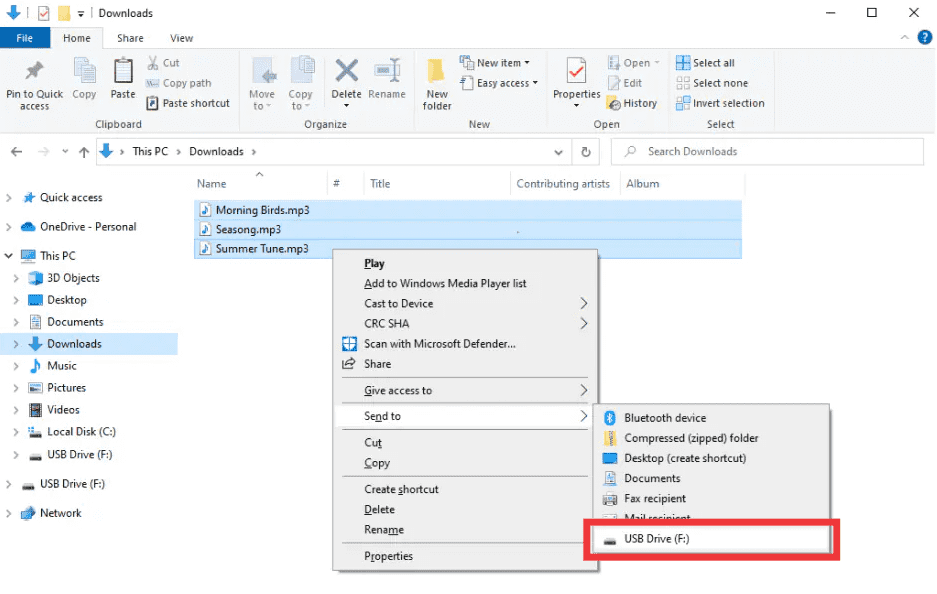
Stap 5. Hoe muziek aan te zetten MP3 speler van SpotifyNa de conversie kunt u de uitvoermap opzoeken. Verbind uw apparaat. MP3 Sluit de speler via USB aan op je computer en kopieer de geconverteerde bestanden. Spotify De muziek is nu klaar om offline afgespeeld te worden op elk apparaat. MP3 stuurt.
Deel 3. FAQ
1. Mag ik plaatsen Spotify nummers direct op MP3 spelers?
Nee. SpotifyDe nummers van zijn DRM-beveiligd en kunnen niet direct worden geëxporteerd. Je hebt een converter nodig zoals DumpMedia Spotify Music Converter om ze compatibel te maken.
2. Hoe converteer ik Spotify afspeellijsten naar MP3?
Gebruik DumpMedia Spotify Music Converter: kopieer afspeellijstlinks, selecteer MP3 als uitvoer, en converteer. Breng de bestanden vervolgens over naar uw MP3 speler.
3. Is het legaal om te converteren? Spotify muziek?
Het omzetten Spotify Het is over het algemeen toegestaan om muziek voor persoonlijk offline gebruik te downloaden. Vermijd het verspreiden van geconverteerde bestanden naar anderen, aangezien dit een schending van het auteursrecht kan zijn.
4. Welke formaten kan ik gebruiken voor MP3 spelers?
MP3 is de meest voorkomende. DumpMedia Spotify Music Converter Ondersteunt ook M4A, WAV en FLAC, die allemaal compatibel zijn met de meeste apparaten.
5. Kan ik overdragen Spotify Muziek streamen naar meerdere apparaten?
Ja. Eenmaal geconverteerd met DumpMedia, Uw Spotify De nummers zijn DRM-vrij en kunnen op elk apparaat worden afgespeeld. MP3 speler, telefoon of tablet.
Deel 4. Om het allemaal samen te vatten
Heb je je ooit afgevraagd hoe je muziek op een apparaat zet? MP3 speler van SpotifyDe oplossing is duidelijk: SpotifyDe DRM van voorkomt directe overdrachten, maar DumpMedia Spotify Music Converter Het verwijdert deze beperkingen. Het zet je favoriete nummers, albums of afspeellijsten om in MP3 of andere universele formaten, met behoud van hoge kwaliteit en waardoor offline afspelen op elk apparaat mogelijk is.
Probeer DumpMedia Spotify Music Converter vandaag en geniet ervan Spotify Muziek overal en altijd, zonder beperkingen, zonder DRM-problemen.