


Tidal vs Apple Music: ¿Cuál es mejor? Comparativa completa
Al elegir un servicio de música en streaming, muchos usuarios comparan Tidal y Apple Music para encontrar la mejor opción. Ambas plataformas ofrecen millones de canciones, streaming de alta calidad y funciones exclusivas. Sin embargo, difieren significativamente en calidad de audio, precio, compatibilidad y experiencia de usuario. En esta guía, analizaremos las principales diferencias entre Tidal y Apple Music y te ayudaremos a decidir cuál se adapta mejor a tus necesidades.
Guía de contenido Parte 1: Introducción a Tidal y Apple MusicParte 2: Tidal Music vs Apple Music: Comparación completaParte 3: ¿Cuál deberías elegir?Parte 4: ¿Qué pasa si quieres tener más control sobre tu música?Parte 5: La mejor manera de descargar Apple Music MP3Parte 6: preguntas frecuentesParte 7: Conclusión
Parte 1: Introducción a Tidal y Apple Music
¿Qué es la marea?
Tidal es conocida por su transmisión de audio de alta fidelidad y su plataforma centrada en los artistas. Ofrece calidad de audio HiFi y sin pérdidas, lo que la hace popular entre los audiófilos.
¿Qué es Apple Music?
Apple Music es el servicio de música en streaming de Apple, profundamente integrado con los dispositivos iOS y el ecosistema de Apple. Ofrece una amplia biblioteca musical y una experiencia de usuario fluida en todos los dispositivos Apple.
Parte 2: Tidal Music vs Apple Music: Comparación completa
Al comparar Tidal con Apple Music, es importante ir más allá de las funciones básicas y comprender cómo se comporta cada plataforma en el uso real.
Calidad de audio
Una de las mayores diferencias entre Tidal y Apple Music es la calidad del audio.
- Tidal ofrece formatos de audio HiFi, FLAC y de alta resolución, lo que la convierte en una opción ideal para los audiófilos.
- Apple Music ofrece audio sin pérdidas y audio espacial con compatibilidad con Dolby Atmos.
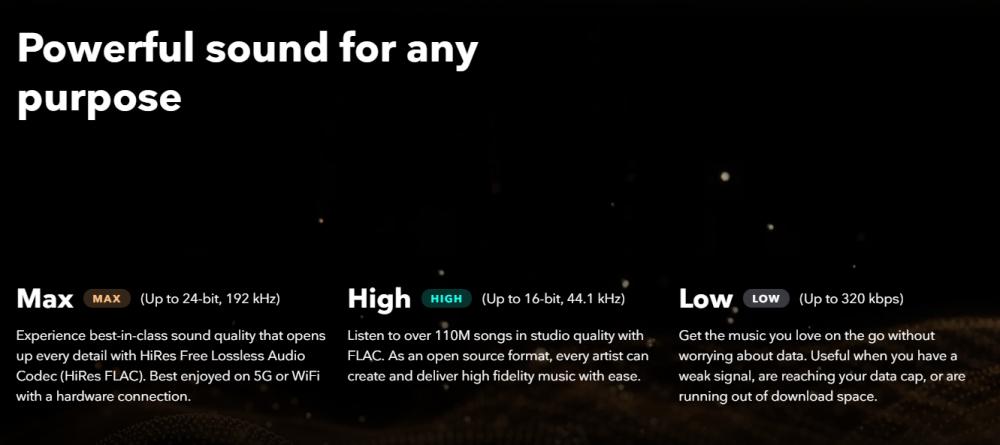
Veredicto: En el debate entre Tidal y Apple Music, ambas plataformas ofrecen un sonido excelente, pero Tidal se impone ligeramente en fidelidad de audio pura, especialmente para usuarios con equipos de alta gama.
Biblioteca de música
Otro factor clave en la comparación entre Tidal y Apple Music es el tamaño del catálogo musical.
- Ambas plataformas ofrecen más de 100 millones de canciones.
- Apple Music suele tener una mejor integración con el contenido generalista y regional.
- Tidal se centra más en contenido seleccionado y en exclusivas de artistas.
Veredicto: En cuanto al tamaño de la biblioteca, Tidal y Apple Music son casi iguales, pero Apple Music tiene una ligera ventaja en cuanto a accesibilidad.
Precios
El precio juega un papel fundamental a la hora de elegir entre Tidal y Apple Music.
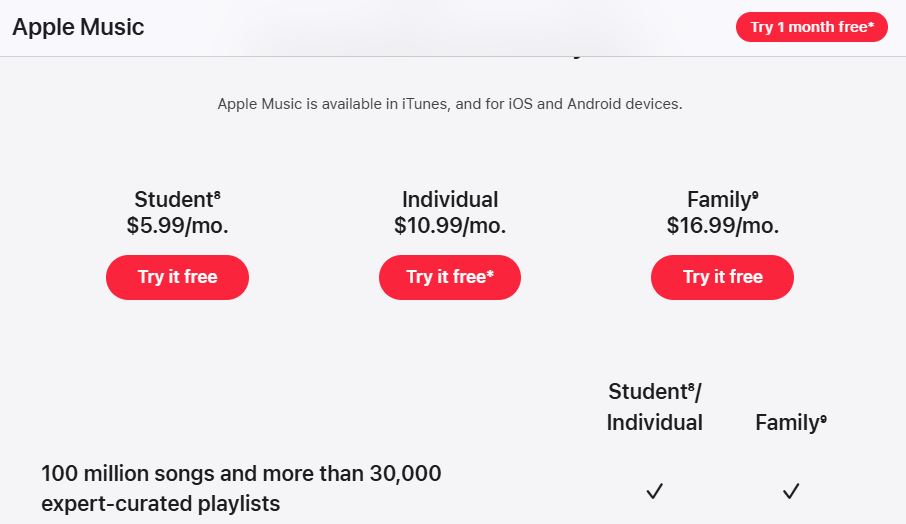
Apple Music ofrece un plan de suscripción más sencillo. El plan individual estándar tiene un precio de 10.99 $ al mes. Para quienes tienen un presupuesto ajustado, el plan para estudiantes sigue siendo una opción muy conveniente por 5.99 $ al mes, que suele incluir Apple TV+ como beneficio adicional. Las familias pueden optar por el plan familiar por 16.99 $ al mes, que admite hasta seis cuentas individuales con una sola suscripción. Muchos usuarios también eligen combinar su música con Apple One, que comienza en 19.95 $ al mes y combina música con almacenamiento en iCloud y otros servicios.
Tidal ha consolidado sus planes de audio de alta resolución, antes costosos, en una única oferta de gran valor que compite directamente con Apple Music y Amazon Music. El plan individual tiene un precio de 10.99 $ al mes. Para hogares, el plan familiar cuesta 16.99 $ al mes y cubre hasta seis miembros, mientras que el plan para estudiantes mantiene un precio significativamente reducido de 5.49 $ al mes. Una característica distintiva de los precios actuales de Tidal es el complemento DJ Extension, que tiene un coste adicional de 9.00 $ al mes.
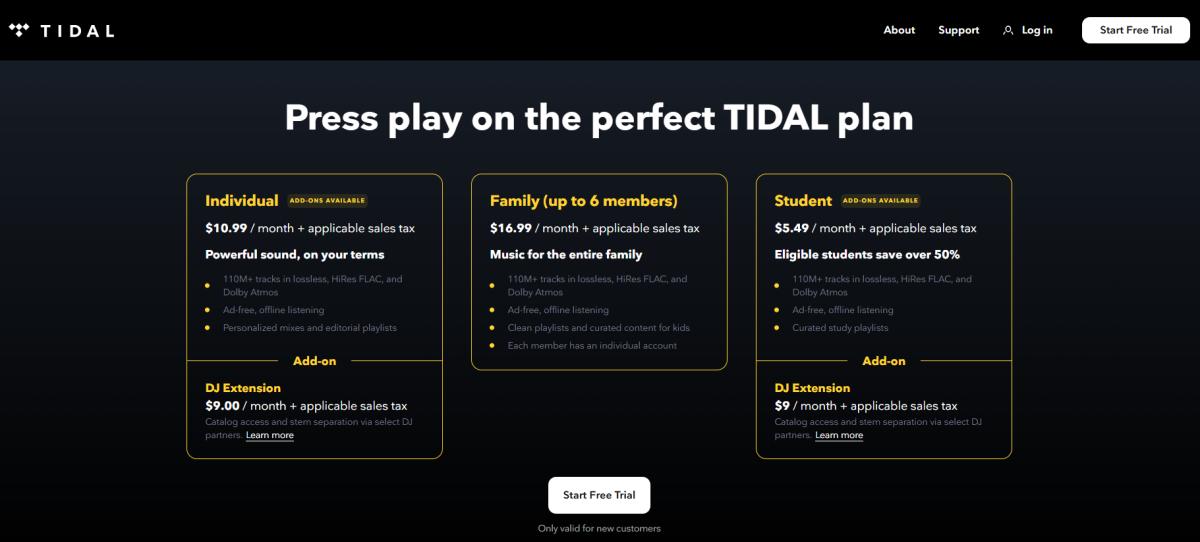
Nota: Tidal ya no ofrece una opción gratuita con publicidad ni descuentos específicos para militares o personal de primera respuesta, ya que estos se eliminaron gradualmente para simplificar el modelo de suscripción.
Veredicto: Para la mayoría de los usuarios, la elección entre Tidal y Apple Music se reduce a simplicidad frente a flexibilidad, siendo Apple Music más fácil de gestionar.
Compatibilidad de dispositivo
La compatibilidad con dispositivos es otro aspecto importante en la comparación entre Tidal y Apple Music. Apple Music funciona a la perfección en iPhone, iPad, Mac y Apple Watch. Tidal, en cambio, es compatible con una gama más amplia de dispositivos de terceros.
Veredicto: En esta comparativa, Apple Music es ideal para los usuarios de Apple, mientras que Tidal es mejor para su uso en múltiples plataformas.
Experiencia de usuario
En lo que respecta a la usabilidad, Tidal y Apple Music muestran claras diferencias.
Apple Music se centra en una estética limpia, al estilo de una revista, que prioriza el contenido editorial seleccionado por expertos. El diseño es coherente con el ecosistema general de Apple: minimalista, con tipografía grande y portadas de álbumes vibrantes. Apple lidera la interacción visual con su función "Apple Music Sing", que ofrece letras personalizables en tiempo real para karaoke y vídeos musicales de alta calidad integrados directamente en las páginas de los artistas.
Tidal se centra más en el descubrimiento de contenido y la interacción con los artistas. Para quienes utilizan hardware externo, ofrece una sección de "Créditos" mucho más completa que la de Apple, donde se detallan todos los productores, ingenieros y músicos de sesión que participaron en cada tema. Tidal ofrece documentales exclusivos, retransmisiones de conciertos en directo y listas de reproducción diarias que tienden a inclinarse ligeramente más hacia géneros como el indie, el hip-hop y el R&B, en comparación con el enfoque más generalista de Apple en la música pop.
Veredicto: Para los usuarios cotidianos, Tidal frente a Apple Music suele favorecer a Apple Music debido a su experiencia más fluida.
Parte 3: ¿Cuál deberías elegir?
Tras analizar todos los aspectos de Tidal frente a Apple Music, la decisión final dependerá de tus prioridades.
Elija Tidal si:
- Priorizas el audio de alta resolución
- Usted utiliza equipos de audio de alta gama.
- Prefieres contenido centrado en el artista.
Elige Apple Music si:
- Estás en el ecosistema de Apple.
- Quieres una experiencia sencilla y sin problemas.
- Prefieres una mejor integración entre dispositivos.
Parte 4: ¿Qué pasa si quieres tener más control sobre tu música?
Tras comparar Tidal con Apple Music, algunos usuarios optan por Apple Music, pero pronto se dan cuenta de sus limitaciones.
Problema: Control limitado sobre la música
Los usuarios de Apple Music se enfrentan a estos problemas:
- No se pueden convertir las canciones a MP3
- No se puede transferir música libremente
- No se pueden guardar las canciones permanentemente fuera de la aplicación.
Para eliminar estas limitaciones, puede utilizar una herramienta profesional como DumpMedia Convertidor de música de Apple.
Parte 5: La mejor manera de descargar Apple Music MP3
A diferencia de los métodos básicos, DumpMedia Apple Music Converter Está diseñado específicamente para usuarios de Apple Music que desean tener control total sobre su biblioteca. Permite a los usuarios: convertir su biblioteca de Apple Music en varios formatos de audio como MP3, AAC, WAV y FLAC para reproducción sin conexión en cualquier dispositivo. Incluso si la app Apple Music no funciona en tu dispositivo, puedes reproducirlos inmediatamente en otro reproductor de música.
¿Lo que hace DumpMedia ¿La mejor decision?
- Convierte Apple Music sin pérdida de calidad
- Eliminar completamente la protección DRM*
- Convertir listas de reproducción y álbumes por lotes
- Mantener etiquetas ID3 y metadatos
- Conversión rápida y estable
Descarga gratuita Descarga gratuita
Cómo descargar canciones de Apple Music como MP3 (Paso a paso)
Para saber cómo disfrutar de Apple Music para siempre >>>

Parte 6: preguntas frecuentes
¿Es Tidal mejor que Apple Music?
Depende de tus necesidades; Tidal destaca por su calidad de audio, mientras que Apple Music ofrece una mejor facilidad de uso.
¿Puedo descargar Apple Music como MP3?
No directamente. Apple Music utiliza protección DRM, por lo que necesitas una herramienta como DumpMedia Convertidor de música de Apple.
¿Qué es más barato, Tidal o Apple Music?
En general, Apple Music tiene precios más sencillos y asequibles.
¿Está disponible el audio sin pérdidas en ambas plataformas?
Sí, tanto Tidal como Apple Music son compatibles con formatos de audio sin pérdida.
Parte 7: Conclusión
Al comparar Tidal vs Apple Music, ambas plataformas ofrecen excelentes características y grandes bibliotecas de música. Sin embargo, si eliges Apple Music y quieres más flexibilidad, como descargar canciones como MP3 o si desea conservarlos permanentemente, necesitará una solución adicional. En ese caso, DumpMedia Apple Music Converter ofrece una forma práctica de desbloquear tu música y disfrutarla sin limitaciones.
Descarga gratuita Descarga gratuita
*DumpMedia Funciona descifrando y descargando canciones de Apple Music en archivos sin DRM, lo que te permite obtener una copia limpia y sin restricciones de tu biblioteca para cualquier dispositivo. Su funcionalidad no incluye la conversión de archivos de audio locales.