


Coste de Pandora Plus en 2026: ¿Merece la pena pagar por él?
Muchos usuarios que buscan información sobre el precio de Pandora Plus intentan decidir si vale la pena pagar la suscripción en comparación con Pandora Free o Pandora Premium. En esta guía, explicaremos todo sobre el precio, las funciones, las limitaciones y las opciones de reproducción sin conexión de Pandora Plus.
Índice Parte 1. ¿Cuánto cuesta el plan Pandora Plus? Parte 2. ¿Qué incluye Pandora Plus? Parte 3. ¿Merece la pena Pandora Plus? Parte 4. La mejor manera de conservar tu música de Pandora para siempre Parte 5. Preguntas frecuentes Parte 6. Conclusiones
Parte 1. ¿Cuánto cuesta el plan Pandora Plus?
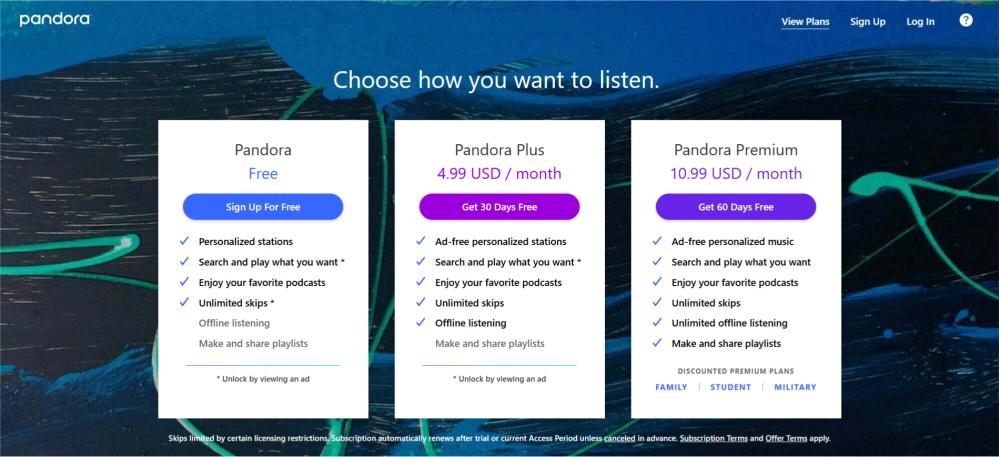
Si estás investigando el costo de Pandora Plus, el precio estándar suele rondar los siguientes valores:
- Pandora Plus Mensual: Alrededor de $4.99/mes
- Pandora Plus Anual: Puede variar según las promociones.
- Prueba gratuita: Generalmente disponible para nuevos usuarios.
Los precios pueden variar ligeramente según la región, la plataforma de facturación o los descuentos promocionales.
En comparación con Pandora Premium, Pandora Plus se considera una opción de suscripción de menor coste para los usuarios que principalmente desean escuchar la radio sin anuncios.
Parte 2. ¿Qué incluye Pandora Plus?
Entender qué es lo que realmente obtienes ayuda a los usuarios a evaluar el costo de Pandora Plus con mayor precisión. Pandora Plus generalmente incluye:
- estaciones personalizadas sin publicidad
- saltos ilimitados
- soporte de reproducción
- mayor calidad de audio
- Escucha de emisoras sin conexión
Para los oyentes ocasionales, estas funciones ya pueden ofrecer una experiencia mucho mejor que la de Pandora Free.
Pandora Plus frente a Pandora Premium
Una de las preguntas más importantes relacionadas con el precio de Pandora Plus es si los usuarios deberían actualizarse a Premium en su lugar.
Pandora Plus
- suscripción mensual más económica
- estaciones de radio personalizadas
- Funcionalidad sin conexión limitada
- menos controles de lista de reproducción
Pandora Premium
- reproducción completa bajo demanda
- creación de lista de reproducción
- Descargas completas sin conexión
- mayor control por parte del usuario
Los usuarios que solo desean una mejor experiencia al escuchar la radio pueden preferir Pandora Plus, mientras que los grandes oyentes de música suelen optar por Premium.
Parte 3. ¿Merece la pena Pandora Plus?
Si vale la pena pagar por Pandora Plus depende de tus hábitos de escucha. Pandora Plus podría valer la pena si:
- escuchar emisoras de radio con regularidad
- Quiero menos anuncios
- Necesita reproducción sin conexión básica
- prefiero costos mensuales más bajos
Sin embargo, muchos usuarios que investigan el coste de Pandora Plus acaban dándose cuenta de que las descargas basadas en suscripción siguen teniendo restricciones.
Parte 4. La mejor manera de conservar tu música de Pandora de forma permanente.
Aunque Pandora Plus permite escuchar sin conexión, las canciones descargadas siguen dependiendo de la suscripción. La música descargada puede dejar de funcionar tras la cancelación, y las emisoras sin conexión no se pueden transferir libremente. Esto significa que los usuarios nunca son dueños absolutos de la música descargada. Por ello, algunos usuarios que buscan información sobre el precio de Pandora Plus empiezan a buscar alternativas permanentes para escuchar sin conexión.
Si quieres conservar las canciones de Pandora una vez que finalice tu suscripción, convertir la música en archivos de audio locales suele ser la solución más sencilla. DumpMedia Convertidor de música Pandora ayuda a los usuarios convertir canciones de Pandora a MP3, FLAC, M4A y WAV. Puedes guardar listas de reproducción de forma permanente y Escucha Pandora sin conexión y sin restricciones de suscripción.Por eso, algunos usuarios que comparan el precio de Pandora Plus acaban prefiriendo soluciones de reproducción sin conexión permanentes.
Descarga gratuita Descarga gratuita
🏅¿Por qué elegir? DumpMedia Convertidor de música Pandora:
- ⭐Integración con el reproductor web Pandora
- ⭐Funciona tanto para usuarios de Pandora Premium como para usuarios gratuitos.
- ⭐Proporcione conversión por lotes a una velocidad de hasta 35x
- ⭐Conserva etiquetas ID3 como artista, portada, arte, etc.
- ⭐Conserva la calidad del audio original
- ⭐100% Limpio. No hay riesgo en su uso.
Convertir música de Pandora a MP3 Paso a Paso
Paso 1: Descarga e instala DumpMedia Instala Pandora Music Converter en tu Mac/PC. Ejecútalo y verás la interfaz. Inicia sesión con tu cuenta Pandora Premium/Gratuita.
Descarga gratuita Descarga gratuita
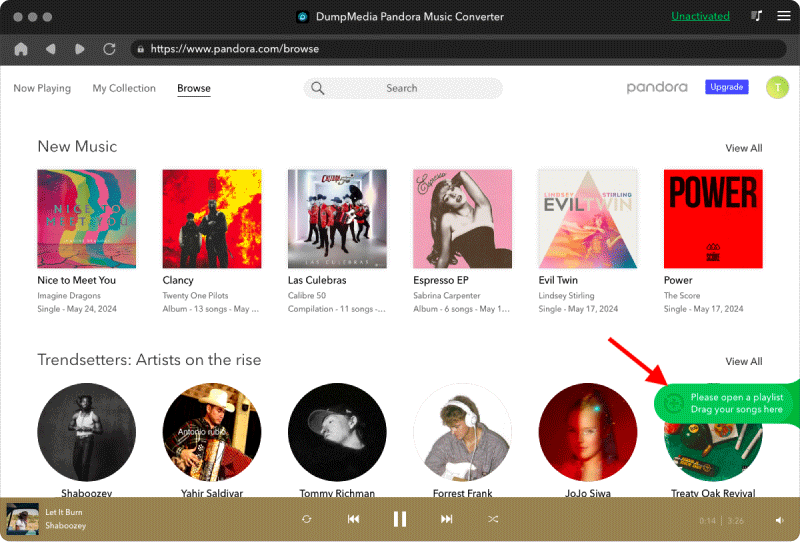
Paso 2. A continuación, arrastre directamente las canciones o las listas de reproducción al icono flotante "+" para agregarlas a la cola de conversión y prepararlas para la descarga.
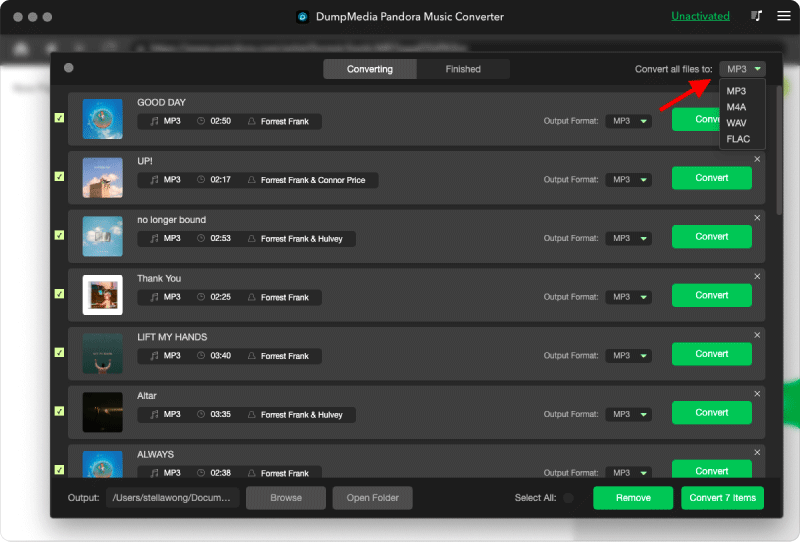
Paso 3. Una vez que esté satisfecho con las canciones que ha seleccionado, puede elegir el formato de archivo de audio que prefiera.
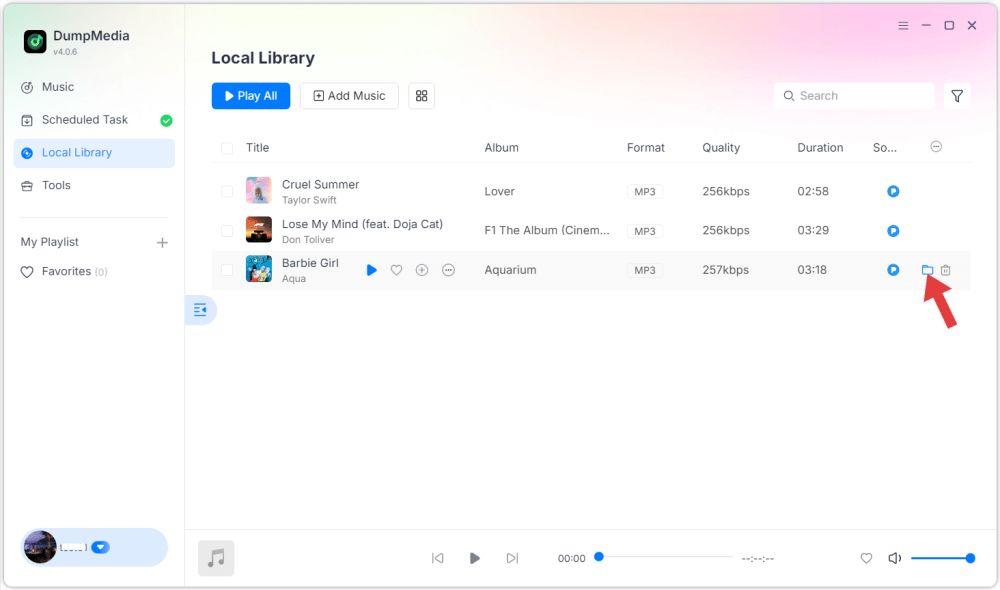
Paso 4: Una vez completada la configuración, los usuarios pueden procesar la conversión haciendo clic en el icono "Convertir". DumpMedia convertirá canciones de Pandora a MP3 En cuestión de segundos gracias a su velocidad ultrarrápida.
Parte 5. Preguntas frecuentes
¿Cuánto cuesta Pandora Plus al mes?
Pandora Plus suele costar alrededor de 4.99 dólares al mes.
¿Pandora Plus incluye la opción de escuchar sin conexión?
Sí, Pandora Plus permite escuchar emisoras sin conexión de forma limitada.
¿Qué sucede después de cancelar Pandora Plus?
Es posible que el contenido descargado para verlo sin conexión deje de estar disponible una vez que finalice la suscripción.
¿Se pueden conservar permanentemente las descargas de Pandora Plus?
Las descargas estándar de Pandora siguen dependiendo de la suscripción, pero los archivos de audio locales convertidos pueden reproducirse de forma permanente.
Parte 6. Pensamientos finales
Es importante comprender el costo de Pandora Plus antes de elegir un plan de suscripción de streaming. Pandora Plus ofrece escucha asequible sin anuncios y funciones sin conexión, pero las canciones descargadas aún dependen de una suscripción activa. Los usuarios que desean acceso permanente sin conexión a menudo prefieren convertir la música de Pandora a formato local. MP3 archivos para una mayor libertad de reproducción y almacenamiento de música a largo plazo.