


Cómo extraer música de Deezer: Métodos sencillos para escucharla sin conexión
Deezer es una de las plataformas de música en streaming más populares, con millones de canciones de diversos géneros. Sin embargo, muchos usuarios desean descargar música de Deezer para disfrutarla sin conexión, guardar copias de seguridad o reproducirla en dispositivos que no son compatibles con Deezer. En esta guía, explicaremos qué significa descargar música de Deezer, analizaremos las opciones disponibles y mostraremos una forma práctica de guardar tu música de Deezer para escucharla sin conexión.
Índice Parte 1. ¿Por qué los usuarios quieren ripear música de Deezer? Parte 2. Métodos oficiales para ripear música de Deezer Parte 3. Una mejor manera de ripear música de Deezer Parte 4. Preguntas frecuentes Parte 5. Resumen
Parte 1. ¿Por qué los usuarios quieren extraer música de Deezer?
La expresión "extraer música de Deezer" generalmente se refiere a guardar canciones de Deezer en un dispositivo local para escucharlas sin conexión. Si bien Deezer ofrece la opción de escuchar música sin conexión a través de sus planes premium, muchos usuarios desean mayor flexibilidad para gestionar sus colecciones musicales.
Existen varias razones por las que la gente busca maneras de extraer música de Deezer.
- Escucha sin conexión: La conexión a Internet no siempre está disponible. Descargar música localmente permite la reproducción ininterrumpida durante los viajes o los desplazamientos.
- Compatibilidad con dispositivos: No todos los dispositivos son compatibles con la aplicación Deezer. Los archivos de música locales suelen poder reproducirse en una gama más amplia de dispositivos.
- Gestión de la colección de música: Muchos oyentes prefieren organizar sus bibliotecas musicales manualmente en lugar de depender completamente de los servicios de streaming.
- Acceso a largo plazo: Es posible que los usuarios deseen seguir teniendo acceso a sus canciones favoritas independientemente de los cambios en la suscripción o de los problemas con la cuenta.
Parte 2. Métodos oficiales para extraer música de Deezer
Los suscriptores de Deezer Premium pueden descargar canciones, álbumes y listas de reproducción para escucharlos sin conexión dentro de la aplicación Deezer.
Para usar el modo sin conexión oficial de Deezer:
Paso 1. Suscríbete a Deezer Premium. Abre la aplicación Deezer.
Paso 2. Busca la lista de reproducción, el álbum o la canción que quieras. Habilita la opción de descarga.
Paso 3. Acceda al contenido descargado a través de la aplicación cuando no tenga conexión a internet.
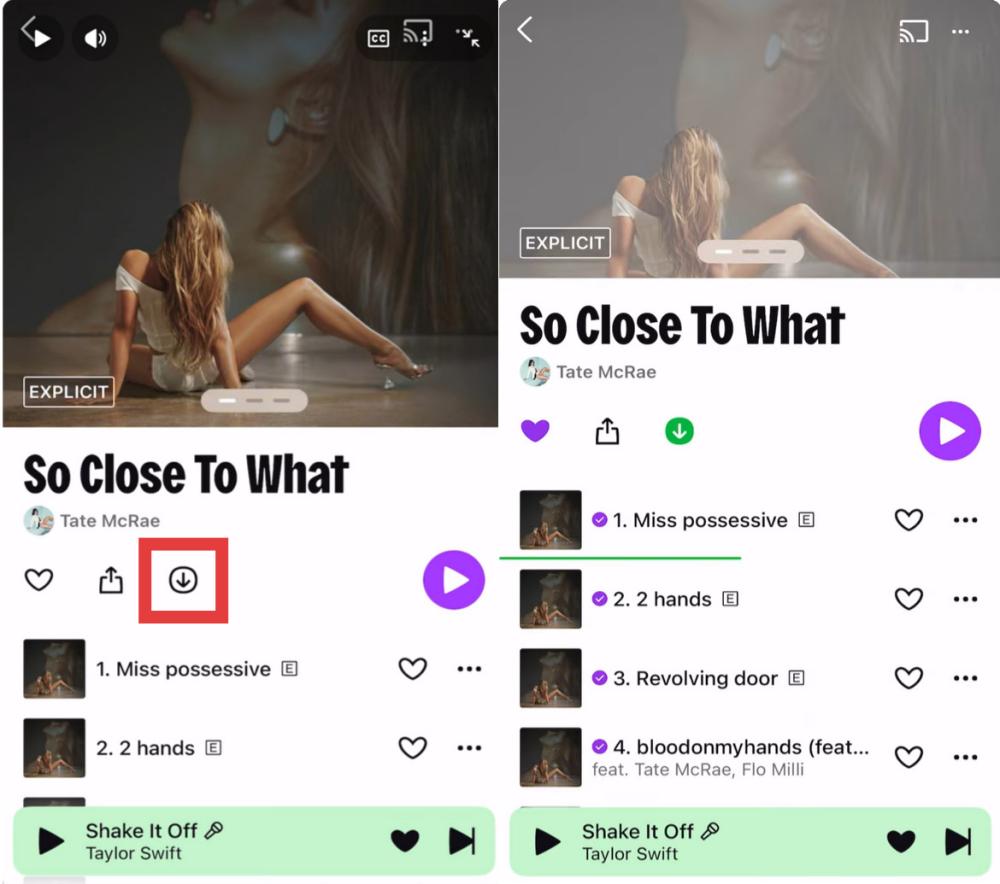
Este método funciona bien para los usuarios que solo necesitan reproducir contenido sin conexión dentro del ecosistema de Deezer.
Limitaciones de las descargas sin conexión oficiales de Deezer
Si bien la función de descarga integrada de Deezer es práctica, tiene varias limitaciones.
- Se requiere suscripción: Las descargas sin conexión generalmente solo están disponibles para suscriptores de pago.
- Restricciones de reproducción: El contenido descargado permanece vinculado a la aplicación Deezer.
- Sin archivos de música locales permanentes: Los usuarios no pueden gestionar libremente las pistas descargadas como archivos de audio estándar.
- Dependencia del dispositivo: Es posible que la música sin conexión no se transfiera fácilmente entre dispositivos.
Estas limitaciones son a menudo la razón por la que los usuarios empiezan a buscar formas de extraer música de Deezer más allá de las opciones oficiales de la plataforma.
Parte 3. Una mejor manera de extraer música de Deezer
Si tu objetivo va más allá de la simple reproducción sin conexión dentro de la aplicación Deezer, una solución específica para descargar música de Deezer puede ofrecerte mayor flexibilidad. Para los usuarios que buscan específicamente cómo extraer música de Deezer, este método suele ser una solución más práctica a largo plazo.
DumpMedia DeezPlus está diseñado para ayudar a los usuarios a descargar música de Deezer y guardar pistas localmente para escucharlas sin conexión. Con DumpMedia, Usted puede fácilmente convertir canciones de Deezer en MP3, WAV, FLAC y otros formatos que se pueden reproducir en MP3 reproductores, teléfonos, estéreos de automóviles u otros dispositivos. Incluso si la aplicación Deezer no funciona en su dispositivo, puede Escucha Deezer sin conexión en otro reproductor de música inmediatamente.
Descarga gratuita Descarga gratuita
🏆¿Por qué elegir? DumpMedia DeezPlus
- Reproductor Deezer integrado - para iniciar sesión directamente en tu biblioteca de Deezer y elegir todas las canciones que te gusten.
- Se conserva la calidad de sonido original. - Mantén un estado de mejor calidad para conservar los efectos de música originales de Deezer.
- Conservar las etiquetas ID3 y la información de metadatos. - Extraer archivos de música con etiquetas ID3 originales, así como información de metadatos.
- Velocidad de descarga de listas de reproducción por lotes - Garantiza una velocidad de descarga de listas de reproducción ultrarrápida, lo que puede acelerar y facilitar una mayor eficiencia en la descarga de música.
- Personalizar la configuración de salida - Para elegir la tasa de bits y la frecuencia de muestreo que prefiera según sus necesidades.
Para cualquiera que busque extraer música de Deezer, DumpMedia Proporciona una forma eficiente de crear y gestionar una biblioteca musical personal.
Cómo extraer música de Deezer usando DumpMedia
El proceso es sencillo y apto tanto para principiantes como para usuarios experimentados.
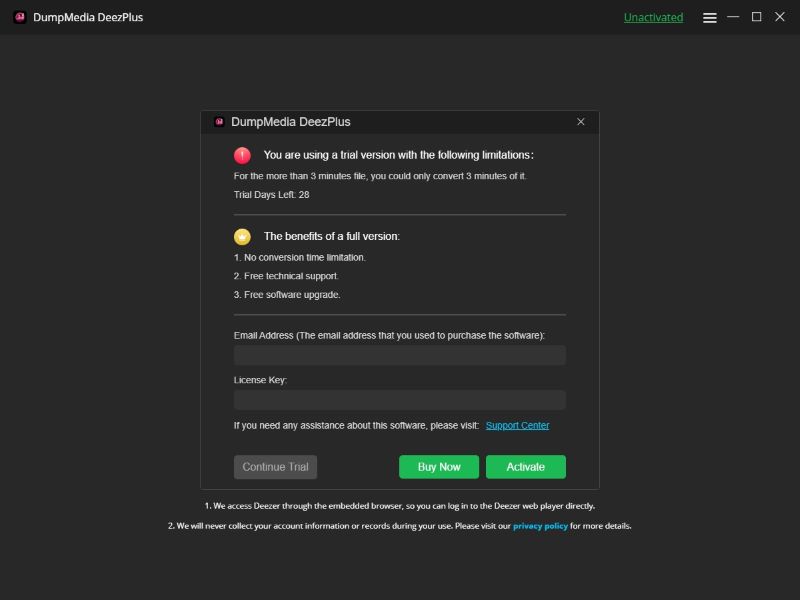
Paso 1: Descarga e instala DumpMedia DeezPlus en tu Mac/PC. Ábrelo y verás la interfaz. Usa tu cuenta Deezer Premium/Gratuita para iniciar sesión.
Descarga gratuita Descarga gratuita
Paso 2. Busca canciones, listas de reproducción o álbumes de Deezer. Simplemente haz clic en "Añadir a la lista de conversión" para agregarlos.
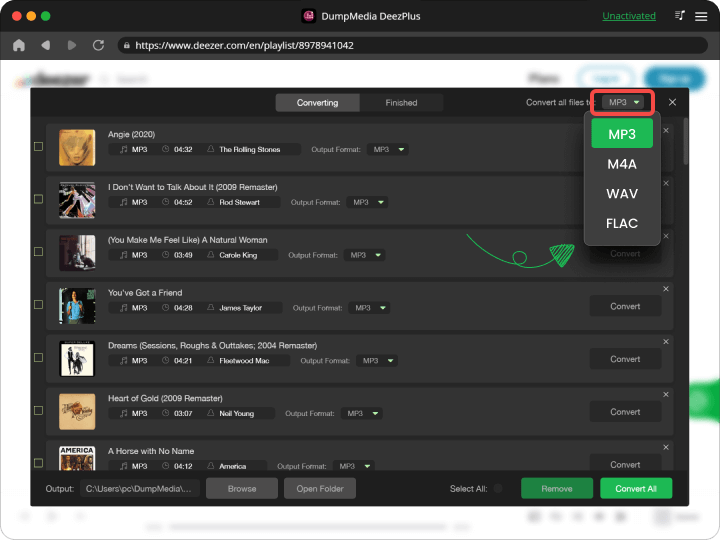
Paso 3: Después DumpMedia analiza automáticamente las canciones, el formato está configurado en MP3 por defecto en la interfaz de conversión. Si desea cambiarlo, haga clic en "MP3Seleccione una opción del menú desplegable. También puede cambiar la tasa de bits o la frecuencia de muestreo. Para obtener el mejor equilibrio, elija 320 kbps.
Paso 4: Una vez completada la configuración, los usuarios pueden procesar la conversión haciendo clic en el icono "Convertir". DumpMedia descargaré canciones de Deezer para MP3 En cuestión de segundos gracias a su velocidad ultrarrápida.
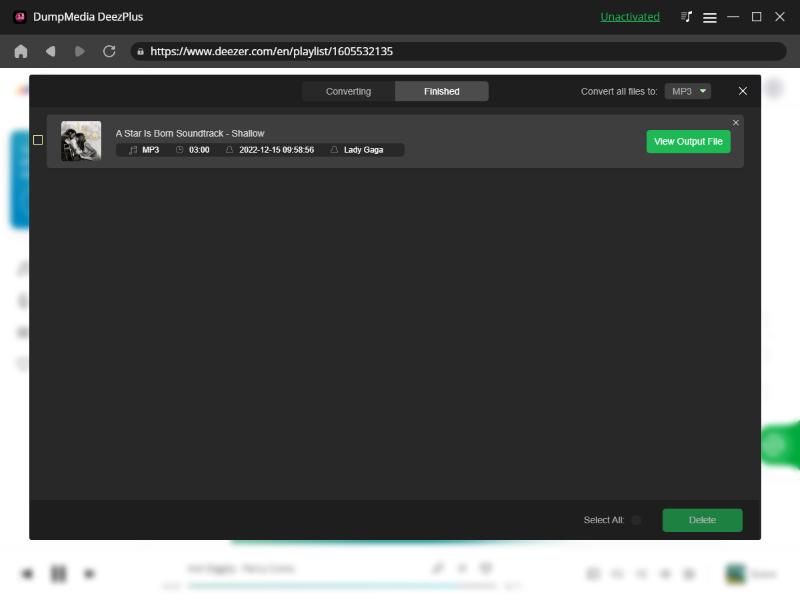
Una vez completada la descarga, podrás acceder a la música directamente desde tu ordenador. Para muchos usuarios, esta es una de las formas más prácticas de descargar música de Deezer y tener fácil acceso a sus canciones favoritas.
Parte 4. Preguntas frecuentes
¿Puedo descargar música de Deezer para escucharla sin conexión?
Sí. Muchos usuarios descargan música de Deezer para poder escucharla sin conexión a internet.
¿Deezer permite descargar música?
Sí. Los suscriptores de Deezer Premium pueden descargar música dentro de la aplicación Deezer para reproducirla sin conexión.
¿Por qué los usuarios quieren descargar música de Deezer?
Entre las razones más comunes se incluyen el acceso sin conexión, una gestión musical más sencilla y una mayor flexibilidad entre dispositivos.
¿Se pueden reproducir las canciones descargadas de Deezer sin la aplicación de Deezer?
Las descargas oficiales de Deezer que se realizan sin conexión suelen permanecer conectadas al ecosistema de Deezer.
Parte 5. Resumen
Si bien el modo sin conexión oficial de Deezer ofrece funcionalidad básica de descarga, viene con ciertas restricciones relacionadas con las suscripciones, la reproducción y la administración de archivos. Si buscas una solución más flexible para extraer música de Deezer, DumpMedia DeezPlus te permite descargar fácilmente canciones, álbumes y listas de reproducción de Deezer para escucharlos sin conexión. Ya sea que quieras organizar tu biblioteca musical, acceder a tus canciones favoritas sin conexión a internet o disfrutarlas en varios dispositivos, DeezPlus te ofrece una forma práctica de gestionar tu música de Deezer más allá del streaming tradicional.