


¿Tu canción de Apple Music no está disponible en tu región? Soluciónalo en 5 sencillos pasos.
Ver el error "Canción de Apple Music no disponible en tu región" puede ser frustrante, sobre todo cuando intentas reproducir tu canción favorita. Este problema suele deberse a restricciones de licencia, configuración de la cuenta o limitaciones regionales. La buena noticia es que existen varias maneras de solucionar este problema. En esta guía, te explicaremos por qué ocurre y te mostraremos soluciones prácticas que realmente funcionan.
Índice Parte 1: ¿Por qué Apple Music dice "No disponible en tu región"? Parte 2: Cómo solucionar el problema "Canción de Apple Music no disponible en tu región" Parte 3: ¿Qué hacer si la canción sigue sin estar disponible? Parte 4: La mejor manera de acceder a las canciones de Apple Music sin restricciones regionales Parte 5: Preguntas frecuentes Parte 6: Resumen
Parte 1: ¿Por qué Apple Music dice "No disponible en tu región"?
Si te encuentras con el error de que la canción de Apple Music no está disponible en tu región, normalmente se debe a una de las siguientes razones:
1. Restricciones de licencia
La disponibilidad de música varía según el país debido a los acuerdos de derechos de autor. Una canción disponible en una región puede estar bloqueada en otra.
2. Configuración regional del ID de Apple
Tu ID de Apple determina a qué contenido puedes acceder. Si la región de tu cuenta no coincide con tu ubicación real, es posible que veas el mensaje de que la canción de Apple Music no está disponible en tu región.
3. Problemas de suscripción o sincronización
Las suscripciones caducadas o los problemas de sincronización también pueden provocar este error.
4. Contenido eliminado por artistas o sellos discográficos
En ocasiones, se eliminan o reemplazan canciones, lo que puede provocar que la canción de Apple Music no esté disponible en la región.
Parte 2: Cómo solucionar el problema de “Canción de Apple Music no disponible en tu región”
Aquí te mostramos formas comprobadas de solucionar el problema de que una canción de Apple Music no esté disponible en tu región:
Solución 1: Cambiar la región del ID de Apple
Actualizar la región de tu ID de Apple suele solucionar estas restricciones geográficas.
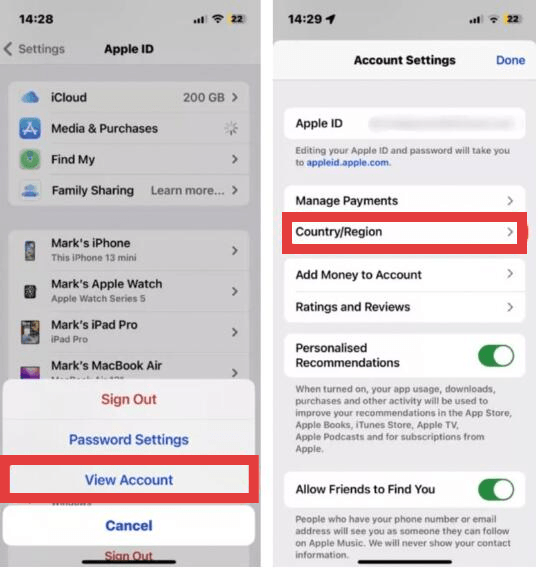
- En iPhone/iPad: Abre la aplicación Ajustes, toca tu Nombre en la parte superior y selecciona Contenido multimedia y compras. Toca Ver cuenta (es posible que tengas que autenticarte con ID de la cara o tu contraseña). En Mac: Abre la aplicación Apple Music, elige Cuenta en la barra de menús y selecciona Configuración de la cuenta.
- Seleccione el país o la región y, a continuación, pulse Cambiar país o región.
- Selecciona tu nueva ubicación de la lista. Revisa los Términos y Condiciones, pulsa Aceptar e introduce un método de pago válido y una dirección de facturación para esa región específica.
Solución 2: usa una VPN
¿Cómo solucionar el problema de que una canción de Apple Music no esté disponible en tu región? Cuando las licencias regionales te impiden reproducir ciertas canciones, una red privada virtual (VPN) puede ser una herramienta muy útil para sortear estas barreras geográficas. Al redirigir tu conexión a internet a través de un servidor ubicado en otro país, una VPN oculta tu dirección IP real y hace que parezca que accedes a Apple Music desde una región donde el contenido está disponible legalmente.
Si bien es efectivo, este método no es una solución perfecta. Es posible que experimentes velocidades de transmisión más lentas, mayor latencia o interrupciones frecuentes durante la reproducción, lo que puede afectar negativamente la experiencia auditiva. Además, Apple Music está estrechamente vinculado a la región de tu ID de Apple, no solo a tu dirección IP. Esto significa que una VPN por sí sola no siempre funcionará a menos que la configuración de tu cuenta también coincida con la ubicación simulada.
Solución 3: Buscar versiones alternativas
A veces, la misma canción existe en otra versión o álbum.
Solución 4: Sincroniza de nuevo tu biblioteca
Si tu biblioteca de Apple Music tiene canciones faltantes o aparecen atenuadas, resincronizar tu cuenta puede restablecer la conexión con los servidores de Apple y solucionar las discrepancias. Este proceso obliga a la aplicación a reconstruir su índice y verificar nuevamente el estado de tu suscripción.
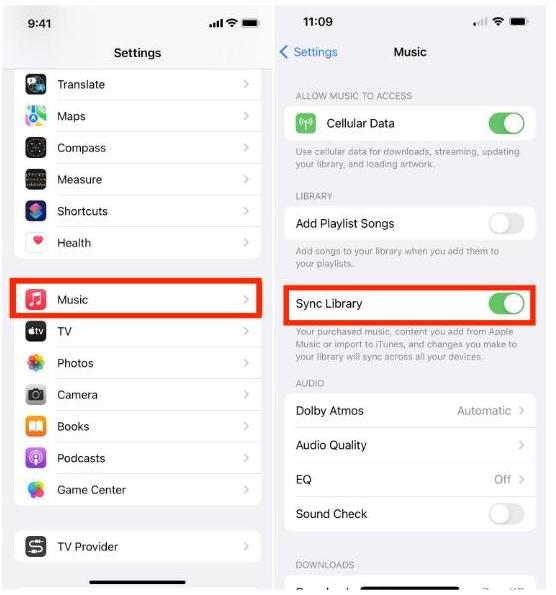
- En movil: Vaya al Configuración > Music y garantizar Biblioteca de sincronización está alternado ON. Si ya estaba encendido, intente apagarlo, esperar unos segundos y volver a encenderlo para iniciar un nuevo escaneo..
- En el escritorio: Abre la aplicación Música, ve a Configuración (o Preferencias) > Generaly asegúrate Biblioteca de sincronización está chequeado. También puede activar manualmente una actualización yendo a Archivo > Biblioteca > Actualizar biblioteca en la nube.
Corrección 5: Comprobar el estado de la suscripción
Otra solución es verificar que tu suscripción a Apple Music siga activa. Si falla un pago o caduca la suscripción, Apple Music restringe inmediatamente el acceso al catálogo de streaming y a las canciones descargadas para escucharlas sin conexión.
Estos métodos pueden solucionar muchos casos de canciones de Apple Music que no están disponibles en la región, pero no todos.
Parte 3: ¿Qué sucede si la canción aún no está disponible?
Incluso después de probar todas las soluciones, es posible que siga apareciendo el error de Apple Music que indica que la canción no está disponible en la región. Esto sucede porque algunas canciones están restringidas permanentemente en ciertas regiones y las limitaciones de licencia no se pueden sortear fácilmente. En este punto, muchos usuarios preguntan: "¿Hay alguna forma de evitar este problema por completo?".
Parte 4: La mejor manera de acceder a las canciones de Apple Music sin restricciones regionales
En lugar de lidiar repetidamente con el problema de que la canción de Apple Music no está disponible en tu región, una mejor solución a largo plazo es guardar tu música sin DRM. MP3 Al eliminar las restricciones digitales vinculadas a la ubicación de tu cuenta, puedes asegurarte de que tu biblioteca musical siga siendo accesible independientemente de los cambios en las licencias regionales o de los viajes.
Para este propósito, DumpMedia Apple Music Converter Es una solución muy recomendable. Está diseñada específicamente para sortear las limitaciones técnicas del DRM FairPlay de Apple*, lo que le permite mantener una colección local permanente de su música.
Descarga gratuita Descarga gratuita
Características y ventajas clave
- Acceso permanente sin conexión: En el momento que todos los DARWINs coticen incluyendo los deslizamientos Las canciones se convierten en MP3Ya no dependen de una suscripción activa a Apple Music ni de la disponibilidad de servidores regionales. Puedes conservarlas para siempre en tu dispositivo personal.
- Conversión de calidad sin pérdida: La herramienta está diseñada para preservar la fidelidad de audio original, asegurando que su MP3Las exportaciones en formato M4A o FLAC suenan tan nítidas como la transmisión original.
- Procesamiento por lotes de alta velocidad: Puedes convertir listas de reproducción o álbumes completos a la vez a velocidades hasta 10 veces superiores a las de los métodos de grabación estándar, lo que te ahorrará mucho tiempo.
- Preservación de metadatos: Conserva automáticamente las etiquetas ID3 esenciales, incluyendo el título de la canción, el nombre del artista, la carátula del álbum y el género, manteniendo así tu biblioteca local perfectamente organizada.
- Compatibilidad universal: Dado que la salida es estándar MP3, puedes transferir tu música a cualquier dispositivo, incluyendo MP3 Reproductores, sistemas de audio para automóviles y altavoces inteligentes que no sean de Apple, sin necesidad de la aplicación Apple Music.
Instrucciones de uso DumpMedia Apple Music Converter
Paso 1: Descarga e instala el software en tu ordenador. Funciona con ambos. WinWindows y Mac. La interfaz es fácil de usar, lo que la hace fácil para principiantes.
Descarga gratuita Descarga gratuita
Paso 2: Abra el reproductor web de Apple Music integrado en el interior. DumpMedia Inicia sesión con tu cuenta de Apple Music. Explora Apple Music y arrastra las canciones, álbumes o listas de reproducción que quieras descargar al convertidor.

Paso 3: En el panel de configuración, seleccione MP3 como formato de salida para permitir una MP3 Descarga de tus pistas seleccionadas.

Paso 4: Haz clic en Convertir y descarga las canciones directamente como MP3 archivos.

Parte 5: preguntas frecuentes
¿Por qué Apple Music dice que la canción no está disponible en la región?
Normalmente se debe a restricciones de licencia o a la configuración de la cuenta.
¿Puedo solucionar de forma permanente el problema de que una canción de Apple Music no esté disponible en mi región?
Puedes solucionar algunos problemas, pero no todos. Algunas canciones tienen restricciones regionales.
¿Existe alguna forma de evitar este problema en el futuro?
Sí. Convertir canciones a MP3 Garantiza que no volverás a enfrentarte a restricciones regionales.
¿Cuál es la mejor solución?
El uso de DumpMedia Apple Music Converter es la forma más fiable de mantener tu música accesible.
Parte 6. Resumen
El error de Apple Music "canción no disponible en la región" puede ser frustrante, pero en muchos casos se puede solucionar con ajustes sencillos. Sin embargo, para mayor comodidad a largo plazo, depender únicamente de las plataformas de streaming puede no ser suficiente. Si desea tener control total sobre su música y evitar por completo las restricciones regionales, convierta sus canciones a MP3 es la mejor solución. Inténtalo DumpMedia Descarga hoy mismo Apple Music Converter y disfruta de tu música sin limitaciones.
Descarga gratuita Descarga gratuita
*DumpMedia Funciona descifrando y descargando canciones de Apple Music en archivos sin DRM, lo que te permite obtener una copia limpia y sin restricciones de tu biblioteca para cualquier dispositivo. Su funcionalidad no incluye la conversión de archivos de audio locales.