


¿Apple Music no está disponible en tu región? Soluciónalo en 2026.
Muchos usuarios de Apple Music se encuentran con el frustrante mensaje: « Apple Music no está disponible en tu región ». Las restricciones regionales, los acuerdos de licencia, la protección DRM y los problemas de verificación de cuenta suelen impedir que las canciones de Apple Music se reproduzcan con normalidad. En esta guía, explicaremos por qué Apple Music muestra el mensaje «no disponible en tu país», cómo solucionar el problema en iPhone, Mac y PC, y la mejor manera de reproducir las canciones de Apple Music sin conexión y sin limitaciones regionales.
Índice Parte 1. ¿Por qué Apple Music dice "No disponible en tu región"? Parte 2. ¿Cómo solucionar el problema de Apple Music no disponible en tu país? Parte 3. La mejor manera de que Apple Music funcione en todas partes Parte 4. Preguntas frecuentes Parte 5. Resumen
Parte 1. ¿Por qué Apple Music dice "No disponible en tu región"?
Los usuarios suelen buscar "Apple Music no está disponible en tu región" en las siguientes situaciones.
- Las canciones de Apple Music aparecen atenuadas.
- Las canciones aparecen en las listas de reproducción, pero no se pueden reproducir.
- Las canciones descargadas de repente ya no están disponibles.
- Las pistas sin conexión dejan de funcionar después de la suscripción o la verificación de la región.
- Problemas con Apple Music durante un viaje
- Problemas con el cambio de país del ID de Apple
- Apple Music no funciona en iPhone ni en Mac.
Existen varias razones por las que los usuarios pueden ver el error "Apple Music no está disponible en tu región".
Restricciones de licencia
Apple Music gestiona las licencias de las canciones de forma diferente según el país y la región. Algunas canciones pueden estar disponibles en un país, pero restringidas en otro debido a acuerdos de derechos de autor. Esta es una de las causas más comunes del problema de que "Apple Music no esté disponible en tu país".
Configuración regional del ID de Apple
Si cambia la región de tu ID de Apple, es posible que algunas canciones desaparezcan. Muchos usuarios se encuentran con el mensaje "Apple Music no está disponible en tu país" después de mudarse al extranjero o cambiar la configuración de pago.
Protección DRM
Las canciones de Apple Music están protegidas por DRM (Gestión de Derechos Digitales) , que requiere verificación de cuenta y autorización regional. Debido a las restricciones de DRM, la reproducción sin conexión podría fallar.
Problemas de verificación de suscripción
Apple Music comprueba periódicamente el estado de la suscripción en línea. Si la verificación falla, los usuarios pueden perder repentinamente el acceso a las canciones descargadas.
Canciones eliminadas del catálogo local
En ocasiones, las discográficas eliminan canciones de catálogos regionales específicos, lo que hace que los temas no estén disponibles aunque antes se pudieran reproducir.
Parte 2. ¿Cómo solucionar el problema de que Apple Music no esté disponible en tu país?
Si sigues viendo el mensaje "Apple Music no está disponible en tu región", los siguientes métodos pueden ayudarte a solucionar el problema.
Comprueba la región de tu ID de Apple.
Una de las principales razones por las que Apple Music no está disponible en tu región es que la configuración regional sea incorrecta. Abre la configuración de tu ID de Apple y confirma que tu país o región coincida con tu ubicación actual y tu método de pago.
Actualizar la información de pago
Los métodos de pago caducados o no compatibles pueden afectar a la verificación de la cuenta y al acceso regional.
Sincronizar de nuevo la biblioteca de Apple Music
Desactive y vuelva a activar la función Sincronizar biblioteca para actualizar la información sobre la disponibilidad de las canciones.
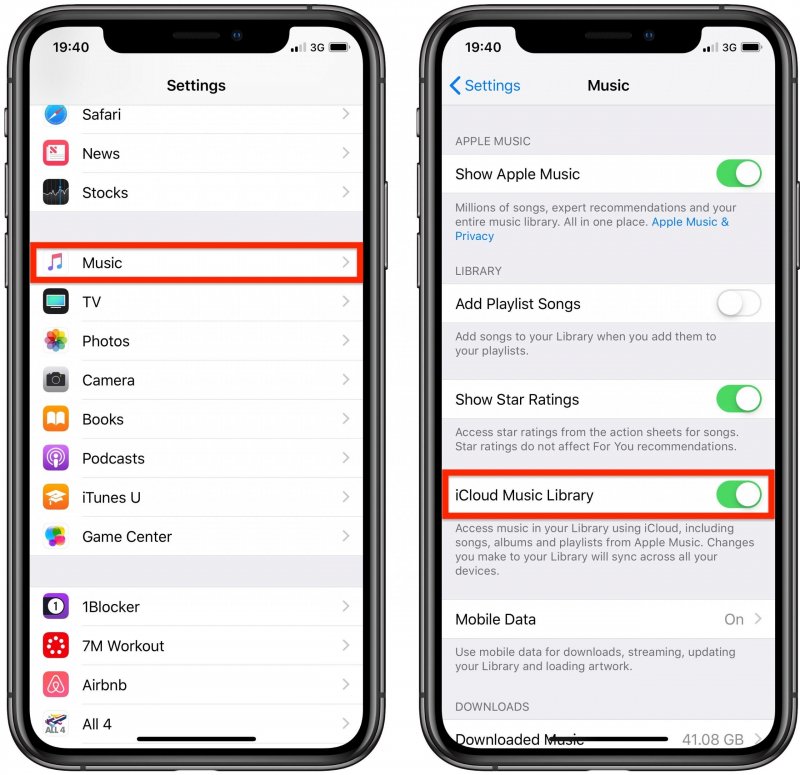
Para iOS (iPhone): Abre Ajustes > Aplicaciones > Música. Desactiva la sincronización de la biblioteca. Espera 30 segundos y vuelve a activarla. Abre la aplicación Música; verás una barra de progreso en la parte superior que indica "Cargando biblioteca musical".
Para Android: Abre la aplicación Apple Music. Pulsa el menú de tres puntos (⋮) en la esquina superior derecha y selecciona Ajustes. Busca Sincronizar biblioteca y desactívala, luego vuelve a activarla.
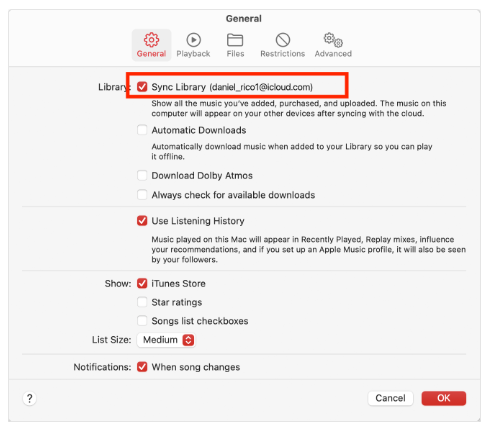
Para macOS (Tahoe / 2026): Ve a Música > Ajustes > General y desmarca la opción Sincronizar biblioteca, haz clic en Aceptar y, a continuación, vuelve a marcarla.
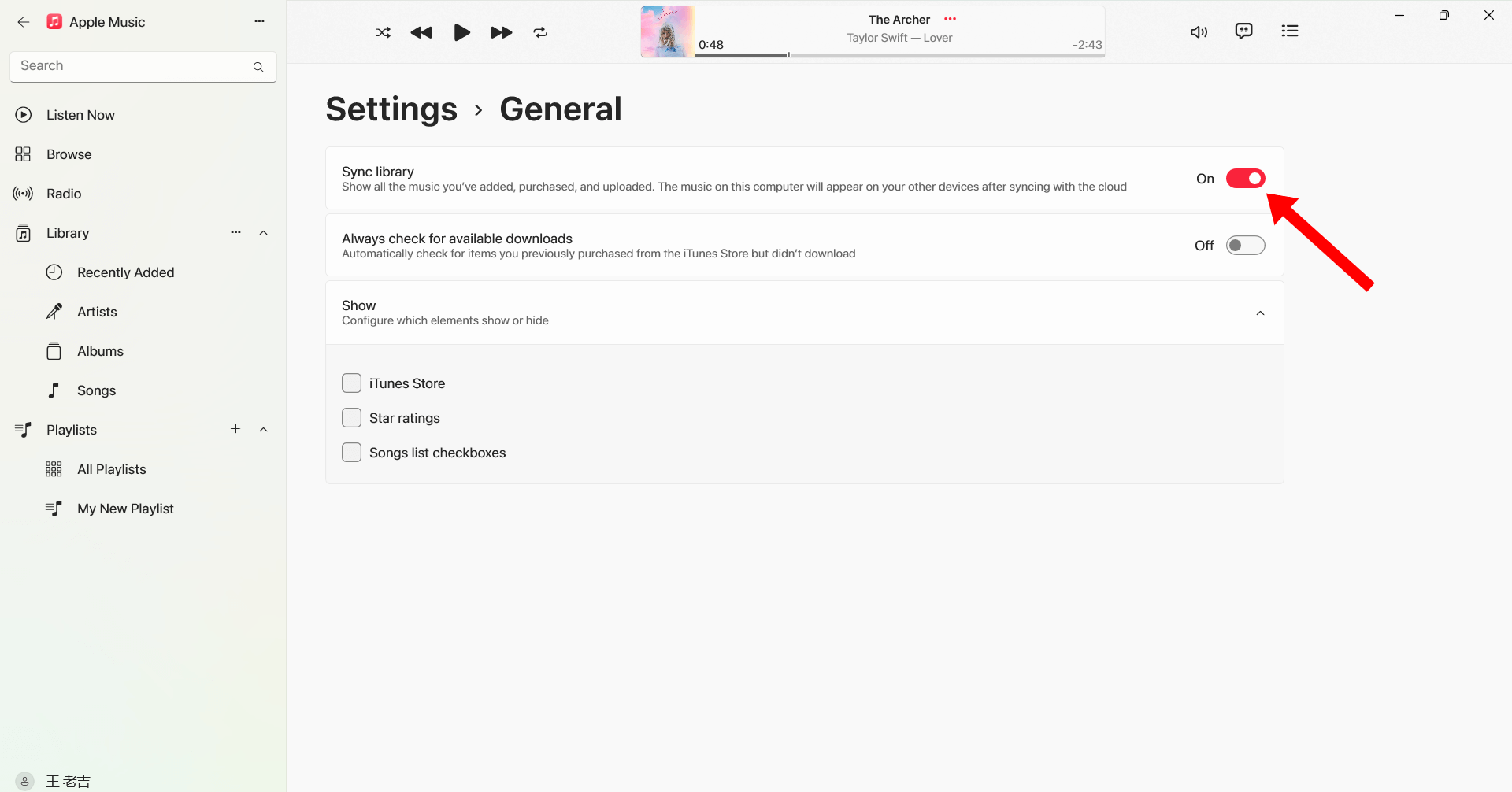
Para WinDow (10/11): Abre la aplicación Apple Music. Haz clic en tu nombre/icono de perfil en la parte inferior de la barra lateral. Ve a Ajustes > General. Desactiva y vuelve a activar la sincronización de la biblioteca.
Cerrar sesión y volver a iniciarla
Volver a iniciar sesión en tu ID de Apple puede actualizar la autorización de Apple Music y solucionar problemas de reproducción relacionados con la región.
Volver a descargar canciones
Es posible que algunas pistas descargadas se dañen o pierdan la autorización. Volver a descargar las canciones podría restablecer la reproducción.
Actualizar iOS o macOS
Las versiones antiguas del sistema pueden causar problemas de compatibilidad con Apple Music.

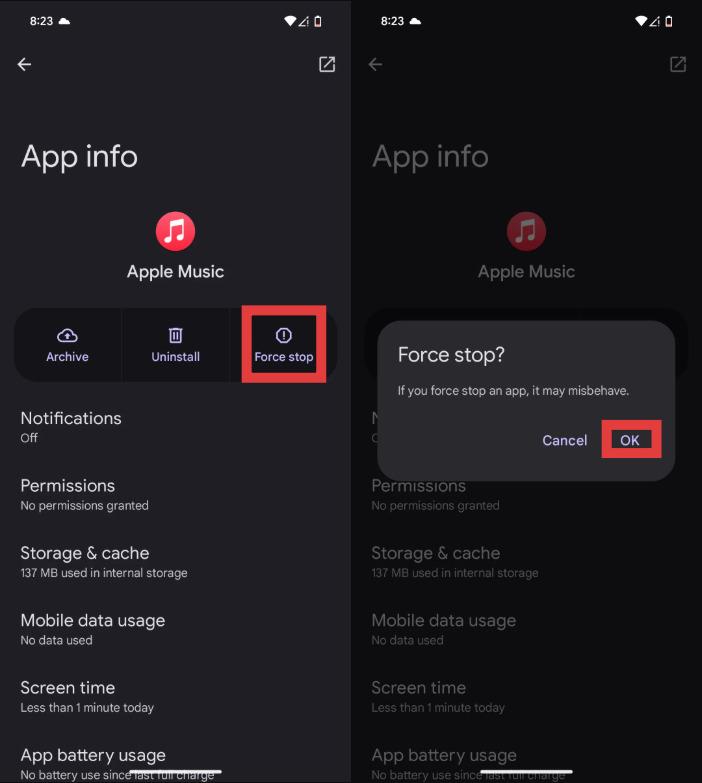
Reinicie la aplicación Apple Music
Los errores temporales también pueden provocar que aparezca el mensaje "Apple Music no está disponible en tu región".
Si estas soluciones no funcionan, el problema podría estar relacionado con restricciones de DRM y limitaciones de licencias regionales que escapan a su control.
Parte 3. La mejor manera de que Apple Music se pueda reproducir en cualquier lugar.
Para evitar problemas recurrentes de "Apple Music no está disponible en tu región", muchos usuarios convertir canciones de Apple Music a formato local MP3 archivosUna de las mejores herramientas para esto es DumpMedia Apple Music ConverterEste convertidor profesional de Apple Music ayuda a los usuarios a guardar canciones localmente para una reproducción sin conexión estable, sin depender de la autorización regional.
Descarga gratuita Descarga gratuita
🏆¿Por qué elegir? DumpMedia Apple Music Converter
- Eliminar la protección DRM de Apple Music*
- Conserva la calidad de sonido original.
- Descarga por lotes listas de reproducción y álbumes
- Rápida velocidad de conversión
- Conservar los metadatos de la canción y las etiquetas ID3.
- Admite la reproducción sin conexión en cualquier dispositivo.
Para los usuarios que se encuentran repetidamente con el mensaje "Apple Music no está disponible en tu región", la aplicación local MP3 La reproducción ofrece una solución a largo plazo más fiable.
Cómo convertir Apple Music a MP3 para reproducción sin conexión
Paso 1: Descarga e instala DumpMedia Instala Apple Music Converter en tu Mac/PC. Ejecútalo y verás la interfaz. Inicia sesión con tu cuenta de Apple Music.
Descarga gratuita Descarga gratuita
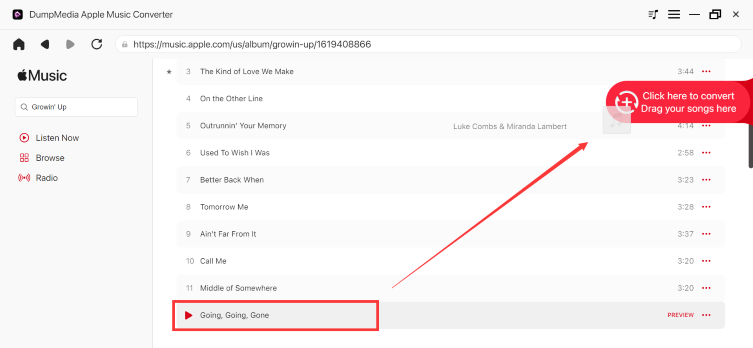
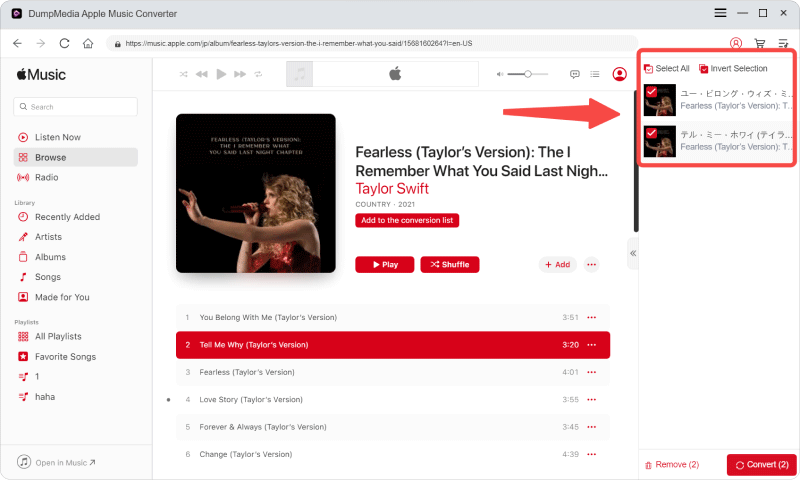
Paso 2. Busca la lista de reproducción, el álbum o la canción que deseas convertir. Puedes arrastrar una sola canción al icono "+" situado a la derecha de la pantalla. También puedes abrir una lista de reproducción o un álbum completo y hacer clic en el icono "Añadir para convertir" para cargarlo en el convertidor.
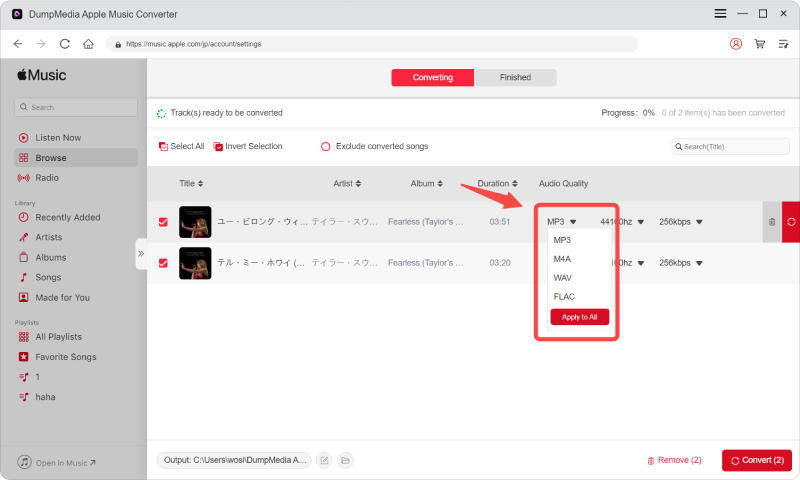
Paso 3: Seleccionar MP3 (la más compatible). También puedes cambiar la tasa de bits o la frecuencia de muestreo. Para obtener el mejor equilibrio, elige 320 kbps.
Paso 4: Una vez completada la configuración, los usuarios pueden procesar la conversión haciendo clic en el icono "Convertir". DumpMedia convertirá las canciones de Apple Music a MP3 En cuestión de segundos gracias a su velocidad ultrarrápida.
Tras la conversión, podrás reproducir tus canciones sin conexión a internet y sin necesidad de verificar la región de Apple Music.
Parte 4. Preguntas frecuentes
¿Por qué Apple Music dice que no está disponible en tu región?
Esto suele ocurrir debido a restricciones de licencia, configuraciones regionales del ID de Apple o problemas de autorización DRM.
¿Cómo soluciono el problema de que Apple Music no esté disponible en mi región?
Puedes intentar actualizar la configuración regional de tu ID de Apple, volver a sincronizar tu biblioteca, descargar las canciones de nuevo o reiniciar la aplicación.
¿Por qué aparecen atenuadas mis canciones de Apple Music?
Las canciones que aparecen atenuadas suelen indicar problemas de licencias regionales o de sincronización.
¿Puedo usar Apple Music mientras viajo al extranjero?
Sí, pero algunas canciones podrían dejar de estar disponibles debido a restricciones regionales de derechos de autor.
¿Cómo puedo guardar las canciones de Apple Music de forma permanente?
Muchos usuarios usan DumpMedia Apple Music Converter para convertir canciones a formato local MP3 archivos para reproducción permanente sin conexión.
Is DumpMedia ¿Es seguro Apple Music Converter?
Sí. Está diseñado para la conversión de Apple Music y la gestión de la reproducción sin conexión.
Parte 5. Resumen
El error “Apple Music no está disponible en tu región” suele deberse a restricciones de licencia, protección DRM, configuración regional del ID de Apple o problemas de verificación de suscripción. Para los usuarios que desean escuchar música sin conexión de forma estable y sin restricciones regionales, DumpMedia Apple Music Converter ofrece una forma práctica de convertir Apple Music en un almacenamiento local permanente. MP3 Al eliminar la dependencia de la aplicación y las restricciones de transmisión, los usuarios pueden disfrutar de Apple Music con mayor libertad en diferentes dispositivos y ubicaciones.
Descarga gratuita Descarga gratuita
*DumpMedia Funciona descifrando y descargando las canciones de Apple Music en archivos sin DRM, lo que te permite obtener una copia limpia y sin restricciones de tu biblioteca para cualquier dispositivo. Su funcionalidad no incluye la eliminación del DRM de los archivos de audio locales.