


Cómo descargar Amazon Prime Music sin conexión en cualquier dispositivo
Muchos suscriptores de Amazon Prime desean descargar música de Amazon Prime para escucharla sin conexión y disfrutar de sus canciones favoritas sin depender de internet. Ya sea que estés de viaje, en tus desplazamientos diarios o simplemente quieras ahorrar datos móviles, escuchar música sin conexión puede mejorar significativamente tu experiencia musical. En esta guía, te explicaremos cómo descargar canciones de Amazon Music en diferentes dispositivos, analizaremos las restricciones más comunes y exploraremos opciones para gestionar tu biblioteca musical sin conexión de forma más flexible.
Índice Parte 1. ¿Se puede descargar Amazon Prime Music? Parte 2. ¿Cómo descargar Amazon Prime Music en el móvil? Parte 3. ¿Cómo descargar Amazon Prime Music en el PC? Parte 4. ¿Por qué no están disponibles algunas descargas de Amazon Prime Music? Parte 5. ¿Cómo mantener Amazon Prime Music sin conexión permanentemente? Parte 6. Preguntas frecuentes Parte 7. Conclusión
Parte 1. ¿Se puede descargar Amazon Prime Music?
Sí. Los miembros de Amazon Prime pueden descargar música de Amazon Prime para escucharla sin conexión a través de la aplicación oficial de Amazon Music. Las canciones descargadas se pueden reproducir sin conexión a internet, lo que facilita la escucha sin conexión durante viajes, vuelos o en zonas con poca cobertura.
Sin embargo, el contenido descargado permanece vinculado a tu cuenta de Amazon Music y a tu estado de suscripción.
Parte 2. ¿Cómo descargar Amazon Prime Music en el móvil?
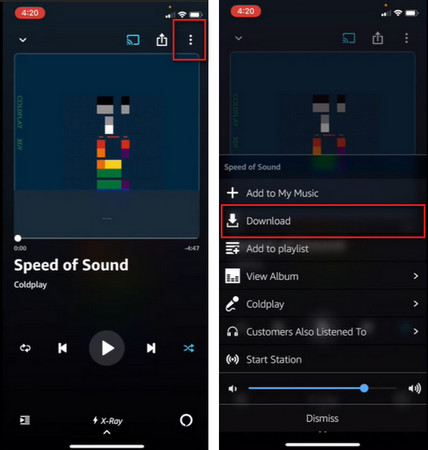
La forma más sencilla de descargar música de Amazon Prime para escucharla sin conexión es a través de la aplicación móvil de Amazon Music.
Descarga Amazon Prime Music en tu teléfono.
- Abre la aplicación Amazon Music.
- Inicie sesión con su cuenta de Amazon.
- Encuentra la lista de reproducción, el álbum o la canción que quieras.
- Pulsa el botón de Descargar.
- Espere a que termine la descarga.
Una vez completado el proceso, podrás acceder a la música sin conexión a internet.
Parte 3. ¿Cómo descargar Amazon Prime Music en PC?
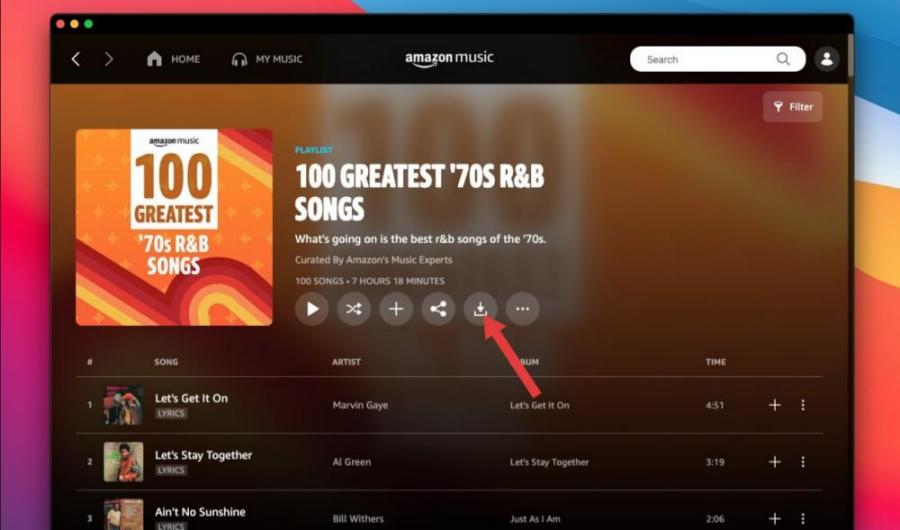
Muchos usuarios también quieren descargar música de Amazon Prime para usarla sin conexión en sus ordenadores. Para ello:
- Instala la aplicación de escritorio de Amazon Music.
- Inicie sesión en su cuenta de Amazon.
- Abre tu biblioteca de música.
- Selecciona la música que deseas guardar.
- Haz clic en la opción Descargar.
Posteriormente, se puede acceder al contenido descargado a través de la aplicación de escritorio de Amazon Music.
Parte 4. ¿Por qué no están disponibles algunas descargas de Amazon Prime Music?
En ocasiones, los usuarios logran descargar música de Amazon Prime para escucharla sin conexión, solo para descubrir posteriormente que ciertas canciones dejan de estar disponibles. Esto puede ocurrir por varias razones.
- Verificación de suscripción: Las descargas sin conexión suelen requerir la verificación de la cuenta. Si la verificación falla, es posible que las canciones descargadas no se reproduzcan.
- Cambios en las licencias: Los catálogos musicales cambian con frecuencia. Si Amazon pierde los derechos de licencia de ciertas canciones, es posible que estas dejen de estar disponibles.
- Restricciones regionales: Algunas canciones tienen restricciones según la ubicación geográfica. Viajar entre países puede afectar ocasionalmente su disponibilidad.
- Problemas con la aplicación o la sincronización: Los errores de software y los problemas de sincronización pueden impedir temporalmente el acceso a la música descargada.
Parte 5. ¿Cómo mantener Amazon Prime Music sin conexión de forma permanente?
Aunque Amazon permite a los usuarios descargar música de Amazon Prime para escucharla sin conexión, las descargas oficiales tienen varias restricciones. Las canciones descargadas generalmente solo se pueden reproducir a través de la aplicación Amazon Music. Por lo general, los usuarios no pueden transferir libremente las canciones descargadas entre dispositivos. Muchos usuarios que buscan descargar música de Amazon Prime en realidad buscan una forma de mantener el acceso a largo plazo a sus colecciones musicales.
Para los usuarios que buscan mayor flexibilidad, DumpMedia Amazon Music Converter ofrece una solución práctica para gestionar el contenido de Amazon Music. El software ayuda a los usuarios a convertir canciones de Amazon Music a formatos compatibles para su reproducción sin conexión. Incluso si el Las canciones aparecen atenuadas en Amazon Music.Puedes reproducir las canciones de Amazon Music sin conexión en otro reproductor de música inmediatamente.
Descarga gratuita Descarga gratuita
🏆¿Por qué usarlo? DumpMedia Amazon Music Converter
- Descargar Amazon Music a MP3WAV, FLAC y AAC
- Integración con el reproductor web de Amazon Music
- Conserva la calidad de sonido original.
- Descarga por lotes listas de reproducción y álbumes
- Rápida velocidad de conversión
- Conservar los metadatos de la canción y las etiquetas ID3.
- Admite la reproducción sin conexión en cualquier dispositivo.
Al convertir la música a formatos de audio ampliamente compatibles, los usuarios pueden disfrutar de sus canciones favoritas en una gama más amplia de dispositivos.
Convertir música de Amazon a MP3 Paso a Paso
Paso 1: Descarga e instala DumpMedia Instala Amazon Music Converter en tu Mac/PC. Ejecútalo y verás la interfaz. Inicia sesión con tu cuenta de Amazon Music.
Descarga gratuita Descarga gratuita
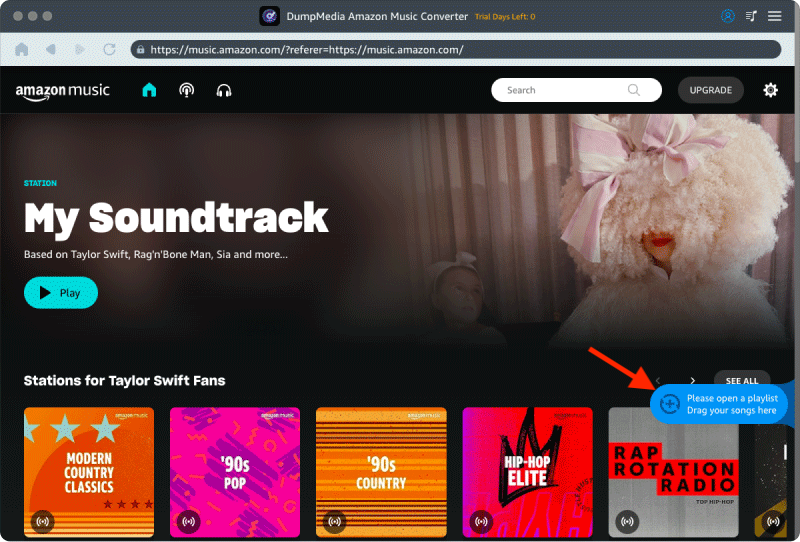
Paso 2. Busca la lista de reproducción, el álbum o la canción que deseas convertir. Puedes arrastrar una sola canción al icono "+" situado a la derecha de la pantalla. También puedes abrir una lista de reproducción o un álbum completo y hacer clic en el icono "Añadir para convertir" para cargarlo en el convertidor.
Paso 3: Seleccionar MP3 (la más compatible). También puedes cambiar la tasa de bits o la frecuencia de muestreo. Para obtener el mejor equilibrio, elige 320 kbps.
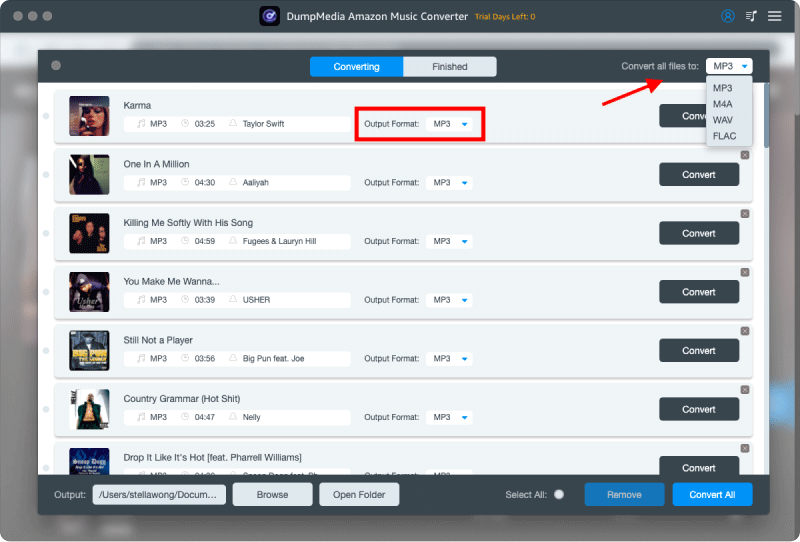
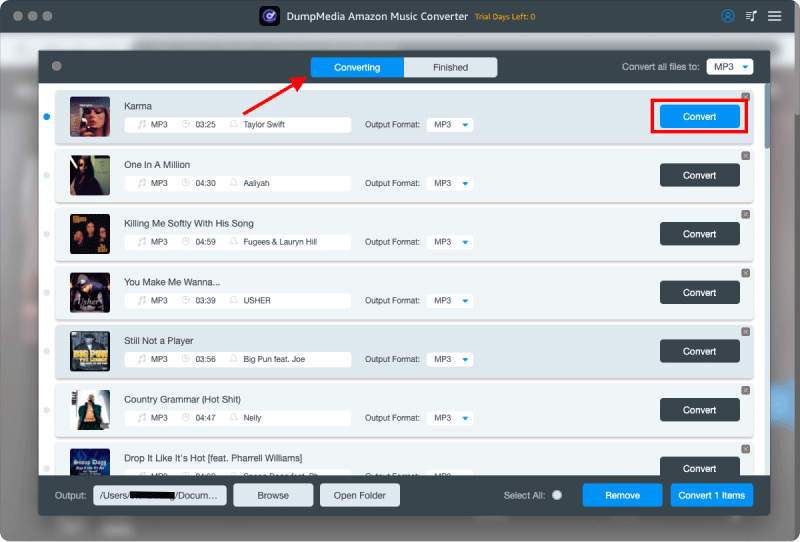
Paso 4: Una vez completada la configuración, los usuarios pueden procesar la conversión haciendo clic en el icono "Convertir". DumpMedia descargaré canciones de Amazon Music para MP3 En cuestión de segundos gracias a su velocidad ultrarrápida.
Parte 6. Preguntas frecuentes
¿Puedo descargar Amazon Prime Music para usarlo sin conexión?
Sí. Las canciones, álbumes y listas de reproducción que cumplan los requisitos se pueden descargar a través de la aplicación Amazon Music para escucharlas sin conexión.
¿Dónde se almacenan las descargas de Amazon Music?
Las descargas se almacenan dentro de la aplicación Amazon Music y, por lo general, no están disponibles como archivos de audio estándar.
¿Caducan las descargas de Amazon Music?
El contenido descargado podría dejar de estar disponible si las suscripciones caducan o si se producen cambios en las licencias.
¿Puedo transferir las descargas de Amazon Music a otro dispositivo?
Por lo general, las descargas oficiales no se pueden transferir libremente como las tradicionales. MP3 archivos.
¿Puedo descargar Amazon Prime Music sin conexión? MP3?
Amazon Music normalmente no proporciona canciones descargadas como MP3 archivos a través de su aplicación oficial.
Parte 7. Conclusión
Muchos usuarios desean descargar música de Amazon Prime para escucharla sin conexión y disfrutarla dondequiera que vayan. Sin embargo, las descargas oficiales tienen ciertas limitaciones, como la dependencia de la suscripción, restricciones de reproducción y flexibilidad limitada de los archivos. Comprender estas restricciones puede ayudarte a elegir la mejor manera de gestionar tu colección de música y disfrutar de una experiencia de escucha sin conexión más cómoda.